On github in your markdown you can do
- [X] Does it work?
The resulting text will be rendered using a checkbox (as you see below)
- [X] Does it work?
This is really useful for being able to create todo lists, I know QOwnNotes already has a todo list featured tied to the calendar, but I don't necessarily need calendar integration, I just want to be able create simple grocery style lists in the text editor.
 chriswininger
All 28 comments
great product by the way, I've tried several other markdown based note taking tools recently, this one seems to outshine the rest.
chriswininger
on 2 Jul 2016
Thank you for your kind words!
inline todo list
I'm sorry. As already thought over in #211 that isn't possible for technical reasons (plain text edit) and doesn't make a lot of sense to me neither...
 pbek
on 2 Jul 2016
pbek
on 2 Jul 2016
Cool, thanks for feedback, I understand if it's not a desired feature. Technically it seems like you should be able to do it through hoedown extension. I found this https://github.com/kjdev/hoextdown which claims to do it. My C++ is a bit rusty, I'm a JS guy. I made a first stab at using that extension in the QOwnNotes project. I got the project to build but did not see any lovely checkboxes in the preview I had hoped. Oh well.
chriswininger
on 3 Jul 2016
I don't think the QTextEdit, that is used for the preview is able to view html checkboxes. I will put that on my list if we use a full browser component some day.
You can also experiment by altering the generated html code for the preview in a Script.
You might take a look at function noteToMarkdownHtmlHook in
https://github.com/pbek/QOwnNotes/blob/develop/doc/scripting/example.qml.
You could try to replace - [X] with a html checkbox to test it...
pbek
on 3 Jul 2016
Ah, you are correct. Looks like QTextEdit can not render them.
chriswininger
on 3 Jul 2016
We have to wait then... ;)
pbek
on 3 Jul 2016
Another vote for this when possible.
Zim does this nicely, and converts '()' to an unchecked checkbox, so nice in meetings to just type:
() do this
 BackSeat
on 3 Feb 2017
BackSeat
on 3 Feb 2017
Currently you would have to vote at Qt for supporting it in QTextEdit first... ;)
pbek
on 3 Feb 2017
In the meantime, for everybody that want this feature, unicode can safe your time. Just put in your document at the top both symbol ☑☐. Then just use it.
 tito
on 15 May 2017
tito
on 15 May 2017
And maybe one thing in qownnotes would be cool is to have an option that when we click on that kind of box, it would switch with the other one. It's a low cost rendering, but still in text and would work ^^
tito
on 15 May 2017
I don't think that would work very well (if at all).
pbek
on 15 May 2017
Can you point to the widget responsible for rendering? Maybe there's an alternative to using html
 asoliverez
on 6 Apr 2018
asoliverez
on 6 Apr 2018
That would be noteTextView in the mainwindow.
pbek
on 6 Apr 2018
@pbek Do I understand this correctly?
Checkboxes can't be implemented because QTextEdit, which is used both for input and the preview, doesn't support them?
If that is the case, what is wrong with one of the web view widgets for the preview, like many other markdown editors are doing?
 clawoflight
on 9 Jun 2018
clawoflight
on 9 Jun 2018
Take a look at Checkbox preview and export in the script repository. You might want to use that.
pbek
on 9 Jun 2018
That works, thanks.
The reasoning is as I stated? :)
clawoflight
on 9 Jun 2018
Right
pbek
on 9 Jun 2018
I'm confused with tasks and todos. I use a lot of - [ ] do something entries (what do you call them, tasks or todos?) in my notes. Can I get them synced with the tasks in the calendar?
 frankgerhardt
on 11 Nov 2018
frankgerhardt
on 11 Nov 2018
Can I get them synced with the tasks in the calendar?
No, sorry.
pbek
on 11 Nov 2018
I would love to work on this feature. Shall we reopen this issue? @pbek
 liulex
on 10 Feb 2019
liulex
on 10 Feb 2019
If we are talking about the preview (and it will not slow it down), sure, go for it!
pbek
on 10 Feb 2019
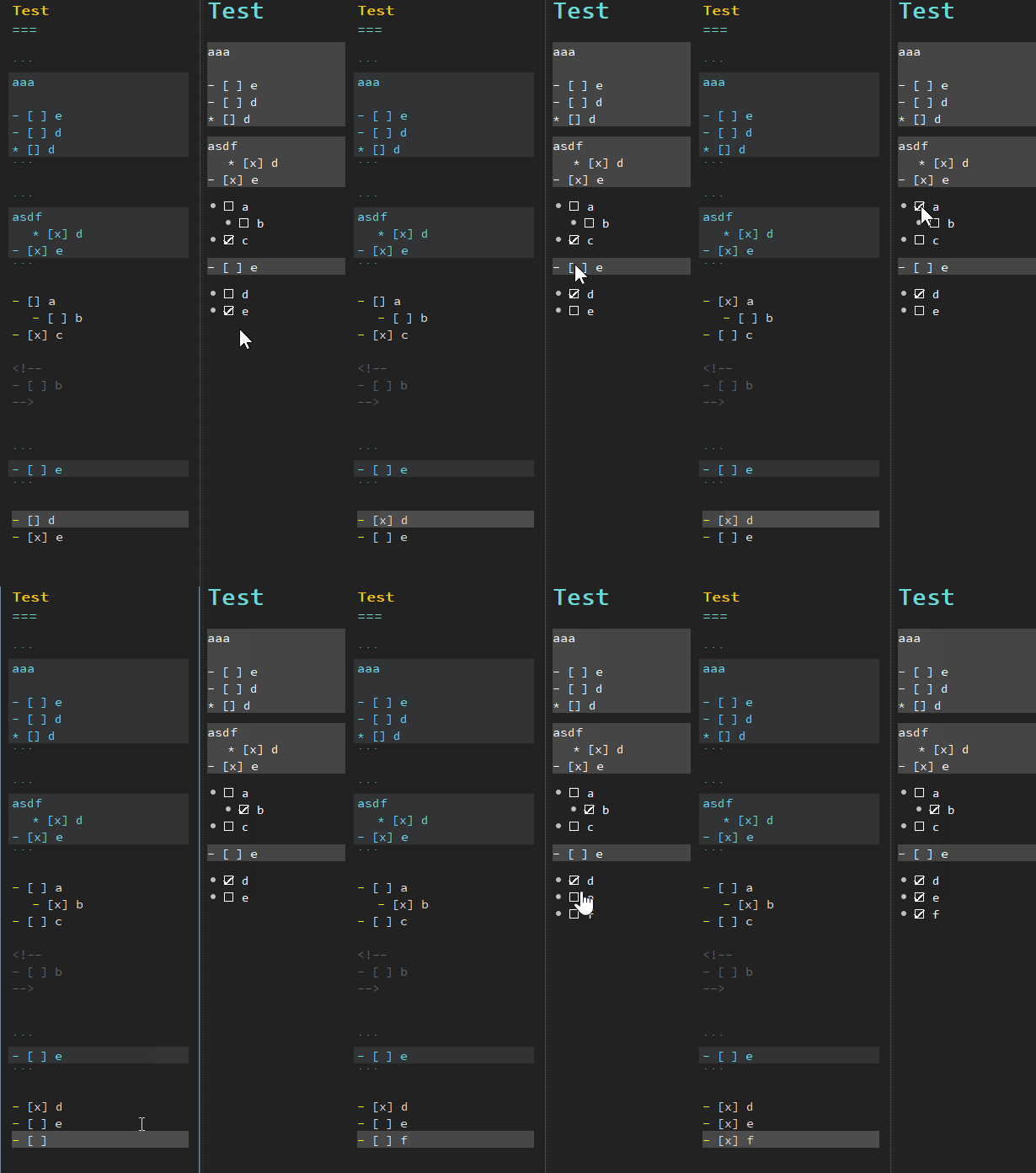
Implemented in #1147 :
liulex
on 11 Feb 2019
19.2.4
- you can now click checkboxes like
- []in the preview
(for #235, thank you @liulex)
pbek
on 11 Feb 2019
There now is a new release, could you please test it and report if it works for you?
pbek
on 16 Feb 2019
@liulex, I never used checkboxes, but since you implemented them I love them. They work like a charm and I will love them even more if checked checkboxes could also be viewed in the preview pdf export (in the Note menu) and the preview pdf export of the currently selected text (context menu of note text edit). :heart_eyes:
pbek
on 18 Feb 2019
@pbek I just examined the code. "The preview pdf export (in the _Note_ menu)" should already have checkboxes in them, right? I just need to handle the preview pdf export of the selected text I suppose?
liulex
on 19 Feb 2019
But "the preview pdf export (in the _Note_ menu)" will bear the anchor links of the checkboxes. I guess they are unwanted in the pdf?
liulex
on 19 Feb 2019
"The preview pdf export (in the _Note_ menu)" should already have checkboxes in them, right?
for me all checkboxes are visible, but unchecked
But "the preview pdf export (in the _Note_ menu)" will bear the anchor links of the checkboxes. I guess they are unwanted in the pdf?
I personally don't care a lot about that
thank you for your dedication! :hugs:
pbek
on 19 Feb 2019
Related issues
 sanderboom
·
5Comments
sanderboom
·
5Comments
 radmen
·
6Comments
radmen
·
6Comments
 nikhilw
·
7Comments
sanderboom
·
5Comments
nikhilw
·
7Comments
sanderboom
·
5Comments
 eimajenthat
·
3Comments
eimajenthat
·
3Comments
Most helpful comment
Implemented in #1147 :
