Qgis: PyQGIS: iface.openFeatureForm() seems not to handle autofill fields?
Coming from
https://github.com/NationalSecurityAgency/qgis-latlontools-plugin/issues/52
Where the issue is: creating a feature+geometry in PyQGIS, and then open the featureform does not init the (autocreation) fields.
OR we miss an essential step in the creation of the feature.
To see it:
- open the project in the zip:
auto.zip - note that the 'text' field is created with an expression function to autogenerate the value with uuid()
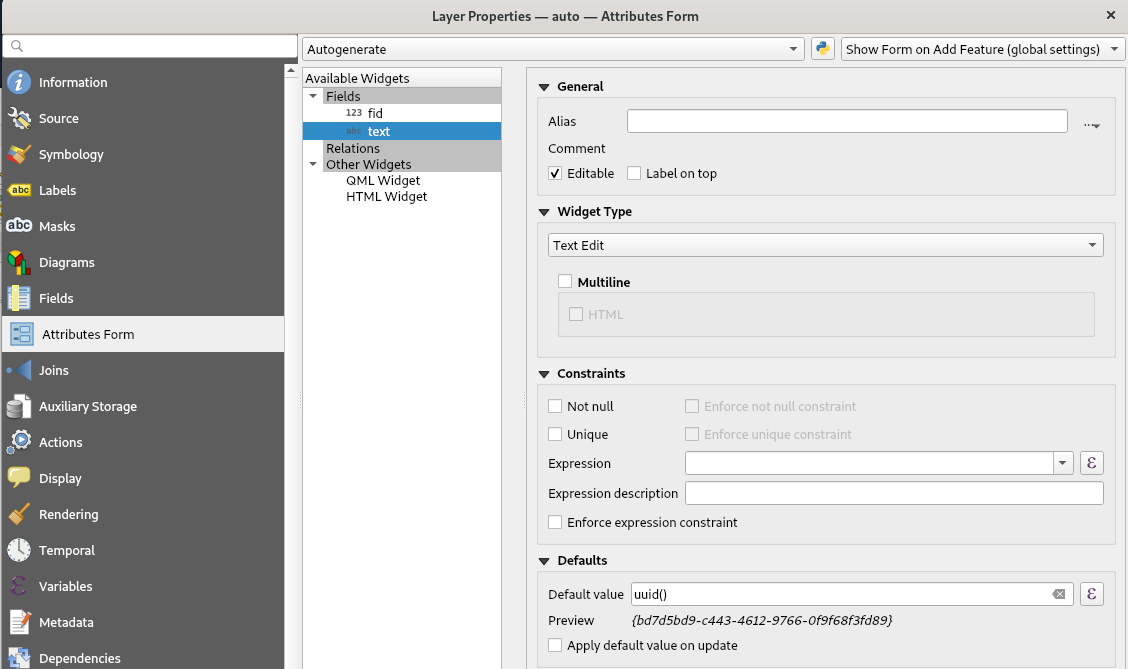
- enable editing on the layer 'auto'
use the normal digitize tools to add a point and digitize a point. You will see:
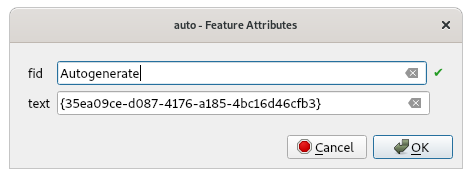
Qgis promisses to create the fid (gpkg) upon creation, AND it autofills the text field with the expression result of 'uuid()'now use the same project to try the same via PyQGIS:
x = 10
y = 10
# make sure the 'auto' layer is selected and enabled for edit
layer = iface.mapCanvas().currentLayer()

feat = QgsFeature()
feat.setFields(layer.fields())
feat.setGeometry(QgsGeometry.fromPointXY(QgsPointXY(x, y)))
# thinking this is maybe needed: (but does not help)
feat.initAttributes(fieldCount=2)
print(f'feat.isValid: {feat.isValid()}') # it is valid now
iface.openFeatureForm(layer, feat)
You will see the following:
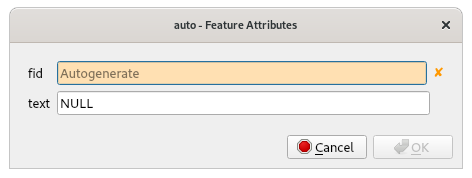
1) fid is apparently not rightly initialized (? red cross)
2) expressions are not ran yet apparently because 'text' field is still zero.
I tried to debug this but could not yet find the issue.
OR are we just not creating the QgsFeature in the right way/order?
 rduivenvoorde
All 3 comments
The handling of the expressions during a normal digitize go through:
https://github.com/qgis/QGIS/blob/master/src/app/qgsfeatureaction.cpp#L168-L320
Anybody an idea how to hit this using PyQGIS? Following is not possible:
action = QgsFeatureAction("add feature", feat, layer, QString(), -1, iface );
action.addFeature( QgsAttributeMap(), showModal, scope )
@rduivenvoorde did you try to create the feature with QgsVectorLayerUtils::createFeature ?
     * Creates a new feature ready for insertion into a layer. Default values and constraints
     * (e.g., unique constraints) will automatically be handled. An optional attribute map can be
     * passed for the new feature to copy as many attribute values as possible from the map,
     * assuming that they respect the layer's constraints. Note that the created feature is not
     * automatically inserted into the layer.
     * \see createFeatures()
 elpaso
on 23 Nov 2020
elpaso
on 23 Nov 2020
@elpaso Ah, thanks I was not aware of that...
Trying now. Only issue I have with these "' context'-based params " is where to get these from ...
Ah, this one works:
feat = QgsVectorLayerUtils.createFeature(layer, geom, {}, layer.createExpressionContext() )
(earlier not, because I did an 'initFeatures(..)' after it...
Thanks!!
rduivenvoorde
on 23 Nov 2020
Related issues
 qgib
·
4Comments
qgib
·
4Comments
 romariocarvalhoneto
·
3Comments
romariocarvalhoneto
·
3Comments
 noenandre
·
4Comments
noenandre
·
4Comments
 Saijin-Naib
·
4Comments
Saijin-Naib
·
4Comments
 hshatti
·
3Comments
hshatti
·
3Comments