Pywinauto: How to iterate all menus/items?
I'm a bit confused trying to get this to work. My interactive PyCrust keeps freezing/crashing when I type a dot. sometimes using the basic examples.
Is there an easy way to do this with pywinauto or should I look for another library?
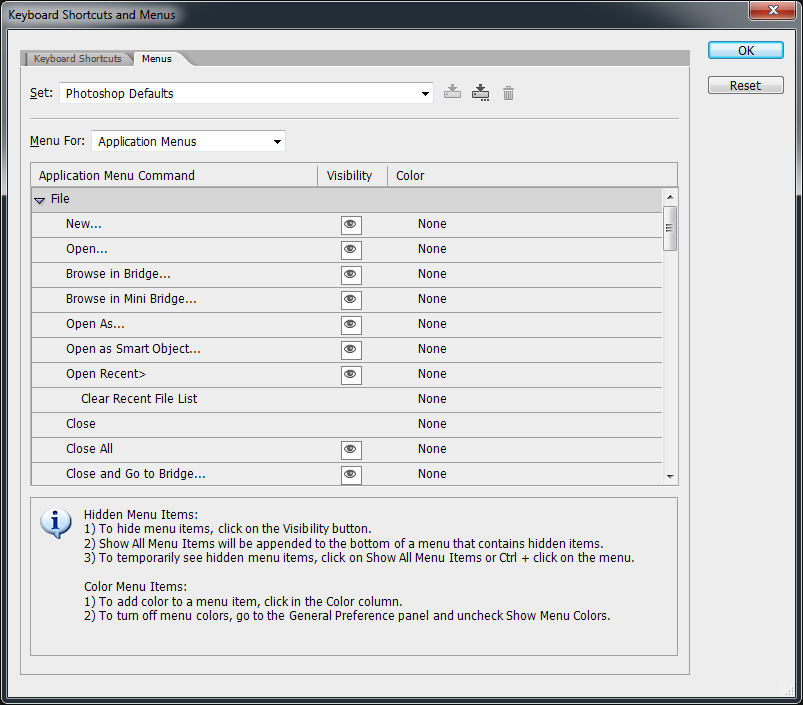
What I'm wanting is each menu/item Infos so I can recreate them in a tree based Menu Editor(wxPython). (Similar to Photoshop CS2 Menus... dialog)
 Metallicow
All 20 comments
Hi @Metallicow it's possible to list all the menu items for many apps using pywinauto though some apps require explicit expanding submenus to list the sub-items.
Could you please provide the full traceback of the crash? And which example and line number is crashed? I've never used PyCrust before, but can try it on my side having clear steps to reproduce.
I'm also curious about this Menu Editor. Are you trying to edit the menus in wxPython code only? Or is it intended for every app that has a menu?
 vasily-v-ryabov
on 6 Jul 2017
vasily-v-ryabov
on 6 Jul 2017
Hi @Metallicow, did you take a look on our Getting started guide? It is only 10-minute reading that can save you a lot of time. It seems that your interactive shell has hard times with Pywinauto because of the attribute resolution magic mentioned in our guide.
We always suggest using GUI inspection tools when writing GUI automation script. For MS Windows it is usually: Inspect or Spy++. If you are able to see your GUI elements with one of this tools you can proceed with pywinauto scripting.
Regarding your menus and menu items, I think the main problem is that the menu elements are not created until a specific menu is expanded. So probably, you will not be able to see all menus at once.
A short example of my interactive Ipython session for an instance of 7-zip application:
In [52]: app = pywinauto.application.Application(backend="uia")

In [53]: app.connect(path="7zFM.exe")
Out[53]: <pywinauto.application.Application at 0x5e57e48>

In [54]: app.top_window().descendants(control_type="MenuBar")
Out[54]:
[<uia_controls.MenuWrapper - 'System', Menu, 5340706797530293602>,
 <uia_controls.MenuWrapper - 'Application', Menu, 4579318945326639329>]

In [55]: app_menu = app.top_window().descendants(control_type="MenuBar")[1]

In [56]: app_menu.items()
Out[56]:
[<uia_controls.MenuItemWrapper - 'File', MenuItem, 5916688697920640546>,
 <uia_controls.MenuItemWrapper - 'Edit', MenuItem, 5916688697916155051>,
 <uia_controls.MenuItemWrapper - 'View', MenuItem, 5916688697917650216>,
 <uia_controls.MenuItemWrapper - 'Favorites', MenuItem, 5916688697925126041>,
 <uia_controls.MenuItemWrapper - 'Tools', MenuItem, 5916688697926621206>,
 <uia_controls.MenuItemWrapper - 'Help', MenuItem, 5916688697922135711>]


In [82]: # Once we have a list of top items we can go through it
In [83]: # Notice that sub-menu items are created only after we expand a menu
In [84]: # and we need to re-discover recently added sub-menus

In [85]: for mi in app_menu.items():
    ...:     mi.set_focus()
    ...:     mi.select()
    ...:     print(app.top_window().descendants(control_type="MenuItem"))
    ...:     print("==============================")
 airelil
on 6 Jul 2017
airelil
on 6 Jul 2017
>>> from pywinauto import application
>>> app = application.Application()
>>> app.start("Notepad.exe")
<pywinauto.application.Application object at 0x08ACE1F0>
>>> app.UntitledNotepad.MenuBar
@vasily-v-ryabov HardCrash No Trace. Typing . after MenuBar takes long i.e. Freezes/Crashes (Not Responding) in wxPython's PyCrust/PyShell
I'm also curious about this Menu Editor. Are you trying to edit the menus in wxPython code only? Or is it intended for every app that has a menu?
Either or. I should be able to grab/edit them from my code and Ex: a pyInstaller exe or another app such as notepad,etc.
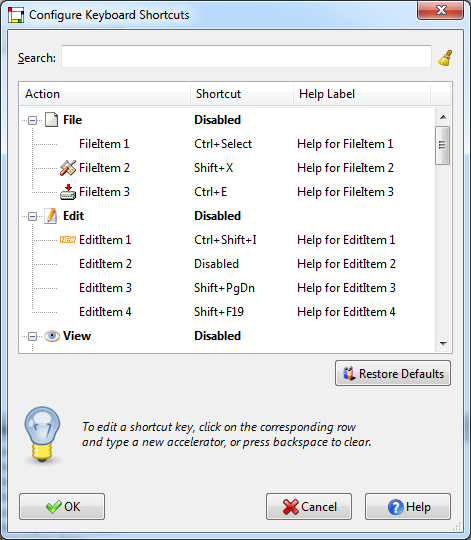
Here are pics of the PS Menus Editor and the wxPython Shortcuts Editor Demo. I also intend to add the Photoshop style Menus... visibility/coloring dialog in wxPython with the shortcuts editor.
================================
@airelil Yeah, I took a quick skim over it. Thanks. Your example works as a starting point and is pretty close to what I am looking for. Probably need another loop/check for grabing submenus.
It appears I am working with the uia_controls.MenuItemWrapper class.
I'm guessing I will need to check every Item for Infos. How would I do that/these...???
- [ ] check if item is a separator.
- [ ] check if item is a radio, check or normal type.
- [ ] check if item has a bitmap icon.
- [ ] check if item is a submenu (then would iterate it also).
It looks like your output didn't register a submenu(CRC) or separators...
<uia_controls.MenuItemWrapper - 'File', MenuItem, 1281588826>
[<uia_controls.MenuItemWrapper - 'Open  Enter', MenuItem, -1977229561>, <uia_controls.MenuItemWrapper - 'Open Inside    Ctrl+PgDn', MenuItem, -1972744066>, <uia_controls.MenuItemWrapper - 'Open Outside   Shift+Enter', MenuItem, -1974239231>, <uia_controls.MenuItemWrapper - 'View F3', MenuItem, -1981715056>, <uia_controls.MenuItemWrapper - 'Edit  F4', MenuItem, -1983210221>, <uia_controls.MenuItemWrapper - 'Rename    F2', MenuItem, -1980219891>, <uia_controls.MenuItemWrapper - 'Copy To...    F5', MenuItem, -1987695716>, <uia_controls.MenuItemWrapper - 'Move To...    F6', MenuItem, -1989190881>, <uia_controls.MenuItemWrapper - 'Delete    Del', MenuItem, -1984705386>, <uia_controls.MenuItemWrapper - 'Split file...', MenuItem, -1993676376>, <uia_controls.MenuItemWrapper - 'Combine files...', MenuItem, -1995171541>, <uia_controls.MenuItemWrapper - 'Properties  Alt+Enter', MenuItem, -1992181211>, <uia_controls.MenuItemWrapper - 'Comment... Ctrl+Z', MenuItem, -1999657036>, <uia_controls.MenuItemWrapper - 'CRC', MenuItem, -2001152201>, <uia_controls.MenuItemWrapper - 'Create Folder  F7', MenuItem, -1998161871>, <uia_controls.MenuItemWrapper - 'Create File   Ctrl+N', MenuItem, -2005637696>, <uia_controls.MenuItemWrapper - 'Link...', MenuItem, -2002647366>, <uia_controls.MenuItemWrapper - 'Alternate streams', MenuItem, -2004142531>, <uia_controls.MenuItemWrapper - 'Exit  Alt+F4', MenuItem, -2013113521>, <uia_controls.MenuItemWrapper - 'System', MenuItem, 368209966>, <uia_controls.MenuItemWrapper - 'File', MenuItem, 1281588826>, <uia_controls.MenuItemWrapper - 'Edit', MenuItem, 1277103331>, <uia_controls.MenuItemWrapper - 'View', MenuItem, 1278598496>, <uia_controls.MenuItemWrapper - 'Favorites', MenuItem, 1286074321>, <uia_controls.MenuItemWrapper - 'Tools', MenuItem, 1287569486>, <uia_controls.MenuItemWrapper - 'Help', MenuItem, 1283083991>]
==============================
I think, you have to filter out the elements you are not interested in by their class name and even text. Again, you can get clues for usefull properties with Inspect tool. I'm not near a computer right now, so maybe I'll take a look at it later on.
airelil
on 7 Jul 2017
I noticed the SWAPY app shows separators and when a submenuitem is clicked expands a tree for the 7zFM.
I noticed this code in the repo, but I still cannot seem to figure out how to access stuff like .Type() and .SubMenu(). Is this because maybe it might be using 'win32' instead of 'uia'? I'm a bit confused by this..
https://github.com/pywinauto/SWAPY/blob/0.4.8/proxy.py#L875
Also it looks like swapy is hit-or-miss with most applications when it comes to snagging Menu/Bar/Items stuff.
Metallicow
on 8 Jul 2017
@Metallicow, you can find examples of working with Menu in our unit tests: https://github.com/pywinauto/pywinauto/blob/master/pywinauto/unittests/test_menuwrapper.py
Notice, it's for 'win32' backend. See below my another IPython session for 7Zip. Remember also it all depends on the underlying GUI framework and sometimes results can be a bit more frustrating.
In [1]: import pywinauto

In [2]: app = pywinauto.application.Application(backend='win32')

In [3]: app.connect(path="7zFM.exe")
Out[3]: <pywinauto.application.Application at 0x5123358>

In [4]: m = app.top_window().Menu()

In [5]: m.Items()
Out[5]:
[<MenuItem &File>,
 <MenuItem &Edit>,
 <MenuItem &View>,
 <MenuItem F&avorites>,
 <MenuItem &Tools>,
 <MenuItem &Help>]

In [6]: m.GetMenuPath("File")
Out[6]: [<MenuItem &File>]

In [7]: submenu = m.GetMenuPath("File")[0].SubMenu()

In [8]: submenu.Items()
Out[8]:
[<MenuItem 7-Zip>,
 <MenuItem &Open        Enter>,
 <MenuItem Open &Inside Ctrl+PgDn>,
 <MenuItem Open O&utside        Shift+Enter>,
 <MenuItem &View        F3>,
 <MenuItem &Edit        F4>,
 <MenuItem >,
 <MenuItem Rena&me      F2>,
 <MenuItem &Copy To...  F5>,
 <MenuItem &Move To...  F6>,
 <MenuItem &Delete      Del>,
 <MenuItem >,
 <MenuItem &Split file...>,
 <MenuItem Com&bine files...>,
 <MenuItem >,
 <MenuItem P&roperties  Alt+Enter>,
 <MenuItem Comme&nt...  Ctrl+Z>,
 <MenuItem CRC>,
 <MenuItem >,
 <MenuItem Create Folder        F7>,
 <MenuItem Create File  Ctrl+N>,
 <MenuItem >,
 <MenuItem &Link...>,
 <MenuItem &Alternate streams>,
 <MenuItem >,
 <MenuItem E&xit        Alt+F4>]

In [9]: submenu.Items()[3].item_type()
Out[9]: 0

In [10]: submenu.Items()[4].item_type()
Out[10]: 0

In [11]: submenu.Items()[6].item_type()
Out[11]: 2048
If you use backend="uia" the menus can be different depending on an application. For example, WireShark is a Qt5 app. The main menu is a MenuBar at the high level, but submenus are expanded using .invoke() method. Children items are inside a Menu that is a top-level window! So the main submenu is implemented as a popup menu which is often a top-level window for "win32".
The following code is working for levels 0, 1, 2 for WireShark:
from __future__ import print_function
from pywinauto.application import Application
import os

# start Wireshark
if (os.path.exists(r"C:\Program Files (x86)\Wireshark")):
    app = Application(backend='uia').start(r"C:\Program Files (x86)\Wireshark\Wireshark.exe")
else:
    if (os.path.exists(r"C:\Program Files\Wireshark")):
        app = Application(backend='uia').start(r"C:\Program Files\Wireshark\Wireshark.exe")
    else:
        print("Can't find wireshark on your computer")

win = app['The Wireshark Network Analyzer']

if app.software_update.exists(timeout=10):
    app.software_update.skip_this_version.click()
    app.software_update.wait_not('visible')  # just to make sure it's closed
win.wait('ready', timeout=15)

# the main menu (index==1, don't mess with System MenuBar containing "Minimize" etc.)
menu = win.descendants(control_type="MenuBar")[1]

# iterate initially visible items (level 0)
for main_item in menu.children():
    main_item.invoke()
    subitems_level_1 = app.window(control_type="Menu").children()
    print([i.window_text() for i in subitems_level_1])

    # iterate expanded items (level 1)
    for item in subitems_level_1:
        if item.legacy_properties()[u'DefaultAction'] == u'ShowMenu':
            # it has submenu
            item.invoke()
            subitems_level_2 = app.window(control_type="Menu", found_index=0).children()
            print([i.window_text() for i in subitems_level_2])
            # can proceed to 3rd level and so on
I've been written this script in 1 hour using Inspect.exe and my experience. So core case doesn't exist, every app is unique (at least for backend="uia"). Only choosing some restricted class of applications (like WPF or WinForms), you may have unified way to obtain the full menu information.
vasily-v-ryabov
on 9 Jul 2017
Closing since no more questions/problems here for a long time.
vasily-v-ryabov
on 25 Jan 2018
@vasily-v-ryabov Umm ya, I only got it to work for me for "some" applications, but not the majority of apps. The sad thing is that most of what I do is python based and is open sourced(PyInstaller) and those even gave me trouble.
I would like to thank you for the time you have spent explaining the process and the scripts/code you folks posted. I'm sure it will help out others looking to do the same thing starting off... Tho while I'm not giving up on the project for the time being.., I'll try the library again at a later date with hopefully better results next time. I guess this is an area to be worked on as far as decrypting a running apps GUI toolkit or whatever.
Metallicow
on 25 Jan 2018
@Metallicow thanks for the update. Can we sum up with the list of target applications to try automation on our side? Do you have download link(s) or sample project(s)?
vasily-v-ryabov
on 26 Jan 2018
@vasily-v-ryabov Well, the wxPython demo would be a start and/or anything that could be compiled with PyInstaller(Ex: a simple wxMenuBar demo). https://www.wxpython.org/ https://github.com/wxWidgets/Phoenix
Also Photoshop(7 thru CS6) didn't work, tho you may not be able to test on some paid apps I understand. I don't recall blender worked either, but I believe they draw their own GUI. I don't recall if the new Krita worked either for me(I know it uses Qt)
A small collection of test scripts located somewhere for various apps would be nice. Ex: ones just specifically for automating the menubars.
Metallicow
on 27 Jan 2018
@Metallicow thanks! Just tried Blender and Krita.
Blender couldn't be automated at all (except image recognition approach). Only top level window is visible to Inspect.exe.
Krita looks much better and pretty similar to WireShark (both Qt5 apps) with all the menu and toolbars info provided. Didn't try Photoshop or wxPython yet, but for example SWAPY is written using wxPython and it can be automated by pywinauto. :)
vasily-v-ryabov
on 27 Jan 2018
Ok, I just tried my PyInstaller compiled app again with SWAPY and recall the frustration I was having with it. It seems the same running from source and compiled but essentially most wxPython apps give me stuff like this????????????????????????????? at times.
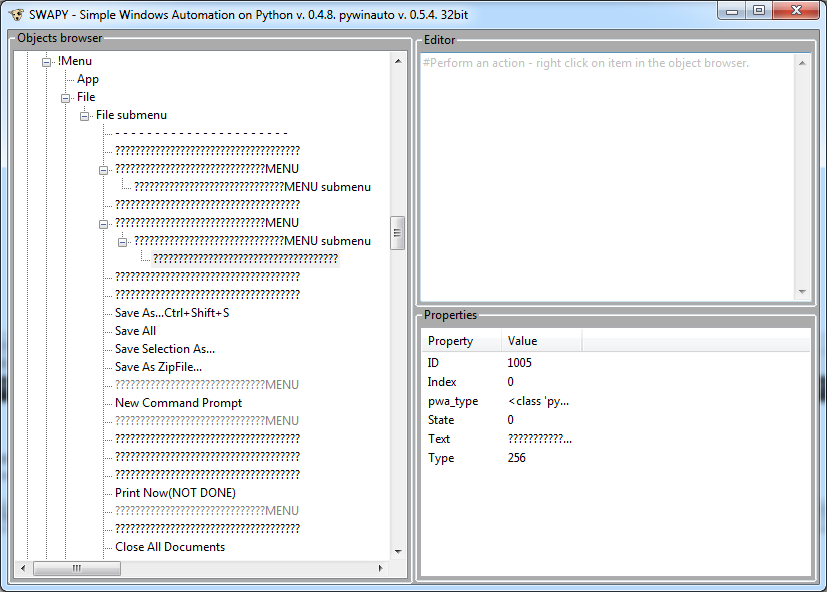
I guess the best approach would be to write an "MenuInfos Ripper" app in wxPython that you could essentially point the app to for example "The wxPython Demo.exe or whatever" and completely recreate that menubar in fullest from strings extracted and recreate a 'wxMenuBar' sample in runnable code. This would need to be the basic working idea before jumping into anything else as far as a Menu/Shortcuts Editor without having the sourcecode right in front of you.
If I can't get it to work with my own source code editor, then it presents a bit of doubt working with other apps. .. See?
Metallicow
on 27 Jan 2018
@vasily-v-ryabov I see that SWAPY has been archived and is read-only repo now.
I notice the last commit is from Nov 2015 and the last issue is from July 2018.
The repo header says this not maintained any more (will be replaced by py_inspect) https://github.com/pywinauto/py_inspect but py_inspect uses PyQt5
Did anyone attempt to rebuild SWAPY with the new wxPython(Phoenix) as it is released now and has a stable version on PyPI. ...wxPython 4.0.x...
Metallicow
on 15 Jan 2020
SWAPY maintainer is not active for a long time. I'm not planning to spend time on inspect tool supporting only "win32" backend. py_inspect contains just less than 150 lines of code. Maybe it's not so hard to re-write it using wxPython. It simply uses new pywinauto architecture and creates very few controls. That's it.
SWAPY code base is much larger. It's not clear to me why it should be updated. If someone wants to create a PR into SWAPY, I can un-archive the project. But does it make sense really?
vasily-v-ryabov
on 18 Jan 2020
Didnt know the maintainer stopped. hmmmm...
It appears that PyQt5 only has an unofficial py2.7 build here https://github.com/pyqt/python-qt5 but it is for 64bit python.
otherwise it means the hassle of building it yourself...
Not sure if all the 3rd party stuff I use has a 64 bit python package... I'd have to investigate now that python2.7 support is over.
I dont know if updating to phoenix would solve the problem... Plus there might have been some changes in pywinauto API that might need updating. Might take a while, but I'll try and look at the code and see what makes it tick.
Metallicow
on 18 Jan 2020
Maybe it's tume to start looking on python 2.7 as to-be-deprecated
airelil
on 18 Jan 2020
@vasily-v-ryabov about https://github.com/pywinauto/py_inspect I'm a bit curious that you are able to merge pull REQz but you have a issue that asks for PyInstaller support, which isn't too hard to add and for the simple imports, why does it not have a try except clause to do this in PySide2(which also supports Py3)? This is kinda strange because unless pywinauto requires Python3, then something similar could be worked up for that in wxPy Phoenix also that would support Py2 and Py3 at the same time...
...Or are you not the GUI type of coder...
The only thing in the file that references pywinauto is self.backend == 'win32' and self.backend == 'uia' which so happens to be a string, so unless import failed, then GUIKit is a moot issue... as I see it...
Metallicow
on 21 Jan 2020
@Metallicow currently our focus is on new backends for pywinauto (Linux and macOS). So py_inspect has lower priority now. I'm planning to switch on it later. But I can commit on code reviews on every PR for sure. My students had experimented with PyInstaller support in branch kivy: https://github.com/pywinauto/py_inspect/tree/kivy So you may take a look at this. Though I don't like this Kivy-based implementation because it looks ugly. Maybe some GUI designer could improve that.
Yes, I'm not a GUI developer. So the choice of GUI framework is probably not the best. If you have more experience, you're welcome to suggest whatever you feel appropriate and easy to use.
vasily-v-ryabov
on 27 Jan 2020
Not sure Python 2.7 support is important for py_inspect, because I though to build it as a standalone executable with code signing so that it doesn't depend on external Python version and doesn't require tricky way to start unsigned executable on different machine which is a stuck for many new users.
vasily-v-ryabov
on 27 Jan 2020
Related issues
 yangliang003
·
18Comments
yangliang003
·
18Comments
 nimuston
·
20Comments
nimuston
·
20Comments
 MyerFire
·
37Comments
MyerFire
·
37Comments
 mtkennerly
·
14Comments
mtkennerly
·
14Comments
 lanzorg
·
16Comments
lanzorg
·
16Comments