Pytube: Pytube yt.streams giving empty streams list for some videos
I'm trying to download this(http://youtube.com/watch?v=hnGWlry_H_Q) or this (https://www.youtube.com/watch?v=j4JQFz_8XxU) from YouTube but when I use yt.streams it just gives an empty list without any streams.
 xenonstride
All 19 comments
Thank you for contributing to PyTube. Please remember to reference Contributing.md
![github-actions[bot] picture](https://avatars2.githubusercontent.com/in/15368?v=4&s=40) github-actions[bot]
on 26 Nov 2020
github-actions[bot]
on 26 Nov 2020
Oh that's really weird. I'll try to look into this soon to see what's causing that.
 tfdahlin
on 27 Nov 2020
tfdahlin
on 27 Nov 2020
@tfdahlin I tried earlier and there was an error on this line https://github.com/nficano/pytube/blob/fab1c34c3b6059697ed0288493d987ecbb273ae9/pytube/extract.py#L425, maybe because the regex doesn't match. Hopefully it helps.
 ahmadkarlam
on 29 Nov 2020
ahmadkarlam
on 29 Nov 2020
I have the same with this video: https://www.youtube.com/watch?v=-EFjkY84Hlo
 martin73388
on 30 Nov 2020
martin73388
on 30 Nov 2020
hi, i'll try to look into this issue soon
tfdahlin
on 3 Dec 2020
It's possible that this is related to the discussion on https://github.com/nficano/pytube/pull/808 where sometimes the metadata was in different spots for different videos.
tfdahlin
on 3 Dec 2020
I'm trying to download this(
http://youtube.com/watch?v=hnGWlry_H_Q) or this (https://www.youtube.com/watch?v=j4JQFz_8XxU) from YouTube but when I use yt.streams it just gives an empty list without any streams.
Same Code @tfdahlin
On My Pc; Python 3.8.6
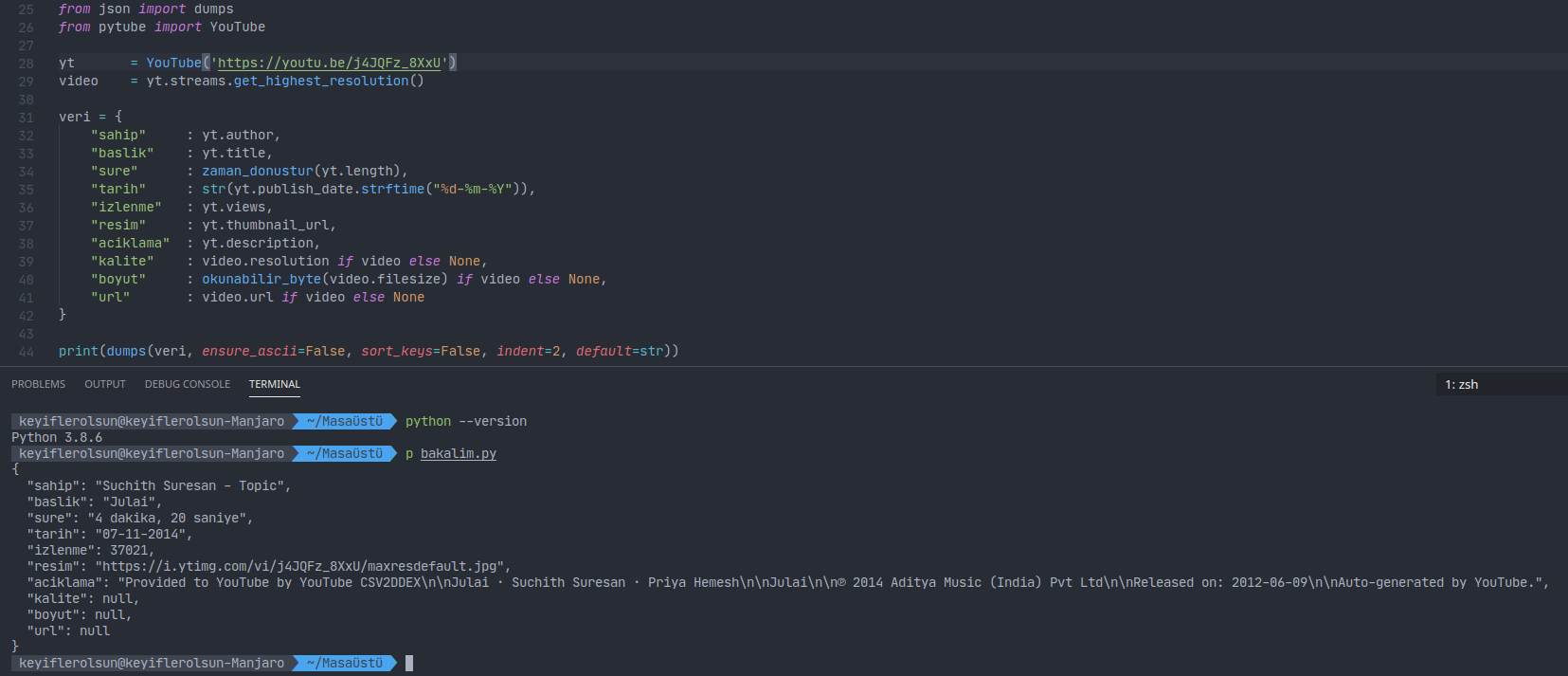
On Heroku; python-3.8.2
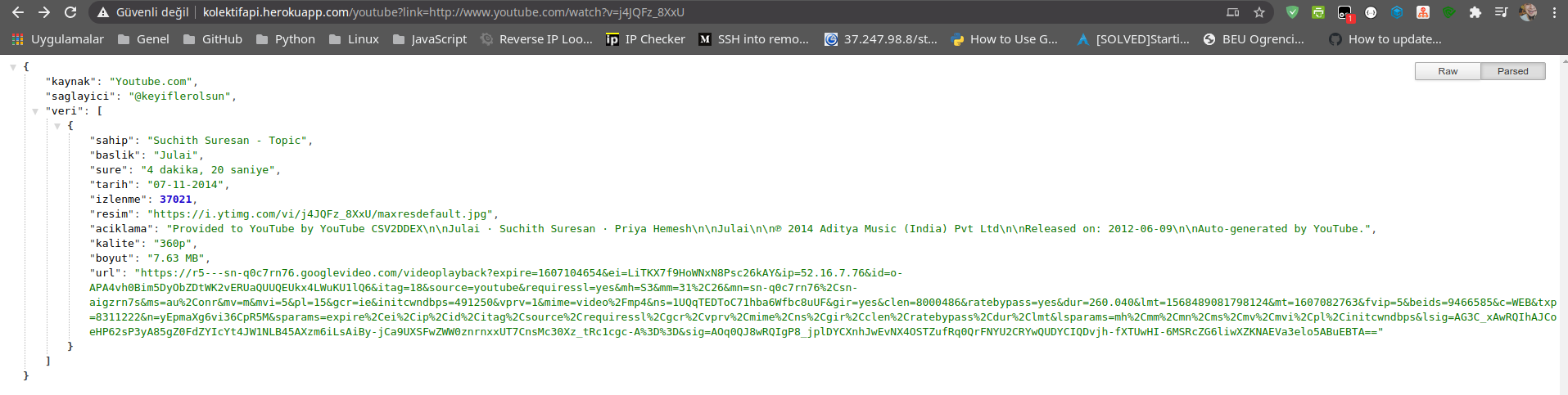
 keyiflerolsun
on 4 Dec 2020
keyiflerolsun
on 4 Dec 2020
YouTube(url=url).streams.get_audio_only() returned None for some songs and not others.
i looked into it and noticed apply_descrambler from extract.py looks for "formats" and "adaptiveFormats" in the Youtube classes vid_info variable, and that for some songs the data downloaded via self.vid_info_raw = request.get(self.vid_info_url) in __main__.py dont contain "formats" or "adaptiveFormats"
I have the same with this video: https://www.youtube.com/watch?v=-EFjkY84Hlo
I ran a test on this video and It has the same issue. The data downloaded has no "formats" or "adaptiveFormats"
Ive been using these videos for testing
https://www.youtube.com/watch?v=L5KMO7lmLsA missing "formats" and "adaptiveFormats
https://www.youtube.com/watch?v=H7oOqMcDcbo has "formats" and "adaptiveFormats
I don't know if this is the root cause of the problem but I think its a good starting point
 michaelknudsen
on 5 Dec 2020
michaelknudsen
on 5 Dec 2020
I fixed this issue by switching the user-agent in the requests.py file
michaelknudsen
on 5 Dec 2020
I fixed this issue by switching the user-agent in the requests.py file
can you show the code ?
ahmadkarlam
on 5 Dec 2020
from
base_headers = {"User-Agent": "Mozilla/5.0", "accept-language": "en-US,en"}
to
agent = "Mozilla/5.0 (X11; Linux x86_64) AppleWebKit/537.36 (KHTML, like Gecko) Chrome/77.0.3865.90 Safari/537.36"
    base_headers = {"User-Agent": agent, "accept-language": "en-US,en"}
in the _execute_request function in request.py
michaelknudsen
on 5 Dec 2020
I found the issue -- this was missing a key that should've been there from the get go. Going to fix and merge this quickly.
tfdahlin
on 5 Dec 2020
Once the unit tests pass, I'll merge it to fix this problem
tfdahlin
on 5 Dec 2020
To install the fix:
python -m pip install git+https://github.com/nficano/pytube
If there are additional problems, please create a new issue.
tfdahlin
on 5 Dec 2020
python -m pip install git+https://github.com/nficano/pytube
Didn't solve the issue for me, my video is: https://youtu.be/IQ_-PVPtIlI
 peternaf
on 7 Dec 2020
peternaf
on 7 Dec 2020
@peternaf I'm not having any problems with that URL. If you're still having problems, please create a new ticket with the full traceback
tfdahlin
on 8 Dec 2020
@peternaf I'm not having any problems with that URL. If you're still having problems, please create a new ticket with the full traceback
Re-run the install command and it seems to be downloading now. Thanks!
peternaf
on 10 Dec 2020
Same issue for me on this video.
 ieshaan12
on 23 Dec 2020
ieshaan12
on 23 Dec 2020
Same issue for me on this video.
@ieshaan12 your video is working on my side. uninstall pytube and install it again and see if it resolves it
xenonstride
on 24 Dec 2020
Related issues
 ajayrandhawa
·
20Comments
ajayrandhawa
·
20Comments
 stdedos
·
24Comments
stdedos
·
24Comments
 twwwy
·
54Comments
twwwy
·
54Comments
 aklajnert
·
23Comments
aklajnert
·
23Comments
 MrspiLLnyK
·
20Comments
MrspiLLnyK
·
20Comments
Most helpful comment
To install the fix:
python -m pip install git+https://github.com/nficano/pytubeIf there are additional problems, please create a new issue.