Pytube: [BUG] Empty streams for some videos
For some links, the streams property is empty, and the get_audio_only() method returns None. I've identified a few such links that seems to be reproducible. Here's my test code that shows the problem:
from pytube import YouTube

FAILING = [
    "https://www.youtube.com/watch?v=L6nrMAFCzhg",
    "https://www.youtube.com/watch?v=T8de-31Hu7g",
    "https://www.youtube.com/watch?v=Y08HWyVSMxg",
    "https://www.youtube.com/watch?v=WchEW9LkK94",
]

OK = [
    "https://www.youtube.com/watch?v=7lYMmW2kPpQ",
    "https://www.youtube.com/watch?v=7eVQHt690nk",
    "https://www.youtube.com/watch?v=4bscOLDng0o",
]

for fail in FAILING:
    yt = YouTube(fail)
    stream = yt.streams.get_audio_only()

    # that's unexpected, stream shouldn't be None
    assert stream is None
    assert len(yt.streams) == 0

for ok in OK:
    yt = YouTube(ok)
    stream = yt.streams.get_audio_only()

    # same code, different links - all good
    assert stream is not None
    assert len(yt.streams) > 0
I've tested on freshly created virtualenv and the newest pytube. Same error on Windows and Ubuntu (WSL).
 aklajnert
All 23 comments
Thank you for contributing to PyTube. Please remember to reference Contributing.md
![github-actions[bot] picture](https://avatars2.githubusercontent.com/in/15368?v=4&s=40) github-actions[bot]
on 13 Dec 2020
github-actions[bot]
on 13 Dec 2020
For some links, the
streamsproperty is empty, and theget_audio_only()method returns None. I've identified a few such links that seems to be reproducible. Here's my test code that shows the problem:from pytube import YouTube FAILING = [ "https://www.youtube.com/watch?v=L6nrMAFCzhg", "https://www.youtube.com/watch?v=T8de-31Hu7g", "https://www.youtube.com/watch?v=Y08HWyVSMxg", "https://www.youtube.com/watch?v=WchEW9LkK94", ] OK = [ "https://www.youtube.com/watch?v=7lYMmW2kPpQ", "https://www.youtube.com/watch?v=7eVQHt690nk", "https://www.youtube.com/watch?v=4bscOLDng0o", ] for fail in FAILING: yt = YouTube(fail) stream = yt.streams.get_audio_only() # that's unexpected, stream shouldn't be None assert stream is None assert len(yt.streams) == 0 for ok in OK: yt = YouTube(ok) stream = yt.streams.get_audio_only() # same code, different links - all good assert stream is not None assert len(yt.streams) > 0I've tested on freshly created virtualenv and the newest
pytube. Same error on Windows and Ubuntu (WSL).
I am facing the same issue, but I need an urgent fix, as i am using this version for my project, Can you provide examples of a few more links that work? so i can atleast demo it, or what could be a desparate fix?
also, the same is happening with playlists. Here is an example that doesnt work
https://www.youtube.com/watch?v=-GhzpvvIXlM&list=PLS1QulWo1RIY6fmY_iTjEhCMsdtAjgbZM
The output of Playlist.video_urls() also returns a None type
 KrishnarajT
on 13 Dec 2020
KrishnarajT
on 13 Dec 2020
Been having the same issue for a while now, some links I found that don't work:
https://www.youtube.com/watch?v=u5CVsCnxyXg
https://www.youtube.com/watch?v=GPUg7n8-M6o
https://www.youtube.com/watch?v=9YgmMJJ34k4
https://www.youtube.com/watch?v=vnLAa6_hB9A
https://www.youtube.com/watch?v=Mw5mAozjC6M
https://www.youtube.com/watch?v=-hptmburu3U
https://www.youtube.com/watch?v=lflsO7pxSE0
https://www.youtube.com/watch?v=mvJjmWTg7Qo
https://www.youtube.com/watch?v=DCi9I7ylt14
All of the above can be reproduced, might be helpful with looking for a pattern.
 PC-02
on 13 Dec 2020
PC-02
on 13 Dec 2020
hi @aklajnert, just to confirm, when you run
import pytube
print(pytube.__version__)
does it show 10.1.0? Those videos are working just fine for me:
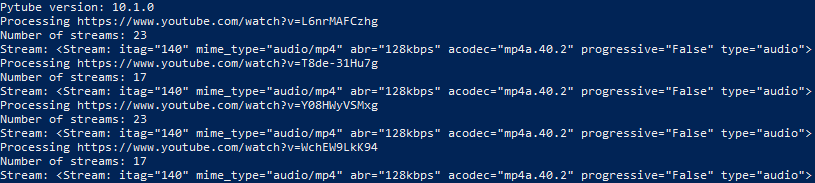
 tfdahlin
on 13 Dec 2020
tfdahlin
on 13 Dec 2020
@tfdahlin It's 10.0.0 actually, but that's the one that gets installed as the newest one:
> pip install --upgrade pytube
Requirement already up-to-date: pytube in /venv/pytube/lib/python3.8/site-packages (10.0.0)
Yeah, that's where the problem is. I'm working on getting something set up so that the pypi repository gets updated more quickly. I can make changes to the repo itself, but don't have access to pypi, so sometimes it takes a while for my bugfixes to get pushed to pypi.
The command you should be using to install pytube from source is python -m pip install git+https://github.com/nficano/pytube. This should have been in the instructions when you made this ticket, but maybe I can make that more clear.
tfdahlin
on 13 Dec 2020
We're hoping that we'll have the process for updating pypi set up sometime this week. The PR is already written, Ronnie just needs to review it when he has the time and set a couple of things up.
tfdahlin
on 13 Dec 2020
@KrishnarajT and @PC-02 I believe your problems are also fixed in the github repository, just not the pypi repository. You should also run python -m pip install git+https://github.com/nficano/pytube to install from source, and see if that fixes the problem for you.
tfdahlin
on 13 Dec 2020
@tfdahlin yes, the links work perfectly fine now, I had noticed the latest version in the docs, but didnt think of installing from source. Thanks a ton!
KrishnarajT
on 13 Dec 2020
@tfdahlin The links work now, looks like it was an issue caused by using 10.0.0. Thank you so much!
PC-02
on 13 Dec 2020
Thanks @tfdahlin - that makes sense. Anyway, the projects that use pytube as dependency cannot just set its version to master, and need to wait for it to be released. But good to know that it is already fixed.
aklajnert
on 13 Dec 2020
@tfdahlin - any ETA when the new version will be released to PyPI?
aklajnert
on 18 Dec 2020
Hopefully this weekend, depends on when @RONNCC has the chance to either review my PR or push an update manually. He said he'd look into it today, but obviously depends on if he has the time to
tfdahlin
on 19 Dec 2020
@tfdahlin - anything I can do to help with the release? It's a bit unpleasant situation as the package cannot be used as a dependency when not released on PyPi.
aklajnert
on 28 Dec 2020
@aklajnert unfortunately, not really at the moment. @RONNCC is the one who has to update the pypi package, and I think he's on vacation and not looking at github currently. I was supposed to be given access to pypi by the owner, but that also hasn't happened yet. I think this is just going to be stuck for a little while longer at this point, likely until after January 1st
tfdahlin
on 28 Dec 2020
@tfdahlin @aklajnert sorry my bad here -- done.
 RONNCC
on 28 Dec 2020
RONNCC
on 28 Dec 2020
It's a bit unpleasant situation as the package cannot be used as a dependency when not released on PyPi.
This shouldn't be the case -- can you explain a bit more around your problem?
RONNCC
on 28 Dec 2020
@RONNCC it has to do with libraries that have pytube as dependencies. There isn't really a good way to tell setuptools to install a package from github if it already exists in pypi as far as I can tell.
tfdahlin
on 28 Dec 2020
@tfdahlin https://stackoverflow.com/questions/32688688/how-to-write-setup-py-to-include-a-git-repo-as-a-dependency ?
RONNCC
on 29 Dec 2020
I kept trying to get that to work, but it only wanted to install from pip, and I can't work out why
tfdahlin
on 29 Dec 2020
I'll admit I gave up pretty early because I wasn't sure if I was diving down a rabbit hole unnecessarily
tfdahlin
on 29 Dec 2020
@tfdahlin https://stackoverflow.com/questions/32688688/how-to-write-setup-py-to-include-a-git-repo-as-a-dependency ?
I've found that also, but it seems that you can't release your package on PyPI with dependencies as links according to this
aklajnert
on 29 Dec 2020
@aklajnert makes sense - seems PyPI essentially restricted it since you're essentially running code _from anywhere_
RONNCC
on 29 Dec 2020
Related issues
 harindu95
·
20Comments
RONNCC
·
29Comments
harindu95
·
20Comments
RONNCC
·
29Comments
 NeverAskWhy
·
62Comments
NeverAskWhy
·
62Comments
 twwwy
·
54Comments
twwwy
·
54Comments
 Ikebani
·
36Comments
Ikebani
·
36Comments
Most helpful comment
@KrishnarajT and @PC-02 I believe your problems are also fixed in the github repository, just not the pypi repository. You should also run python -m pip install git+https://github.com/nficano/pytube to install from source, and see if that fixes the problem for you.