Pytorch3d: Unexpected behavior when adjusting image_size in raster_settings
This is related to #482. I used the codes by @gkioxari and 3d teapot data in that post. The only change was the image_size in raster_settings to test out non-square rendering in the recent release.
When image_size was (600,1200), I got the following rendered image:
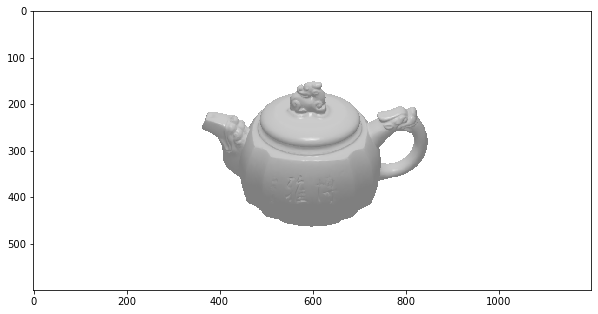
However, after I changed image_size to (600,1199), the rendered image was
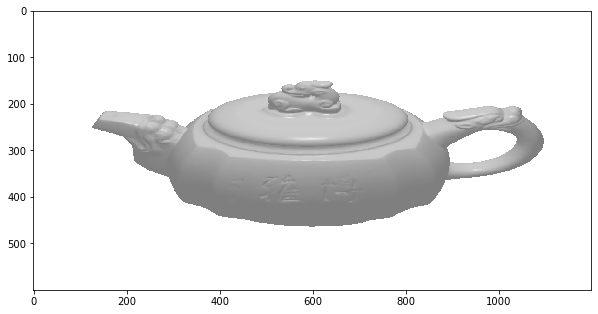
Somehow, the aspect ratio 2 is serving as a hard-coded threshold to decide whether stretch out the image during the rendering.
 cmis91
All 8 comments
@cmis91 What settings are you using for the cameras? See this related issue about non square image rendering and the explanation of how to set the settings: https://github.com/facebookresearch/pytorch3d/issues/548#issuecomment-775345072 and also this doc about how the cameras and rasterizer works for the non square image case: https://github.com/facebookresearch/pytorch3d/blob/master/docs/notes/renderer_getting_started.md#rasterizing-non-square-images
 nikhilaravi
on 22 Feb 2021
nikhilaravi
on 22 Feb 2021
It's the image_size in RasterizationSettings. I copied the code and data from #482 here. The strange behavior is that why the rendered image changes so dramatically when changing the image_size from (600,1200) to (600,1199). @gkioxari, since you wrote the code below, can you take a quick look and get a sense of what could happen there?
teapot.obj.zip
device = torch.device("cuda:1")

obj_filename = "/tmp/output/teapot.obj"
verts, faces, aux = load_obj(obj_filename, device=device, load_textures=False)

raster_settings = RasterizationSettings(
    image_size=(600,1199), blur_radius=0, faces_per_pixel=1
)

R = euler_angles_to_matrix(
    torch.tensor([[2.18166, 0.0, 0.0]], dtype=torch.float32, device=device), "XYZ"
)
T = torch.tensor([[0, 0, 350]], dtype=torch.float32, device=device)

lights = PointLights(
    device=device,
    location=((0.0, 30.0, 200.0),),
)

cameras = PerspectiveCameras(device=device, focal_length=3.5, R=R, T=T)
renderer = MeshRenderer(
    rasterizer=MeshRasterizer(cameras=cameras, raster_settings=raster_settings),
    shader=HardGouraudShader(device=device, lights=lights, cameras=cameras),
)

textures = TexturesVertex(
    torch.ones((1, verts.shape[0], 3), device=device, dtype=torch.float32)
)
mesh = Meshes(verts=[verts], faces=[faces.verts_idx], textures=textures)

image = renderer(mesh)

filename = "/tmp/output/teapot.png"
rgb = image[0, ..., :3].detach().squeeze().cpu()
Image.fromarray((rgb.detach().cpu().numpy() * 255).astype(np.uint8)).save(filename)
The aspect ratio is not hard coded but there is a bug in a int division that should be a float division. We will fix this!
 gkioxari
on 23 Feb 2021
gkioxari
on 23 Feb 2021
Great. Thanks for the quick triage. Feel free to close it now or after fixing the bug.
cmis91
on 23 Feb 2021
Thanks for reporting! We will keep it open until we fix it!
gkioxari
on 23 Feb 2021
This issue has now been fixed in master https://github.com/facebookresearch/pytorch3d/commit/13429640d3dfcdf20dc3645d74b621f5fb4faee5. If you wait until tomorrow you can install the nightly conda build of PyTorch3D to get the fix or clone from master.
nikhilaravi
on 24 Feb 2021
I am closing this! @cmis91 feel free to re-open if you see more issues!
gkioxari
on 25 Feb 2021
Pulled from the master branch, tried with different image_size, and verified that the problem mentioned above disappeared. Thanks for the quick fix.
cmis91
on 27 Feb 2021
Related issues
 aluo-x
·
3Comments
aluo-x
·
3Comments
 AndreiBarsan
·
3Comments
AndreiBarsan
·
3Comments
 ldepn
·
3Comments
ldepn
·
3Comments
 abhi1kumar
·
3Comments
abhi1kumar
·
3Comments
 cihanongun
·
3Comments
cihanongun
·
3Comments