Pytorch3d: Rasterizer with rectangular frame size
Hi guys, I'm having some difficulties working with the rasterizer when the frame is not square. In this example 1024x512.
I was wondering if this was either my mistake or a bug in the camera matrix?
The problem is that the mesh is always rendered "a bit squashed" like in this picture:
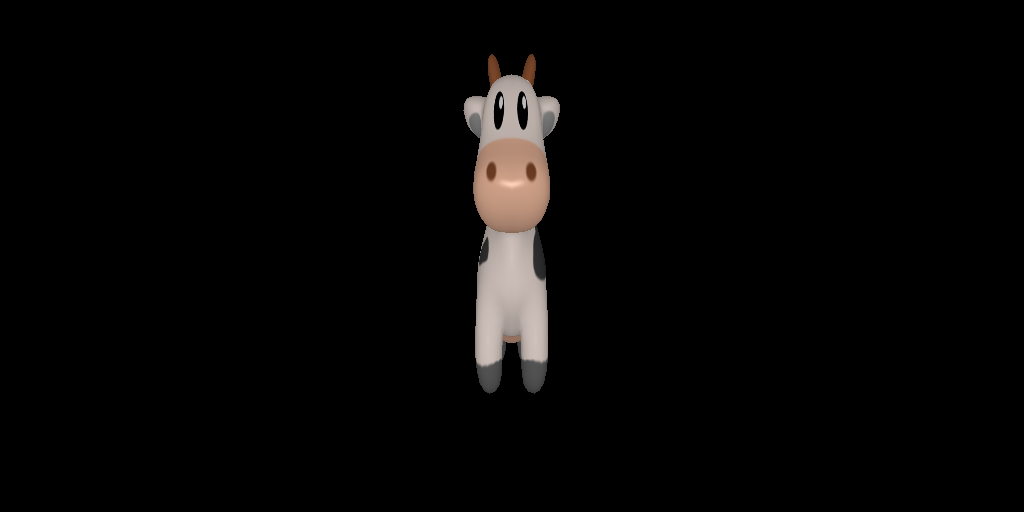
The Camera arguments are (as printed in the code):
image_size_wh: [[1024, 512]]
focal_length: [[512, 512]]
principal_point: [[511.5, 255.5]]
Which seem to me perfectly fine.
I'm attaching the code I have used. Cow mesh as from the tutorial "render_textured_meshes":
import os

import torch
from matplotlib import pyplot as plt
from pytorch3d.io import load_objs_as_meshes
from pytorch3d.renderer import PerspectiveCameras, look_at_view_transform, RasterizationSettings, PointLights, \
    MeshRenderer, MeshRasterizer, SoftPhongShader, BlendParams

device = torch.device("cuda:0")
torch.cuda.set_device(device)


DATA_DIR = "./data"
obj_filename = os.path.join(DATA_DIR, "cow_mesh/cow.obj")

mesh = load_objs_as_meshes([obj_filename], device=device)

R, T = look_at_view_transform(2.7, 0, 180)
image_size = [512, 1024]

N = 1
image_size_wh = [image_size[::-1]] * N
focal_length = [[image_size[0]] * 2 for _ in range(N)]
principal_point = [[(ims - 1) / 2 for ims in _ims] for _ims in image_size_wh]

print("image_size_wh:", image_size_wh)
print("focal_length:", focal_length)
print("principal_point:", principal_point)`

cameras = PerspectiveCameras(device=device, R=R, T=T,
                             focal_length=focal_length, principal_point=principal_point, image_size=image_size_wh)

raster_settings = RasterizationSettings(image_size=image_size)

blend_params = BlendParams(background_color=(0, ) * 3)

lights = PointLights(device=device, location=[[0.0, 0.0, -3.0]])

renderer = MeshRenderer(
    rasterizer=MeshRasterizer(
        cameras=cameras,
        raster_settings=raster_settings
    ),
    shader=SoftPhongShader(
        device=device,
        cameras=cameras,
        lights=lights,
        blend_params=blend_params
    )
)

images = renderer(mesh)

for i in range(N):
    plt.figure(figsize=(10, 10))
    plt.imshow(images[i, ..., :3].cpu().numpy())
    plt.grid("off")
    plt.axis("off")

plt.show()
Any hints please?
Thank you very much
 michele-arrival
All 6 comments
Hi @michele-arrival! Your problem is with the camera definition. Note that our cameras, as they are passed into the rasterizer, are in NDC space. Note that different libraries make different assumption for cameras so it's crucial to understand how the cameras are expected to be defined in each library.
In Pytorch3D, we want cameras to be in NDC. Users can define cameras in screen space (or else known as image space), as in your case, and these are transformed according to
These transforms basically assume that the camera parameters you define span the NDC space and we use assumption to convert them.
In your case, the camera parameters as you define them lead to a focal length fx and fy in NDC space that are not equal, and thus the shape is squeezed when it's transformed with the camera.
I think we need to better document this to avoid confusion. Until then, I'd recommend defining cameras in NDC space. In our view, this is a better space to define cameras as focal length and image size are independent.
So to be more concrete, I'd define a camera as follows
cameras = PerspectiveCameras(focal_length=((1.0, 1.0),))
and then specify image_size=(512, 1024) when rasterizing.
 gkioxari
on 3 Feb 2021
gkioxari
on 3 Feb 2021
Hi @gkioxari! Thanks for the explanation!
While I understand the need to convert to NDC internally, I don't understand what definition of f and px, py one should adhere to, in order to get the right perspective transformation. Every definition I have seen, has fx == fy unless there is pixel distortion. What am I missing?
How would you recommend one goes about when using an arbitrary set of {f, (px, py), (w, h)} with the current pytorch3d API?
Thank you!
PS. I'm perfectly happy to use width == height and px -= (width - height) // 2, which makes it work, but I'm not sure just cracking it is the right way to tackle a definition that I don't understand :D cheers.
michele-arrival
on 8 Feb 2021
Hi @michele-arrival! You are absolutely right in wondering this and this is our failure to document it well.
The issue here is two fold. First, it's the camera definition for non-square cameras and second is how that connects to our rasterizer.
Camera definition
Cameras are commonly defined such that when transforming a (X,Y,Z) point with x=fx X/Z +px and y=fy Y/Z + py, the pixels (x,y) that lie in the image plane span [-1, 1]. This is for both square and non square images. If fx=fy that means that the camera captures equal spans of X and Y in the world space (or equal fields of view). If fx>fy then the span for X that the camera captures is smaller (e.g. for same Z, smaller values of X will make it into the image than for Y). So (fx, fy) is related to the field of view. Note that pixel distortion is a different camera parameter and we don't support that currently in PyTorch3D. So all this is good and the camera transform from NDC to screen that I mentioned in my comment above adheres to this. If you do the math, you will see that it maps the pixel at (0, 0) in screen space to (-1, -1) in NDC space and similarly the pixel at (W-1, H-1) to (1, 1).
Non square rasterization
Now, the issue comes with the non square rasterization. In square rasterization, we rasterize the (X,Y,Z) points for which (x, y) in [-1, 1]x[-1, 1]. For non square rasterization, we change this up a bit. See https://github.com/facebookresearch/pytorch3d/commit/d07307a451f3521e4cf522876b67b14b34021809. If s is the aspect ratio, we rasterize pixels which are in [-1, 1]x[-s, s] if height is bigger than width or `[-s, s]x[-1, 1] if width is bigger than height. This assumption does not adhere to the camera definition in screen space that I mentioned above and is the reason for the confusion. This is the part we need to document better.
Ok fine, but what do I do?
Until we document this better and find a more elegant way to connect our cameras defined in screen space to our rasterizer for the non-square rasterization case, I'd advise you to instead define cameras in NDC space. As I mentioned in my comment above, cameras in NDC space are the ones that are naturally supported and don't have the issue of screen to NDC conversion based on span assumptions.
gkioxari
on 8 Feb 2021
Hi @gkioxari, thanks again for the thorough explanation.
Sure the NDC space definition makes sense. IMHO the simple fact that screen space intrinsic is an option that can be used in the PerspectiveCamera API, grants the user the right to use it.
Either way, this bit is the one that will help me match the API with the expected behaviour.
If
sis the aspect ratio, we rasterize pixels which are in[-1, 1]x[-s, s]if height is bigger than width or[-s, s]x[-1, 1]if width is bigger than height.`
As I mentioned it works for me with w > h, so I'll keep it in mind shall I encounter the opposite case.
Coincidentally, wouldn't this happen to be just the right translation that could happen in PerspectiveCamera under the hood to avoid misunderstandings?
Feel free to close this issue if you consider it solved (it is for me).
Thank you!
michele-arrival
on 9 Feb 2021
Absolutely! I have been thinking how to cleanly do this and one solution could be to have this conversion happen under the hood. I want to think of more solutions in case I missed any better ones but this seems to be a good contender for now :) Hopefully a clean fix will come soon!
gkioxari
on 9 Feb 2021
Great!
Meanwhile I thought I would dump my few lines of code that "fix" the aspect ratio here: https://github.com/facebookresearch/pytorch3d/pull/560
happy to add tests if I'm told where to put them
michele-arrival
on 9 Feb 2021
Related issues
 unlugi
·
3Comments
unlugi
·
3Comments
 ldepn
·
3Comments
ldepn
·
3Comments
 abhi1kumar
·
3Comments
abhi1kumar
·
3Comments
 udemegane
·
3Comments
udemegane
·
3Comments
 zhjscut
·
3Comments
zhjscut
·
3Comments