Pytorch3d: The render result will become unexpected if the model on a batch is not the same!!!
I use batch render for different model with different pose. I found that if the models on a batch are different, the render color image will go wrong, but the silhouette is ok. (not sure for depth image.)
The color image is fetched by:
    phong_raster_settings = RasterizationSettings(image_size=image_size,
                                                  blur_radius=0.0,
                                                  faces_per_pixel=1)
    phong_renderer = MeshRendererDepth(
        rasterizer=MeshRasterizer(cameras=cameras,
                                  raster_settings=phong_raster_settings),
        shader=TexturedSoftPhongShader(device=device)).to(device)
and the silhouette is fetched by:
`
# To blend the 100 faces we set a few parameters which control the opacity and the sharpness of edges. Refer to blending.py for more details.
blend_params = BlendParams(sigma=1e-4, gamma=1e-4)
# Define the settings for rasterization and shading. Here we set the output image to be of size 640x640. To form the blended image we use 100 faces for each pixel. Refer to rasterize_meshes.py for an explanation of this parameter.
silhouette_raster_settings = RasterizationSettings(
    image_size=image_size,  # longer side or scaled longer side
    # blur_radius=np.log(1. / 1e-4 - 1.) * blend_params.sigma,
    blur_radius=0.0,
    # The nearest faces_per_pixel points along the z-axis.
    faces_per_pixel=1)

# Create a silhouette mesh renderer by composing a rasterizer and a shader
silhouete_renderer = MeshRenderer(
    rasterizer=MeshRasterizer(cameras=cameras,
                              raster_settings=silhouette_raster_settings),
    shader=SoftSilhouetteShader(blend_params=blend_params)).to(device)
`
Can anyone tell me that, is it a feature or it is a bug?
The wrong result is look like:

(left is expected, right is rendered by pytorch3d.)
 densechen
All 7 comments
Can you provide the data and the whole code for us to run in order to reproduce this case?
 gkioxari
on 22 Jul 2020
gkioxari
on 22 Jul 2020
@gkioxari @nikhilaravi Thanks for your time. I have written a script and provided some testing data to reprodece the result.
You can refer here to download the testing zip.
densechen
on 23 Jul 2020
The code you shared is far from clean which makes it hard for me to use. As advice, please try to share clean code that is as compact as possible which reproduces your error case. I took your data however and rendered them and the outputs look fine to me.
Code (compact and concise):
    # obj_filename = os.path.join("/tmp/output/issue283", "002_master_chef_can/textured.obj")
    obj_filename = os.path.join("/tmp/output/issue283", "003_cracker_box/textured.obj")

    # Load obj file
    mesh = load_objs_as_meshes([obj_filename], device=device)

    R, T = look_at_view_transform(dist=0.3, elev=89, azim=-178)  # for master_chef_can

    cameras = OpenGLPerspectiveCameras(device=device, R=R, T=T)

    raster_settings = RasterizationSettings(
        image_size=512,
        blur_radius=0.0,
        faces_per_pixel=1,
    )

    lights = PointLights(device=device, location=[[0.0, 0.0, 0.1]])

    renderer = MeshRenderer(
        rasterizer=MeshRasterizer(
            cameras=cameras,
            raster_settings=raster_settings
        ),
        shader=TexturedSoftPhongShader(
            device=device,
            cameras=cameras,
            lights=lights
        )
    )
    images = renderer(mesh)
    filename = "/tmp/output/crackerbox.png"
    rgb = images[0, ..., :3].detach().squeeze().cpu()
    Image.fromarray((rgb.numpy() * 255).astype(np.uint8)).save(filename)
Output for the two data points:
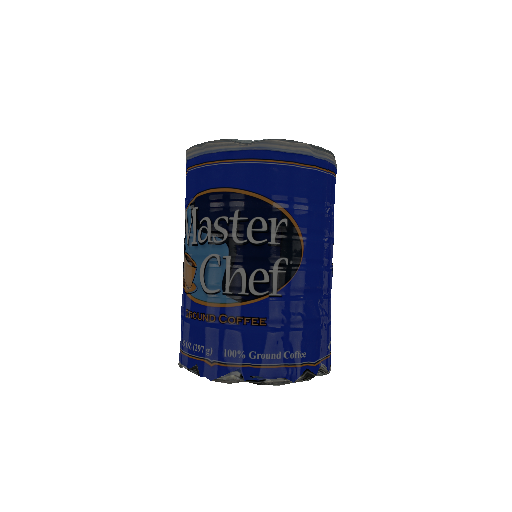

gkioxari
on 23 Jul 2020
@gkioxari I also run the code you provided.
`
R, T = look_at_view_transform(dist=0.3, elev=89, azim=-178) # for master_chef_can
cameras = OpenGLPerspectiveCameras(device=device, R=R, T=T)
raster_settings = RasterizationSettings(
image_size=512,
blur_radius=0.0,
faces_per_pixel=1,
)
lights = PointLights(device=device, location=[[0.0, 0.0, 0.1]])
renderer = MeshRenderer(
rasterizer=MeshRasterizer(
cameras=cameras,
raster_settings=raster_settings
),
shader=TexturedSoftPhongShader(
device=device,
cameras=cameras,
lights=lights
)
)
images = renderer(mesh)
filename = "crackerbox.png"
rgb = images[1, ..., :3].detach().squeeze().cpu()
Image.fromarray((rgb.numpy() * 255).astype(np.uint8)).save(filename)
`
Pay attention to that: I only change the next-to-last line, which is
rgb = images[0, ..., :3].detach().squeeze().cpu()
to
rgb = images[1, ..., :3].detach().squeeze().cpu()
Just change the batch to last, and I get the wrong render image:
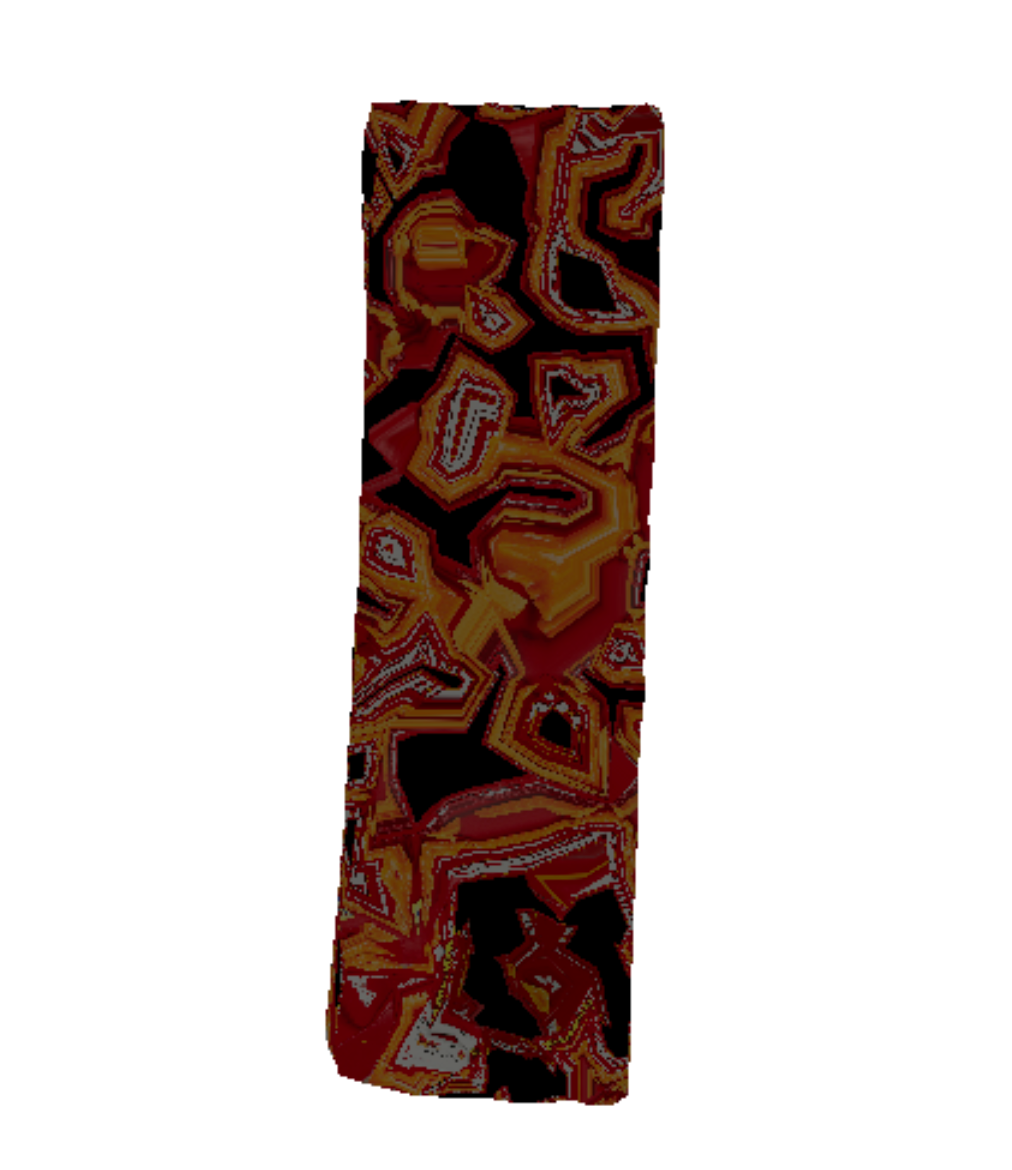
I am using a Titan x on ubuntu 16.04.
densechen
on 23 Jul 2020
Weirdly, this issue is only when both meshes are loaded and the error is with the 2nd mesh. In my code I rendered them one by one and everything was fine. We are looking into it.
gkioxari
on 23 Jul 2020
@densechen ok thanks for clarifying the issue, it seems to be related to texture interpolation. I will look into it and get back to you soon.
 nikhilaravi
on 23 Jul 2020
nikhilaravi
on 23 Jul 2020
I hope that this has now been fixed by that commit, which is now included in the nightly build. Please reopen if that is not the case.
 bottler
on 24 Aug 2020
bottler
on 24 Aug 2020
Related issues
 elcronos
·
3Comments
elcronos
·
3Comments
 ldepn
·
3Comments
ldepn
·
3Comments
 unlugi
·
3Comments
unlugi
·
3Comments
 TheshowN
·
3Comments
TheshowN
·
3Comments
 NotAnyMike
·
3Comments
NotAnyMike
·
3Comments