Pytorch3d: Rendering is flipped
Hello,
I believe that the rendering is being flipped in the X axis. For example, if we see the image render in the tutorial render_textured_meshes the image looks like this:

However, in meshlab

You can see in the texture that the eyes are in the other direction. It is not the texture mapping as I have tested with non-symmetric objs.
 HectorAnadon
All 20 comments
@HectorAnadon thanks for pointing this out. I will check the texture interpolation code and get back to you.
 nikhilaravi
on 20 Feb 2020
nikhilaravi
on 20 Feb 2020
Sorry, it is not the texture interpolation, it is the mesh that is flipped.
HectorAnadon
on 20 Feb 2020
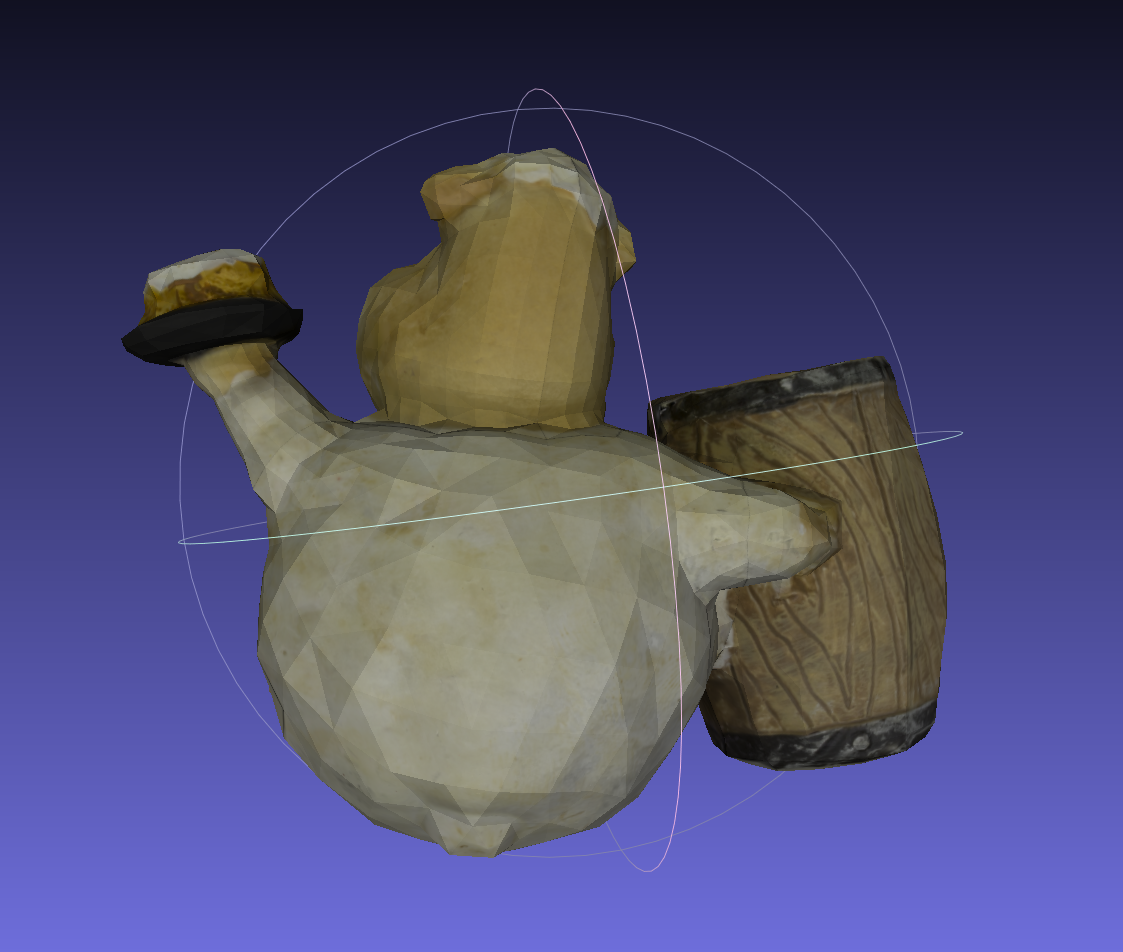
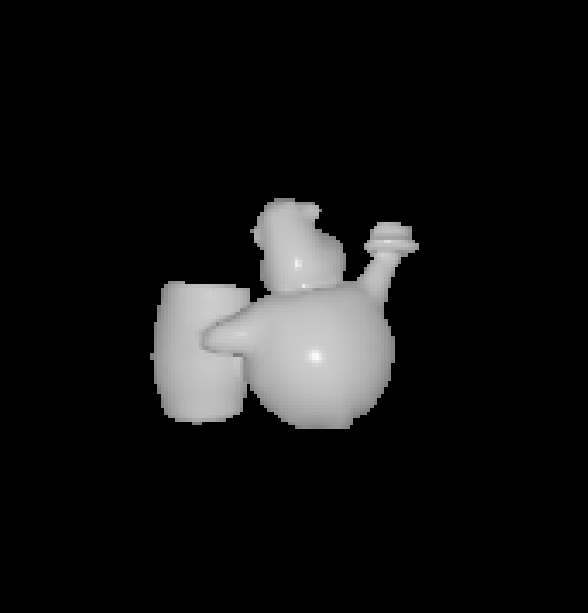
Back of the object
HectorAnadon
on 20 Feb 2020


Front of the object
HectorAnadon
on 20 Feb 2020
Might it be that the X axis is inverted?
HectorAnadon
on 20 Feb 2020
Yes, I agree X is flipped. In the NDC space, if it is right-handed with z-min at z-near, then x should be positive to the left. However, in the projection matrices it is positive to the right.
For the tutorials teapot example, if we get the camera position using camera_position_from_spherical_angles, it is [ 0.3991, 1.9284, -2.2632].
So the camera is 'behind' the teapot in world space.
here is an image to show what I mean:
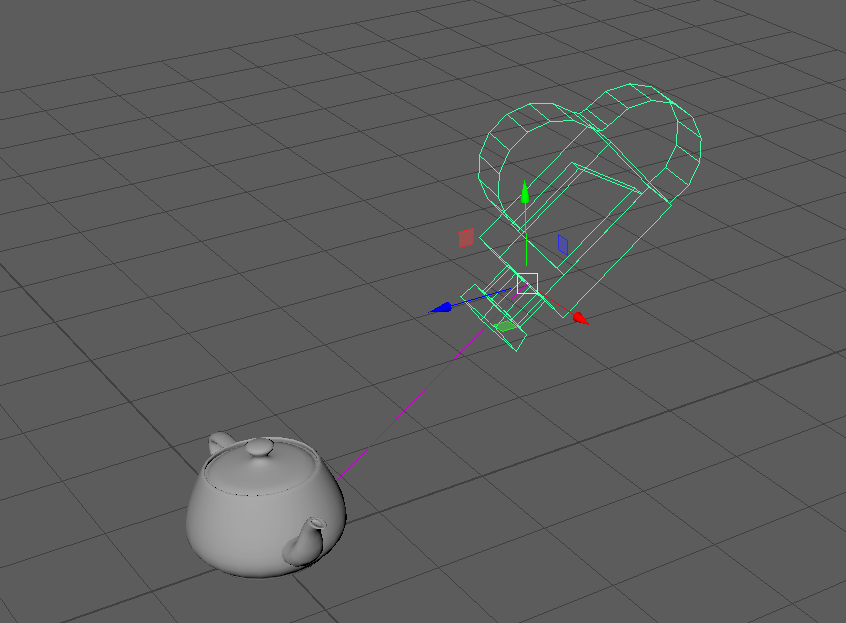
it is clear from this image that the teapot example should show the spout on the left, yet in the example it is spout to the right:

 davegreenwood
on 21 Feb 2020
davegreenwood
on 21 Feb 2020
I think I should add some more information:
The first image I posted is from the viewport of Maya. This software uses the same coordinates as OpenGL: y-up, right handed. In the image, the red, green, blue gnomon indicates x, y, z world coordinates.
To position the camera, I called the function: camera_position_from_spherical_angles to give the camera position alongside the teapot object in world space.
Now, we can see an image from that camera should produce an image of the teapot with the spout to the left, yet the tutorial result shows the spout to the right.
There are two possible reasons:
- The camera extrinsic matrix should position the camera at positive z, but look at the same point. Although all the light positions could be effected. For what it's worth, I don't think this is the problem :)
- The camera intrinsic matrix. It is stated that the NDC is also right handed, so if we maintain y-up and have zmin at znear, then x should be positive to the left. In OpenGL the NDC is left handed y-up, with x positive to the right. There is a nice illustration here: http://www.songho.ca/opengl/gl_projectionmatrix.html#perspective
So, if your NDC is right handed as I described you should change x direction in the intrinsic matrix composition, by negating the x-scale in the matrix. Again, for what it's worth, I think this is where the problem lies.
As an example here is a view with that suggested change, and including a light at [1.0, 1.0, -2.0].

I made a change to the intrinsic matrix in cameras.py line 133 like so:
P[:, 0, 0] = 2.0 * znear / (right - left)
to:
P[:, 0, 0] = - 2.0 * znear / (right - left)
You can see that flipping the x gives the expected object orientation,
light highlight etc. given the positions of all objects in world space.
davegreenwood
on 24 Feb 2020
@HectorAnadon thanks for raising this important issue and @davegreenwood thanks for helping answer it.
The coordinate system we use during rasterization is positive y pointing down, positive x pointing to the right, and positive z pointing in to the page. This is a right hand coordinate system but results in the object in the image being "upside down".
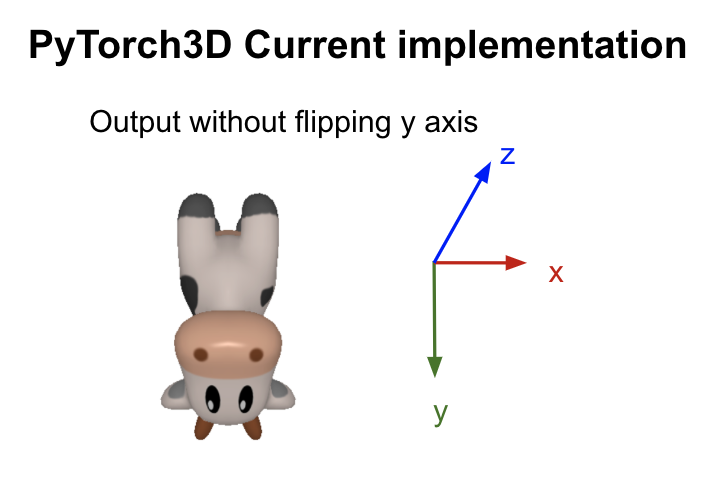
In the blending functions the y axis is flipped at the end which results in mirroring of the image in the y direction but causes the problem mentioned in this issue - the resulting coordinate frame is no longer right handed (i.e. positive x to the right, positive y upwards and positive z into the screen)
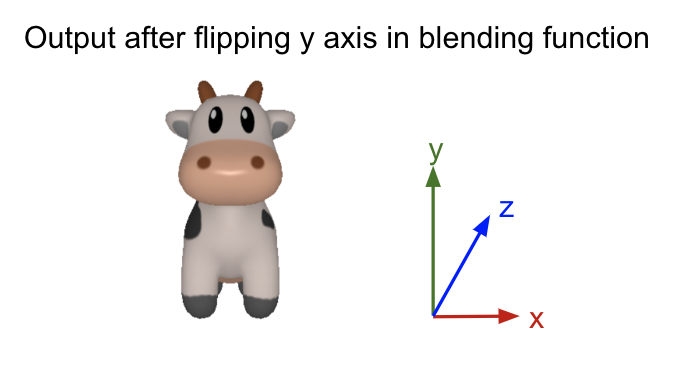
Regarding the cow example, I had a look at SoftRasterizer which the PyTorch3D rasterization implementation is inspired by - their image is also incorrect in the x direction. They solve the y up/down problem by reversing the y axis during the rasterization step (as opposed to blending) but do not reverse the x axis.
For a quick fix, you can change the calls to torch.flip to specify flipping in dimensions [1, 2] which will flip the image in both the x and y directions. e.g.
Replace with:
return torch.flip(pix_colors, [1, 2])
It would be much cleaner to add a hack here than make any changes to the perspective projection matrices mentioned above.
For a more thorough fix we will be changing the rasterization code: the default will assume the same coordinate frame as meshlab (see example below). We will also enable a setting for users to specify which direction y should be and x will be computed accordingly to give a right handed system.
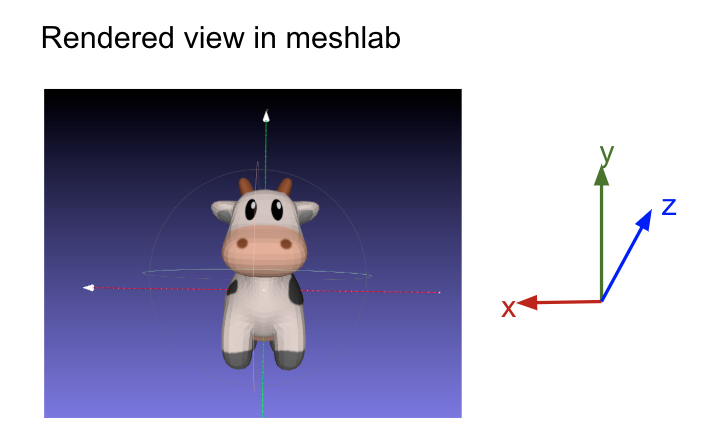

nikhilaravi
on 26 Feb 2020
Thank you @nikhilaravi. Looking forward to the fix in the rasterization code. Do you have any estimate when the fix will be applied? Thanks!
HectorAnadon
on 26 Feb 2020
I am assuming that this line should be updated too https://github.com/facebookresearch/pytorch3d/blob/f358b9b14dbc1414c588f308b35f55705d777873/pytorch3d/renderer/blending.py#L41
HectorAnadon
on 26 Feb 2020
@HectorAnadon yes we will update the rasterization code and all the blending functions. We will try to get this fix into master by the end of the week. I will update this issue when the fix has been merged!
nikhilaravi
on 26 Feb 2020
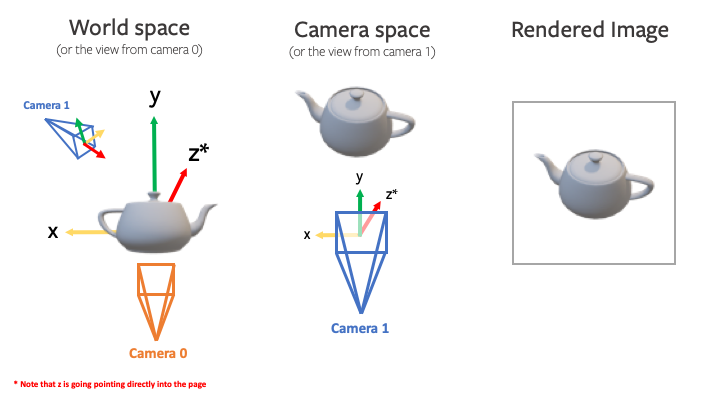
We have landed a fix for this 15c72be and updated the documentation for the renderer. The flipping in the blending functions has been removed the rasterization step has been updated to ensure the directions of the axes are correct in the rendered image. The convention for world and camera coordinates is explained by this diagram:
nikhilaravi
on 6 Mar 2020
@nikhilaravi I haven't test it in depth, but now it looks like Y axis is flipped.
Edit: I was wrong, it is needed to rebuild the repository.
HectorAnadon
on 6 Mar 2020
@HectorAnadon what do you mean?
nikhilaravi
on 6 Mar 2020
Edit: I was wrong, it is needed to rebuild the repository.
HectorAnadon
on 6 Mar 2020
Okay, forget everything. I needed to rebuilt the repository. Pulling was not enough. Is that the recommended way to be up to day? Or shall I use pip from github directly? Sorry for the missunderstanding @nikhilaravi and great work! Thanks for fixing it so fast
HectorAnadon
on 6 Mar 2020
@HectorAnadon yes you can install directly from github, or if you need to edit any of the code you can pull from master, delete the build directory and rebuild.
nikhilaravi
on 6 Mar 2020
hi @HectorAnadon, could you say exactly what you did to avoid the y-flip you first noticed?
I have git pulled master from here to a clean directory, and done pip install -e . and I get y-flipped.
This is on linux and macOS.
I'm just trying to track down where this happens on our install.
thanks!
davegreenwood
on 7 Mar 2020
Actually, I've got it - but in case anyone else is wondering - I had written a custom blend function, and now the rasteriser does not require the flip on return. All good now :)
davegreenwood
on 7 Mar 2020
@davegreenwood great!!
nikhilaravi
on 8 Mar 2020
Related issues
 TheshowN
·
3Comments
TheshowN
·
3Comments
 zhjscut
·
3Comments
zhjscut
·
3Comments
 TSKongLingwei
·
3Comments
TSKongLingwei
·
3Comments
 ldepn
·
3Comments
ldepn
·
3Comments
 NotAnyMike
·
3Comments
NotAnyMike
·
3Comments
Most helpful comment
@HectorAnadon thanks for raising this important issue and @davegreenwood thanks for helping answer it.
The coordinate system we use during rasterization is positive y pointing down, positive x pointing to the right, and positive z pointing in to the page. This is a right hand coordinate system but results in the object in the image being "upside down".
In the blending functions the y axis is flipped at the end which results in mirroring of the image in the y direction but causes the problem mentioned in this issue - the resulting coordinate frame is no longer right handed (i.e. positive x to the right, positive y upwards and positive z into the screen)
Regarding the cow example, I had a look at SoftRasterizer which the PyTorch3D rasterization implementation is inspired by - their image is also incorrect in the x direction. They solve the y up/down problem by reversing the y axis during the rasterization step (as opposed to blending) but do not reverse the x axis.
For a quick fix, you can change the calls to
torch.flipto specify flipping in dimensions [1, 2] which will flip the image in both the x and y directions. e.g.https://github.com/facebookresearch/pytorch3d/blob/f358b9b14dbc1414c588f308b35f55705d777873/pytorch3d/renderer/blending.py#L184
https://github.com/facebookresearch/pytorch3d/blob/f358b9b14dbc1414c588f308b35f55705d777873/pytorch3d/renderer/blending.py#L90
Replace with:
It would be much cleaner to add a hack here than make any changes to the perspective projection matrices mentioned above.
For a more thorough fix we will be changing the rasterization code: the default will assume the same coordinate frame as meshlab (see example below). We will also enable a setting for users to specify which direction y should be and x will be computed accordingly to give a right handed system.