Python-slack-sdk: Slack Login Error in rtm_connect
I am following this tutorial here: https://www.fullstackpython.com/blog/build-first-slack-bot-python.html and I am having a problem when I am trying to run the code. The errors I get are:
Traceback (most recent call last):
File "C:\Users\n0342338\AppData\Local\Programs\Python\Python36\lib\site-packages\slackclient\client.py", line 52, in rtm_connect
self.server.rtm_connect(use_rtm_start=with_team_state, **kwargs)
File "C:\Users\n0342338\AppData\Local\Programs\Python\Python36\lib\site-packages\slackclient\server.py", line 151, in rtm_connect
raise SlackLoginError(reply=reply)
slackclient.server.SlackLoginError
The code is never entering the 'if slack_client.rtm_connect(with_team_state=False)' statement.
Here is the code:
slack_token = os.environ['SLACK_BOT_TOKEN']
slack_client = SlackClient(slack_token)

#slack_client = SlackClient(os.environ.get('SLACK_BOT_TOKEN'))
# starterbot's user ID in slack: Value is assigned after the bot starts up
startbot_id = None

#constants
RTM_READ_DELAY = 1 #This is a 1 second RTM_READ_DELAY
EXAMPLE_COMMAND = "do"
MENTION_REGEX = "^@(|[WU].+?)>(.*)"
print('at beggining')
def parse_bot_commands(slack_events):
    """
        Parses a list of event coming from the Slack RTM API to find bot commands.
        If a bot command is found, this function returns a tuple of command and channel.
        If it is not found, then this function returns None, None.
    """
    for event in slack_events:
        if event["type"] == "message" and not "subtype" in event:
            user_id, message = parse_direct_mention(event["text"])
            if user_id == starterbot_id:
                return message, event["channel"]
    return None, None

def parse_direct_mention(message_text):
    """
        Finds a direct mention (a mention that is at the begginging) in message message
        and returns the user ID which was mentioned. If there is no direct mention
        it returns None
    """
    matches = re.search(MENTION_REGEX, message_text)
    #The first group contains the username, the second groups contains the
    #remaining message return (matches.group(1), matches.group(2).strip()) if
    #matches else (None, None)

def handle_command(command, channel):
    """
        Executes bot command if the command is known
    """
    #Default response is help text for the user
    default_response = "Not sure what you mean. Try *{}*.".format(EXAMPLE_COMMAND)

    #Finds and executes the given command, filling in response
    response = None

    #Other commands implement there
    if command.startwith(EXAMPLE_COMMAND):
        response = "Sure...write stuff here"

    #Sends the response back to the channel
    print('before api call')
    slack_client.api_call(
        "chat.postMessage",
        channel=channel,
        text=respones or default_response
        )
print('at name=main')
if __name__ == "__main__":
    print('in name = mian')
    if slack_client.rtm_connect(with_team_state=False):
        print("Starter Bot connected and running!")
        #Read bot's user ID by calling Web API method 'auth.test'
        print('here')
        starterbot_id = slack_client.api_call("auth_test")["user_id"]
        while True:
            command, channel = parse_bot_commands(slack_client.rtm_read())
            if command:
                handle_command(command, channel)
            time.sleep(RTM_READ_DELAY)
        else:
            print("Connection failed. Exception taceback printed above")
 LMPK
LMPK
All 16 comments
When I started with this same code, I got the same SlackLoginError in the same files and lines. The issue I had was handing the wrong token along. It took me a while to figure out what I was supposed to do too, but I found it. You need to use the Bot User OAuth Access Token specifically (see below).
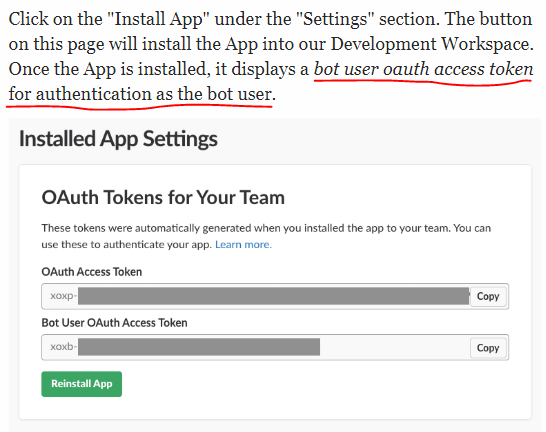
This got my bot to deliver the Starter Bot connected and running! text properly.
 cxr00
on 15 Jun 2018
cxr00
on 15 Jun 2018
I got the bot user access token right and set it to an environment variable but, I still get the same error.
I'm on a Windows machine. Maybe this is an issue on Windows?
 sharad-vm
on 6 Sep 2018
sharad-vm
on 6 Sep 2018
I'm having the same error! Have you already found the solution for this? Thanks!
 clodoan
on 16 Oct 2018
clodoan
on 16 Oct 2018
@clodoan are you also on Windows? can you check to see if the slack_token variable has the right token value? i would do this by putting print(slack_token) right after the first line.
 aoberoi
on 16 Oct 2018
aoberoi
on 16 Oct 2018
thanks @aoberoi ! I've just found the error: I was using a method that doesn't work with bot token. Just with user token or workplace token! Thanks anyway 👍 !
clodoan
on 16 Oct 2018
python ./starterbot.py
Failed RTM connect
Traceback (most recent call last):
File "/anaconda3/lib/python3.6/site-packages/slackclient/client.py", line 140, in rtm_connect
self.server.rtm_connect(use_rtm_start=with_team_state, **kwargs)
File "/anaconda3/lib/python3.6/site-packages/slackclient/server.py", line 163, in rtm_connect
raise SlackLoginError(reply=reply)
slackclient.server.SlackLoginError
Connection failed. Exception traceback printed above.
Hi, same error on mac--> i have used correct token--> but same error: Any suggestion plz
 nilesh4554
on 19 Oct 2018
nilesh4554
on 19 Oct 2018
I tried using bot token still it is failing.
I am using python3 , i also python 2 installed.
 saurabhbahl19
on 7 Jan 2019
saurabhbahl19
on 7 Jan 2019
OK I fixed the issue , rather than using pybot token use user token . it
worked for me.
saurabhbahl19
on 7 Jan 2019
python2 starterbot.py worked for me with the Bot User OAuth Access Token
 w-red-1
on 3 Mar 2019
w-red-1
on 3 Mar 2019
This still seems to be an issue.
If i connect with the xoxp-* token i get: not_allowed_token_type
If i connect with the xoxb-* token i get: The server responded with: {'ok': False, 'error': 'missing_scope', 'needed': 'rtm:stream' [...]
I have given the app all permissions possible.
Using this example-code:
import os
import slack

@slack.RTMClient.run_on(event='message')
def say_hello(**payload):
    data = payload['data']
    web_client = payload['web_client']
    rtm_client = payload['rtm_client']
    if 'Hello' in data.get('text', []):
        channel_id = data['channel']
        thread_ts = data['ts']
        user = data['user']

        web_client.chat_postMessage(
            channel=channel_id,
            text=f"Hi <@{user}>!",
            thread_ts=thread_ts
        )

slack_token = os.environ["SLACK_API_TOKEN"]
rtm_client = slack.RTMClient(token=slack_token)
rtm_client.start()
EDIT This however works with a old xoxb-* legacy-token.
 jimmy927
on 30 Jan 2020
jimmy927
on 30 Jan 2020
@jimmy927, the new granular scopes (new xoxb-* token) don't support RTM. You can create a classic slack app if you need to create a new token. But keep in mind that the Slack App Directory will stop accepting new app submissions for classic slack apps on Feb 21, 2020.
Instead of RTM, we recommend using the Events API. If there is a specific reason or use case you need RTM over Events API, I'd love to hear about it.
 stevengill
on 3 Feb 2020
stevengill
on 3 Feb 2020
Instead of RTM, we recommend using the Events API. If there is a specific reason or use case you need RTM over Events API, I'd love to hear about it.
I see. I think that event-API looks good it solves some problems, but at additional complexity. To set up a lot of different endpoints in my app is just much more work and more complex when i just need to build a simple chatbot that responds to some simple commands. Also you assume i have some app somewhere that can receive your calls.
jimmy927
on 4 Feb 2020
@jimmy927 I understand the issue about having to spend time updating an app that already works for you.
If you aren't distributing your app to the App Directory, you can continue to use RTM. Just use the Classic Slack App as I mentioned above.
Events API does need some sort of backend to receive events and handle posting to a channel.
stevengill
on 4 Feb 2020
@jimmy927 I understand the issue about having to spend time updating an app that already works for you.
If you aren't distributing your app to the App Directory, you can continue to use RTM. Just use the Classic Slack App as I mentioned above.
Events API does need some sort of backend to receive events and handle posting to a channel.
I am actually migrating from python slackclient 1.x, and according to the migration guide i should use RTM, see here: https://github.com/slackapi/python-slackclient/wiki/Migrating-to-2.x
However i am now following this guide instead.
https://medium.com/@ronakbansal/how-to-build-slack-bot-with-python-django-using-events-api-670460930172
I do have an backend that is reliable, i just think you should keep it simple, keep in mind i have written different slack-integrations for half a decade and i am confused which API to use.
I think your new mechanics is too complex for a beginner to get started.
Imagine i would have to write this without the blogpost above, it would probably take me an entire day to get everything working and understand the mechanics.
jimmy927
on 4 Feb 2020
@jimmy927 thanks for pointing out that the migration guide is using rtm. I will file an issue to get that updated.
That guide on medium looks useful. I'd also recommend checking out our python tutorials on GitHub. These have been recently updated to use events instead of RTM since the granular scopes changes.
We are also investing time in creating more tutorials for python specifically. We know that we don't have enough examples and plan on providing more in the near future so it is easier and faster for folks looking to get started and for folks looking to dive deeper into app building.
stevengill
on 4 Feb 2020
That guide on medium looks useful. I'd also recommend checking out our python tutorials on GitHub. These have been recently updated to use events instead of RTM since the granular scopes changes.
Looks great, but it uses Flask which i don't have or want to introduce on my side.
jimmy927
on 4 Feb 2020
Related issues
 Terrance
·
3Comments
LMPK
·
3Comments
Terrance
·
3Comments
LMPK
·
3Comments
 Dwyte
·
3Comments
Dwyte
·
3Comments
 miklasz
·
5Comments
miklasz
·
5Comments
 marshallino16
·
3Comments
marshallino16
·
3Comments
Most helpful comment
Looks great, but it uses Flask which i don't have or want to introduce on my side.