Python-language-server: Add __init__ parameters to class completion documentation
I'd like to propose two features.
First of all, could you please, add the class argument list at the top of the documentation pane when using intellisene? Like how it is done in Jedi? I mean have a look at this :
Language server :

When using LanguageServer, when browsing/going through different class members /namespaces , the class argument list doesn't exist, there is only a class name which doesn't provide any kind of useful information! in order to see how a class is instantiated (what and how many arguments it has), you need to specifically navigate to that class! (i.e type the whole class name).
While in Jedi this is done very neatly :
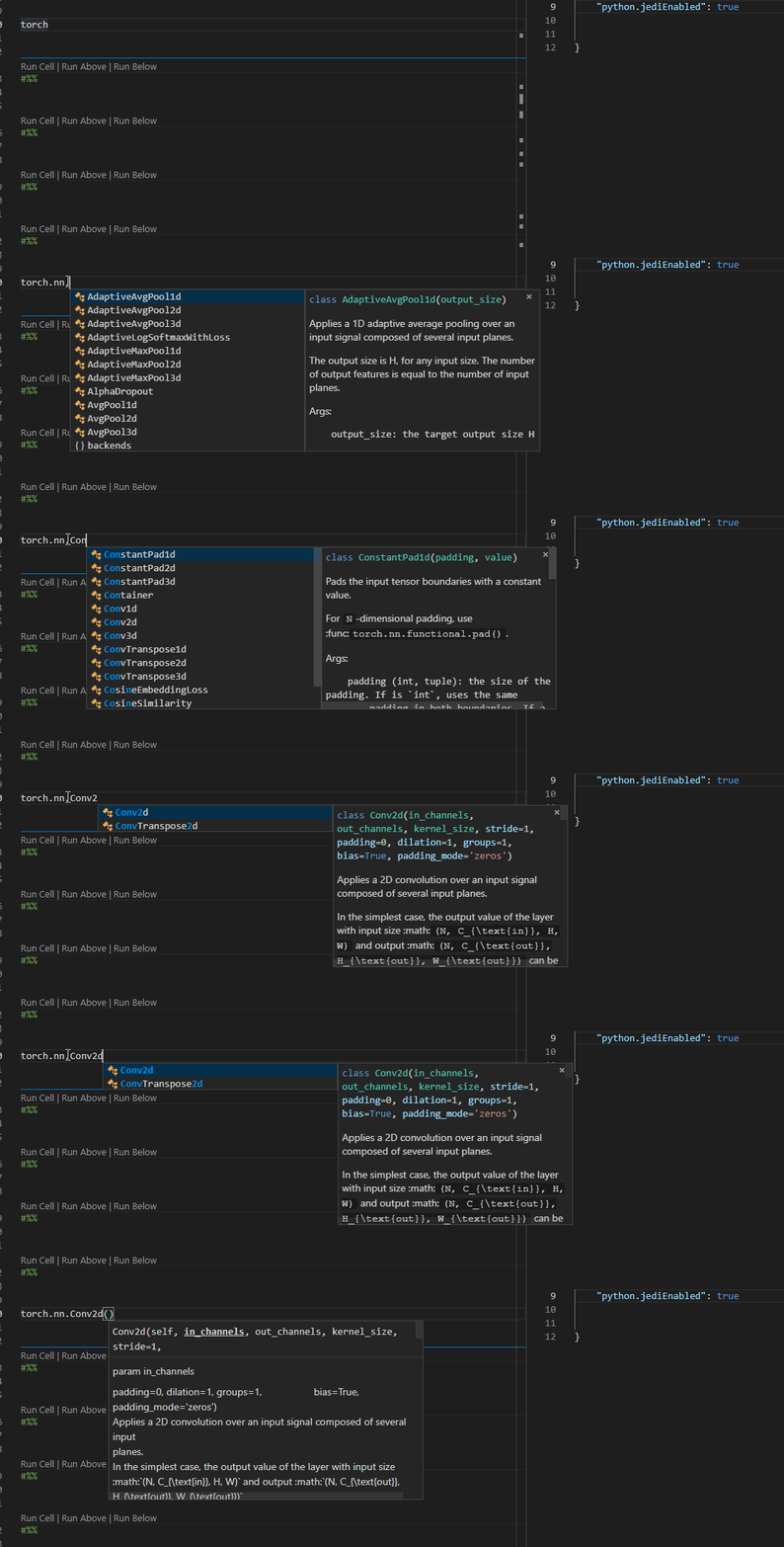
You can instantly see a class argument list while browsing/going through different members /namespaces and this makes development much easier .
Apart from that, the coloring makes it way easier and interesting to read the documentations provided by the intellisense! the output in LangaugeServer is very crude in terms of presentation and is really bad compared to what Jedi offers. So please do something about this as well!
My other feature request is about how intellisense works, dont know if this should be asked here, but here it goes:
It would be much better if pressing a . or enter or space on a half typed entity, selects the currently selected entity from the intellisense dropdown list. To make it more clear, consider the following image :

Here I'm halfway in typing an entity name, if I press a . it will simply write nn.adap while it was expected to complete the half-typed name using the currently selected item from the dropdown list!
Here's another example :

Pressing . on this should choose the currently selected item from the dropdown list, i.e. Conv2d.
 Coderx7
All 8 comments
The former is doable, but may actually be bad for classes with too many parameters in its __init__. What do you think is "crude", besides the lack of the parameter list? The colorig logic is in VSC, and is the same between both. If you mean that the class name itself isn't colored, then that's likely because there's no () or : after the class name (and the TextMate files which do colorization don't pick it up).
The latter is not in our control, that's a VS Code thing. We only provide the list, then the editor filters and decides when to actually use one of the completions.
 jakebailey
on 6 Jun 2019
jakebailey
on 6 Jun 2019
Thank you for your response,
The parameters count shouldn't be a problem really! as there aren't many cases with excessive number of parameters, and even if we face one, currently we
- need to deal with them when we reach the class itself (i.e write
MyClass()) anyway. - as you can see in Jedi, the wrapping can be used and arguments can be neatly placed in multiple new lines(maybe formated based on pep8?!).
By crude I'm specifically referring to the documentation pane (information pane? regarding each class/method in the intellisense) and yes, currently the coloring is missing, based on different datatypes, if you can colorize each argument, it'd much readable as you can see in the Jedi. Also, the documentation rendering is not complete as you can see the raw tex! (we have this issue in Jedi as well).
Coderx7
on 6 Jun 2019
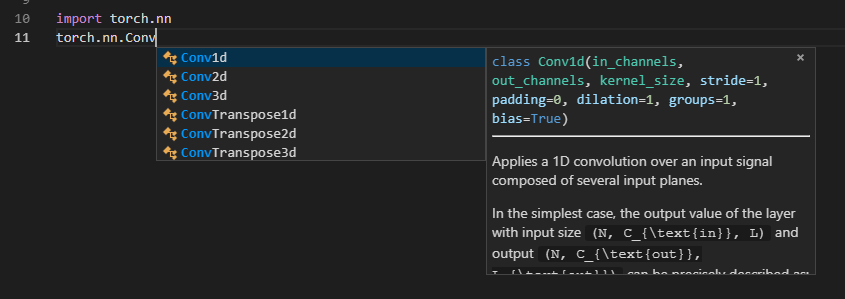
A quick 5 minute hack:
jakebailey
on 6 Jun 2019
I can PR this, but note that it's _technically_ "wrong" in a way, since that syntax is supposed to be used to declare the class, so those arguments are supposed to be types, hence the green color on the positional arguments.
jakebailey
on 7 Jun 2019
That looks much better now!
Yes, that's right but even though, its way better than before.
For type inference we can use type hints if they are available, we can also have a look at the current information provided to us, e.g using docstrings, Args for Conv2d reads:
Args: in_channels (int): Number of channels in the input image out_channels (int): Number of channels produced by the convolution kernel_size (int or tuple): Size of the convolving kernel stride (int or tuple, optional): Stride of the convolution. Default: 1 padding (int or tuple, optional): Zero-padding added to both sides of the input. Default: 0 padding_mode (string, optional). Accepted values zeros and circular Default: zeros dilation (int or tuple, optional): Spacing between kernel elements. Default: 1 groups (int, optional): Number of blocked connections from input channels to output channels. Default: 1 bias (bool, optional): If True, adds a learnable bias to the output. Default: True
Coderx7
on 7 Jun 2019
I'm not sure where type inference comes into play here, I was talking about the syntax highlighting. Torch already ships with stubs, which we use for our analysis. We don't parse docstrings for type information (which we should do at some point, but for torch, that info is already given by stubs that come with torch).
jakebailey
on 7 Jun 2019
I was referring to the syntax highlighting in the tool tips(documentation pane), based on types you should be doing the syntax highlighting, if not how are you doing it?
Doesnt torch provide type hints for tensors only ?
Coderx7
on 7 Jun 2019
Syntax highlighting is performed by VS Code itself, we just mark a block in markdown as python, and it does the rest using a TextMate profile (which is just a collection of ordered regex matches). If we don't provide "real" python, then we run the chance of that profile showing things oddly, like the green names because it's assuming you're setting a base class.
Maybe torch only provides it for tensors, I perhaps wrongly assumed that they had hinted their entire library.
Anyway, I'll make a PR for this when I get a chance to do some comparisons to see if I need to limit the size of the arguments shown.
jakebailey
on 7 Jun 2019
Related issues
 DonJayamanne
·
6Comments
DonJayamanne
·
6Comments
 jmatthewpeters
·
5Comments
jmatthewpeters
·
5Comments
 doron-cohen
·
5Comments
doron-cohen
·
5Comments
 melwas
·
5Comments
melwas
·
5Comments
 Jma353
·
3Comments
Jma353
·
3Comments
Most helpful comment
A quick 5 minute hack: