Python-language-server: Intelisense does not work if method or class has any decorator or tag attached
@sonisn commented on Thu Apr 18 2019
I have installed visual studio (v1.33.1) on my Linux container with Python extension.
The problem is if method name or class has decorator/tag used, intelisense does not work and code completion is not that helpful.
from nose.plugins.attrib import attr
from abc import xyz

@attr(speed='low')
class TestSomething(nosetest):
    def setup(self):
          super(self, TestSomething).setup()

    @attr(status='UnderDevelpment',reason='Dev team is working on it')
    def testSomething():
vs
from nose.plugins.attrib import attr

class TestSomething(nosetest):
     def setup(self):
          super(self, TestSomething).setup()

     def testSomething():
In above two version, if I use second version, intelisense and code completion works without any issue, as I type 'self.object1.' it gives all options (method/variable) for object1 but Version#1 above has attr tag attached to class and def, in this case intelisens gives only options from current files not from actual class.
@karrtikr commented on Fri Apr 19 2019
Please inform if you're using language server or jedi, i.e check the value of python.jediEnabled in settings.
@gramster commented on Fri Apr 19 2019
Also, where are you typing self.object1.? It isn't in the example code you supplied. Doesn't seem like it can be in testSomething as that isn't an instance method and has no self.
@sonisn commented on Fri Apr 19 2019
Please inform if you're using language server or jedi, i.e check the value of
python.jediEnabledin settings.
I am not sure Python extension has any language server, let me know if I am missing something.
https://marketplace.visualstudio.com/itemdetails?itemName=ms-python.python
I think you aer talking about intellicode-visual-studio-code, I tried Intelicode extension but server was blacked my company's firewall setting so I cant use Inteli code.
https://docs.microsoft.com/en-us/visualstudio/intellicode/intellicode-visual-studio-code
@sonisn commented on Fri Apr 19 2019
Also, where are you typing
self.object1.? It isn't in the example code you supplied. Doesn't seem like it can be intestSomethingas that isn't an instance method and has noself.
This isn't real code, I can't add my company code here. You are right, I missed 'self' in function argument.
Object1 (inherited method) is function of nosetest base class. So as my TestSomething class derived from it, and it has all method available.
@sonisn commented on Fri Apr 19 2019
The proble here is tag (@attr) whenever we define tag over method or class, code completion/intelisense doent work.
@karrtikr commented on Fri Apr 19 2019
Please inform if you're using language server or jedi, i.e check the value of
python.jediEnabledin settings.I am not sure Python extension has any language server, let me know if I am missing something.
https://marketplace.visualstudio.com/itemdetails?itemName=ms-python.pythonI think you aer talking about intellicode-visual-studio-code, I tried Intelicode extension but server was blacked my company's firewall setting so I cant use Inteli code.
https://docs.microsoft.com/en-us/visualstudio/intellicode/intellicode-visual-studio-code
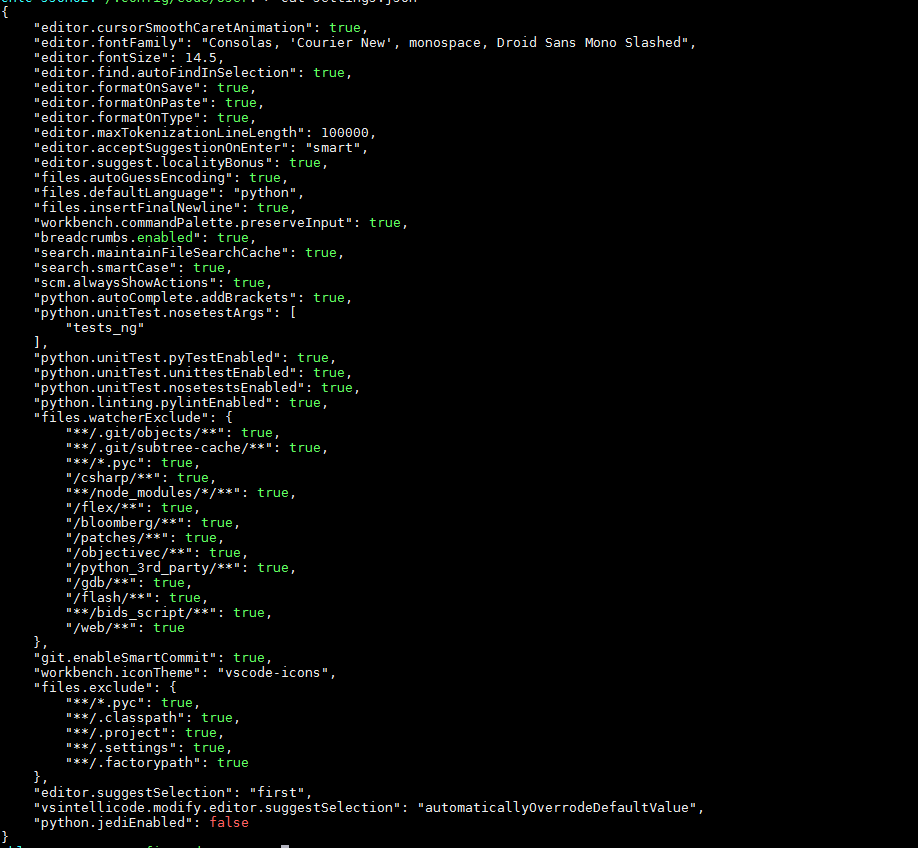
Please paste your .vscode/settings.json file and report the value of setting python.jediEnabled
@sonisn commented on Sat Apr 20 2019
I dont have any setting file under .vscode/setting.json, I have one under ~/,config/Code/User
Please find attached snapshot

@sonisn commented on Sat Apr 20 2019
Please inform if you're using language server or jedi, i.e check the value of
python.jediEnabledin settings.I am not sure Python extension has any language server, let me know if I am missing something.
https://marketplace.visualstudio.com/itemdetails?itemName=ms-python.python
I think you aer talking about intellicode-visual-studio-code, I tried Intelicode extension but server was blacked my company's firewall setting so I cant use Inteli code.
https://docs.microsoft.com/en-us/visualstudio/intellicode/intellicode-visual-studio-codePlease paste your
.vscode/settings.jsonfile and report the value of settingpython.jediEnabled
I dont have any setting file under .vscode/setting.json, I have one under ~/,config/Code/User
Please find attached snapshot
 DonJayamanne
All 6 comments
@sonisn, can you provide a bit more info what is missing. I don't have nosetest definition, but if I derive from my own class, base class methods also appear.

 MikhailArkhipov
on 21 Jun 2019
MikhailArkhipov
on 21 Jun 2019
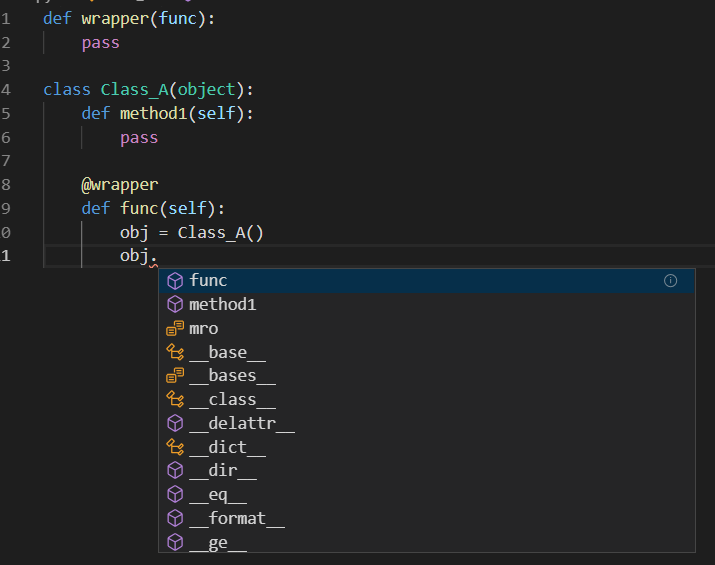
I can confirm this issue. This code:
def wrapper(func):
    pass

class Class_A(object):
    def method1(self):
        pass

@wrapper
def func(self):
    obj = Class_A()
Steps to reproduce:
- Paste this code in VS Code, save as .py file, wait for python extension loading.
- Add new line with indent to the bottom, type "obj" and hit "." and wait.
- Intellisense does not work
- Hit ctrl+space
- Wrong completion list (symbols in file)
- Place cursor in the end of "@wrapper" line and hit ctrl+space, return to the bottom line
- Hit ctrl+space
- Now Intellisense works like expected
Environment data
- VS Code version: 1.36.1
- Extension version (available under the Extensions sidebar): 2019.6.24221
- OS and version: Windows 10
- Python version (& distribution if applicable, e.g. Anaconda): 3.7.4
- Type of virtual environment used (N/A | venv | virtualenv | conda | ...): N/A
- Relevant/affected Python packages and their versions: XXX
- Jedi or Language Server? (i.e. what is
"python.jediEnabled"set to; more info #3977): Jedi
Expected behaviour
Intellisense works
Actual behaviour
Intellisense does not work
BTW In my case I use Jedi because with "python.jediEnabled": true option VS Code falls back to Jedi engine. May be it happens because my company's firewall setting blocks Microsoft Python language server installation.
Starting Microsoft Python language server.
Starting Jedi Python language engine.
 rgeraskin
on 5 Aug 2019
rgeraskin
on 5 Aug 2019
Been several months...

It is unclear from the first example what is self.object1. since there is no object1 defined in the class.
Feel free to reopen if this is still a problem. Thanks.
MikhailArkhipov
on 18 Sep 2019
I know this is a old issue and I might not know a lot about how is going, but I ended up with this problem and found this SO question.
Is this question related? Could you please test if it works with the example from this question?
 EduVencovsky
on 25 Sep 2020
EduVencovsky
on 25 Sep 2020
I have tested with the way mentioned but its not working.
Still having the same issue.
On Fri, Sep 25, 2020 at 11:59 AM EduVencovsky notifications@github.com
wrote:
I know this is a old issue and I might not know a lot about how is going,
but I ended up with this problem and found this SO question
https://stackoverflow.com/questions/54537879/vscode-doesnt-show-code-suggestions-for-discord-py
.Is this question related? Could you please test if it works with the
example from this question?—
You are receiving this because you were mentioned.
Reply to this email directly, view it on GitHub
https://github.com/microsoft/python-language-server/issues/999#issuecomment-699041496,
or unsubscribe
https://github.com/notifications/unsubscribe-auth/AEX6NDGBN24GW6ISLYOJNCLSHTEAPANCNFSM4HHRIA2A
.
--
Thanks & Regards,
Snehal Soni
 sonisn
on 30 Sep 2020
sonisn
on 30 Sep 2020
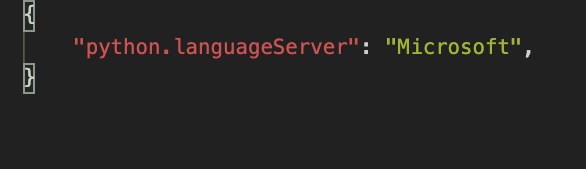
Noticing this behavior in the Microsoft Python Language Server as well (Confirmed that Jedi is not being used in this project. For context, I do not use Jedi in my case, as it has compatibility issues with another Python module I use for these types of projects)
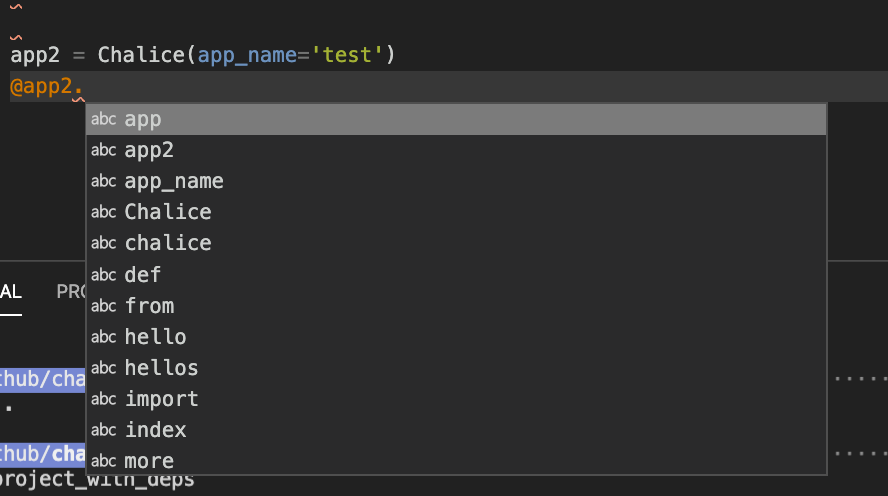
For example, using Chalice, which has a decorator API similar to flask, if I try to autocomplete something like...
app = Chalice(app_name='project_with_deps')


@app.route('/')
def index():
    return {'hello': 'world'}
If I build another function with @app and I want to see what is available, I'll try to hit ctrl+space in MacOS, and it only provides what has been defined as vocabulary in the file itself (Screenshot)
If I drop the decorator moniker from app, I can see the available attributes and methods with no issue:
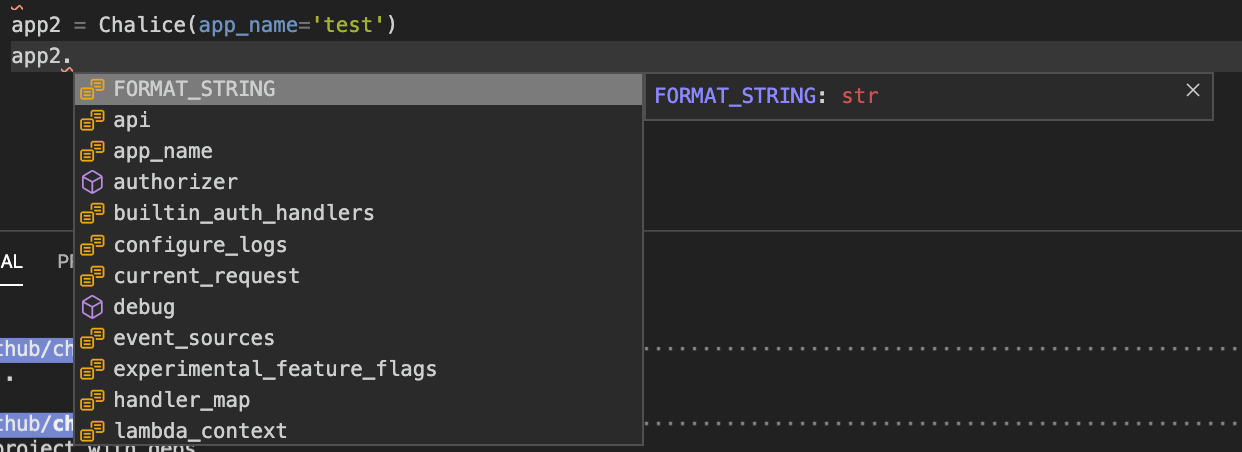
 webdog
on 15 Oct 2020
webdog
on 15 Oct 2020
Related issues
 jakebailey
·
4Comments
jakebailey
·
4Comments
 rpedrodasilva10
·
4Comments
DonJayamanne
·
3Comments
rpedrodasilva10
·
4Comments
DonJayamanne
·
3Comments
 rsalunga29
·
5Comments
rsalunga29
·
5Comments
 mostafaeweda
·
6Comments
mostafaeweda
·
6Comments
Most helpful comment
I can confirm this issue. This code:
Steps to reproduce:
Environment data
"python.jediEnabled"set to; more info #3977): JediExpected behaviour
Intellisense works
Actual behaviour
Intellisense does not work
BTW In my case I use Jedi because with
"python.jediEnabled": trueoption VS Code falls back to Jedi engine. May be it happens because my company's firewall setting blocks Microsoft Python language server installation.