Pysimplegui: [Question/Enhancement] Multiline justification?
Type of Issues (Enhancement, Question)
Question (and possible enhancement?)
Operating System
Ubuntu 18.04.4 LTS
Python version
Python 3.6.9
PySimpleGUI Port and Version
4.24.0 Released 3-Jul-2020
Your Experience Levels In Months or Years
Python programming experience: 4 y.
Programming experience overall: 7 y.
Have used another Python GUI Framework (tkinter, Qt, etc) previously (yes/no is fine)? no.
You have completed these steps:
- [x] Read instructions on how to file an Issue
- [x] Searched through main docs http://www.PySimpleGUI.org for your problem
- [x] Searched through the readme for your specific port if not PySimpleGUI (Qt, WX, Remi)
- [x] Looked for Demo Programs that are similar to your goal http://www.PySimpleGUI.com
- [x] Note that there are also Demo Programs under each port on GitHub
- [x] Run your program outside of your debugger (from a command line)
- [x] Searched through Issues (open and closed) to see if already reported
- [x] Try again by upgrading your PySimpleGUI.py file to use the current one on GitHub. Your problem may have already been fixed but is not yet on PyPI.
Description of Problem / Question / Details
Is it possible to change Multiline justification? Or how can I implement a similar element to represent lot of text with fixed size and scrollbar? First idea that came to my mind was a Text element, but given the extensiveness of the text I wanted to represent, I discarded it.
Thanks.
 scmanjarrez
All 6 comments
I managed to get a justification parameter working for the element itself. But after a couple of hours of trying to enable application of a justification on a single update basis, I'm not getting anywhere. Something tells me you're not after an element that has everything justified in a particular direction. Correct me if I'm wrong there and I'll check in what I have.
 PySimpleGUI
on 28 Jul 2020
PySimpleGUI
on 28 Jul 2020
Give 4.26.0.14 a try that's posted on GitHub.
I still need to update the docstrings, but the parameters you're looking for are all the same...
justification
You can add it on the Multiline creation, the Multiline.update call and cprint calls.
There's a slight "issue" with coloring in that the entire line will be colored if justification was chosen. I'm lookinf ro ways around it, but for now, it's the best I can do on shortish-order.
Here's a test harness to get you going on itL
import PySimpleGUI as sg

layout = [  [sg.Text('My Window')],
            [sg.Multiline('default text', size=(60,30), justification='r', write_only=True, autoscroll=True,  reroute_cprint=True, reroute_stdout=False, key='-IN-')],
            [sg.Button('Go'), sg.Button('Exit')]  ]

window = sg.Window('Window Title', layout, finalize=True)

while True:             # Event Loop
    event, values = window.read()
    print(event, values)
    if event == sg.WIN_CLOSED or event == 'Exit':
        break
    window['-IN-'].update('New centered value\n', append=True, justification='c')
    sg.cprint(event, values, c='white on green', justification='r')
    sg.cprint(event, values, c='white on red', justification='l')
    sg.cprint(event, values, c='white on blue', justification='c')
window.close()
Let me know if this a bit of what were expecting.
PySimpleGUI
on 28 Jul 2020
Thank you very much, that's just what I needed.
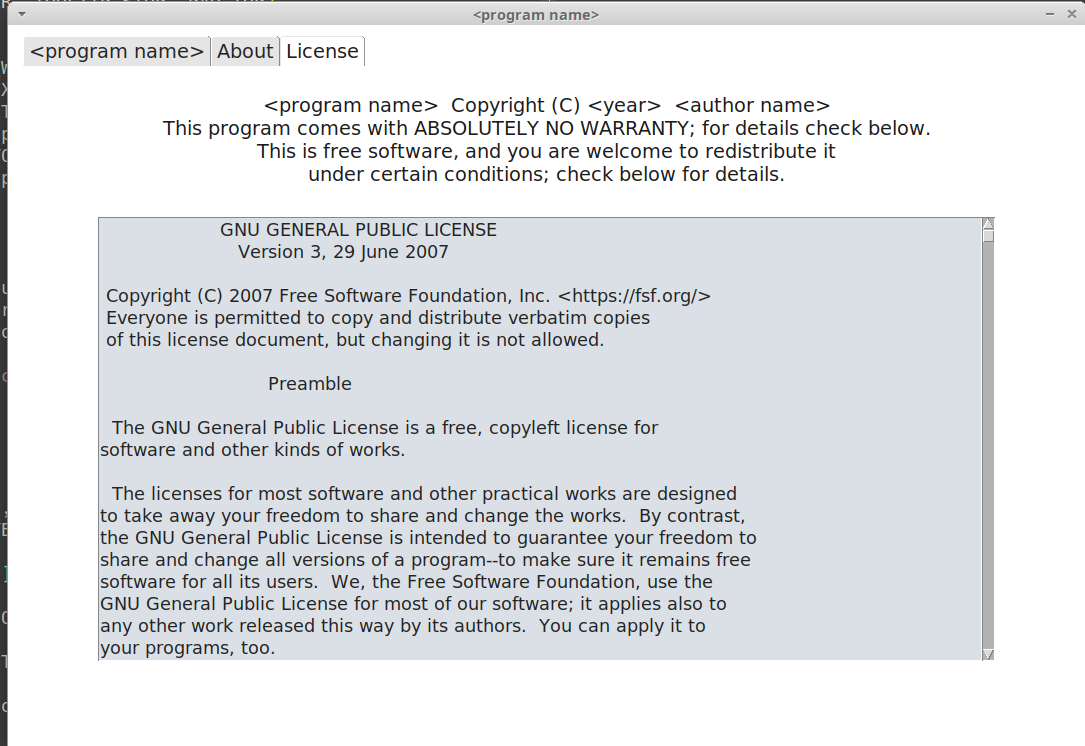
I'm using center justification with all my elements, sometimes if I need to apply a different justification, I create a frame. I'm not updating justification on the fly, I justify at the creation time and that's all.
Here is a extract of the GUI.
scmanjarrez
on 28 Jul 2020
Ok, let's leave this open... there's still a lot of work to do with it and it needs cross-porting
The other approach since they're all justified, is to simply use a Text element inside of a Column element. That would give you a lot more control.
PySimpleGUI
on 28 Jul 2020
Oh, I'll definitely give a try to the column element. Thank you.
scmanjarrez
on 28 Jul 2020
You'll need to be sure and call "expand" on the column element most likely. I think there's an example
Here's another test app that demonstrates that it's tricky to get colored text that's only got the text itself colored:
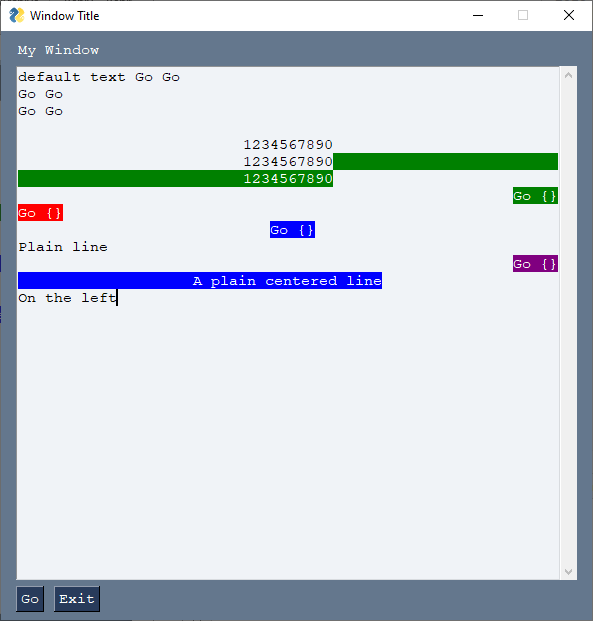
You have to do some tricks to get the colors to start and stop at the right place.
import PySimpleGUI as sg

layout = [  [sg.Text('My Window')],
            [sg.Multiline('default text', size=(60,30), justification='l', write_only=True, autoscroll=True,  reroute_cprint=True, reroute_stdout=False, key='-IN-')],
            [sg.Button('Go'), sg.Button('Exit')]  ]

window = sg.Window('Window Title', layout, finalize=True, font='Courier 11')

while True:             # Event Loop
    event, values = window.read()
    print(event, values)
    if event == sg.WIN_CLOSED or event == 'Exit':
        break
    sg.cprint(event, event)
    sg.cprint(event, event)
    sg.cprint(event, event)
    window['-IN-'].update('\n1234567890', append=True, justification='c')
    window['-IN-'].update('\n1234567890', append=True, justification='c')
    sg.cprint('\n1234567890', c='white on green', justification='c')
    sg.cprint(' ', end='', justification='r')
    sg.cprint(event, values, c='white on green', justification='r')
    sg.cprint(event, values, c='white on red', justification='l')
    sg.cprint(' ', end='', justification='c')
    sg.cprint(event, values, c='white on blue', justification='c')
    sg.cprint('Plain line')
    sg.cprint(' ', justification='r', end='')
    sg.cprint(event, values, c='white on purple', justification='r')
    sg.cprint('A plain centered line', c='white on blue', justification='c')
    window['-IN-'].update('On the left', append=True, justification='l')

window.close()
Related issues
 OPMUSER
·
5Comments
OPMUSER
·
5Comments
 flowerbug
·
4Comments
flowerbug
·
4Comments
 OndoyManing
·
4Comments
OndoyManing
·
4Comments
 yogesh-aggarwal
·
3Comments
scmanjarrez
·
5Comments
yogesh-aggarwal
·
3Comments
scmanjarrez
·
5Comments