Pysimplegui: Suppression of FolderBrowse Warning (Mac)
Type of Issues (Enhancement, Error, Bug, Question)
Warning
Operating System
Mac OS Catalina 10.15.4
Python version
Python 3.7.1
PySimpleGUI Port and Version
module 'PySimpleGUI' from ...
4.19.0 Released 5-May-2020
Your Experience Levels In Months or Years
__5__ Python programming experience
__5__ Programming experience overall
__Yes__ Have used another Python GUI Framework (tkinter, Qt, etc) previously (yes/no is fine)?
You have completed these steps:
- [X] Read instructions on how to file an Issue
- [X] Searched through main docs http://www.PySimpleGUI.org for your problem
- [X] Searched through the readme for your specific port if not PySimpleGUI (Qt, WX, Remi)
- [X] Looked for Demo Programs that are similar to your goal http://www.PySimpleGUI.com
- [X] Note that there are also Demo Programs under each port on GitHub
- [X] Run your program outside of your debugger (from a command line)
- [X] Searched through Issues (open and closed) to see if already reported
Description of Problem / Question / Details
I get the following warning when using a Folder Browse Element on my Mac. It does not occur however when using a File Browse Element. Do you know if there is a way to suppress this? NSSavePanel seems to be directly related to Macs so I think this is only a Mac issue.
WARNING: <NSOpenPanel: 0x7f7fb91d5b50> running implicitly; please run panels using NSSavePanel rather than NSApplication.
Paste your code here
import PySimpleGUI as sg
print(sg)
print(sg.version)

layout = [[sg.FolderBrowse('Folder Browse', key="BROWSE", target='INPUT'),
           sg.Input('Hi', key='INPUT')],
          [sg.FileBrowse('File Browse', key="BROWSE2", target='INPUT2'),
           sg.Input('Hi2', key='INPUT2')]]

window = sg.Window('Window that stays open', layout).finalize()
while True:
    event, values = window.read()
    if event in (None, 'Exit'):
        break
window.close()
 trcote
All 9 comments
Never heard of it before. It's a warning so not something I can catch and do anything with.
You're the first person to report it and this button has been around since July 2018 so it leads to be think something on the Mac has recently changed. Or something on your specific Mac perhaps.
Let's see if other Mac users come up with similar results or have seen this before.
 PySimpleGUI
on 15 May 2020
PySimpleGUI
on 15 May 2020
No problem. I've tried using the warningsmodule to suppress it and it doesn't seem to recognize it as a typical warning so its gonna have to just stay for now.
trcote
on 15 May 2020
The tkinter call that I'm making to browse for folders is filedialog.askdirectory. Perhaps searching for your error along with this tkinter information will help lead to the root cause of the warning.
PySimpleGUI
on 16 May 2020
You can also try running this little program and see if it generates the same warning.
import tkinter as tk
from tkinter import filedialog

folder_name = tk.filedialog.askdirectory()
print(folder_name)
Found it! The difference you actually already have solved in the FileBrowse code. For Mac, setting the parent to the root will give the warning.
Tkinter with error:
from tkinter import filedialog
from tkinter import *

root = Tk()
root.title('Test')

def open_f():
    root.filename = filedialog.askdirectory(parent=root)
    my_label = Label(root, text=root.filename).pack()

my_btn = Button(root, text='Open File', command=open_f).pack()
root.mainloop()
Warning after clicking FileDialog:
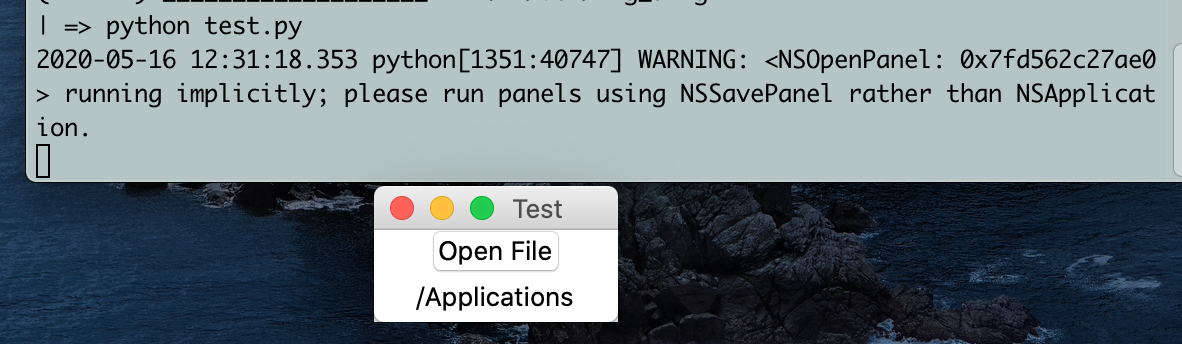
Changing askdirectory to omit parent:
root.filename = filedialog.askdirectory()
No warning after clicking FileDialog:
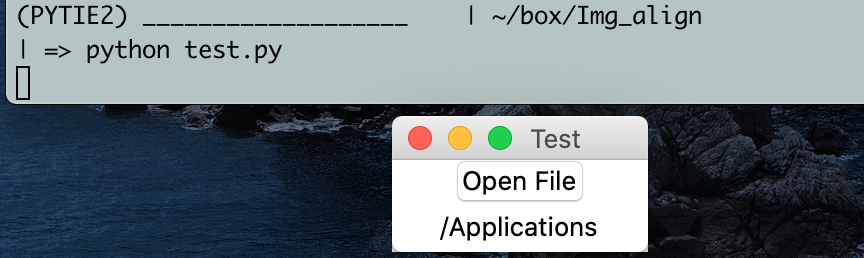
Selection still works but now with no warning.
trcote
on 16 May 2020
Oh, I see. Didn't realize the same hack needed to be done for that one too. Will get it fixed up and checked in shortly.
PySimpleGUI
on 16 May 2020
Added fix to the code and released to GitHub. You can use the "upgrade" button in sg.main() to overwrite your pip installed version with the GitHub version. I HOPE that it works on the Mac. You may be the first person that tries it however.
If you do this, run sg.main() again afterward to make sure the correct version number is shown.
PySimpleGUI
on 17 May 2020
Downloaded and tested: no warning. Good to go, thanks!
trcote
on 17 May 2020
Sorry it took a few iterations, but we eventually got there.
PySimpleGUI
on 18 May 2020
Related issues
 scmanjarrez
·
5Comments
scmanjarrez
·
5Comments
 lucasea777
·
3Comments
lucasea777
·
3Comments
 DKatarakis
·
6Comments
DKatarakis
·
6Comments
 ncotrb
·
4Comments
ncotrb
·
4Comments
 xuguojun168
·
3Comments
xuguojun168
·
3Comments