Pysimplegui: [Question] Column() padding
Type of Issues (Question)
Operating System windows10
Python version 3.6
PySimpleGUI Port and Version: tk
Code or partial code causing the problem
tried to modify the Demo example Demo_Columns.py
with pad=(0, 0) for Column() and both Text() and Input() to get a rid of spaces at the column sides but failed, please see screenshot below and modified code
import PySimpleGUI as sg
sg.theme('BlueMono')
css = {'text_color': 'white', 'background_color': 'green'}
# Column layout
col = [[sg.Text('col Row 1', **css)],
       [sg.Text('col Row 2', **css, pad=(0, 0)), sg.Input('col input 1', pad=(0, 0), size=(55,1))],
       [sg.Text('col Row 3', **css), sg.Input('col input 2')]]
# Window layout
layout = [[sg.Listbox(values=('Listbox Item 1', 'Listbox Item 2', 'Listbox Item 3'),
                      select_mode=sg.LISTBOX_SELECT_MODE_MULTIPLE, size=(20, 3)),
           sg.Col(col, background_color='blue', pad=(0, 0))],
          [sg.Input('Last input')],
          [sg.OK()]]
# Display the window and get values
window = sg.Window('Compact 1-line form with column', layout)
event, values = window.read()
# sg.popup(event, values, line_width=200)
window.close()

 pyIDM
pyIDM
All 21 comments
There's padding still on the listbox
 MikeTheWatchGuy
on 25 Dec 2019
MikeTheWatchGuy
on 25 Dec 2019
And on the input element inside the column. Every element has padding. You can also set padding at the window level if you want all elements to have padding of zero, zero
MikeTheWatchGuy
on 25 Dec 2019
Oh, I think I misunderstood. The areas you circled are inside the column. I will look at it shortly
MikeTheWatchGuy
on 25 Dec 2019
I found the problem. It appears to be a bug. For some reason I was adding in the window's margin setting on every "Row Frame". This means every new row inside a container will be offset by the amount set by the Window's margins.
Get a new PySimpleGUI.py file from GitHub and see if that fixes what you're after. It should.
This leaves the question of why it was there to begin with and if there will be any significant fallout.
I may want to add a margin setting to all of the containers to deal with this. Still pondering but for now I'm OK with removing this extra padding and putting the responsibility onto the user to pad rows themselves.
 PySimpleGUI
on 25 Dec 2019
PySimpleGUI
on 25 Dec 2019
i tested the new pySimpleGUI.py, it solved the problem
the advantage is more space and control given to the user,
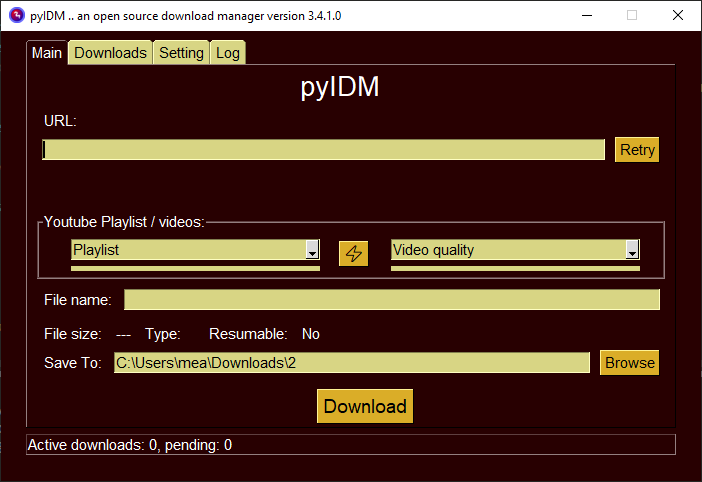
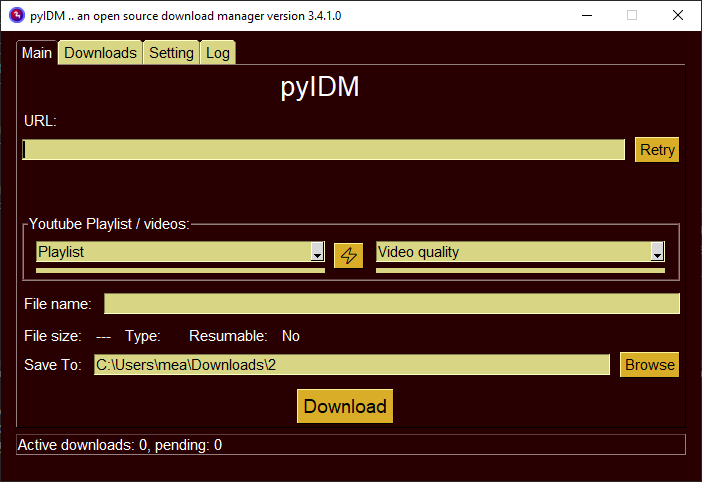
here is 2 snapshots with and without padding
before with padding, the playlist combo can't expand because of column padding
without padding, the playlist combo is filling the space correctly
still have a question, how to add padding to the whole row? instead of per element padding
pyIDM
on 25 Dec 2019
One thing need to mention, this modifications will affect a lot of people's previous designs,
if possible to keep the old default padding and just disable it for the element with padding=(0, 0)
pyIDM
on 25 Dec 2019
or maybe make a global option for disable auto padding for the rows
pyIDM
on 25 Dec 2019
It's not something that's been implemented in any of the ports and exposes an implementation detail that I don't want the user to mess with. I was forced to expose the existence of the row_frame when hiding elements completely.
I'm fully aware that this will effect everyone's designs. I'm extremely cautious about backwards compatibility. This is why it's only on GitHub at the moment. There is a lot of regression testing I need to do.
As I explained above I am contemplating adding Margins to container just as windows have margins.
If you want to move over an entire container's worth of rows, add padding to every row inside again, then place the entire contents of the container into a Column Element and add padding to that element.
I'm really not interested in adding anything that exposes the base row. All ports would need to expose this. It complicates and exposes something that's not needed. Users have control to move rows over themselves by padding the first item.
The reason I removed the padding is that it made it impossible to create a particular kind of layout. Having "impossible" situations, where desire cannot be fulfilled by any means, then it's a change I'm likely to consider. But for things that the user is able to do but are maybe not the most convenient to do, they are a lower priority.
Simple... must keep things simple.
PySimpleGUI
on 25 Dec 2019
Need to examine the other ports to try to get some level of consistency between the ports. PySimpleGUIQt for example pads rows differently (and now incorrectly). I'm guessing in Wx and Web they're done differently was well.
The idea here is that rows are transparent. That there is no "row container". "Row" is not an element.
PySimpleGUI
on 25 Dec 2019
Thats right things must stay simple, for me i like it this way without padding,
and as you said to add padding to the row just add padding to the first and last element of the row, nice and simple
simple is better 👍
pyIDM
on 25 Dec 2019
Don't get me wrong here..... I DO appreciate the discussion, you tossing ideas out. This is how PySimpleGUI improved, via conversations and ideas.
This was the right change to make. As I said, rows are meant to be transparent things. They shouldn't even exist to the user except in terms of the layout having rows. They're invisible things that group together stuff.
It should be noted however, that they do exist. If one element on a row has Y padding that's greater than everyone else on that row, then the entire row moves with the padding. It's an unfortunate side effect.
You would need to use Columns to get unusual effects like text being shifted around inside of a row.
Here the first element inside the Column, on row 2 has a pad of (0,25).

You can adjust items Y location within a row by specifying uneven padding.
Here I've changed the pad to (0, (0, 25)) (0 on the top, 25 on the bottom)
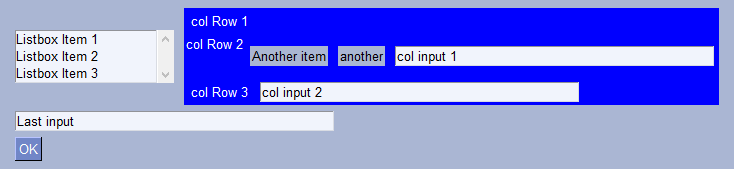
I'm not sure any other way of handling layouts like this when the fundamental building block is rows... but I don't want to add config stuff on a row when it won't buy you anything in the end that you can't already get in your code.
PySimpleGUI
on 25 Dec 2019
Well, seems good, please let me know if you make this change in official pypi release. :)
pyIDM
on 25 Dec 2019
What I think is a good workaround / compromise will be to add Margins to all containers. I try to expose as many of the parameters that windows have to the other containers. I did not do this for Margins however. This is what would allow everyone to get back this "lost" X padding. They simply add a margin parameter to their container.
Unfortunately adding margins to containers is a cross-port nightmare. When one gets it, they all need it.
I think this will fix things.
If I decide to back out this change, then what you can do to get your zero padding inside of a column is to get the window's margins to (0,0). It was the window's margin value that was being added to the X padding for the rows.
Hmmmmm..... wait.... this change may have killed the entire margin capability for windows. Clearly a lot more work needed on this before it can go anywhere beyond GitHub.
PySimpleGUI
on 25 Dec 2019
Hmmmmm..... wait.... this change may have killed the entire margin capability for windows. Clearly a lot more work needed on this before it can go anywhere beyond GitHub.
it looks complicated than i thought, will wait and see how it goes
pyIDM
on 25 Dec 2019
Margins still work... whew!
Adding individual margin settings to the container elements is the right design.
I may be able to design it in a way that the default will emulate the results that happen today. This would not change anything for the user base and adding the capability you need to have no padding inside of a Column. Yea, Column.margin = (None, None) means the column will pick up the setting from the top-level window. You would set it to (0,0) to get the effect you're after, just like on a Window if you want no margins you have to set margins=(0,0).
The logic / design I try to follow is that a window is like another container element and vice versa. Lately I've been dropping entire layouts into a single Column in order to center everything in the window.
PySimpleGUI
on 25 Dec 2019
Testing with the PyPI release I see that you can get rid of the padding within the column by setting the window's margins = (0,0). Inside every container there is a margin added that is the same size as the window's margin... but only in the X direction.
PySimpleGUI
on 25 Dec 2019
Very cooool!!, it is much better this way :)
pyIDM
on 25 Dec 2019
I forgot WHY I had the code there and the reason was that I wanted margins to be added to the containers as well as windows, but had not yet added parameters to set margins on containers, so I defaulted it to the margin of the window.
Rather than do a big change to the APIs, I'm going to back out the change and say that margin=(0,0) is the way to get what you're after :-) Otherwise it'll be a large feature addition across all the ports and I'm not sure I'm up for it with all the other stuff to do.
PySimpleGUI
on 25 Dec 2019
Rather than do a big change to the APIs, I'm going to back out the change and say that margin=(0,0) is the way to get what you're after :-) Otherwise it'll be a large feature addition across all the ports and I'm not sure I'm up for it with all the other stuff to do.
I think margin=(0,0) option is enough and no need to add anything else
just tested with pypi release and it works as expected , thanks a lot
pyIDM
on 25 Dec 2019
I tweaked it a little to margins=(2, 0) and i am very happy with the outcome, nice work 👍
pyIDM
on 25 Dec 2019
I'm going to close this as it's not really a bug. It's working as designed.
I'll replace with an enhancement that containers get a margin parameter so they can each be individually set.
PySimpleGUI
on 26 Dec 2019
Related issues
 thelou1s
·
4Comments
thelou1s
·
4Comments
 OPMUSER
·
5Comments
OPMUSER
·
5Comments
 OndoyManing
·
4Comments
OndoyManing
·
4Comments
 ECOM-Klaus
·
4Comments
ECOM-Klaus
·
4Comments
 ihouses
·
6Comments
ihouses
·
6Comments