Pysimplegui: [ Demo Program ] Running a Matplotlib window along-side a PySimpleGUI Window (Code included)
Type of Issues
Bug
Operating System
Windows 10 x64
Python version
Python 3.7.4 x64
PySimpleGUI Port and Version
PySimpleGUI tkinter 4.4.1
PyCharm 2019.2.4
I was wanted use pysimplegui for neural nets GUI, but found problem.
Below simplest demo program.
How to reproduce problem:
1 Run program
2 Click button "Plot", program prints "before", show chart window, after close this window nothing. Main loop stops.
ps1 After some investigation, i found that program is working only under debugger step by step (F8)
ps2 Also after close main window process not stops.
import PySimpleGUI as sg
import matplotlib.pyplot as plt
import datetime
import sys

def plot_draw(history):
    plt.plot(history)
    plt.show()
    return True

main_window = sg.Window('Title', [[sg.Button('Plot')]])

while True:
    event, values = main_window.Read(timeout=1000)
    if event in (None, 'Cancel'):
        break
    elif event == '__TIMEOUT__':
        now = datetime.datetime.now()
        print(now)
    elif event == 'Plot':
        history = [0.1, 0.2, 0.5, 0.7]
        print('before plot')
        try:
            ok = plot_draw(history)
        except:
            print(sys.exc_info()[0])
        print('after plot '+str(ok))
 alr888rav
All 22 comments
Please take a look at this issue, pinned to the top of the Issues section of this GitHub, on how to file an issue. It teaches you how to format code so that it can easily be copied, pasted, run. It also provides you with a checklist of places you can check for a solution to your problem.
Please fill out the Issue form as it asks for info like the version number of PySimpleGUI that you're running.
I'm unclear as to the exact problem you're describing. It sounds like this function: plot_draw(history) never returns. You don't mention printing of "after plot" in the error case.
 PySimpleGUI
on 8 Nov 2019
PySimpleGUI
on 8 Nov 2019
I updated the first post. And yes, look like this function: plot_draw(history) never returns.
After some investigation, i found that program is working only under debugger step by step (F8)
alr888rav
on 8 Nov 2019
I fixed your code formatting problem. Please look at how that was done so that you can post code in the future that everyone will enjoy :-) The same technique works on many forums, Reddit, etc.
Are you trying to run both a matplotlib window and a PySimpleGUI window separately? If so, then I don't believe theplt.show() function returns until you've closed the matplotlib window. I forget the correct sequence of Matplotlib calls that will return execution to the program after the window is closed.
I did not believe this would work, but I ran the Matplotlib window in a thread.... this is VERY dangerous with tkinter being involved.
import PySimpleGUI as sg
import matplotlib.pyplot as plt
import datetime
from threading import Thread
import sys

def plot_draw(history):
    plt.plot(history)
    plt.show()
    return True

main_window = sg.Window('Title', [[sg.Button('Plot'), sg.Cancel()]])

while True:
    event, values = main_window.Read(timeout=1000)
    if event in (None, 'Cancel'):
        break
    elif event == '__TIMEOUT__':
        now = datetime.datetime.now()
        print(now)
    elif event == 'Plot':
        history = [0.1, 0.2, 0.5, 0.7]
        print('before plot')
        t = Thread(target=plot_draw, args=[history,], daemon=True)
        t.start()
        print('after plot')
main_window.close()
del main_window
For example, when exiting the program, you'll get the dreaded tkinter error message:
RuntimeError: main thread is not in main loop
Tcl_AsyncDelete: async handler deleted by the wrong thread
PySimpleGUI
on 8 Nov 2019
Have you looked at the "normal" way that Matplotlib is used with PySimpleGUI? If not, check out the demo programs as there are a number of examples. Normally, the Matplotlib figure is shown as part of the GUI itself. This means you don't have those controls that the Matplotlib window has, but it also gets around this very issue of running 2 GUIs simultaneously.
PySimpleGUI
on 8 Nov 2019
I think I've figured it out. The important addition was the block parm plt.show(block=False)
This allowed the function to return. Because it appears that Matplotlib is running tkinter too, the PySimpleGUI code is enabling the window to continue to be interactive while ALSO allowing the PySimpleGUI window itself to keep running.
It's a really cool discovery that I'll turn into yet another Matplotlib Demo Program.
Here's some code to try:
import PySimpleGUI as sg
import matplotlib.pyplot as plt

def plot_draw(history):
    plt.plot(history)
    plt.show(block=False)
    print('back from plot show')
    return True

main_window = sg.Window('Title', [[sg.Button('Plot'), sg.Cancel()]])

while True:
    event, values = main_window.Read()
    if event in (None, 'Cancel'):
        break
    elif event == 'Plot':
        history = [0.1, 0.2, 0.5, 0.7]
        print('before plot')
        plot_draw(history)
        print('after plot')
main_window.close()
del main_window
Thank you very much, the problem is resolved.
The better way is embedding. The topic can be closed.
alr888rav
on 8 Nov 2019
Oh really?! Embedding is going to work out for you? That's nice to hear.
I'm glad it was posed as another window problem as now people have a choice. It's really awesome that they are actually working together at the same time because Matplotlib and PySimpleGUI are running the same event loop internally. I wouldn't have thought it possible.
Re-opening until can make a quick demo program from this.
PySimpleGUI
on 8 Nov 2019
I have experience embedding the matplotlib figure and the buttons (home, pan, zoom, save) in PySimpleGUI-tk windows. If you need help with this let me know. I wrote some code that you use like this:
wd.draw_figure_w_toolbar(window['canvas'].TKCanvas, fig, window['canvas_toolbar'].TKCanvas)
and you get this:

the first argument is the canvas in which the matplotlib figure variable is embedded, (the one you get with fig = plt.figure()). The second is the figure and the last argument is the canvas element in which to place the buttons.
The draw_figure_w_toolbar function can be used in your code instead of plt.show().
The buttons work as expected, although you need to be careful with the size of the canvas because it can cause unwanted resizing depending on several factors.
I also wrote code related to this, like embedding just the figure or changing the layout for the buttons toolbar
 SuperMechaDeathChrist
on 14 Nov 2019
SuperMechaDeathChrist
on 14 Nov 2019
Have you posted your code anywhere that users can see and perhaps incorporate into their programs?
PySimpleGUI
on 14 Nov 2019
Have you posted your code anywhere that users can see and perhaps incorporate into their programs?
not yet, I'll put it on my github and link to it for someone who may need it
SuperMechaDeathChrist
on 14 Nov 2019
@SuperMechaDeathChrist did you link to where you have this code? I'm looking for similar functionality that allows users to have the basic controls of a pyplot.
 dcdenu4
on 11 Dec 2019
dcdenu4
on 11 Dec 2019
Oh, right, I forgot about this post!
PySimpleGUI
on 11 Dec 2019
This is a demo program for a matplotlib graph with controls.
https://github.com/SuperMechaDeathChrist/Widgets/blob/master/plt_figure_w_controls.py

SuperMechaDeathChrist
on 11 Dec 2019
THANK YOU THANK YOU THANK YOU THANK YOU THANK YOU THANK YOU THANK YOU THANK YOU THANK YOU THANK YOU THANK YOU THANK YOU THANK YOU THANK YOU THANK YOU THANK YOU THANK YOU THANK YOU THANK YOU THANK YOU THANK YOU THANK YOU THANK YOU THANK YOU THANK YOU THANK YOU THANK YOU THANK YOU THANK YOU THANK YOU THANK YOU THANK YOU THANK YOU THANK YOU THANK YOU THANK YOU THANK YOU !
PySimpleGUI
on 11 Dec 2019
@SuperMechaDeathChrist would it be OK if I reworked this a little and posted it as a Demo Program? I've got no problem linking back over to your GitHub in the comments.
I want to convert it to use the more recent PEP8 bindings, remove the FindElement calls, finalize, etc. Stuff that's not needed or out of date with the latest coding conventions.
PySimpleGUI
on 11 Dec 2019
Sure
SuperMechaDeathChrist
on 11 Dec 2019
I can't find where this code is used and PyCharm is complaining about it not finding key_press_handler. Is it required?
    def on_key_press(event):
        key_press_handler(event, canvas, toolbar)
        canvas.TKCanvas.mpl_connect("key_press_event", on_key_press)
Also, is there a specific reason for maximizing the window? Is there a requirement that it run in a particular state?
PySimpleGUI
on 11 Dec 2019
The on_key_press function isn't need, I don't remember what it was for, probably something I forgot to comment when I was writhing the code.
The maximize was just to figure out the correct size of the figure when clicking Plot, that way the window was static while trying different numbers. It's not necessary.
SuperMechaDeathChrist
on 11 Dec 2019
I really appreciate you figuring all this sh*t out. There will be a LOT of happy data scientists thanks to you.
PySimpleGUI
on 11 Dec 2019
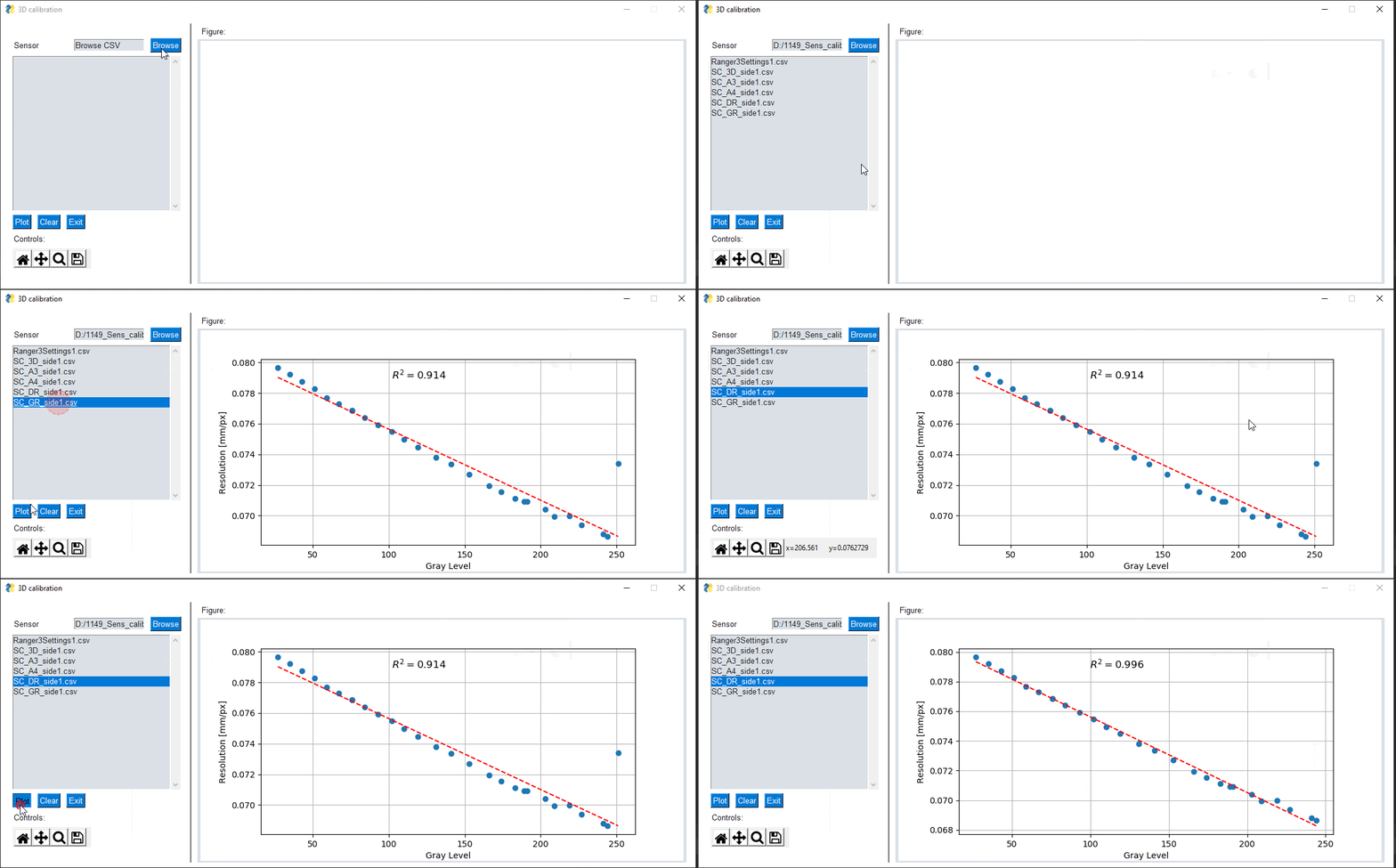
thanks for this example!, i reworked it a bit for my own needs, which basically were to display a graph, add a trend line and delete with a click outliers. I'll be posting later, when it will be "cleaner".
thanks again for this example
 chacoff
on 16 Sep 2020
chacoff
on 16 Sep 2020
if somebody is interested, i upload all here:
https://github.com/chacoff/Remove-Outliers-with-PYSimpleGUI-from-a-linear-regression
chacoff
on 17 Sep 2020
Thank you for taking the time to post your code and a screen GIF! Sorry it's taken me a bit to acknowledge the contribution. It looks great.
PySimpleGUI
on 18 Sep 2020
Related issues
 OPMUSER
·
5Comments
OPMUSER
·
5Comments
 lucasea777
·
3Comments
lucasea777
·
3Comments
 mozesa
·
4Comments
mozesa
·
4Comments
 xuguojun168
·
3Comments
xuguojun168
·
3Comments
 ncotrb
·
4Comments
ncotrb
·
4Comments
Most helpful comment
thanks for this example!, i reworked it a bit for my own needs, which basically were to display a graph, add a trend line and delete with a click outliers. I'll be posting later, when it will be "cleaner".
thanks again for this example