Pysimplegui: DrawText not displaying on python2.7
Type of Issues (Enhancement, Error, Bug, Question)
Bug
Operating System
Windows 7
Python version
Python 2.7.12
PySimpleGUI Port and Version
2.0
Code or partial code causing the problem
import PySimpleGUI27 as pSG

width = 100
height = 60
font = ("Courier New", 10)

layout = [
    [pSG.Text("Testing0")],
    [pSG.Graph((width, height), graph_bottom_left=(0, height), graph_top_right=(width, 0),
               key="graph", pad=(0, 0))]
]

window = pSG.Window("test", layout, margins=(0, 0))
graph = window.Finalize().Element("graph")
graph.DrawText("Im not here!", (0, 0), font=font)


while True:
    event, values = window.Read()
    if event is None or event == 'Exit':
        break
window.Close()``
This returns only the text "Testing0" and the graph object is present but no text whatsoever. I can however draw lines and other drawing functions.
 EvanMaltby
All 10 comments
I'm afraid that 2.7 support severely lags the Python 3 version., I have a problem at the moment with the built-in debugger blocking me from creating a 2.7 version. It's why the version number hasn't been bumped to 3.0.
However, DrawText should work.
Don't pass in a font. Simplify as much as possible. Set as FEW options as you can in your entire program.
Try moving around the location you're drawing.
 MikeTheWatchGuy
on 2 Aug 2019
MikeTheWatchGuy
on 2 Aug 2019
OK, I've had some time to setup an environment and try it. Yea, I see now what you mean. There is something seriously wrong.
MikeTheWatchGuy
on 3 Aug 2019
Don't use the PySimpleGUI27 that's in GitHub. It's clearly got trouble.
There are some large problems with the 27 port at the moment and I must have checked in bad code.
I would use pip installed code.
If you use a pip installed version of PySimpleGUI27, then you'll need to change your code as the layout is not inside of the Window call in that version. Your code is:
import PySimpleGUI27 as pSG

width = 100
height = 60
font = ("Courier New", 10)

layout = [
    [pSG.Text("Testing0")],
    [pSG.Graph((width, height), graph_bottom_left=(0, height), graph_top_right=(width, 0),
               key="graph", pad=(0, 0))]
]

window = pSG.Window("test123").Layout(layout)
graph = window.Finalize().FindElement("graph")
graph.DrawText("Im not here!", (0, 0), font=font)


while True:
    event, values = window.Read()
    if event is None or event == 'Exit':
        break
window.Close()
It produces a window that looks like this:
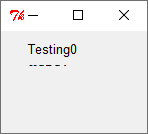
Can I inquire as to what is stopping your migration to Python3?
MikeTheWatchGuy
on 3 Aug 2019
Honestly I've just been writing python 2.7 code out of being comfortable with it for years. Maybe I needed an excuse to switch and this seems to be it. I'll migrate my project to Python 3 if this library is far more stable on it
Cheers for your response!
EvanMaltby
on 3 Aug 2019
It is indeed more stable, better supported, and as warned in the docs, the 2.7 version will be _deleted_ from the GitHub Dec 31.
I REALLY appreciate you taking this step. It's something that 2.7 users often resist. I promise it's not a difficult transition. Honest. Super-honest. 👍
MikeTheWatchGuy
on 3 Aug 2019
I recommend 3.6. 3.7.4 has some tkinter problems so if you go with 3.7, use a slightly lower version number.
MikeTheWatchGuy
on 3 Aug 2019
Got it, Just got my project running under Python 3 perfectly in under 15 minutes, just changed the print functions and not requiring decoding unicode strings and done
EvanMaltby
on 3 Aug 2019
NICE!
I'm saving your post for other Python 2 users!
MikeTheWatchGuy
on 3 Aug 2019
I'm going to close this, assuming your 15 minute success included running your PySimpleGUI program. If not, feel free to re-open it!
MikeTheWatchGuy
on 3 Aug 2019
Hey Evan... is everything going OK?
Don't want to sound overly weird about this, but I'm really glad you jumped. It sets an excellent example. It not now, when? Right? 😏 I just hope it's continued to be OK.
MikeTheWatchGuy
on 4 Aug 2019
Related issues
MikeTheWatchGuy
·
6Comments
 lucasea777
·
3Comments
lucasea777
·
3Comments
 flowerbug
·
4Comments
flowerbug
·
4Comments
 ncotrb
·
4Comments
ncotrb
·
4Comments
 xuguojun168
·
3Comments
xuguojun168
·
3Comments