Pysimplegui: [PySimpleGuiWeb]Current TAB events de-activated after returning from second window
Issue.
Linux (RedHat Enterprise Linux 7.6 64bit)
Python 3.6.6
Port PySimpleGUIWeb
Version 0.28.1
I am following the design pattern 1 'window 1 does not remain active' but for the WEB port not TK. The twist in my example is that both win1 and win2 feature a tabbed layout.
The issue I am hitting is that, from inside one of the win1 tabs, I hit a button which hides win1 and activates win2. When I return to the parent window it reappears with the correct (current) tab selected but button clicks inside that tab pane no longer emit events. It looks as if the gui functions work i.e the button changes colour when clicked but we get no events.
This problem is only for the 'current' tab when I return from the child window, other parent window tabs work as expected. Switching away from and back to the current tab does not get events working either.
Note that for window activation/deactivateion I am using hide()/unhide() as per the demo program but I notice the QT version uses dissapear()/reappear() instead and the pySimpleGuiWeb.py implements both of these constructs, as well as enable()/disable() and refresh(). I'm not sure exactly which functions to call for the gui version - am I missing something obvious but undocumented like an explicit refresh() or enable on the tabgroup?
Do you have any suggestions to follow? If not I'll work up a minimal reproducible example.
 gwingnhbc
All 46 comments
Yea, Multiple windows and the Web Port may have some issues as it's not been exercised much.
There are separate demo programs for each port in addition to the main PySimpleGUI Demo Programs.
You may be the first person that's tried this sequence of events.
While evidently the multiple windows code was released some time ago, it could be a little buggy.
I would be sure and check the web port's readme to see what's been added and what hasn't. Or take a peek at the source code by following your call into PySimpleGUIWeb.py.
 MikeTheWatchGuy
on 31 Jul 2019
MikeTheWatchGuy
on 31 Jul 2019
Well, I coded up a minimum reproducible case and it didn't reproduce :-)
So the very good news is that it is possible to have this construct of multiple tabbed windows in the web port. Now I just need to find which bit of the other stuff I do breaks it or has some sort of stupid local error.
gwingnhbc
on 1 Aug 2019
Thus their value :-) Thanks for giving it a go as it clearly has given you a path forward a little further.
MikeTheWatchGuy
on 1 Aug 2019
More than a little further, I now have a multi-user, multi-window tabbed app with authentication, multiple data driven screen layouts and some parts of the functionality actually working rather than just mockups. Its amazing how easy this stuff of yours is to use Mike.
See below for a minimum reprodcible case. It doesn't quite reproduce the same issue with just one tab being disabled but it shows the same problem for all the app when you hit the 'exit' button so I think gives a good clue. Amazingly it all works and you can navigate back and forwards between windows and tabs without problems until you hit 'exit'. At that point it as if the PySimpeGui side code has stopped so no more events are reported but the Remi side code carries on working displaying the window and still providing the navigation between tabs. Does this make sense from an internal architecture perspective? Do I need a better/clean way of exiting the app (rather than just breaking out of the main event loop) so as to also clean down the Remi side?
[ Shockingly formatted code deleted and reposted later ]
gwingnhbc
on 2 Aug 2019
Edit the post and reformat it. Click the 3 dots like this:
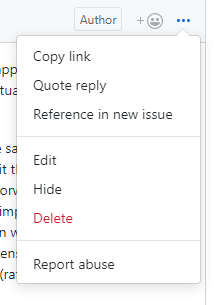
The quickest way to not get help is to post code that's not formatted (that's true across the entire internet and why I went to great lengths to show you exactly how to do that).
I'm impressed at your ability to keep pressing on by yourself. I'm so sorry that I've not been here to help.
I suspect that I'm exiting remi when you click exit but I need to check it. It's now on the list for today, after you format your code :-)
MikeTheWatchGuy
on 2 Aug 2019
Yeah, sorry again for the formatting. I was rather surprised how it changed once I hit the 'comment' button - I'll make sure to preview it first next time. Here's another go.
import  PySimpleGUIWeb  as sg

# Design pattern 1 - First window does not remain active
# Also implements Remi server for multiuser app and tabbed windows.

tab1_layout = [[sg.Button('Tab1 Button')]]
tab3_layout = [[sg.Button('Tab3 Button')]]
tab2_layout = [  [sg.Input(do_not_clear=True)],
                [sg.Text('', key='_OUTPUT_')],
                [sg.Button('Tab2 Button')],
                [sg.Button('Launch 2')]]

layout =[   [sg.Text('Window 1')],
            [sg.TabGroup([[ sg.Tab('Tab1',tab1_layout)
                            ,sg.Tab('Tab2',tab2_layout)
                            ,sg.Tab('Tab3',tab3_layout)]])],
            [sg.Button('Win1 Not Tabbed Button')],
            [sg.B('Exit')]
        ]

win1 = sg.Window('Window 1', web_ip='10.137.0.79',web_multiple_instance=True,disable_close=True ).Layout(layout)
win2_active=False
while True:
    #ev1, vals1 = win1.Read(timeout=10000)
    ev1, vals1 = win1.Read()
    print(f'DEBUG: ev1 event is {ev1}')
    if ev1 is None or ev1 == 'Exit':
        break
    win1.FindElement('_OUTPUT_').Update(vals1[0])

    if ev1 == 'Launch 2' and not win2_active:
        win2_active = True
        win1.Hide()

        w2tab1_layout = [[sg.Button('w2Tab1 Button')]]
        w2tab2_layout = [
                        [sg.Button('w2Tab2 Button')],
                        [sg.Button('Back')]
                        ]

        layout2 =   [
                    [sg.Text('Window 2')],
                    [sg.TabGroup([[ sg.Tab('Tab1',w2tab1_layout),
                                    sg.Tab('Tab2',w2tab2_layout)]])]
                    ]

        win2 = sg.Window('Window 2').Layout(layout2)
        while True:
            ev2, vals2 = win2.Read()
            print(f'DEBUG: ev2 event is {ev2}')
            if ev2 is None or ev2 == 'Back':
                win2.Close()
                win2_active = False
                win1.UnHide()
                break
I don't believe you need the hides because one window REPLACES another in PySimpleGUIWeb.
If you change these lines, then you'll see the back button
        w2tab2_layout = [[sg.Button('w2Tab1 Button')]]
        w2tab1_layout = [
                        [sg.Button('w2Tab2 Button')],
                        [sg.Button('Back')]
                        ]
The problem seems to be that the window is not expanding, but works when you show it in the default tab.
But, yea, the tabs stop working but the buttons and the windows work! 1 for 2.
It has to be a Remi problem, so I'll contact them.
Tabs are pretty advanced and are often one of the last things I code up. Tabs, Tables and Trees, these will be the death of me. Oh, and multiple windows.
MikeTheWatchGuy
on 2 Aug 2019
Just to clarify: The things you mention above weren't problems (or at least not problems I had spotted). I think the odd visual effects with the tabs showing different sized panes is just because I have different layouts on the panes and only put the 'Exit' button on one of those panes in the first window in this example. I'm not too worried about this stuff - in my real code I just put 'something' on the r/h side in the same position in each tab pane and then the tabs display nicely all the same size. Its nice to have dynamic size changes like this, although in the example it looks horrible its easy to make the appearance consistent and the dynamic behaviour is there when we want it.
When you run the above sample code you should however see that whenever you press a button the event is echoed on stdout. After pressing the 'Exit' button the panes and windows all seem to keep functioning and visually showing button clicks but the events are no longer logged on stdout and I suspect PySimpleGui events are no longer actually generated. That's the issue that concerns me. The visual dancing around of tab sizes when the tab layout is inconsistent I can deal with, likewise for window sizes.
gwingnhbc
on 2 Aug 2019
Understood, however, re-using layouts can have _FAR reaching and very unusual side effects_. It just should never happen. This problem very well could have been caused by something like this. An old object that causes the window to believe it's been closed for example, would be all that it would take to simply stop receiving events. I wouldn't be so nutso about it if it wasn't a serious problem. I clearly need to emphasize this further in the docs.
MikeTheWatchGuy
on 2 Aug 2019
Righto, I think I need to clearly understand this as my window layouts are largely driven dynamically by data and when returning to a parent window we need to query the database to pick up current data state and then layout the window accordingly. I can design it such that this doesn't happen between tab switches within a window but it will sometimes be necessary to 'refresh/replace with a different layout' when returning to a parent window.
Could you advise what is the clean way to destroy an old window so that you can lay out a new version to replace it? Or do it some other way - I don't want to make it hard and will change my methods to suit the tool as necessary :-) If you could give some pointers as to what might be the best approach I'll do some experimenting.
Edit: Reading more of the example programs I see that some of these explicitly call window.Close() so I'll try that. Hopefully this function destroys the window and it's child objects so that it will be safe(r) to instantiate a window again with a new layout? Also - I have avoided popups so far as they didn't seem plausible in a web context but I see you have a demo program for this pattern which I could look at. Is the internal handling of popups different to normal windows such that they might provide an easier route to doing the 'bad' stuff I need to do here?
gwingnhbc
on 3 Aug 2019
The way to "destroy" a window is to use window.Close()
This should return you to the previous window.
The problems you're bumping up against are that the Web port is the one that's most recent, what I was last working on prior to the large document updates. I will return to it shortly.
Today I'll speak with the Remi project owner.
MikeTheWatchGuy
on 4 Aug 2019
Hello @gwingnhbc , I'm going to investigate over this problem. @MikeTheWatchGuy asked me to check about possible bugs in remi or the integration with PySimpleGuiWeb. I will inform you as soon as I will have a solution or questions. ;-)
 dddomodossola
on 4 Aug 2019
dddomodossola
on 4 Aug 2019
Thanks for the super good response guys So much appreciated..
gwingnhbc
on 5 Aug 2019
Hey, good news, my issue (from a user perspective at least) seems solved :-)
Here's a new tidied up example that is a bit clearer to run and see what is happening. As you suggested Mike it was unnecessary (for the Remi port) to hide the window so I dropped that out and it started working. I also had some timeout events on the loops to show if the loops were srill running but they aren't relevant to the fix as it runs the same with or without timeouts.
The problem left over was that after exiting the main loop the Remi window keeps running and displaying an active window with still switching tabs etc, however I have put an explicit Window.Close() in the main loop called from my 'Exit' button and now that properly terminates the PSG code includng the Remi window - that now displaying just the spinning cube.
import  PySimpleGUIWeb  as sg

# Design pattern 1 - First window does not remain active
# Also implements Remi server for multiuser app and tabbed windows.

tab1_layout = [[sg.Button('Tab1 Button')]]
tab3_layout = [[sg.Button('Tab3 Button')]]
tab2_layout = [  [sg.Input(do_not_clear=True)],
                [sg.Text('', key='_OUTPUT_')],
                [sg.Button('Tab2 Button')],
                [sg.Button('Launch 2')]]

layout =[   [sg.Text('Window 1')],
            [sg.Text('The second tab holds the button to invoke our child window')],
            [sg.TabGroup([[ sg.Tab('Tab1',tab1_layout)
                            ,sg.Tab('Tab2',tab2_layout)
                            ,sg.Tab('Tab3',tab3_layout)]])],
            [sg.Text('The exit button is common to the whole window not a specific tab')],
            [sg.B('Exit')]
        ]

win1 = sg.Window('Window 1', web_ip='10.137.0.79',web_multiple_instance=True,disable_close=True ).Layout(layout)
win2_active=False
while True:
    #ev1, vals1 = win1.Read(timeout=10000)
    ev1, vals1 = win1.Read()
    print(f'DEBUG: ev1 event from parent window loop is {ev1}')
    if ev1 is None or ev1 == 'Exit':
        win1.Close()
        break
    win1.FindElement('_OUTPUT_').Update(vals1[0])

    if ev1 == 'Launch 2' and not win2_active:
        win2_active = True
        #win1.Hide()
        w2tab1_layout = [[sg.Button('w2Tab1 Button')]]
        w2tab2_layout = [[sg.Button('w2Tab2 Button')]]
        layout2 =   [
                    [sg.Text('Window 2     And some more text blah, blah ...')],
                    [sg.TabGroup([[ sg.Tab('Tab1',w2tab1_layout),
                                    sg.Tab('Tab2',w2tab2_layout)]])],
                    [sg.Text('The back button is common to the window not local to a tab')],
                    [sg.Button('Back')]
                    ]

        win2 = sg.Window('Window 2').Layout(layout2)
        while True:
            #ev2, vals2 = win2.Read(timeout=10000)
            ev2, vals2 = win2.Read()
            print(f'DEBUG: ev2 event from child window loop is {ev2}')
            if ev2 is None or ev2 == 'Back':
                win2.Close()
                win2_active = False
                #win1.UnHide()
                break
print(f'AAAAAAAAAAArgh exited main loop!!!!!!!!!!!!')
Wonderful! Well done @gwingnhbc !
dddomodossola
on 5 Aug 2019
Well, what I've done is get the test case working, but my main code isn't completely fixed when I apply those changes. I still have the problem that when I return from the child window to parent all the gui stuff works and all the parent window tabs work except for the tab which held the 'go to child' button and which I return to. In just this one particular tab the buttons stop generating on-click events after return from child. I have moved on a bit and established that the main even loop in my PySimpleGui code is still running and generating events (I put in a timeout event to check this) but isolating which bit of code is causing it may prove painful. Differences I can think of between my code and the example above are that I have a lot of buttons in the tab and they use a three element tuple as their key rather than a simple string.
Unless that suggests a cause please leave me to work on reproducing a simple example- I will go quiet for a time as just one more working day here then I get to go on holiday so don't think I've given up :-)
gwingnhbc
on 5 Aug 2019
Just know that it's highly likely to not be anything at all you're doing. You've given us an example that reproduces the problem easily. I'm probably not doing the right things with multiple windows. Give the PySimpleGUI and Remi teams a bit to work on it.
 PySimpleGUI
on 5 Aug 2019
PySimpleGUI
on 5 Aug 2019
Strange, the problem seems to be not repeatable. I was able to see the problem, but restarting the app and reproducing the same sequence of operations there where no error.
EDIT: The problem seems to be the window update on Tab change event. Buttons works correctly, choosing a different tab seems that nothing happens, but if you refresh window with F5 the tab change happens.
dddomodossola
on 5 Aug 2019
I had no success in fixing this error today. I'm investigating. Some details about investigation:
- The problem occurs frequently doing in sequence "select tab2"->"Launch 2"->"Back" , after this, selecting a different tab doesn't refresh the window (it refreshes if F5 pressed).
- In the faulty condition, remi receives the "tab selection event" but it doesn't send update messages.
- This could happen in case of "disabled refresh", "missing parent widget", "an hidden exception"
"disabled refresh" : this condition was investigated and not verified
"hidden exception": this condition was investigated and not verified
"missing parent widget": this condition was investigated and not verified BUT requires further checks, especially about window destruction sequence.
I will keep you informed. ;-)
dddomodossola
on 6 Aug 2019
I don't think you ever want to refresh a window because it send a disconnect to me. I'll pass that back up to the user too.
It should be really clear via what I'm printing, when I think the server is disconnected. I don't think I removed those prints.
MikeTheWatchGuy
on 6 Aug 2019
There may very well likely be a hidden exception!!!!
I had to place my entire packing stuff into my own try block because I wasn't able to get ANY exceptions back when there was an error. I don't understand what has been going on with that. This is the first port out of all of them where I needed to do this.
MikeTheWatchGuy
on 6 Aug 2019
Thanks for the work on this guys. Some observations on behaviour and repeatability in case these are of help:
a) I note the comments on inconsistency above but that is not what I see. When I run the above modified example using Linux Firefox as the browser locally on the server running the app it works perfectly every time. No faults, no inconsistencies that I can provoke.
b) I run the app and Firefox browser as above but also run a second simultaneous connection using Chrome on a remote windows desktop. In this case both open the parent window and generate button click events until I go to the second window on the local instance. After this, even after return to parent window, no button click events register from the remote browser although the local browser instance continues with full functionality. This is repeatable.
I mention the latter just in case it helps the diagnostic work. If it is a separate issue we can forget it for now.
gwingnhbc
on 6 Aug 2019
@gwingnhbc thank you a lot for these info. What do you mean exactly when you says that buttons stops to generate click event? You don't see window changes, or you don't see terminal messages?
dddomodossola
on 6 Aug 2019
@gwingnhbc @MikeTheWatchGuy Hello! I can't confirm 100% that the problem is solved but there are good possibilities.
Preface:
During startup widgets are created and belongs to an App instance. Unfortunately, web architecture is a dirty world and browsers makes different connections to speedup page loading. Multiple connections means multiple App instances.
Remi uses cookies to uniquely identify a client and groups instances with cookie identifier.
Cause:
PySimpleGuiWeb catches app instances as soon as these are created, ignoring cookie id. Because of an unclear series of events that happens during window swaps, widgets that belongs to a specific app instances start to inform a different app instances for changes. The correct app instance doesn't receives refresh triggers anymore.
Solution
    class MyApp(remi.App):
        def __init__(self,*args, userdata2=None):
            # self.window = window    # type:  Window
            # ppprint(args[-1])
            if userdata2 is None:
                userdata = args[-1].userdata
                self.window = userdata[0]       # type: Window
            else:
                self.window = userdata2         # type: Window
            self.master_widget = None
            print("new App instance %s"%str(id(self)))
            #>>>>>>>>>>>>>>>>>>>>>>>>>>>>>> REMOVE THIS LINE <<<<<<<<<<<<<<<<<<<
            #self.window.App = self

            if userdata2 is None:
                # res_path = os.path.dirname(os.path.abspath(__file__))
                # ppprint('res path', res_path)
                super(Window.MyApp, self).__init__(*args,  static_file_path={'C':'c:','c':'c:','D':'d:', 'd':'d:', 'E':'e:', 'e':'e:', 'dot':'.', '.':'.'})

        #>>>>>>>>>>>>>>>>>>>>>>>>>> ADD THIS FUNCTION <<<<<<<<<<<<<<<<<<<<<
        def _instance(self):
            remi.App._instance(self)
            self.window.App = remi.server.clients[self.session]

        def log_message(self, *args, **kwargs):
            pass
OK, I have made this change and checked into the GitHub. Please download a new PySimpleGUIWeb.py file.
Note this patch shown was for a PyPI release from what I can tell as there is code that is in the GitHub version that's missing above.
Can you please try the this new GitHub version?
MikeTheWatchGuy
on 7 Aug 2019
When I run it, I continue to get problems with the tabs not working. Maybe I'm running the wrong user code to test it and/or maybe I made incorrect changes.
It would be nice to post the specific user code we're testing with? I'm running the last complete program I see.
Sorry for being out of the loop as I've let you guys go at this one on your own for a bit.
I am concerned that the GitHub version wasn't used as the basis rather than the PyPI version.
MikeTheWatchGuy
on 7 Aug 2019
Hello @MikeTheWatchGuy , excuse me for the late reply. Yestarday night I ended-up the debugging at 1:00 AM, and I was really tired.
I used the last code provided by @gwingnhbc together with the PySimpleGuiWeb code provided by you. Today I will test the changes you made on GitHub master branch.
EDIT:
Looking at the code on GitHub I see the line https://github.com/PySimpleGUI/PySimpleGUI/blob/29eb6ca43bdc6c334b18f574aa614298099ce124/PySimpleGUIWeb/PySimpleGUIWeb.py#L3557
and I suppose that it has the same purpose of the line above it. Maybe it have to be commented too. I will test it this evening.
dddomodossola
on 7 Aug 2019
@dddomodossola
Just answering "What do you mean exactly when you says that buttons stops to generate click event? "
I mean that each event loop in my code example above prints a debug message for each event returned and then after we hit the "return to tab window issue" these events are no longer printed when a button is clicked. Visually the button click still happens in the gui so I guess Remi must be registering the click internally but that click isn't passed back up to my application code as an event any more.
gwingnhbc
on 7 Aug 2019
@dddomodossola
I'm happy for you and this group to take a version of PySimpleGUIWeb.py and modify it and distribute among yourselves. I don't think I need to be in the loop if you feel comfortable making the changes (I think you do with no problem).
Just hand me back the changed file and I'll check it against some of my test applications to make sure nothing broke for them.
If you need my help, of course just say so.
MikeTheWatchGuy
on 7 Aug 2019
Hello @MikeTheWatchGuy just to be sure to not misunderstand your comment, I haven't exchanged a PySimpleGuiWeb.py version with others than you.
Here is the modified version (based on the most updated version from github) with bugfix. I did different other tests and it works flawlessly
PySimpleGUIWeb.py.txt
@gwingnhbc Can you Please download and test this version? You seems to be an experienced developer, however I provide you some little instructions about this for completeness:
- Download the file, and rename it removing the ".txt" extension;
- Copy the file in the folder where your application is stored;
- run your application.
Since you copied this file in the same folder of your script, it "override" the version installed by pip. If you delete this file, obviously the version coming from pip becomes again the active one.
dddomodossola
on 8 Aug 2019
And can you verify that the code we are all trying to run is the last thing that was posted by @gwingnhbc ?
MikeTheWatchGuy
on 8 Aug 2019
The only change I see, indeed, is that line you pointed out... commented out.
And, for me... IT WORKED!!!!!!!!!!
But, let's wait for @gwingnhbc to celebrate.
MikeTheWatchGuy
on 8 Aug 2019
I'm sorry that so much time and effort was spent on this... and it came down to maybe 4 lines of code? UGH. I really don't know what I'm doing.
MikeTheWatchGuy
on 8 Aug 2019
@MikeTheWatchGuy
And can you verify that the code we are all trying to run is the last thing that was posted by @gwingnhbc ?
Yes of course, confirmed ;-)
dddomodossola
on 8 Aug 2019
@MikeTheWatchGuy
I'm sorry that so much time and effort was spent on this... and it came down to maybe 4 lines of code? UGH. I really don't know what I'm doing.
Don't worry Mike, the most difficult it is, the most interest I feel. :D
However, this was really difficult to fix (I hope it is fixed). It is really a challange to integrate two libraries like remi and pysimplegui, and you did it in a really short time! My congratulations!
Now I go to sleep, waiting for @gwingnhbc feedback. Have a good day!
dddomodossola
on 8 Aug 2019
Checked into GitHub. If you download a new PySimpleGUIWeb.py (version 0.31) you'll get the change. I'll release to PyPI very soon.
Thanks for your patience @gwingnhbc !
MikeTheWatchGuy
on 8 Aug 2019
Has @gwingnhbc confirmed the fix?
dddomodossola
on 8 Aug 2019
Apologies the delayed response after all your good work guys. I'm actually away on annual leave at present but will find somewhere with an internet connection I can run the test. My responses are going to be ... intermittent, until the end of next week. I may not even have a phone signal for much of the time when I'm in the mountains.
gwingnhbc
on 9 Aug 2019
Testing results with "0.31.0.0"
single instance: pass
multiple instance: fail
When running single instance my example code above ran perfectly, but note that for me it was running well repeatably before - I did not see the inconsistent behaviour you observed for my local Linux Firefox browser session.
When I run mult-instance (i.e. make a second simultaneous connection to the Remi application URL) using Chrome under Windows10:
a) The original instance running locally continues to run wihout being affected by second instance start.
b) The second Remi window appears as before the recent code change. A message of "new App instance nnnnnnnnnnnnnn" appears on the controlling terminal running PySimpleGui. Visually Remi button clicks take place but no events are printed on the controlling terminal. Tab selection on this second instance does not make any effect hence I am unable to navigate to its child window.
c) When I hit the 'exit' button on the original/local instance it kills both instance whose screens are replaced by the rotating cube. My application code exits with it's 'AAAArgh exited main loop!!" message. One time I tested the controlling terminal then exited back to the command prompt, on another test I had another message, immediately after my 'AARGH" and before returning to command prompt of "Returned from Remi start command ... now sending None event".I probably performed a slightly different set/sequence of actions between those two tests.
After exiting as above the local sessions web page is left up with the spinning cube, even though the controlling application has returned to command prompt. If I now start up my app once more, in a single instance test but leaving the spinning cube up, something strange happens. This time the Remi window appears in a second tab of the local browser leaving the spinning cube in the first tab. However this time the Remi window does not seem to generate events or allow tab selection i.e. it behaves the same as the second instance fail described above. If I now close the first(spinning cube) tab the second Remi application tab instantly starts working again and generating events, allows tab selection, initiation of the child window and return and now works perfectly as a single instance app.
Am I even doing it right just initiating the main window with "multi-instance=True" or is there another parameter to start up the server side 'headless' and then initiate multiple remote instances rather than running a local one that I should be using? Please let me know if there is any clarification or additional tests you would like me to run at this point.
Thanks again for all your work guys!
@dddomodossola
Yep you guessed right I have been around a bit but the last serious code development I did was forty years ago in Pascal and assembler. I'm pretty new to github so the help is appreciated.
gwingnhbc
on 9 Aug 2019
@gwingnhbc There's so much here that I'm having a hard time following it.
There's a basic, outstanding question on the table to you that I haven't heard a reply on. You're on the thread with Evan where is where there's been some cross-over that has made it confusing.
The basic question is:
_Do you understand that PySimpleGUIWeb does not enable you to run 1 program that serves multiple sessions where 2 users see 2 different appearing screens?_
I get the impression that you're trying to achieve the not achievable and have tricked yourself in a previous test that you did, briefly, achieve it. I saw one post where you indicated that a single instance of your program was serving multiple users, showing different information to each user (i.e. a multi-session outcome).
MikeTheWatchGuy
on 9 Aug 2019
@MikeTheWatchGuy
Ooops. You are spot on there Mike. My understanding was that PySimpleGuiWeb would serve up a multi-user Remi application and indeed my first simple test of that was successful. Reading the documentation I found issue #1526 which I read as confirming this.
With this restriction being the case tough being the case though, it runs flawlessly as a single user instance and maybe the issue is ready to close?
That said I do need an app for multiple users and will give this some thought. Maybe I can implement a front end serving multiple completely independent single user PySimpleGui/Remi apps pretty much entirely in user code and I'll raise a separate enhancement or info request to check that I have no fundamental misunderstandings if I want to pursue that route.
gwingnhbc
on 9 Aug 2019
I clearly misunderstood or didn't thoroughly understand what's was being said.
I'm not a web programmer. When I hear "Multi-session", "Multiple connections", etc, and that a new session has to be started, I just assume that's all the stuff that Remi needs to do to handle multiple connections. That's at the REMI level.
At the PySimpleGUI level, there's only 1 thread running of your program and that I'm not spinning out multiple threads with multiple "windows" or in fact multiple entire environments.
I thought that was evident reading what the code looks like as well as that you can move across all these environments and PySimpleGUI acts the same way.
PySimpleGUI is a GUI. GUI. Not web page server. There is no attempt to event show something that looks like a mocked up webpage.... done quite on purpose.... because that's simply not what it is. It's a GUI that happens to run in a browser.
The use case that I tried to bring out as one of the primary uses for this is a Raspberry Pi where you don't have a screen attached to it. You still want to interface with your application, configure it, etc. That's not at all similar to serving up web pages or allowing multiple people to connect in any way other than to display the same information.
The game I posted using the Web interface was meant to re-enforce this point too. Both players see the same screen and even see the same controls.
Gosh, I'm sorry if there was anything misleading that causes you to waste time.
MikeTheWatchGuy
on 9 Aug 2019
You are always welcomed to post an Enhancement Request.
MikeTheWatchGuy
on 9 Aug 2019
I'm a "Continuous Process Improvement" kinda person. It was beaten into me for a very long time, as a result, I try to make stuff better, pretty much all the time. So, if something's not clear, could be better, etc, rather than get pissy and defensive about it, I try to fix it. It's a challenge to do and I'm not perfect (for sure).
Here is what I wrote about PySimpleGUIWeb in the Readme. It's somewhat new in that it wasn't until 4.0 that I began this latest round of documentation changes (top to bottom as it were).
I don't care if anyone read it yet or not. I am looking for it to help clear up misunderstandings, be clear, educate if I can, etc.
Lemme know how this can be improved please....
https://pysimplegui.readthedocs.io/en/latest/#web-version-remi
MikeTheWatchGuy
on 10 Aug 2019
No improvement needed - the documentation addition is both concise and clear.
Thanks for making it clear that full multi-user apps are not the intended use for pysimpleguiWeb and probably aren't achievable without significant rework of the architecture ( I guess the 'right' way to do this would be to have the multi-user remi server serve up pysimplegui threads rather than the othe way around). It's clear that there are no immediate plans for this so I'll close the issue, with thanks for all the work done on it.
gwingnhbc
on 21 Aug 2019
It's clearly "on the list" of stuff I want PySimpleGUIWeb to do. It's just going to likely be a while. But, sometimes these things happen quickly. Just know that it's not going to be forgotten about.
MikeTheWatchGuy
on 21 Aug 2019
Related issues
MikeTheWatchGuy
·
6Comments
 thelou1s
·
4Comments
thelou1s
·
4Comments
 flowerbug
·
4Comments
flowerbug
·
4Comments
 OndoyManing
·
4Comments
OndoyManing
·
4Comments
 DKatarakis
·
6Comments
DKatarakis
·
6Comments