Pysimplegui: [PySimpleGUI-tk] issue w/ Table Colors. Doesn't show table colors when running Python 3.7.4. OK on 3.7.2
Type of Issues (Enhancement, Error, Bug, Question)
1) Table Colors don't seem to affect my Table widget:
background_color='#1DB954'
alternating_row_color='black'
Also, there is row_colors but there is no example on how to use this so I would appreciate if you could provide one.
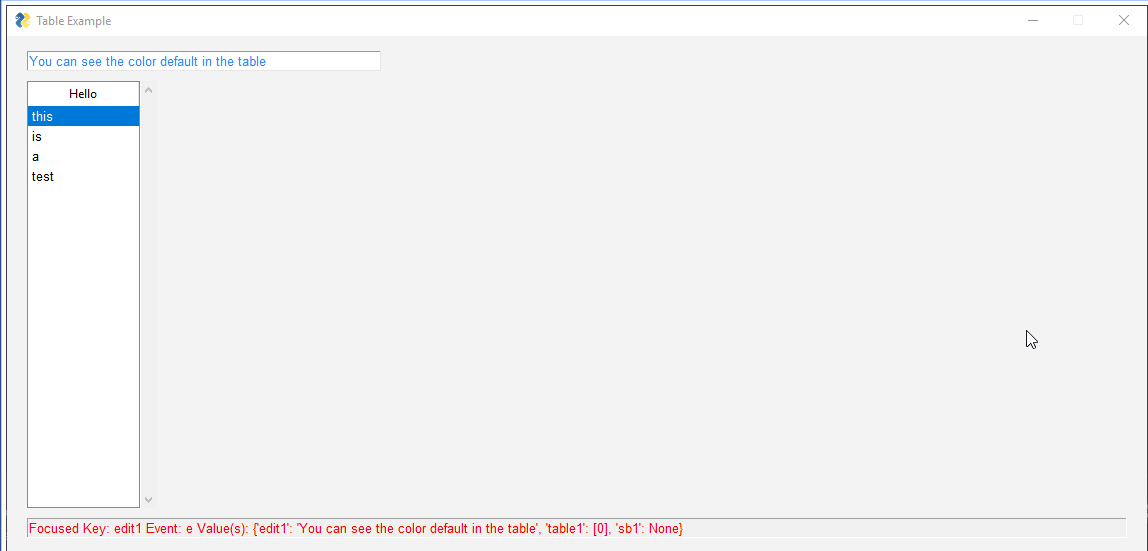
GUI: proof I am not lying that the colors don't change
2) When using window.FindElementWithFocus().Key it does not seem to be able to detect focus on my Table which clearly has a Key, which causes an error. if window.FindElementWithFocus() is used instead, it gives a none result.
3) Request?
I would like to be able to manually focus on a widget but I'm not sure if there is a command for that. something like this maybe? _window.Element('edit1').focus()_ or is there already a way to manually focus on a widget?
Operating System
Win10
Python version
3.7
PySimpleGUI Port and Version
4.0
Code or partial code causing the problem
import csv
import PySimpleGUI as sg


def main():
    # filename = os.path.join(os.path.expanduser('~'), 'Dropbox', 'Sync', 'inventarioHL.csv')
    filename = 'inventarioHL.csv'
    with open(filename, "r") as infile:
        reader = csv.reader(infile)
        header_list = next(reader)
        data = list(reader)  # read everything else into a list of rows
    sg.SetOptions(element_padding=(0, 10),
                  background_color='#F3F3F3')

    layout = [
        [sg.InputText(
            key='edit1',
            size=(50, 20),
            background_color='white',
            text_color='#2687FB',
            enable_events=True)],
        [sg.Table(
            key='table1',  # HELLO I EXIST
            values=data,
            headings=header_list,
            max_col_width=25,
            auto_size_columns=False,
            justification='left',
            background_color='#1DB954',  # Bg not changing color
            alternating_row_color='black',  # Colors are not changing
            # row_colors=''  # Any Examples on how to use this?
            num_rows=20,
            enable_events=True)],
        [sg.StatusBar(
            key='sb1',
            size=(137, 0),
            text='App Started!',
            text_color='red')]
    ]

    window = sg.Window(
        title='Table Example',
        return_keyboard_events=True,
        grab_anywhere=False).Layout(layout)

    while True:
        event, values = window.Read()

        if event is None or event == 'Exit':
            break

        if event == 'Escape:27':  # Exit on ESC
            window.close()

        # if event != 'Escape:27':
        #     window.Element('edit1').focus()  # I know this does not exist but how to manually focus on a widget?

        if event == 'Delete:46':  # Clear Edit1 on DEL
            window.Element('edit1').Update('')

        try:
            sb_update = window.FindElementWithFocus().Key
            print(window.FindElementWithFocus().Key)
        except:
            sb_update = window.FindElementWithFocus()
            print(window.FindElementWithFocus())

        window.Element('sb1').Update(f"Focused Key: {str(sb_update)} Event: {event} Value(s): {values}")

main()
 fenchai23
All 28 comments
Hi there.,.. I did not doubt you were seeing what you were seeing. I suggested posting here because you can simply drag and drop an image file into the Issue, or even copy and paste. I did a screenshot of your screen so that it's here to see:
 MikeTheWatchGuy
on 11 Jul 2019
MikeTheWatchGuy
on 11 Jul 2019
Please try this code on your machine:
#!/usr/bin/env python
import sys

if sys.version_info[0] >= 3:
    import PySimpleGUI as sg
else:
    import PySimpleGUI27 as sg
import random
import string

# ------------------ Create a fake table ------------------
class Fake():
    @classmethod
    def word(self):
        return ''.join(random.choice(string.ascii_lowercase) for i in range(10))

    @classmethod
    def number(self, max=1000):
        return random.randint(0,max)


def make_table(num_rows, num_cols):
    data = [[j for j in range(num_cols)] for i in range(num_rows)]
    data[0] = [Fake.word() for _ in range(num_cols)]
    for i in range(1, num_rows):
        data[i] = [Fake.word(), *[Fake.number() for i in range(num_cols - 1)]]
    return data

data = make_table(num_rows=15, num_cols=6)
# sg.SetOptions(element_padding=(0,0))
headings = [data[0][x] for x in range(len(data[0]))]

layout = [[sg.Table(values=data[1:][:], headings=headings, max_col_width=25, background_color='#1DB954',
                        auto_size_columns=True, display_row_numbers=True, justification='right', num_rows=20, alternating_row_color='blue', key='_table_')],
          [sg.Button('Read'), sg.Button('Double')],
          [sg.T('Read = read which rows are selected')],[sg.T('Double = double the amount of data in the table')]]

window = sg.Window('Table', grab_anywhere=False, resizable=True).Layout(layout)

while True:
    event, values = window.Read()
    if event is None:
        break
    if event == 'Double':
        for i in range(len(data)):
            data.append(data[i])
        window.FindElement('_table_').Update(values = data)
    sg.Popup(event, values)
    # print(event, values)
window.Close()
sys.exit(69)
This is what it looks like on my screen:

MikeTheWatchGuy
on 11 Jul 2019
This is what it looks like on mine 🤔

fenchai23
on 11 Jul 2019
Well now, we've got ourselves a mystery.
Are you running the programs using an IDE? If so, can you please run from command line?
Also, please do this test:
- Start python from command line
- At the >>> prompt enter:
>>> import PySimpleGUI as sg
>>> sg - Copy and paste what's printed
- then type at the prompt:
>>> import tkinter
>>> tkinter.TkVersion - copy and paste the version number
MikeTheWatchGuy
on 11 Jul 2019
1) yes, I am using PyCharm IDE, I'm not very familiar with how cmd and python interpreter works but I ran this in the terminal inside PyCharm because cmd does not seem to recognize any command I send.
2)
3)
```>>> import PySimpleGUI as sg
sg
.py'>
4)
5)
import tkinter
tkinter.TkVersion
8.6
```
fenchai23
on 11 Jul 2019
Looks like you're running a virtual environment.
Did you realize your getting the package from a location on DropBox?
Please download and place in your application's folder the latest PySimpleGUI.py file from GitHub. This is the link you want:
https://github.com/PySimpleGUI/PySimpleGUI/blob/master/PySimpleGUI.py
Then run the same test to see if PyCharm is picking up the right one.
You may have to drag and drop into PyCharm's project folder. I'm not sure how you're setup. It should have no trouble finding it if it's in the same folder as your code that imports it.
MikeTheWatchGuy
on 11 Jul 2019
ok I downloaded the newest pySimpleGUI and placed on the root of my project folder.
It looks like before, the version was 4.0 now it's 4.1.0.8 Unreleased
>>> import pySimpleGUI as sg
>>> sg
<module 'pySimpleGUI' from 'C:\\Users\\ferna\\Dropbox\\Python\\py_Practice\\pySimpleGUI.py'>
>>> import tkinter
>>> tkinter.TkVersion
8.6
>>>
Once it's all in place and you've run the test, I would like another run.
You may need to restart PyCharm after adding that file. If when you type: sg you see the same location for PySimpleGUI.py then either PyCharm needs restarting to see if it will pick up the new file. Or the file didn't get properly added to the project.
We can tell for sure you've got the right one if you type:
>>> sg.main()
You'll see a screen that looks like this:
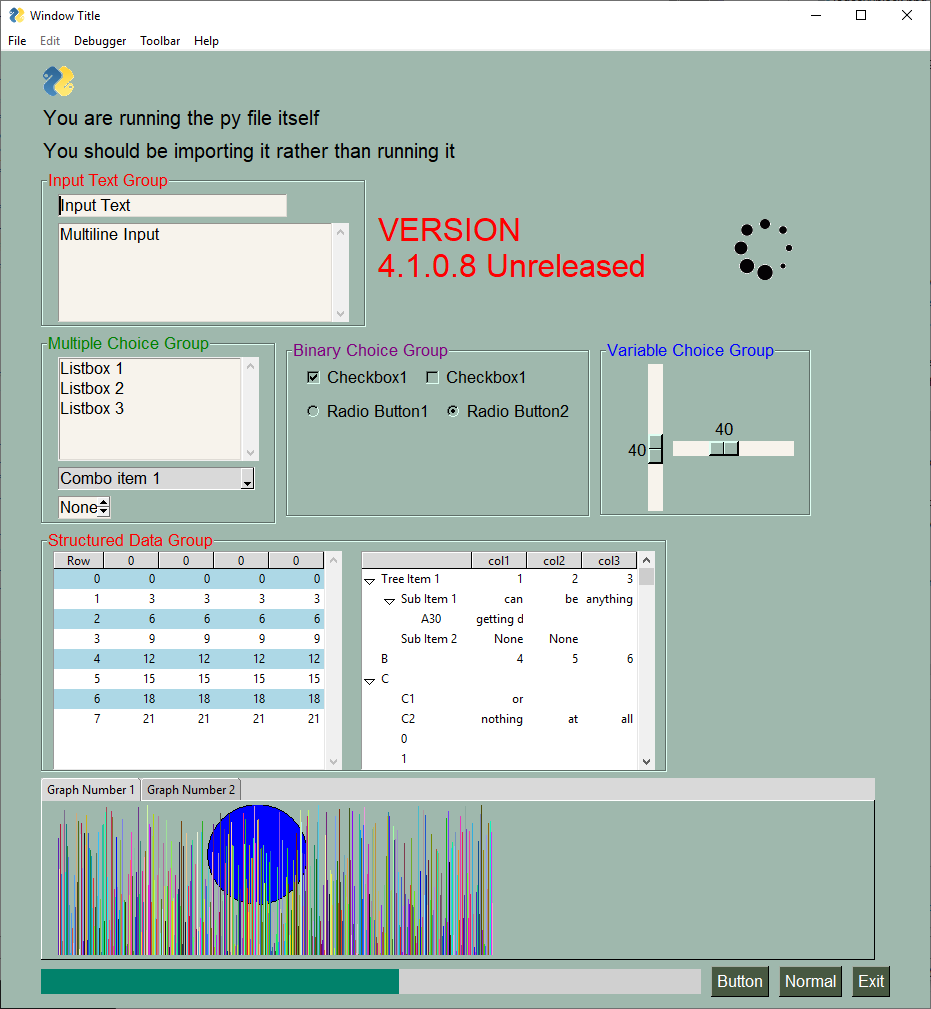
If you don't please send me a screenshot of what you get.
MikeTheWatchGuy
on 11 Jul 2019
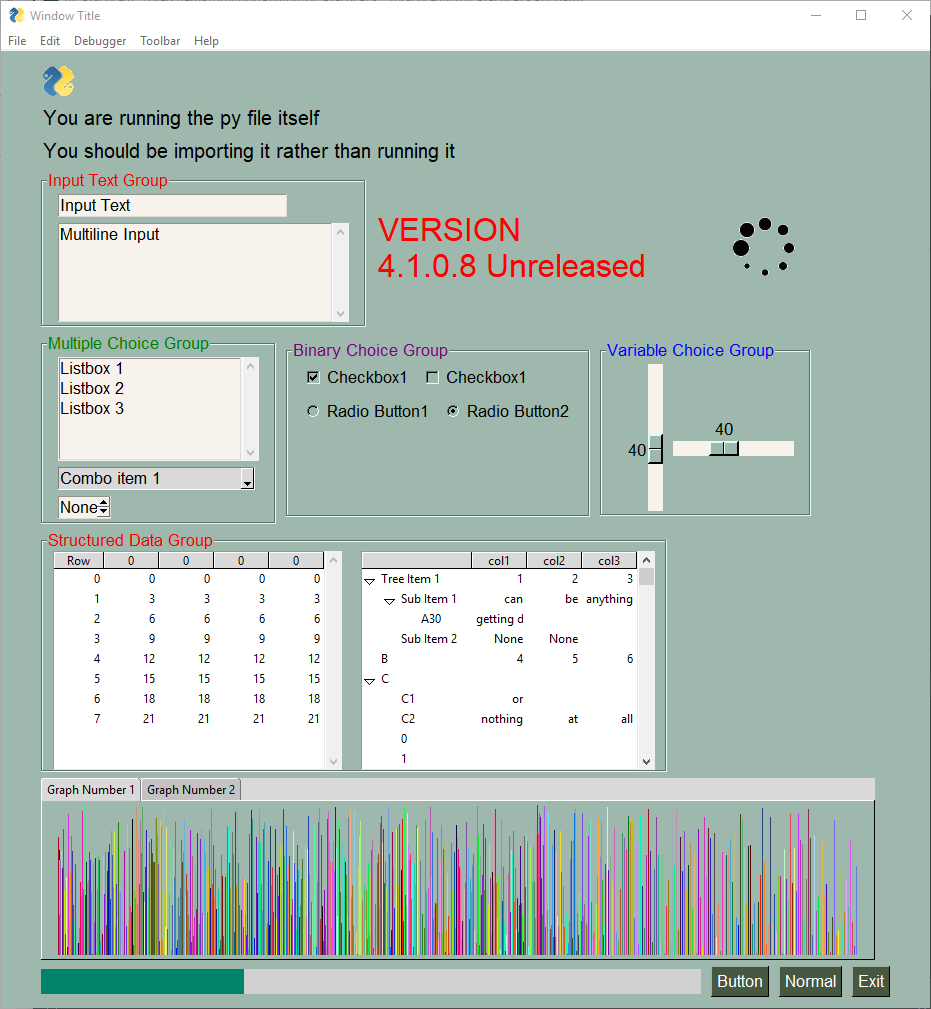
weird. it still does not want to color the table rows.
fenchai23
on 11 Jul 2019
It's like a bad version of tk or a video driver problem of some kind. My guess is that if we wrote a tkinter standalone program the exact same thing would happen.
This needs a bit of tkinter research to see who else has seen this problem before.
"tkinter treeview color missing" is a good place to start.
MikeTheWatchGuy
on 11 Jul 2019
PyCharm may still be causing problems.
Please open a dos window, type "python" and run the same tests as before at the >>> prompt.
We have to get PyCharm completely out of the equation. So, launch a command prompt and fire up python.
MikeTheWatchGuy
on 11 Jul 2019
doesn't look like it's pyCharm issue. I installed python 3.7.4, rebooted and tested.

fenchai23
on 11 Jul 2019
As for your feature request, have you looked at the documentation at http://www.PySimpleGUI.org, or the readme on the homepage and typed Control+F to search for "focus".
"Focus" is found at 61 locations in the readme.
The reason FindElementWithFocus returns None means none of your elements has focus according to tkinter. Only "input" types of elements can get focus. Table isn't an input element..
MikeTheWatchGuy
on 11 Jul 2019
As for your feature request, have you looked at the documentation at http://www.PySimpleGUI.org, or the readme on the homepage and typed Control+F to search for "focus".
"Focus" is found at 61 locations in the readme.
The reason FindElementWithFocus returns None means none of your elements has focus according to tkinter. Only "input" types of elements can get focus. Table isn't an input element..
this sets the focus lol... I am sure I tried this... maybe I missed the True in window.Element('edit1').SetFocus(True) but this worked : 3
about the table, does it mean the table never gets focused? 🤔
(nvm maybe I never need it anyways as values dict contains all the data I need when I click on any row)
fenchai23
on 11 Jul 2019
I don't think you'll need it. You can get immediate click events back for a Table. That essentially what getting focus is all about.
See how _easy and simple_ it is to use the documentation? It's so much quicker to do a search of that page than it is to type up a bunch of stuff in a GitHub Issue.
Guessing only gets you so far. Guessing, then posting an Issue because you didn't guess right and didn't read the docs gets you a trip to the docs, hanging your head in the appropriate amount of shame 😉
Another thing you can do is use the built-in help system. Open your Python shell (type Python or do that PyCharm terminal thing you do). Do the import as usual >>> import PySimpleGUI as sg. And then type at the prompt help(the thing you want help on)
For help with the multiline element (to see all of its methods for example) type
>>> help(sg.Multiline)
You'll be treated to all kinds of stuff about it. Including member functions you shouldn't be calling, but that's being fixed as quickly as I can do it while writing the docs.
As I sit here working on your Issue, in the background I'm writing the documentation, again, to use the latest and greatest docstrings. You'll see all of the methods for an element much easier. I hoped to have it ready today.
MikeTheWatchGuy
on 11 Jul 2019
thank you for your great work. I also hope it gets even easier and prettier as it will benefit us all :)
I tried to test my table script on another computer but it gives me an error when I try to import pySimpleGUI
it says:
line 104, in <module>
    import tkinter as tk
ModuleNotFoundError: No Module named 'tkinter'
I installed the latest python 3.7.4, how does it not have tkinter 🤔
fenchai23
on 11 Jul 2019
You're doing everything from the command line on the new system?
What happens if you open a dos cmd prompt and type:
python -m tkinter
You should see a little test window like you did with PySimpleGUI. You can test your PySimpleGUI install the exact same way later after you get tkinter up.
There are options to install Python I think. Perhaps one doesn't install tk. I would install again since you've already downloaded it.
I rarely ever install one. I'm on 3.6 and have been for forever. Not everything works with 3.7 yet so not going there personally.
MikeTheWatchGuy
on 12 Jul 2019
I think I found the problem!!!
I installed python 3.6, created a new venv in pyCharm and tested your script example. and loooook!
(py_Practice36) C:\Users\ferna\Dropbox\Python\py_Practice36>python
Python 3.6.8 (tags/v3.6.8:3c6b436a57, Dec 24 2018, 00:16:47) [MSC v.1916 64 bit (AMD64)] on win32
Type "help", "copyright", "credits" or "license" for more information.
>>> import pySimpleGUI as sg
>>> sg
<module 'pySimpleGUI' from 'C:\\Users\\ferna\\Dropbox\\Python\\py_Practice36\\pySimpleGUI.py'>
>>> sg.main()

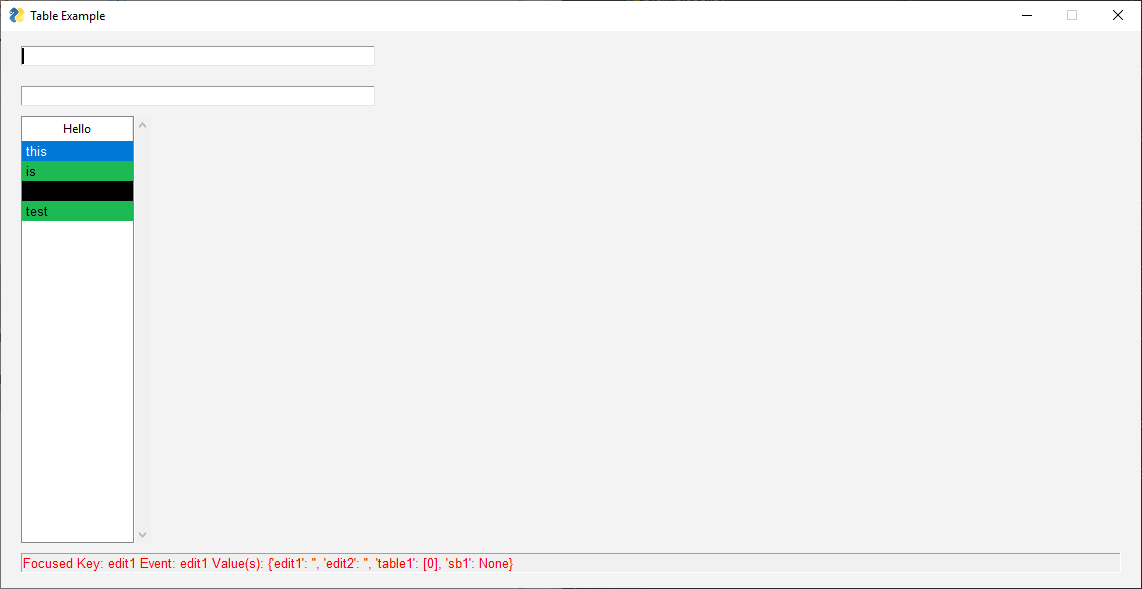

So is the problem python 3.7 Specific?
fenchai23
on 12 Jul 2019
The problem is you-specific 😢
There are a number of people running 3.7 successfully.
I think you've got a bad install of 3.7 or something along those lines.
MikeTheWatchGuy
on 12 Jul 2019
weird, I uninstalled python 3.7.4, reinstalled, tested same as with py 3.6 and it the tables indeed don't have custom colors.
fenchai23
on 12 Jul 2019
Is the take away on this that 3.6 works and 3.7 does not?
If so, what in 3.7 are you using that's not in 3.6? You could re-download the 3.7 installer to rule out corrupted installer.
How about going with 3.6 and stopping the testing and retesting and get to your application?
MikeTheWatchGuy
on 12 Jul 2019
they are all installed fresh from the start and only have pySimpleGui so I don't know what is going on. I'm trying to test on another computer now
edit: I reinstalled PyCharm and Python 3.6.8 on another computer and it ran just fine, the table colors are applied and visible. Haven't tested with 3.7.4
edit2: btw is it possible to give tooltip background colors, fonts, html formattings? I remember it was possible on qt. Not sure about tkinter but I'm sure there is nothing about customizing tooltips in readme.
fenchai23
on 12 Jul 2019
No custom tooltips.
I suggest re-downloading Python. Start from the very beginning. I've had weird stuff happen where an install file wasn't quite right. It's unlikely, but you should cover all bases. When you see a potential place for the failure to be located (a bad install file) you should test that specific failure point to rule it out.
What specific feature of 3.7 are you in need of at this moment?
No tooltip stuff on tkinter nor Qt.
No HTML formatting. I'm working on the design of colors for multiline elements in tkinter. The same kind of interface would be used for all ports. There's a recent Issue open for it where it's being discussed. The design involves embedding "Color Tokens" in your string so that background and foreground colors can be changed at any time.
PySimpleGUI at this time is simply providing access to the Elements. On the fly formatting of tooltips are likely to be low on the feature list at this time.
However, I've posted before about access to the underlying widgets before, but it's not in the readme yet. element.Widget will get you direct access to the underlying GUI framework's widget. The expandability is covered in the upcoming doc release.
MikeTheWatchGuy
on 12 Jul 2019
yes, I did uninstall and re-downloaded latest python 3.7.4 and it hasn't helped. I'll try python 3.7.4 on another computer from start and see how it goes.
I don't even know what 3.7 gives from 3.6 so it's not much of a problem for me atm.
Np about Custom Tooltips, it's not high priority. I rather you make progress on tables which is my favorite widget to play with :) I still don't know what
row_colors do btw. and it's empty on Tables readme so it's not implemented yet?
fenchai23
on 12 Jul 2019
Right, there are a number of features that are in there, and working, but not yet documented. That's why I'm working my ass off on these f-ing docs. I'll eventually get to the table element in the docs. Very soon. I'm making great progress.
OK, about row_colors.... your best bet anytime you have a question about a parameter or a bug or ? The quickest thing to do is search these GitHub Issues. I found several, some that show it being used. Check both open and closed Issues.
Briefly, from what I recall,
row_colors: List[Tuple[int, str]] - a list of tuples containing a row number and a color string. [(0, 'red'), ...]
Check out the Issues as I'm sure I described it somewhere in there for sure. The reason it may be left open is that it's not yet in the docs.
MikeTheWatchGuy
on 12 Jul 2019
Type of Issues (Enhancement, Error, Bug, Question)
- Table Colors don't seem to affect my Table widget:
background_color='#1DB954'
alternating_row_color='black'
Also, there isrow_colorsbut there is no example on how to use this so I would appreciate if you could provide one.
GUI: proof I am not lying that the colors don't change- When using
window.FindElementWithFocus().Keyit does not seem to be able to detect focus on my Table which clearly has a Key, which causes an error. ifwindow.FindElementWithFocus()is used instead, it gives anoneresult.- Request?
I would like to be able to manually focus on a widget but I'm not sure if there is a command for that. something like this maybe? _window.Element('edit1').focus()_ or is there already a way to manually focus on a widget?Operating System
Win10
Python version
3.7
PySimpleGUI Port and Version
4.0
Code or partial code causing the problem
import csv
import PySimpleGUI as sg


def main():
    # filename = os.path.join(os.path.expanduser('~'), 'Dropbox', 'Sync', 'inventarioHL.csv')
    filename = 'inventarioHL.csv'
    with open(filename, "r") as infile:
        reader = csv.reader(infile)
        header_list = next(reader)
        data = list(reader)  # read everything else into a list of rows
    sg.SetOptions(element_padding=(0, 10),
                  background_color='#F3F3F3')

    layout = [
        [sg.InputText(
            key='edit1',
            size=(50, 20),
            background_color='white',
            text_color='#2687FB',
            enable_events=True)],
        [sg.Table(
            key='table1',  # HELLO I EXIST
            values=data,
            headings=header_list,
            max_col_width=25,
            auto_size_columns=False,
            justification='left',
            background_color='#1DB954',  # Bg not changing color
            alternating_row_color='black',  # Colors are not changing
            # row_colors=''  # Any Examples on how to use this?
            num_rows=20,
            enable_events=True)],
        [sg.StatusBar(
            key='sb1',
            size=(137, 0),
            text='App Started!',
            text_color='red')]
    ]

    window = sg.Window(
        title='Table Example',
        return_keyboard_events=True,
        grab_anywhere=False).Layout(layout)

    while True:
        event, values = window.Read()

        if event is None or event == 'Exit':
            break

        if event == 'Escape:27':  # Exit on ESC
            window.close()

        # if event != 'Escape:27':
        #     window.Element('edit1').focus()  # I know this does not exist but how to manually focus on a widget?

        if event == 'Delete:46':  # Clear Edit1 on DEL
            window.Element('edit1').Update('')

        try:
            sb_update = window.FindElementWithFocus().Key
            print(window.FindElementWithFocus().Key)
        except:
            sb_update = window.FindElementWithFocus()
            print(window.FindElementWithFocus())

        window.Element('sb1').Update(f"Focused Key: {str(sb_update)} Event: {event} Value(s): {values}")

main()
I have exactly the same issue, also in Win10, python 3.7.
 g-xu
on 18 Jul 2019
g-xu
on 18 Jul 2019
This appears to be a problem with tk that's being released with the latest 3.7.
What 3.7 feature are you using in particular?
MikeTheWatchGuy
on 19 Jul 2019
I'm assuming the folks here with problems are running 3.7.4, the absolute latest and greatest. If you're NOT, please let me know.
What had me scratching my head is that there have been 3.7 users of PySimpleGUI for a long long time.
That must mean it's a problem with 3.7.4. I installed 3.7.2 and 3.7.4 to verify that it's 3.7.4.
Here are the results from running the same Demo_Table_Element program.
3.7.2 version

3.7.4 version
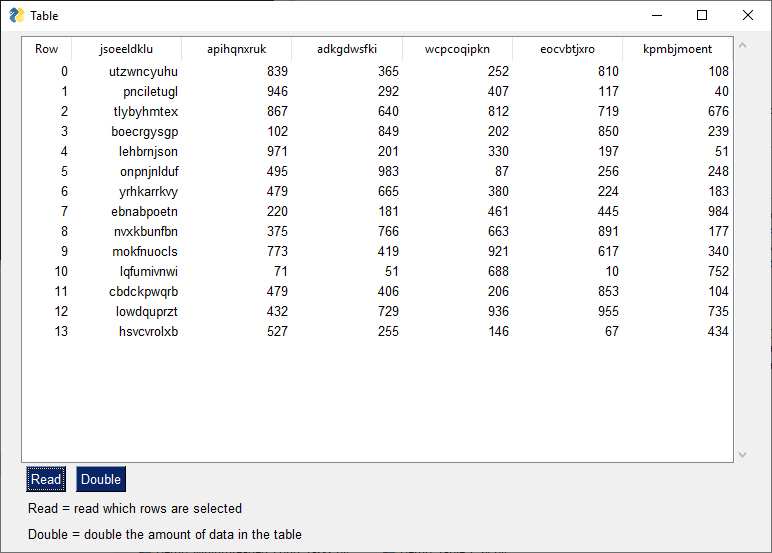
This leads me back to my previous post's question:
_What 3.7 feature are you using in particular?_
I've not understood the RUSH to run projects using 3.7 when there's zero need by the user. It's had known problems with packages for a while now. Not everything works with 3.7. And clearly, they've broken something in 3.7.4.
Let this be a cautionary tale for all Python users. The absolute latest and greatest may be "cool" to have installed, but when that "coolness" turns into hours and hours of debugging of the Python components instead of your code, it's not so cool anymore.
Sometimes being on the bleeding edge only makes you bleed (or cry).
If you're doing something that legit needs 3.7, then you should use 3.7.2 if you're using PySimpleGUI.
I'm closing this as officially solved.
MikeTheWatchGuy
on 20 Jul 2019
Related issues
 OndoyManing
·
4Comments
OndoyManing
·
4Comments
 OPMUSER
·
5Comments
OPMUSER
·
5Comments
 flowerbug
·
4Comments
flowerbug
·
4Comments
 xuguojun168
·
3Comments
xuguojun168
·
3Comments
 lucasea777
·
3Comments
lucasea777
·
3Comments