Pysimplegui: [Enhancement-Tk, Qt] Multiple colored text in Multiline / Text (Workarounds inside)
Type of Issues (Enhancement, Error, Bug, Question)
Question
Operating System
Windows 10
Python version
3.7.3
PySimpleGUI Port and Version
PySimpleGUI-TK 4.0.0
Code or partial code causing the problem
Dear Mike, first of all I would like to thank you for your smart module!
I would like to create a protocol that has lines / sections with multiple colored text in addition to the standard colored lines of text. I did a lot of research and found the tag function of tkinter
(For example: https://stackoverflow.com/a/14786570)
However, I don't know how to include it in the multiline text field without having to import tkinter again. Also I dont know how to access the function via TKroot.
from datetime import datetime
import PySimpleGUI as sg

layout = [[sg.Multiline("", key="protocol", autoscroll=True)], [sg.Button("TEST")]]
window = sg.Window("Multiline textfield with colors", layout, size=(400,200))

while True:
    now = datetime.now()
    time = "["+now.strftime("%H:%M:%S")+"] "

    # -------------------------------------
    # THE CHALLENGE:
    colortext = TKroot()
    colortext.tag_config('warning', background="yellow", foreground="red")
    colortext = colortext.tag_add('end', "Colorful text", 'warning')
    # -------------------------------------

    display = time + "Normal color text" + "\n" + time + colortext + "\n"

    event, values = window.Read()
    if event is None:
        break
    if event == "TEST":
        window.FindElement("protocol").Update(display, append=True)

window.Close()
Thank you very much for your effort and have a nice day.
Nico
 ncotrb
All 30 comments
Multicolored Text has been an ongoing topic.... not necessarily here, but certainly in my head. Thought about it a number of times and researched solutions just as you have. Nothing has jumped out at me an a relatively easy way of doing it on any of the ports. In Qt, for example, I'm pretty sure one of their widgets uses HTML as the input, but I don't support that just yet.
I'm right in the middle of updating the core documentation. I'm still on the main part, all of the Element Signatures, their parameters explained, etc. The changes are largely in the code at this point.
I bring it up because of a new Chapter that is coming....
Extending PySimpleGUI
As I mentioned in one of the announcements, all of the ports today provide direct access to their underlying GUI Framework's widget by accessing the variable: element.Widget. I've already been exploiting this capability to quickly "implement" a one-off feature for a user. Or supply early access to a feature not yet released. You'll find examples in the Issues. Here are a couple of recent ones.
https://github.com/PySimpleGUI/PySimpleGUI/issues/1655
https://github.com/PySimpleGUI/PySimpleGUI/issues/1639
Access the tkinter root variable
Top get to the root for your window, you'll find it at:
window.TKroot
You won't need to import tkinter to use either of these 2 bits of tkinter info. What you need is access to their methods and properties and for that you don't need to import anything.
Here's an example bit of code I gave one user so they could directly clear a Listbox:
window.FindElement('_lb1_').Widget.selection_clear(0, 100) # clear all listbox selections 0 to 100
I'm highly interested in anything you come up with. Definitely will be turning it into a Demo Program as there are people that want this feature (including me)
 MikeTheWatchGuy
on 4 Jul 2019
MikeTheWatchGuy
on 4 Jul 2019
Oh.,.. I should mention.... the only Element that has a portion of it that is a tk.Text object is the Output Element.
To access this Text Object in an Output Element, the code will be:
window.Element('_OUTPUT_TAG_').Widget.output
This one is kinda special because the Widget variable doesn't point directly to a tkinter widget but rather a compound widget that I created based on Frame, Text, Scrollbar, etc.
No other Element use a tk.Text widget.
MikeTheWatchGuy
on 4 Jul 2019
If you manage to get something working with the Output Element, then I'll consider making a multi-colored text element that will be make from a tk.Text Widget rather than a tk.Label
MikeTheWatchGuy
on 4 Jul 2019
Hi Mike, I am very positively surprised at how quickly you reacted to my request.
I will deal with your many valuable tips over the next few days. I have to get up early, so unfortunately I have to go to bed now.
I wish you every success in updating the detailed documentation.
I'll get back to you as soon as I have something useful. I am happy that it will perhaps also help other people.
Best regards
Good things always come back =)
ncotrb
on 4 Jul 2019
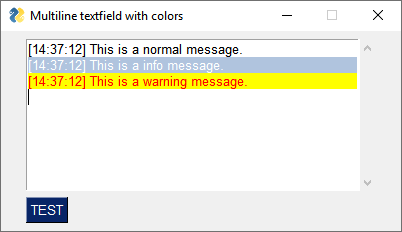
Good evening, I actually managed to build a working code based on your signposts. The widget variable helped. Of course you could do it more elegantly with a defined function or class, but it illustrates the method. I will certainly be able to optimize it soon. Here is the previous code snippet:
from datetime import datetime
import PySimpleGUI as sg

layout = [[sg.Multiline("", key="protocol", autoscroll=True)], [sg.Button("TEST")]]
window = sg.Window("Multiline textfield with colors", layout, size=(400,200))

while True:
    now = datetime.now()
    time = "["+now.strftime("%H:%M:%S")+"] "

    event, values = window.Read()
    if event is None:
        break
    if event == "TEST":
        txt = window.FindElement('protocol').Widget
        txt.tag_config("info", background="lightsteelblue", foreground="white")
        txt.tag_config("warning", background="yellow", foreground="red")
        txt.insert("end", time + "This is a normal message.\n")
        txt.insert("end", time + "This is a info message.\n", "info")
        txt.insert("end", time + "This is a warning message.\n", "warning")

window.Close()
Info for other users:
txt.tag_add("info", "1.0", "1.10")
This allows you to specify an area / range to be colored. However, the tag is generally effective from the beginning of the text in the text field. So you would have to add the length / line number of the text always before to the value specifications, if a further marking is to be set.
ncotrb
on 5 Jul 2019
I'll certainly take a look at this today. I'm impressed you did something SO Quickly!!
I'm a bit torn as to how to integrate this stuff into PySimpleGUI because it means creating a new Element and with it comes a whole new set of methods to deal with these colors. It's going to me some time to come up with the "simple" interface I'm looking for.
Need to determine if this could be an extension of MultlineOutput Element (which has not yet been implement on tkinter because it's not been needed). It could be a great delivery vehicle for this overall.
MikeTheWatchGuy
on 5 Jul 2019
Pretty spiffy!
MikeTheWatchGuy
on 5 Jul 2019
Whoa, wait... you used a Multiline Element???
Not an Output element?
Interesting as I didn't realize the ScrolledText Widget has the same capability as the Output Element.
Wow, I may be able to get this integrated easier than I thought. I want really easy to use methods which is where the challenge will be.
MikeTheWatchGuy
on 5 Jul 2019
Maybe this is also useful (but dirty), if you add the following line of code, the auto downscroll will work as expected. =)
window.FindElement('protocol').Update("", append=True)
That's an interesting technique. Is the autoscroll parameter not working as expected when you call update now? You need both append and autoscroll set if you want to scroll to the end.
I have been having terrible problems in PySimpleGUIWeb with this lately, but didn't realize there was a problem in tkiner version.
MikeTheWatchGuy
on 5 Jul 2019
The autoscroll parameter usually works perfectly in the PSG-TK version as described and expected. But if I use the insert function without a additional Update call, it won't work. But maybe I'm clumsy, I don't have much coding experience.
btw: I really appreciate your funny error handling comments in the PySimpleGUI.py :-D
ncotrb
on 5 Jul 2019
Thank you I can use all the compliments I can get these days. I thought all my comments were serious 😏
I've got a lot of commenting to finish and documentation to write on top of it, so adding new things are getting to be on the back burner lately.
For this one I need a week or two to think about the methods and interfaces I want to use for this. I am not going to do anything close to what tkinter supplied. I think there are some much more clever and user friendly designs awaiting.
Like everything else tkinter, I'm confident I can design a better Pythonic interfaces for whatever it is that needs doing.
MikeTheWatchGuy
on 5 Jul 2019
OK, this one is officially on the list. However, I need a bit of time to design the interface that I want for this. It's one I want to get "right", feel right, be _simple_ Pythonic.
I'm considering everything from embedded markers to chained methods to print-like interfaces that you output directly to, ......., Lots of possibilities.
MikeTheWatchGuy
on 6 Jul 2019
Here is one design that I'm exploring now. Wanted to see what you think about it.
The way it works is that "color codes" are embedded into strings. You can then use Python's many different string creation techniques to embed these markers.
If you want to use f-strings, it will look like this:
my_output = f"This is plain text. {CC('red')} And this code has red letters. {CC('white', 'red')}And this is text that is white on a red background"
Or, you can use _simple_ string concatenation:
my_output = "This is plain text." + CC('red') + "And this code has red letters."
CC is a Color Code generator function. It'll return the string that is embedded into your strings.
The end user shouldn't care at all what these look like because they will never see the internal representation. They will always see this string displayed in a MultilineOutput Element or I may continue to have only Multiline in the tkinter port. I dunno about that part just yet.
The goal here is to make an interface that is SO SUPER EASY for users that they will not need any additional help/documentation than the 2 lines I gave you above. You will pass this string into the Update method just like you do now. The difference is that you don't have to do ANY of the tagging, inserting, etc.
This needs to work on all PySimpleGUI ports so I'm trying to stay super-generalized if possible.,
MikeTheWatchGuy
on 6 Jul 2019
I am pleased that you want to accomplish this task with so much enthusiasm and I am very happy that my feedback is important to you.
I like your design approach very much Maybe opening and closing tags with styling parameters could be useful (like HTML with inline CSS). It would be great if additional formatting like bold, underline, italic, strikethrough etc. could be defined in this way. But I have too many wishes, I think! :-D
Even if you want to make it easier for inexperienced users, an experienced user will appreciate the direct solution. Personally, I find it appealing to specify the color specifications as global variables at some point.
With my somewhat limited knowledge I imagine two types of possible instructions (optional parameters) for the Update call:
1) range definition:
window.FindElement("_Output_").Update("This is a string.",
tag1=(range=(1,4), font="Open Sans", size="10", fg="white", bg="green", style="italic"),
tag2=(range=(11,16), font="Comic Sans", size="8", fg="red", bg="yellow", style="bold"))
2) tag definition:
window.FindElement("_Output_").Update(f"{tag("start", font="Open Sans", size="10", fg="white", bg="green", style="italic")}This{tag("end")} is a {tag("start", font="Open Sans", size="10", fg="white", bg="green", style="italic")}string{tag("end")}.")
I have added a function to my very dirty code to get better handling:
from datetime import datetime
import PySimpleGUI as sg

layout = [[sg.Multiline("", key="protocol", autoscroll=True, size=(400,9))], [sg.Button("TEST"), sg.Exit(button_color=('black', 'orange'))]]
window = sg.Window("Multiline textfield with colors", layout, size=(400,200))

def ColorMsg(element_name, message_type, message):
    txt = window.FindElement(element_name).Widget
    if message_type == "info":
        txt.tag_config(message_type, background="deepskyblue", foreground="white")
        txt.insert("end", message + "\n", message_type)
        window.FindElement(element_name).Update("", append=True)
    elif message_type == "success":
        txt.tag_config(message_type, background="limegreen", foreground="white")
        txt.insert("end", message + "\n", message_type)
        window.FindElement(element_name).Update("", append=True)
    elif message_type == "warning":
        txt.tag_config(message_type, background="yellow", foreground="red")
        txt.insert("end", message + "\n", message_type)
        window.FindElement(element_name).Update("", append=True)
    elif message_type == "error":
        txt.tag_config(message_type, background="red", foreground="white")
        txt.insert("end", message + "\n", message_type)
        window.FindElement(element_name).Update("", append=True)
    else:
        window.FindElement(element_name).Update(message + "\n", append=True)

while True:
    now = datetime.now()
    time = "["+now.strftime("%H:%M:%S")+"] "

    event, values = window.Read()

    if event is None or event == "Exit":
        break
    if event == "TEST":
        ColorMsg("protocol", "", time+"This is a normal message.")
        ColorMsg("protocol", "info", time+"This is a info message.")
        ColorMsg("protocol", "success", time+"This is a success message.")
        ColorMsg("protocol", "warning", time+"This is a warning message.")
        ColorMsg("protocol", "error", time+"This is a error message.")

window.Close()

ncotrb
on 6 Jul 2019
Good to see you've built some functions and infrastructure to help you out with your immediate needs.
It's going to be a bit before I'll be able to implement any of this. I have to complete the documentation work that's going on now as well as extend it all to encompass all 4 ports. It's a lot of documenting to say the least.
Even though it could be a while before the coding starts, I wanted to jump on the design right away while this topic is still fresh in everyone's mind. Of course I'm going to ask you what you think of the designs I come up with. You're the only person at this time that has worked with multi-colored multiline text in PySimpleGUI
I have been intentionally shutting out all of the various designs that are available now using tkinter, Qt, etc, so that I can focus on what I want the PySimpleGUI solution to appear to the user. I don't want to emulate any of them directly. I'm SURE I can do it easier and better. My lack of history of building GUI applications is one of my biggest strengths and likely why PySimpleGUI works as well as it does. I'm an outsider, bringing in methods and techniques that may, or may not, be familiar to the GUI world.
PySimpleGUI started as an alternative approach to existing Python GUIs. I want to continue the "do it in a simplified way" that is not like tkinter, Wx or Qt. I clearly am not going to be actually doing much that is entirely new as I am currently designing it to be "tag" based. As in "you embed color / formatting tags" into your text.
Embedded color / formatting tags are not new to computing, at least I don't think so. I assume that is exactly how colored text in a shell works already, right? You output some color code either on a character by character basis, or mark a spot as the starting point for a color and one for the end.
It needs to work across all 4 ports as well. The safest and easiest way I could think of doing this is to allow the user to work with normal strings, entirely, in conjunction with existing interfaces (the Update method in particular)
I'm with you on being able to define tags ahead of time, but mine are different than yours in a fundamental way. There is no concept of "range". I don't want anyone counting characters to determine what text should be colored red versus black. Just as soon as they've got it right, one additional character needs to be added and suddenly all of those hardcoded offsets are worthless.
I understand a desire to be able to encompass ANY kind of styling into these tags in ways like you mention, font, bold, etc, but I'm limiting things to color at this point. No fonts, no bolds, no underlines, no clickable specific bits of text like a URL. I'm shooting for enabling users to easily specify the foreground and background colors for a multi-lined string. It's going to be a large endeavor to pull this off across all 4 ports with just the color. I'll certainly keep in mind these other goals and will consider it down the road. It would help if I had a development team of 6 experienced engineers working for me, but I can't afford that just yet.
Finally, one of the fundamental benefits and goals of PySimpleGUI is compact code. I don't want to have to ask the users to add ANY additional lines of code if at all possible. I think that my design will be capable of doing all that.
Anyway, more further down the road. back to writing documentation.
MikeTheWatchGuy
on 6 Jul 2019
Just wanted to say that I'm really impressed with your dedication to updating this project and responding to comments. Great job, Mike! Keep it going. Can't wait for this feature to become available :)
 codeunifier
on 18 Jul 2019
codeunifier
on 18 Jul 2019
I'll get to it, honest.
In the meantime, I suggest using the working example that's been posted. That will at least get you something going.
There's a LOT going on right now. The number of user installs mysteriously almost tripled this week. And, I'm still trying to finish the docs. Until these docs get completed and a real RELEASE of 4.1 gets out the door, very little new feature work is being done. I'm spending a lot of time during the day answering questions and then spending the night trying to document as much as I can before nodding off at the keyboard.
MikeTheWatchGuy
on 19 Jul 2019
Hi, I'm after something similar (multicolor text in Multiline) but in the QT backend. I can do an .Update() with a given color but if i want several difference lines with different colours, i haven't found a way to do that. If you could give me some pointers on how to go about hacking it in for now i'd be very grateful.
 tensorfoo
on 15 Nov 2019
tensorfoo
on 15 Nov 2019
I'm not at all sure how to go about multi-colored text support in Qt. My guess is that it involves a rich text widget of some type that is probably not the one in use now.
 PySimpleGUI
on 15 Nov 2019
PySimpleGUI
on 15 Nov 2019
I'm not at all sure how to go about multi-colored text support in Qt. My guess is that it involves a rich text widget of some type that is probably not the one in use now.
Thanks. I'm looking at it, apparently it should be as easy as setTextColor. However I think when we do an Update() we might be setting the style back in between. I'm trying to figure it out. It might be an easy fix if that's the case.
tensorfoo
on 15 Nov 2019
I figured it out :) It was super simple, i was along the right track except when we use append=True on the Update on MultiLineEdit what happens in the backend is we call self.QT_TextEdit.setText(self.QT_TextEdit.toPlainText() + str(value))
which will set the text to the concat of the old and the new one so it will have the new color only. The fix was to change it to an append,
self.QT_TextEdit.append(str(value))
Then I have two different colored lines with successive calls to Update, provided i used append=True on the second one.
see https://github.com/tensorfoo/PySimpleGUI/commit/6bb716e88d0a09119def933b21f1ff37e42a3f05 for the changes required. I feel a similar approach could be taken for other stylistic changes like bold, font, etc which would be pretty cool.
tensorfoo
on 15 Nov 2019
I tried the Qt workaround, but am finding that the call to self.QT_TextEdit.append(str(value)) causes a newline to be inserted after each append. This may be why .setText was used instead of append.
PySimpleGUI
on 27 Nov 2019
Ah, but self.QT_TextEdit.insertPlainText(str(value)) does not insert a newline.
I can't use the direct changes proposed by @tensorfoo because I lose the ability to change text colors on updates of all Elements which is not a good thing.
Instead I'm adding a new parameter to the update the enables setting the color of each update that's called. A proposed new call signature that retains backward compatibility is:
def Update(self, value=None, text_color_for_value=None, disabled=None, append=False, background_color=None, text_color=None, font=None, visible=None)
I'll upload a new update to GitHub shortly.
PySimpleGUI
on 27 Nov 2019
OK, I've completed this feature for the PySimpleGUIQt port. You can read more about here here: https://github.com/PySimpleGUI/PySimpleGUI/issues/2261
Now that I've had some time to actually design and deliver something, it's likely I'll take a similar approach with the tkinter port. I like this approach where each time update is called, it is possible to set the color for that specific bit of text.
I had something more elaborate in my head previously, but keeping it simple has paid off well with the other PySimpleGUI features.
PySimpleGUI
on 27 Nov 2019
DONE DONE DONE DONE
FINALLY it's done for both PySimpleGUI and PySimpleGUIQt!
There is a demo program created to show how to use named Demo_MultilineMulticoloredText.py
The demo runs on both the tkinter and Qt ports with NO changes required other than the import change. I love these kinds of demos :-)
Here's the demo program so you can see what was implemented.
Thank you for everyone's patience as I figured this thing out.
import PySimpleGUI as sg
# import PySimpleGUIQt as sg

"""
    Demonstration of how to work with multiple colors when outputting text to a multiline element
"""

sg.change_look_and_feel('Dark Blue 3')

MLINE_KEY = '-MLINE-'+sg.WRITE_ONLY_KEY
layout = [  [sg.Text('Demonstration of Multiline Element\'s ability to show multiple colors ')],
            [sg.Multiline(size=(60,20), key=MLINE_KEY)],
            [sg.B('Plain'), sg.Button('Text Blue Line'), sg.Button('Text Green Line'),sg.Button('Background Blue Line'),sg.Button('Background Green Line'), sg.B('White on Green')
             ]  ]

window = sg.Window('Demonstration of Multicolored Multline Text', layout)

while True:
    event, values = window.read()       # type: (str, dict)
    print(event, values)
    if event in (None, 'Exit'):
        break
    if 'Text Blue' in event:
        window[MLINE_KEY].update('This is blue text', text_color_for_value='blue', append=True)
    if 'Text Green' in event:
        window[MLINE_KEY].update('This is green text', text_color_for_value='green', append=True)
    if 'Background Blue' in event:
        window[MLINE_KEY].update('This is Blue Background', background_color_for_value='blue', append=True)
    if 'Background Green' in event:
        window[MLINE_KEY].update('This is Green Backgroundt', background_color_for_value='green', append=True)
    if 'White on Green' in event:
        window[MLINE_KEY].update('This is white text on a green background',  text_color_for_value='white', background_color_for_value='green', append=True)
    if event == 'Plain':
        window[MLINE_KEY].update('This is plain text with no extra coloring', append=True)
window.close()
Just realized the docstring needs updating... will get that done shortly.
PySimpleGUI
on 1 Dec 2019
Forgot to post the window the demo is capable of making:

PySimpleGUI
on 1 Dec 2019
Closing this since it's officially released to PyPI. It will need to be addressed in the other 2 ports at some point but am OK with tk & Qt for now.
PySimpleGUI
on 15 Dec 2019
Related issues
MikeTheWatchGuy
·
3Comments
ncotrb
·
4Comments
 flowerbug
·
4Comments
MikeTheWatchGuy
·
6Comments
MikeTheWatchGuy
·
6Comments
flowerbug
·
4Comments
MikeTheWatchGuy
·
6Comments
MikeTheWatchGuy
·
6Comments
Most helpful comment
I'll get to it, honest.
In the meantime, I suggest using the working example that's been posted. That will at least get you something going.
There's a LOT going on right now. The number of user installs mysteriously almost tripled this week. And, I'm still trying to finish the docs. Until these docs get completed and a real RELEASE of 4.1 gets out the door, very little new feature work is being done. I'm spending a lot of time during the day answering questions and then spending the night trying to document as much as I can before nodding off at the keyboard.