Pysimplegui: Overlaying graphics
Is it possible to overlay 2 (or more) graphic images - what I have in mind is a pressure gauge with a fixed dial and then a moving needle superimposed on that which rotates around a fixed pivot (NOT in the centre of the dial) or similar diagrams. Even better if I could then overlay a digital readout on top of that. I can do it in small increments with multiple images (if I ignore the digital readout), but animation would be easier. I would also want to switch the dial and readouts between PSI & BAR.
 Derek-OM
All 11 comments
Sounds quite doable. However, it is you that will be doing the compositing. PySimpleGUI's task is to simply display the result.
I once did compositing using OpenCV2. Here's the routine I used. I think it's numpy based. You should be able to search stack overflow and find plenty of code to composite images.
Here's the code that I ended up using in my project:
def _composite_images(image1, image2, alpha=1.0, location=(0, 0)):
    anchor_x, anchor_y = location
    foreground, background = image1.copy(), image2.copy()

    # Check if the foreground is inbound with the new coordinates and raise an error if out of bounds
    background_height = background.shape[1]
    background_width = background.shape[1]

    foreground = cv.resize(foreground, DEFAULT_QR_FRAME_SIZE, interpolation=cv.INTER_CUBIC)
    # foreground = cv.resize(foreground, (int(background_height//3),int(background_width//3)), interpolation=cv.INTER_CUBIC)
    foreground_height = foreground.shape[0]
    foreground_width = foreground.shape[1]
    if foreground_height+anchor_y > background_height or foreground_width+anchor_x > background_width:
        raise ValueError("The foreground image exceeds the background boundaries at this location")
    # do composite at specified location
    start_y = anchor_y
    start_x = anchor_x
    end_y = anchor_y+foreground_height
    end_x = anchor_x+foreground_width
    blended_portion = cv.addWeighted(foreground,
                alpha,
                background[start_y:end_y, start_x:end_x,:],
                1 - alpha,
                0,
                background)
    background[start_y:end_y, start_x:end_x,:] = blended_portion
    return background
There is no guarantees behind this code.
Hit the net, let us all know what you find!
 MikeTheWatchGuy
on 26 Feb 2019
MikeTheWatchGuy
on 26 Feb 2019
Hello Mike - managed to build a working dial with the following code -
def dial_setup():
gauge = Image.open('pressure gauge for GUI - PSI.gif').convert('RGBA')
needle = Image.open('pressure gauge needle for GUI.gif').convert('RGBA')
rotation = (PSI - 40) * -1
needle2 = needle.rotate(rotation, resample=PIL.Image.BICUBIC, center=pivot)  # Rotate needle, pivot is centre point of needle gif
gauge.paste(needle2,box =(0, 63), mask=needle2)  # Paste needle onto gauge
" # the needle pivot defaults to the centre of the dial: box moves it 0 pixels right, 63 pixels down to where the actual pivot is
" # the needle gif needs to be the same dimensions as the dial, with the actual pivot at the centre of the gif
" # you will need to calculate the vertical offset from your original drawing files
" # the gifs are transparent outside the area of the actual graphic
gauge.save('new_gauge.png')
print (type(gauge))
return gauge
Now I just need to work out how to overlay text on it.
I do, however, have a problem with displaying the image. At the moment I am using the following line:-
sg.Image(filename='new_gauge.png',key='_fn1_', size = (PG_image_H, PG_image_W))],
but there seems to be no way to update it. - it is too clunky anyway, I really need to display the memory image, not the file. I tried using the data attribute, but it complained that my image (type PIL.Image.Image) was not byte type. Is there a way to convert it, or should I be using some other way to display it.
I have written a small sample program to show how this works and would like to add it to your code samples - how do I go about it? (when working obviously).
Derek-OM
on 27 Feb 2019
Managed to add the text with the following replacing the last 3 lines in last post :-
fnt=ImageFont.truetype(font='FreeMono.ttf', size=48)     # in CURRENT folder - download if missing
img_draw=ImageDraw.Draw(gauge)
img_draw.text((60,185),str(int(PSI)),(0,0,0), font=fnt)  # Coordinates, Text, Color
img_draw.text((60,187),str(int(PSI)),(0,0,0), font=fnt)  # Faking bold font
img_draw.text((62,185),str(int(PSI)),(0,0,0), font=fnt)  # Faking bold font
gauge.save('new_gauge.png')
print (type(gauge))
return gauge
Still need to crack the display problem though.
Derek-OM
on 27 Feb 2019
I may have misspoken about PySimpleGUI's image capabilities.
It is possible to "draw" an image onto a Graph Element, just like you can draw circles, lines, etc. What I do not know is how the alpha channel is handled for GIFs and PNGs. It may be possible to put together one of these gauges using a Graph element that has a series of drawing calls performed on it. Wish I had said something before. I'll do a test to see if compositing is done correctly.
The Uno Game that can be found in the demos shows how multiple images can be overlapped for example.
I've taken several passes as making meters and gauges with PySimpleGUI, none of them ever came to conclusion. Lots of sketches in notebooks, etc, but no code to show for it.
Of course I welcome submissions to the Demo Programs. this one sound like an excellent one as it adds a really cool capability.
MikeTheWatchGuy
on 27 Feb 2019
Regarding images and formats....
There are 2 ways to get images specified. One is via a filename. The other is via a "bytes" object.
A base64 encoded image is one example of a bytes object.
Look at the demo programs that use OpenCV to see more examples of how to interact with the Image element using the data parameter. Check out Demo_OpenCV.py in particular.
I ALWAYS seem to have to come and ask @JorjMcKie (my SAVIOR when it comes to images) when it comes to these things and he magically makes them all OK! But I don't seem to learn from the experiences. Maybe this time?? (HELP!!)
Don't worry, we'll make it so that you can update your images without having to load them from a file.
MikeTheWatchGuy
on 1 Mar 2019
@Derek-OM - as per your comment and Mike's previous post (can't resist flatteries):
I do, however, have a problem with displaying the image. At the moment I am using the following line:-
sg.Image(filename='new_gauge.png',key='_fn1_', size = (PG_image_H, PG_image_W))],
but there seems to be no way to update it. - it is too clunky anyway, I really need to display the memory image, not the file. I tried using the data attribute, but it complained that my image (type PIL.Image.Image) was not byte type. Is there a way to convert it, or should I be using some other way to display it.
PIL can open memory resident images (i.e. not reading disk files itself) if you feed it a file-like object instead. For example a
io.BytesIO.conversely, PIL can write an
Imageto memory instead of a file - again using a file-like object. And you can choose the image format of that as well, potentially including any necessary conversions. Snippet:
# let img be a PIL Image
import io
bio_out = io.BytesIO() # file-like object in memory
img.save(bio_out, format="PPM") # PIL writes to memory, image format PPM

# downstream applications like PySimpleGUI can now use this image "file"
# either they are able to directly use the file-like object "bio_out", or they need to be
# given the file's content, bio_out.getvalue()

img_field.Update(data=bio_out.getvalue()) # I believe this is the syntax in PySimpleGUI

# the "data" parameter accepts a number of formats:
# PPM images, PNG images (Python3 only), PIL ImageTk, very few others
# avoid PNG if you can for performance reasons
 JorjMcKie
on 1 Mar 2019
JorjMcKie
on 1 Mar 2019
Hello - thanks for the suggestions - some improvement but still not updating - I am obviously still doing something wrong, but not sure what.
The attached files are the py code as txt (at least it does not screw up the formatting) and the 3 gif files for the display. You will also need FreeMono.ttf (it will not let me download that file type) or find a suitable substitute.
The program displays 2 dials - one for PSI at top, another for BAR below it.
There are 2 sliders - one changes the PSI values. Both needles should move in sync.
The second slider sets speed timing for an AutoRun button that slowly increases the PSI value from 0 to 80.
The PSI dial uses the latest suggestions - it is now displaying the initial dial + needle, but does not appear to update. It took quite a bit of code jiggling to get it to appear at all. Strangely the transparent area outside the dial has aquired a blue background.
The BAR dial uses my original code that failed to update.
The digital value for PSI or BAR should appear on the left hand side of the dials opposite the PSI & BAR marks.
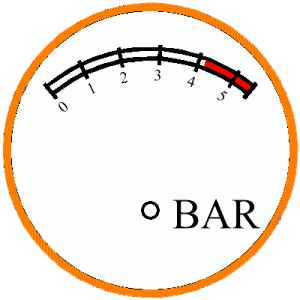
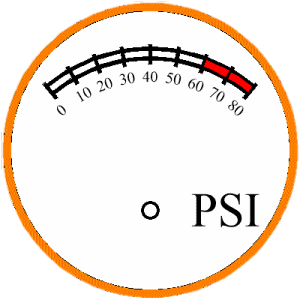
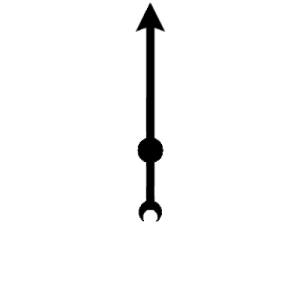 Derek-OM
on 1 Mar 2019
Derek-OM
on 1 Mar 2019
Hello - finally cracked it - the display problem was down to when is a global not a global. In python's case it is more like continental! I am really, really begining to hate python's variable handling, for multiple reasons that I will not go into here. Corrected code is attached -
Dial_demo.txt
It is probably horribly un-pythonic, but it is my first attempt to code with python and it is bit difficult to break the coding habits of half a century!
Mike - can you add it to the demo programs, or do you want me to do it?
Derek-OM
on 7 Mar 2019
FANTASTIC!
I KNEW you would eventually get it.
I was looking forward to seeing something like this someday! Congrats on doing it.
Let me play with the code for a bit.
MikeTheWatchGuy
on 7 Mar 2019
This is REALLY cool! Like MEGA cool. I really wanted to do something like this but never got around to it. I'm glad to see someone else did!
Before posting in the Demo area, I would like to see some changes:
- Do not require downloading of the FreeMono.ttf file. Is it really needed? Can a system font work?
- Convert the files to Base64 variables that are added to the code so that the files are not required
The idea is to supply a single .py file that will do what your demo does (without any additional files)
Not required right away, but these would be great:
- Make your dial code into an SDK that people can easily integrate.
- It would be great to turn into a Class.
- This would allow Creation, and Update methods
- Perhaps could be made to look like an Element or even something like it turned into an official Element
MikeTheWatchGuy
on 7 Mar 2019
I would really love to use a standard font, but using the 'bigfont' (Helvetica 17 bold) defined in the program produced the error "AttributeError: 'str' object has no attribute 'getmask'". A bit of research suggested that the img_draw.text command required a PILfont, hence the 'FreeMono.ttf'. If anyone knows how to use PIL with a standard font I would prefer that.
Run into a problem trying to use base64 - encoded the gif then copied and pasted into a line as follows:-
gauge_in=base64.b64decode('pasted code')
the problem occurs later with the line:-
gauge=gauge_in.copy() # create true copy, NOT a link!
which produces the error "AttributeError: 'bytes' object has no attribute 'copy'".
This is such a huge variable (estimated ~ 15K) that python defaults to just providing a link instead of a true copy. The result of this is that the needle and pressure value just build up as the needle moves. It needs a clean copy of the dial to add the needle and pressure number to.
I am a total novice at using python (worse still this is the first object orientated programming language I have used) with a total of real solid programming of about one month preceeded by about two months of experimenting, so a lot of this stuff is way outside my comfort zone.
Derek-OM
on 8 Mar 2019
Related issues
 ncotrb
·
4Comments
ncotrb
·
4Comments
 scmanjarrez
·
5Comments
scmanjarrez
·
5Comments
 yogesh-aggarwal
·
3Comments
yogesh-aggarwal
·
3Comments
 ECOM-Klaus
·
4Comments
ECOM-Klaus
·
4Comments
 xuguojun168
·
3Comments
xuguojun168
·
3Comments
Most helpful comment
Hello - finally cracked it - the display problem was down to when is a global not a global. In python's case it is more like continental! I am really, really begining to hate python's variable handling, for multiple reasons that I will not go into here. Corrected code is attached -
Dial_demo.txt
It is probably horribly un-pythonic, but it is my first attempt to code with python and it is bit difficult to break the coding habits of half a century!
Mike - can you add it to the demo programs, or do you want me to do it?