Pysimplegui: Button and button text still invisible on Mac
I've just came across PySimpleGUI and it's a life saver for me!
However running the PySimpleGUI.py demos, I'm still experiencing the invisible button text issue, like the one https://github.com/PySimpleGUI/PySimpleGUI/issues/70
Running using PyCharm, under macos mojave. Tried ChangeLookAndFeel to other than "GreenTan", but it seems Mac is not supported for changing the colour scheme?
No problem while running under Win10. Unfortunately most of my python development is doing on my Mac.
(Forgive my ignorance if I posted this wrongly. I'm still new using github)
-Shah-

 shahgazer
All 34 comments
Did you try making some of the changes that were suggested in the Issue you referenced, such as setting the global button color?
Add this to the very beginning of your code.
sg.SetOptions(button_color=sg.COLOR_SYSTEM_DEFAULT)
 MikeTheWatchGuy
on 30 Jan 2019
MikeTheWatchGuy
on 30 Jan 2019
I've added at the top as follows:
sg.SetOptions(button_color=sg.COLOR_SYSTEM_DEFAULT)
sg.ChangeLookAndFeel('GreenTan')
and it is still the same.
Do I have to make any changes in the COLOR_SYSTEM_DEFAULT values in Pysimplegui.py
COLOR_SYSTEM_DEFAULT = '1234567890' # Colors should never be this long
shahgazer
on 31 Jan 2019
The only thing I can think of at the moment is for you to search through both the open and closed Issues for how other people solved Mac problems.
MikeTheWatchGuy
on 1 Feb 2019
I am running in to a similar issue, and I think it has to do with using dark mode on Mojave. Changing appearance from dark to light on mine gave buttons their texture and text back
 Tim020
on 18 Feb 2019
Tim020
on 18 Feb 2019
_Finally_! Something that makes a difference!
THIS is our bug/fix I bet. Thank you so much for posting it!
I see in the above screenshot that the Checkbox text is missing too. Does that come back when you turn on light mode?
MikeTheWatchGuy
on 18 Feb 2019
I can confirm this.
 wmarchewka
on 6 Mar 2019
wmarchewka
on 6 Mar 2019
I'm having a similar issue, however I didn't notice a difference between light mode and dark mode.
import PySimpleGUI as sg
layout = [ [sg.Submit('Submit')] ]
window = sg.Window('Test window').Layout(layout)
event = window.Read()
With dark mode:

With light mode:

Conditions:
- MacOS Mojave 10.14.3
- Python 3.7.2 (homebrew)
- PySimpleGUI==3.25.0
 arnauldvm
on 12 Mar 2019
arnauldvm
on 12 Mar 2019
I suspect that the tk version may have a part to play as well.
MikeTheWatchGuy
on 13 Mar 2019
If you add the COLOR_SYSTEM_DEFAULT options it seems to fix it in Mojave light mode:
import PySimpleGUI as sg

sg.SetOptions(
                 button_color = sg.COLOR_SYSTEM_DEFAULT
               , text_color = sg.COLOR_SYSTEM_DEFAULT
             )
layout = [ [sg.Submit('Submit')] ]
window = sg.Window('Test window').Layout(layout)
event = window.Read()


Dark mode is still affected, I might do some more digging.
Environment:
MacOS Mojave 10.14.3
Python 3.7.2 (also brew)
PySimpleGUI 3.25.0
 silvether
on 18 Mar 2019
silvether
on 18 Mar 2019
Oh wow! FINALLY, another clue!
I super-appreciate you taking the time to figure out a way to "fix" this.
BTW, the setting COLOR_SYSTEM_DEFAULT basically tells my software to leave the settings the f_ck alone! Don't do anything. Don't set any color. Don't try to guess. Just do nothing with that setting.
So many people are suffering that have Macs. I wish I could do more, but I don't have a Mac.
PLEASE oh PLEASE let me know if you can solve the dark mode problem!
MikeTheWatchGuy
on 18 Mar 2019
It reproduces to me.
After some googling, I find this post:
https://stackoverflow.com/questions/52529403/button-text-of-tkinter-not-works-in-mojave
conda update -n root conda and conda update --all seem to work to my environment!
 jnory
on 24 Mar 2019
jnory
on 24 Mar 2019
WOW! What a find!
Does this mean that everyone that is having this button problem is running Conda?
> Someone else in the thread said upgrading to Python 3.7.1 fixed it.
Another one offered this workaround:
I found an easy solution on Reddit: just resize the window slightly, and the interface elements appear!
MikeTheWatchGuy
on 24 Mar 2019
Given following test program:
try:
    import Tkinter as tk
except ImportError:
    import tkinter as tk

root = tk.Tk()
b = tk.Button(root, text='foo')
b.pack()
root.mainloop()
Homebrew Python 2 and 3 provide empty button in Mojave + dark mode, but system's /usr/bin/python (or /usr/bin/pythonw) work fine. Similarly, the PySimpleGUI works in system python but not Homebrew one.
This works:
mstenber@yuri ~>/usr/bin/pythonw
Python 2.7.10 (default, Aug 17 2018, 19:45:58)
[GCC 4.2.1 Compatible Apple LLVM 10.0.0 (clang-1000.0.42)] on darwin
Type "help", "copyright", "credits" or "license" for more information.
>>> import PySimpleGUI27 as sg
>>> sg.main()
but other Pythons in /usr/local/bin installed by Homebrew do not.
 fingon
on 26 Mar 2019
fingon
on 26 Mar 2019
Resize thing did not work for me btw, the button is there but text is white on white background in both Python versions from homebrew (and also Python 3.7.2 I built from scratch, although dunno if PYTHONPATH was contaminated somehow in that test).
fingon
on 26 Mar 2019
I finally get this issue resolved. The root cause is python3 is using the outdated tcl/tk lib comes with MacOS if you install python3 via homebrew.
You can check the tcl/tk version by following command:
python3 -c "import tkinter; print(tkinter.TkVersion)"
If it shows "8.5", then you will find that button text is invisible. Because Python3 only works fine with tcl/tk 8.6 on MacOS.
To resolve the issue, you need to uninstall brew version, download and install the official python3 package from python.org.
Then you could run upper tkinter version checking command again, if you get "8.6", the issue is resolved.
 AllenDang
on 5 Jun 2019
AllenDang
on 5 Jun 2019
Oh wow!!
This is huge for Mac users!
Finally, instructions that will enable Mac users to use PySimpleGUI as there have been so many problems. I will pull out your instructions and include them in the readme.
I wonder if this upgrade will enable Mac users to use color.
Hmmm... I'll look at checking the version in the PySimpleGUI code and can re-enable some of the features that have been blocked.
MikeTheWatchGuy
on 5 Jun 2019
Aha! I'd love to test the re-enabled features. :P
AllenDang
on 5 Jun 2019
You can test several things that haven't worked such as button color. You'll get a warning printed out, but you'll still be able to do the operation.
The only call that stops you is the call to ChangeLookAndFeel. All other calls, such as calling Update on a Button element to change its color should work now (in theory).
If it works for you,, I'll add more code to deal with the version number.
MikeTheWatchGuy
on 5 Jun 2019
BTW, probably correct thing to do is to open an issue against Homebrew Python port - @AllenDang did you do it already?
fingon
on 5 Jun 2019
Oh.... I can change the text color, but background color still doesn't work.
I've tried to set the button_color both in constructor method, and Update, none of them works.
AllenDang
on 6 Jun 2019
Oh, wait, there's a check using the Button constructor that blocks Mac users.
One way around this is to set the Button class variable Button.ButtonColor = tuple like you would send into the constructor. You must do this before calling Layout or Window passing the layout parameter.
Try this little bit of code and see if it makes a button that's white on red:
import PySimpleGUI as sg

my_button = sg.Button('Read')
my_button.ButtonColor = ('white', 'red')

layout = [
            [sg.Text('My layout')],
            [my_button]
         ]

window = sg.Window('My new window', layout)

while True:             # Event Loop
    event, values = window.Read()
    if event is None:
        break
    print(event, values)
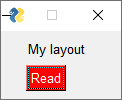
The reason I mentioned the Update method earlier is that it does not have this Mac check on it. It will complain, but it will also set the values.
MikeTheWatchGuy
on 6 Jun 2019
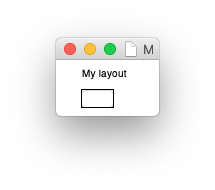
I've tried your code, but the button background color remains white...
AllenDang
on 10 Jun 2019
Ugh.... it appears the problem remains. That's too bad. It seemed like it was getting close. I'm shocked the tkinter team for the Mac hasn't fixed this yet since it's been a year.
Do you have "Dark Mode" set correctly for PySimpleGUI? I recall that being part of the problem.
It appears that you cannot set the background color. You can try and change the text color to red to see what it looks like, if anything. Reverse the colors:
my_button.ButtonColor = ('red', 'white')
MikeTheWatchGuy
on 10 Jun 2019
The text color could be changed. And I tested i "light mode" and "dark mode", background color doesn't work in both.
AllenDang
on 11 Jun 2019
After some research, I found a way to change the background color of a TK button.
Here is the code:
`from tkinter import *
import platform
if platform.system() == "Darwin": # if its a Mac
B = Button(text="Refersh All Windows",
highlightbackground="Yellow", fg="Black", highlightthickness=30)
else: # if its Windows or Linux
B = Button(text="Refresh All Windows", bg="Yellow", fg="Black")
B.place(x=5, y=10, width=140, height=30)
mainloop()`
Use highlightbackground instead of bg on Mac just works. May be this will help...
AllenDang
on 11 Jun 2019
Any Updates ?
 joseph-vedadi
on 11 Jul 2019
joseph-vedadi
on 11 Jul 2019
Am planning on making the above change shortly. Simply haven't had the time to get to this.
MikeTheWatchGuy
on 11 Jul 2019
If you're using the latest code, you can add this single line of code and see if it fixes your problem.
window.FindElement('MY ELEMENT KEY').Widget.config(highlightbackground='yellow')
I tried it and on my windows machine it didn't do anything, but if I changed the foreground it did change. So perhaps on Windows the highlightbcakground doesn't do anything. Pperhaps if the background is already set it doesn't work on Windows?
Get sure and get the latest code, 4.0 and up in order to get access to the Widget member variable.
MikeTheWatchGuy
on 11 Jul 2019
Upgrading python to 3.8 with Tk 8.6 on Catalina works. I uninstalled the Brew version and installed the Python.org version. I haven't checked my other installs but hoping things still work.
 RideLikeTheWind
on 26 Nov 2019
RideLikeTheWind
on 26 Nov 2019
I'm not sure how valid your test may have been as it depends on what version of PySimpleGUI you were using. It could be you picked up the ttk buttons which makes Mac buttons look great now.
I need to make a better list, perhaps on the non-existent WIKI about the Python versions that have problems. I think a new one was reported this week about 3.8. Anything > 3.7.3 has had problems with Table and Tree elements.
If the buttons look good on your Mac with 3.8, it would be nice to know what version of PySimpleGUI you're running.
 PySimpleGUI
on 26 Nov 2019
PySimpleGUI
on 26 Nov 2019
I'm not sure how valid your test may have been as it depends on what version of PySimpleGUI you were using. It could be you picked up the ttk buttons which makes Mac buttons look great now.
I need to make a better list, perhaps on the non-existent WIKI about the Python versions that have problems. I think a new one was reported this week about 3.8. Anything > 3.7.3 has had problems with
TableandTreeelements.If the buttons look good on your Mac with 3.8, it would be nice to know what version of PySimpleGUI you're running.
Yep for sure - I am running 4.6.0. That said, I haven't tried any Table or Tree elements at this stage. It's a _very_ simple interface. Nonetheless, just glad I can see the buttons.
RideLikeTheWind
on 28 Nov 2019
Can you send me a screenshot of running your application and also one of running the test harness (call sg.main())?
Oh, also... what does this statement mean?
I uninstalled the Brew version and installed the Python.org version.
Is everyone on the Mac NOT running the Python and the tkinter versions released on the Python web site? I'm seriously confused. Are you saying that when someone reports running 3.7 on the Mac they're not downloading that from the Python.org but instead getting is elsewhere?
PySimpleGUI
on 28 Nov 2019
@RideLikeTheWind I just realized that you didn't mention _color_ in your description of what's working. This means you may be using the older plain tk buttons. Those have been working for quite some time... when the button is white.
Only the recent 4.7.0 release of PySimpleGUI has full support for colored buttons on the Mac. I think if you upgrade to that version you'll be even happier with the results as you will be able to use all of the look and feel themes and have windows that look like all of the other platforms. The key was getting support for ttk buttons to work.
Can you verify by what you mean by working? Are your buttons on 4.6 white?
I'm going to close this topic as the Mac button issues is finally fixed!
PySimpleGUI
on 28 Nov 2019
Still busted on the homebrew version as of now
 jamesy0ung
on 30 Oct 2020
jamesy0ung
on 30 Oct 2020
Related issues
MikeTheWatchGuy
·
5Comments
 lucasea777
·
3Comments
MikeTheWatchGuy
·
6Comments
lucasea777
·
3Comments
MikeTheWatchGuy
·
6Comments
 eyeonus
·
6Comments
eyeonus
·
6Comments
 ncotrb
·
4Comments
ncotrb
·
4Comments
Most helpful comment
I am running in to a similar issue, and I think it has to do with using dark mode on Mojave. Changing appearance from dark to light on mine gave buttons their texture and text back