Pysimplegui: An empty object that can be sized with float
Can you think of something that PSG has that can push that plus button down about 0.4f? I'd like to not over hack this thing to make it look right if there is some element I can use as a buffer to push it down a bit. The difference is caused by the multiline, which i can't make any smaller than it is already. I suppose I could also make the plus sign have a grey bar at the top but that's the kind of hack I want to avoid. Thanks.

Code:
EHX_column = [[Sg.Image(data=TestAnatomy_images.econfig)],
                      [Sg.Multiline("Enter Element Tag", size=(35, 1),
                                    enter_submits=True, key='enterElement',
                                    do_not_clear=True)],
                      [Sg.InputCombo(ddElements, key="elementtype",
                                     size=(35, 1))],
                      [Sg.InputCombo(ddCols, key="colortype", size=(35, 1))],
                      [Sg.ReadButton('', key="highlight", border_width=0,
                                     size=(33, 5),
                                     image_data=TestAnatomy_images.HLimg,
                                     tooltip="Highlight Element")]]

        buildcolumn = [[Sg.Image(data=TestAnatomy_images.scriptoptionsconfig)],
                       [Sg.InputCombo(ddbuildactions, key="buildactions",
                                      size=(35, 10))],
                       [Sg.InputText("Add Arguments to Command",
                                     key="enterText", size=(38, 9))],
                       [Sg.T("")],
                       [Sg.T("")],
                       [Sg.ReadButton(
                               '',
                               key="addButt",
                               image_data=TestAnatomy_images.addButt,
                               border_width=0,
                               tooltip="Add the command to your script")]]
 eagleEggs
All 19 comments
We attempted, and failed, from what I recall, at setting the size of a Column.
I'm wondering if putting a column within a column would be a way to get around it?
For example if want 800x600 column, start with a column that sizes to 800 wide, then place that into a column that sizes 600 tall.
I'm still unsure what went wrong with that column sizing code. It's just not right.
It would be helpful to work backwards using a pure tkinter implementation. That's essentially what we have to mirror.
I share your frustration at lining sh*t up in PySimpleGUI.
The PySimpleGUIWeb (Remi) port may show a way out of these kinds of problems as I'm going to be adding options to Columns that signal what "kind" of layout to use. For example, "Center all elements within Column".
Qt has a "Stretch" widget that enables pushing widgets around inside of a window. You can right justify an Element by adding a Stretch Element to the left of it. Put a Stretch between 2 Elements and they will split with one going to the far left, the other the far right. Hmmmm.... I assume now that having one on each side of an Element will CENTER it.
What's needed for your operation is the ability to size a column to a particular size and also to push the button down to the bottom of the Column. I'm not sure how to do that in any of the frameworks (tk, Qt, Wx, Web).
 MikeTheWatchGuy
on 26 Jan 2019
MikeTheWatchGuy
on 26 Jan 2019
Hmmm ok. I will mess around with it some more and see if I can get it to work. Maybe I’ll find a reason to add the same elements in both columns so it matches right. But for now just add a buffer grey bar on the image as that is the quickest fix.
eagleEggs
on 26 Jan 2019
I share in your frustration :-(
MikeTheWatchGuy
on 26 Jan 2019
Well gee your padding is floatable... Only thing is I'm a single pixel off of where I need and it will either go over or under it lol.... This is palatable though - Much better than the original.
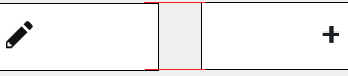
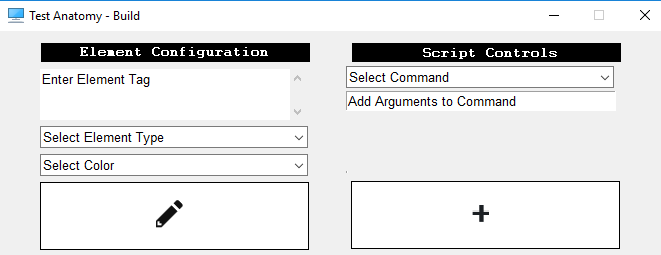
eagleEggs
on 26 Jan 2019
huh? How did you do that? And what padding, on the last element of the window?
MikeTheWatchGuy
on 26 Jan 2019
I spent way too much time on this but it was worth it lol...
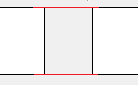
Yea the padding on every object are floats. Very helpful!
eagleEggs
on 26 Jan 2019
What do you mean by that? The "element pad" that is a parameter to every element call?
Maybe if you posted some code it would made sense.
MikeTheWatchGuy
on 26 Jan 2019
Finding the exact number for that one pixel shifting ended up being this:
[Sg.ReadButton('', key="highlight", border_width=0,
                                     size=(33, 5) ,pad=(0,15.99999),
                                     image_data=TestAnatomy_images.HLimg,
                                     tooltip="Highlight Element")]]
That's _WEIRD_.
What does it do? Does that not add 15 pixels on each side? Does it only make a difference if you have a whole lot of them on a single line so that the .00001 adds up to a single pixel? I can't imagine how it could matter since you can't split a pixel in half.
If I ever get the PySimpleGUIWeb far enough along to support your stuff, I would be interested to see if it's a fit for your project.
MikeTheWatchGuy
on 26 Jan 2019
Yea it is strange. It does pad all sides and I didn't notice that. Throws it off a bit more.... aaaah. But the fact that the two buttons didn't align together was actually worse for my brain when I would look at it. I'll work this part out somehow. Maybe redesign so the top options are on the side of the large multiline or something.
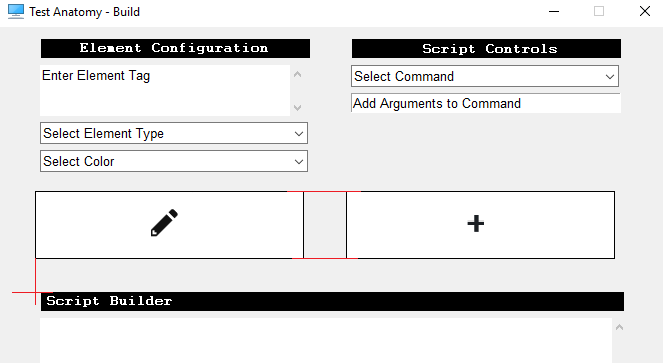
Wait... Is the PSGWeb the secret project? I would love to port this to a web app.
Oh and it’s just that element. I went from 15.9999999999 and kept removing a single 9 until finding the right number.
Feel free to close this unless you want to talk more on the physics of splitting pixels :P
eagleEggs
on 26 Jan 2019
You could try including a blank Image, Graph or Canvas element that has a specific size. This will allow you to pad things out in a different way. Those you can specify a particular size.
Sorry I don't have better alignment mechanisms. If I understood how to do it in tkinter then I could provide the tools to you to get it done. The problem is that I don't know how to implement what you're looking for in tkinter other than what we've already got.
If you can figure out what you need I'll do my best to code it up. It's unclear to me exactly what that is.
MikeTheWatchGuy
on 27 Jan 2019
Any way you could let me know what elements in layouts you’ll support next in PSGWeb? I loaded up today and looks / works great, would like to see if investing time in now is worth it. Is this actively developed currently? Side note really looking forward to using it for my server module so users can use their browser :)
eagleEggs
on 1 Feb 2019
PySimpleGUIWeb is the #1 priority at the moment. Wx is on hold as a result. I want to get Web done quickly. Working hard to get Web to a point that I can go back to Wx. Have no fear, PySimpleGUIWeb will get most or all of its elements.
It would be helpful to know the priority order of your elements needed. I tend to work best knowing what people actually need versus me coding through a feature matrix.
MikeTheWatchGuy
on 1 Feb 2019
GREAT!!!
It's def not a drop in conversion yet (at least for me!). I had to remove some flags to get it to render. Perhaps some element flags are affecting things. But I can run my existing app in PSGWeb but only blue buttons render and clicking them don't cause errors, no formatting, no images, no text. But it may be specific to my app which is a bit large in terms of the main loop and multiple windows.
edit: this is just a quick update. I'll get some more details later
eagleEggs
on 1 Feb 2019
AH... right, multiple windows.... HUGE problem in PySimpleGUIWeb.
Popups don't currently work for example.
I'm planning on making Popups work as "dialogs" in Remi. Hard to explain what that means.
Stick with the other versions of PySimpleGUI for now because multiple windows may be a ways off.
MikeTheWatchGuy
on 1 Feb 2019
Yes I'll wait it out but I'm excited, nice work I love the way it works and looks.
eagleEggs
on 1 Feb 2019
I'm loving this repl.it thing.
Struggling to get through how to do an Update to an InputText element. The cursor isn't moving to the end of the string when I Update.
Next element I want to do is Image or Graph
MikeTheWatchGuy
on 1 Feb 2019
Image is probably the most anticipated :) IMO
eagleEggs
on 1 Feb 2019
I'm happy with where this is at, we can close this.
Also wanted to add that I did something kind of interesting (to me) with the gui main loop.
Added a database commit under the
if b4 != Sg.TIMEOUT_KEY:
                if shelfdb['ta'][7] == True:
                    driverDB.insert_gui("{}_{}".format(b4, values4),
                                        shelfdb['ta'][17],
                                        shelfdb['ta'][1],
                                        shelfdb['ta'][2])
So my database fills up with whatever the users are doing in the GUI. Which is kind of cool for assessing any issues that come up, as well as not having to go get their hardcoded log - Plus the ability to graph what they're doing... lol. Anyway was really easy with the way PSG is so thought I'd share.
eagleEggs
on 5 Feb 2019
Related issues
 martinmeteor
·
4Comments
martinmeteor
·
4Comments
 scmanjarrez
·
5Comments
MikeTheWatchGuy
·
6Comments
scmanjarrez
·
5Comments
MikeTheWatchGuy
·
6Comments
 ncotrb
·
4Comments
ncotrb
·
4Comments
 ECOM-Klaus
·
4Comments
ECOM-Klaus
·
4Comments