Pysimplegui: Potential collab with guizero
Hi there, I found another project on GitHub
https://github.com/lawsie/guizero, where they wanted to make gui dev in Python easier especially for kids to use, I was thinking that maybe you could collaborate together?
 Pyroseza
>All comments
I'm familiar with the project and looked at it prior to writing PySimpleGUI.
The package interfaces have a different architecture. PySimpleGUI focuses on providing access to all of the underlying GUI's widgets in a simplified manner. It simplifies the overall GUI interfaces by providing a non-Object-Oriented architecture and does not have a callback architecture.
Both projects have positive intentions as a core principal. The other open source GUI projects motivated the choices of PySimpleGUI's goals. A different overall approach was chosen however.
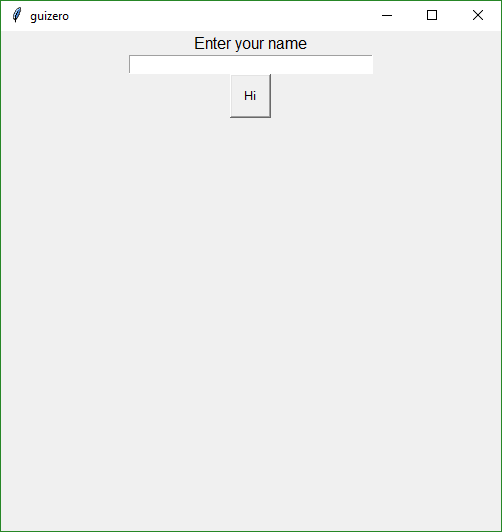
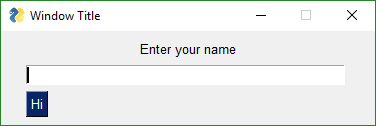
Here is a side by side comparison. I downloaded a simple application from the guizero GitHub that allows you to enter your name and then it will popup a window with the information you entered. Additionally, each character you type is printed out on the console.
guizero
The window
The code
from guizero import App, TextBox, PushButton, Text, alerts
from tkinter.font import Font

def go():
    alerts.info("hi", "hi " + textbox.value)

def key_pressed(key):
    print("key pressed {}".format(key))

app = App()
text = Text(app, text="Enter your name")
textbox = TextBox(app, width=40)
textbox.update_command(key_pressed)
button = PushButton(app, text="Hi", command=go)
app.display()
PySimpleGUI
The window
The code
import PySimpleGUI as sg

layout = [ [sg.Text('Enter your name', justification='center', size=(40,1))],
           [sg.Input()],
           [sg.Button('Hi')]]

window = sg.Window('Window Title', return_keyboard_events=True).Layout(layout)

while True:             # Event Loop
    event, values = window.Read()
    if event is None or event == 'Exit':
        break
    elif event == 'Hi':
        sg.Popup('Hi ' + values[0])
    else:
        print(f'Key pressed {event}')
If you study the code you'll see the differences in architecture I mentioned before.
The PySimpleGUI code is designed to be linear. You see everything that's happening to your window right there in your code's Event Loop. Traditional GUIs utilize callbacks for button presses. Button presses and all other events are returned through a single interface, the call to Read.
All of the GUI packages solve certain problems quite effectively. Each has a set of features they cover in an architecture of their choosing. I don't consider one any one of us better than the others.
 MikeTheWatchGuy
on 18 Jan 2019
MikeTheWatchGuy
on 18 Jan 2019
Related issues
 martinmeteor
·
4Comments
martinmeteor
·
4Comments
 OPMUSER
·
5Comments
OPMUSER
·
5Comments
 flowerbug
·
4Comments
flowerbug
·
4Comments
 OndoyManing
·
4Comments
OndoyManing
·
4Comments
 yogesh-aggarwal
·
3Comments
yogesh-aggarwal
·
3Comments
Most helpful comment
I'm familiar with the project and looked at it prior to writing PySimpleGUI.
The package interfaces have a different architecture. PySimpleGUI focuses on providing access to all of the underlying GUI's widgets in a simplified manner. It simplifies the overall GUI interfaces by providing a non-Object-Oriented architecture and does not have a callback architecture.
Both projects have positive intentions as a core principal. The other open source GUI projects motivated the choices of PySimpleGUI's goals. A different overall approach was chosen however.
Here is a side by side comparison. I downloaded a simple application from the guizero GitHub that allows you to enter your name and then it will popup a window with the information you entered. Additionally, each character you type is printed out on the console.
guizero
The window
The code
PySimpleGUI
The window
The code
If you study the code you'll see the differences in architecture I mentioned before.
The PySimpleGUI code is designed to be linear. You see everything that's happening to your window right there in your code's Event Loop. Traditional GUIs utilize callbacks for button presses. Button presses and all other events are returned through a single interface, the call to
Read.All of the GUI packages solve certain problems quite effectively. Each has a set of features they cover in an architecture of their choosing. I don't consider one any one of us better than the others.