Pysimplegui: Window management?
Hey. I'm sure I'm doing something completely wrong but I need to have windows pop up, get the values from buttons and inputs, and close and open the main window again to get the inputs from that window.
So, swapping back and forth - I'm sure there is a built in way to do this.
Currently I'm closing the main window, then opening a new window, then closing again. Ideas? Guide me!!!
while True:

    b, values = window.Read()  # read input values from GUI

        # if you click config button, close main window and open config window:
    if b == "config": # main menu config button press
        window.Close()
        window = sg.Window('Test Anatomy - Configuration Panel').Layout(
                    [[sg.Column(layout2)]]).Finalize()

        # if you click button on new window, close it and reopen main window:
    if b == "Connect Database":
        sg.Popup("Settings Saved")
        window.Close()
        window = sg.Window("Test Anatomy - Main Menu", grab_anywhere=True, no_titlebar=False, auto_size_text=False, icon=MY_WINDOW_ICON).Layout(layout).Finalize()
This works - But is there a cleaner way?
 eagleEggs
All 79 comments
Do you need to close the windows?
You can also hide windows and then unhide them.
 MikeTheWatchGuy
on 12 Nov 2018
MikeTheWatchGuy
on 12 Nov 2018
The only way I get it to work 100% (without clicking that does nothing which I think is when it doesn't know the window values) - Is to fully close and open the next window. Am I recreating the wheel here again?
Seems like anything I do to keep two windows open at once, the second window stops taking input and closing it closes all of them. I don't really like how I have to close the first window to open the second but maybe you have some info on that. I've looked into tkinter methods to work it out but can't really use those now and don't really want to.
Creating the window like this:
build, (filename, a, b, c) = sg.Window(
works really well, except that I can't continuously get the values in a loop like the main loop / window can. So I'm just using the close/open new window method.
What I have works for now, any advice is appreciated though.
eagleEggs
on 13 Nov 2018
I'm lost. I don't know any other way of putting it.
I need a better explanation, from the top.
I am opening window A.
Window A then opens window B that has 3 buttons
I get input values and then close window B with an OK button.
This is the kind of explanation I need. Not a paragraph of words.
I'm slow to catch on and need to be told in a very logical way what you want and perhaps what you've tried, but how about we start with what you want.
MikeTheWatchGuy
on 13 Nov 2018
Of course, I admit I am not explaining well...
Here is the code:
`while True:
b, values = window.Read() # read input values from GUI
if b == "build": # main menu build button press
window = sg.Window('Test Anatomy - Build Mode Panel', grab_anywhere=False, no_titlebar=True,
auto_size_text=False, icon=MY_WINDOW_ICON).Layout(
[[sg.Column(buildcolumn, size=(1, 1)),
sg.Column(BuildModeColBox)]]).Finalize()
buildmode = window.FindElement('BuildMode')
buildmode.Update(
"""class BuildApp(Engine):
def __init__(self, *args):
super(BuildApp, self).__init__(*args))\n\n""")
if b == "config": # main menu config button press
window.Close()
window = sg.Window('Test Anatomy - Configuration Panel', grab_anywhere=True, no_titlebar=True, auto_size_text=False, icon=MY_WINDOW_ICON).Layout(
[[sg.Column(configlayout)]]).Finalize()
if b == "Connect Database":
sg.Popup("Connected Database") # add checks later
if b == "Main Menu":
window.Close()
window = sg.Window("Test Anatomy - Main Menu", grab_anywhere=True, no_titlebar=True, auto_size_text=False,
icon=MY_WINDOW_ICON).Layout(layout).Finalize()`
Order of events:
1) Main window opens
2) You click button, first window closes, second window opens
3) You click 'Main Menu', second window closes, original window opens.
I did all of that because I couldn't get:
1) The values from buttons on the second window if both windows were opened at the same time
2) When closing the second window with the X, it closed the entire application
What I would like to figure out:
1) Keep main window open when opening second window and get buttons / values concurrently from both. All while letting you close the second window with X without closing the first window, or the first window with X to close the application.
eagleEggs
on 13 Nov 2018
Whoa, wait, closing the second window with an X shouldn't close the application.
Try this popup example. If what you're saying is true, closing a popup with an X will close the entire application. Those kinds of problems went away when I changed the windowing system around a few weeks ago.
Have you tried it recently?
import sys
if sys.version_info[0] >= 3:
import PySimpleGUI as sg
else:
import PySimpleGUI27 as sg
layout = [
[sg.Text('Your typed chars appear here:'), sg.Text('', key='_OUTPUT_')],
[sg.Input(do_not_clear=True, key='_IN_')],
[sg.Button('Show'), sg.Button('Exit')]
]
window = sg.Window('Window Title').Layout(layout)
while True: # Event Loop
event, values = window.Read()
print(event, values)
if event is None or event == 'Exit':
break
if event == 'Show':
# change the "output" element to be the value of "input" element
sg.Popup('Test second window')
window.FindElement('_OUTPUT_').Update(values['_IN_'])
window.Close()
DOH! Let me update.... OMG if this fixes it........
eagleEggs
on 13 Nov 2018
I did all of that because I couldn't get:
The values from buttons on the second window if both windows were opened at the same time
When closing the second window with the X, it closed the entire application
Neither one of these should be true.
MikeTheWatchGuy
on 13 Nov 2018
Actually yes I am updated.
Testing your code.... please wait... .. .. .. .. . . . .
eagleEggs
on 13 Nov 2018
You SURE of that? Because closing a second window with an X should not close the app. You don't have an old copy of PySimpleGUI.py file in the app folder?
Can you post something that I can actually run?
MikeTheWatchGuy
on 13 Nov 2018
Your code runs fine. But, what I'm doing is essentially making a pop up window that has more values and buttons - When I modify to do that, I see these issues. Is there a simpler way to load a layout in a window 'popup' that is supported?
eagleEggs
on 13 Nov 2018
Let me experiment for a bit on the 2 window thing. Something seems off.
A Popup is nothing more than a window that's being defined and shown for you. Maybe there are more multiwindow problems still that I don't know about.
MikeTheWatchGuy
on 13 Nov 2018
Ok, I'll put together some code for you though. Do you have any multi window examples?
eagleEggs
on 13 Nov 2018
import sys

if sys.version_info[0] >= 3:
    import PySimpleGUI as sg
else:
    import PySimpleGUI27 as sg

layout = [
            [sg.Text('Your typed chars appear here:'), sg.Text('', key='_OUTPUT_')],
            [sg.Input(do_not_clear=True, key='_IN_')],
            [sg.Button('Show'), sg.Button('Exit')]
         ]

window = sg.Window('Window Title').Layout(layout)

while True:             # Event Loop
    event, values = window.Read()
    print(event, values)
    if event is None or event == 'Exit':
        break
    if event == 'Show':
        layout2 = [
            [sg.Text('The second window'), sg.Text('', key='_OUTPUT_')],
            [sg.Input(do_not_clear=True, key='_IN_')],
            [sg.Button('Show'), sg.Button('Exit')]
                ]
        window2 = sg.Window('Second Window').Layout(layout2)

        event, values = window2.Read()
        window2.Close()

window.Close()
There's a multi-window example.
I'll add some Demo programs that show how to do some common multi-window things.
Just be sure and CLOSE your second window after you're done with it or it can f-things-up
MikeTheWatchGuy
on 13 Nov 2018
If you're doing a bunch of multi-window stuff, I would stay off Qt until I get that stuff working well. They work, but there are edge cases that cause trouble.
I think for tkinter it all works fine, assuming you close your windows and aren't "illegally" interacting with a window that shouldn't be open.
MikeTheWatchGuy
on 13 Nov 2018
Oh wow thanks for talking it out with me, got it working. I didn't see that window example but it helped. Thanks!
eagleEggs
on 13 Nov 2018
Oh good! So it's working now? No having to do weird things to get it to work?
I'm still fixing up the Qt code's multi-window stuff.
One problem is that PySimpleGUI aren't modal. You can interact with the first window with the second window open. This is good and bad, depending on how you want it to behave.
Glad you're running again. Sorry about the lack of sample code.
MikeTheWatchGuy
on 13 Nov 2018
No prob! Thanks. It seems though that once you click a few buttons on the second window that calls another IF button click statement (like a button that creates a pop up), all of the buttons stop working. It's because the new window value hooks are not in the main loop (As you've exited the IF statement that has b2, values = window2.Read()
It's as if you'd need to open all of the windows in the beginning of the app and then hide them to have them in the main loop.
I suppose I could through an IF statement in the main loop and turn it off and on with the various windows to put it in the main loop...
eagleEggs
on 13 Nov 2018
Well, if after every button I add another listener to window2 it works... probably not best practice though lol:
if b == "config": # main menu config button press
        window2 = sg.Window('Test Anatomy - Configuration Panel', grab_anywhere=True, no_titlebar=True, auto_size_text=False, icon=MY_WINDOW_ICON).Layout(
                    [[sg.Column(configlayout)]]).Finalize()
        b, values = window2.Read()
        configFlag = "True"

if b == "Connect Database":
        sg.Popup("Connected Database") # add checks later
        b, values = window2.Read()
        configFlag = "True"
You CANNOT re-use layouts.
You cannot open windows over and over again using the same layout.
Do you see in my example how I have the entire LAYOUT in the loop? Pay close attention to the pattern.
If you call Window().Layout, it must be with a clean, unused layout.
MikeTheWatchGuy
on 13 Nov 2018
Well, if after every button I add another listener to window2 it works... probably not best practice though lol:
I have no idea what you meant by this message.
That little bit of code doesn't help me. I don't have any context.
MikeTheWatchGuy
on 13 Nov 2018
Did you manage to pull your layout definition inside the loop, right before you call Windw().Layout()?
It should clear up the issues you are having.
MikeTheWatchGuy
on 13 Nov 2018
So each layout for each window will need to be called within the main loop right? There are some issues here, like I said about the buttons not being available 100% even in the test code you gave me - Because the variable hook into the window is within an IF statement nested in the main loop. It works once, and then never again. The example works, because you only click something once. My issue is maintaining element variables within a second window, while having the first window still up. I came up with something that works for me for now which is to hide/show or open/close the windows.
eagleEggs
on 13 Nov 2018
Yes, the layouts must be in the main loop.
To be clear....
Any time you write:
window = sg.Window('title'.).Layout(layout)
the layout must be "new". You cannot have already used it.
The reason for this is that the elements are objects with data/state. When you've used them in one window and then try to use them again in another window, that data is incorrect.
Maybe we're not being clear in the needs. I'm still confused.
Do ALL buttons, in all windows, need to be available all the time?
If so, then yes, my posted solution above won't work.
As far as calling multiple times, I opened and closed the second window at least 20 times with no issues. Problems WILL occur if you attempt to interact with window 1 while window 2 is present.
If you need access to all buttons at all times, then you must run an event loop that uses timeout=0 on one of those windows. You need to constantly read all the buttons in a non-blocking fashion.
Please be specific in how your application is to behave and I can help. Again, it's very helpful to see a logical, step by step explanation:
Open window 1
Click button that opens window 2
Click button in window that that closes it
It's this kind of explanation I'm missing.
MikeTheWatchGuy
on 13 Nov 2018
My issue is maintaining element variables within a second window, while having the first window still up.
You can have the first window up at all times.
"maintaining element variables within a second window".
I don't understand this statement, which seems to be your issue.
MikeTheWatchGuy
on 13 Nov 2018
Here is how you can run 2 windows where both remain active:
import sys

if sys.version_info[0] >= 3:
    import PySimpleGUI as sg
else:
    import PySimpleGUI27 as sg

layout = [
            [sg.Text('Your typed chars appear here:'), sg.Text('', key='_OUTPUT_')],
            [sg.Input(do_not_clear=True, key='_IN_')],
            [sg.Button('Show'), sg.Button('Exit')]
         ]

window = sg.Window('Window Title').Layout(layout)
win2_active = False
while True:             # Event Loop
    event, values = window.Read(timeout=100)
    if event != sg.TIMEOUT_KEY:
        print(event, values)
    if event is None or event == 'Exit':
        break
    if event == 'Show' and not win2_active:
        win2_active = True
        layout2 = [
            [sg.Text('The second window'), sg.Text('', key='_OUTPUT_')],
            [sg.Input(do_not_clear=True, key='_IN_')],
            [sg.Button('Show'), sg.Button('Exit')]
                ]
        window2 = sg.Window('Second Window').Layout(layout2)

    if win2_active:
        event, values = window2.Read(timeout=0)
        if event != sg.TIMEOUT_KEY:
            print("win2 ", event)
        if event == 'Exit' or event is None:
            win2_active = False
            window2.Close()

window.Close()
This works for most cases, but I just found an issue with closing the second window using the X. It works fine on PySimpleGUIQt by the way.
These things are possible to do, but you need to be logical and explicit about what you want to do rather than randomly trying things that may work for a while but are likely to break down the road.
I'm happy to help you get this logic straightened out. I just need to understand what exactly it is you want to do. It's not helpful at this point to hear what's broken. We need to start with the requirements and work upwards from there.
In the meantime, I will look into the closing with an X issue on tkinter. It appears to be causing an event for the first window erroneously.
MikeTheWatchGuy
on 13 Nov 2018
Thanks, I'm good to go! Greatly appreciate you putting up with my ignorance. I still try to avoid many GUI related things which is my own fault - I just want to get to the other things I have planned :D Next time I will do my due diligence instead of relying on your masterful wisdom :)
eagleEggs
on 13 Nov 2018
No ignorance problem... just need clear communications. I'm slow to pick things up.
Don't worry about contacting me.
I need to fix this closing with an X problem that's happening on tkinter.
I just isolated it but don't yet know how to fix it. The problem is that I'm told about the X event. If I kill the window, it's causing the first window to get an event back of "none". Not good.
If you care to try PySimpleGUIQt, you may actually have better results. I can help with that port when you're ready to try it. I'm trying to figure out if I can do a translation of the sizes between characters and pixels in a rough way so that no source code change will be required. Perhaps an "Option" that indicates sizes are tkinter style.
MikeTheWatchGuy
on 13 Nov 2018
Here's the deal with these kinds of problems.... I need problems like these to be reported so they can be fixed. It's how the package grows and gets better.
I know you don't want to mess with this GUI stuff, but please be patient and let's work it out the right way. This way you don't get random problems in the future.
I just checked in a 'fix' for the "Closing the second window with an X" problem! At least I hope.
It's a risky enough change that I'm only checking into Dev branch for the moment.
Get this file: https://github.com/MikeTheWatchGuy/PySimpleGUI/blob/Dev-latest/PySimpleGUI.py
It has the changes to make the example code above work "perfectly". (the one with timeout=0)
I still don't know / understand the order of things you want. I don't know if both windows have to remain active for example.
Is it possible for you to post the entire program so I can see what you're doing?
MikeTheWatchGuy
on 13 Nov 2018
I went ahead and pushed this over to Master Branch. I think it works a lot better with the fix so I'm releasing it.
MikeTheWatchGuy
on 13 Nov 2018
Hey this is going really well! I worked out most kinks if not all of them!!!... I've also found that the window X issue, as well as some buttons not getting pressed in the main loop can be resolved by moving those IF button statements further up the main loop, as strange as that sounds...
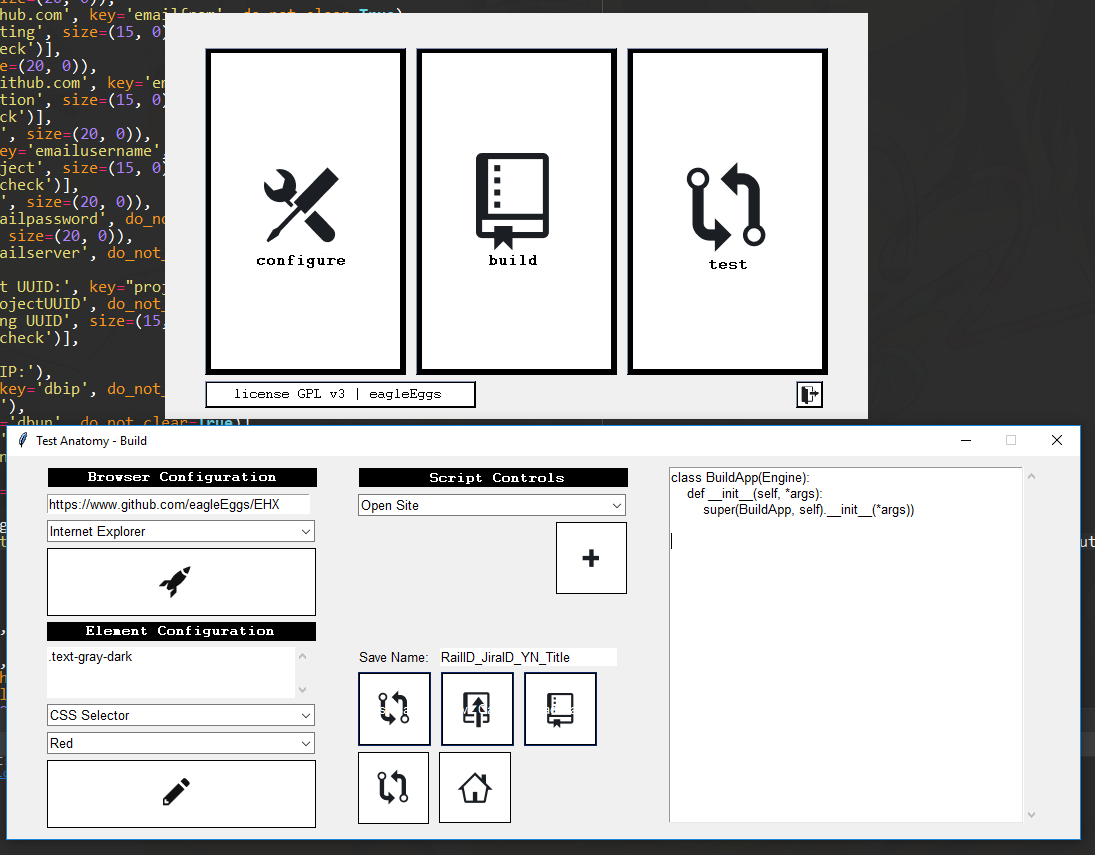
eagleEggs
on 16 Nov 2018
Hey, congrats! Post some screen shots. It's a very different look than the Topanga look and feel.
MikeTheWatchGuy
on 16 Nov 2018
Aah all windows working perfectly... Love PSG!!!
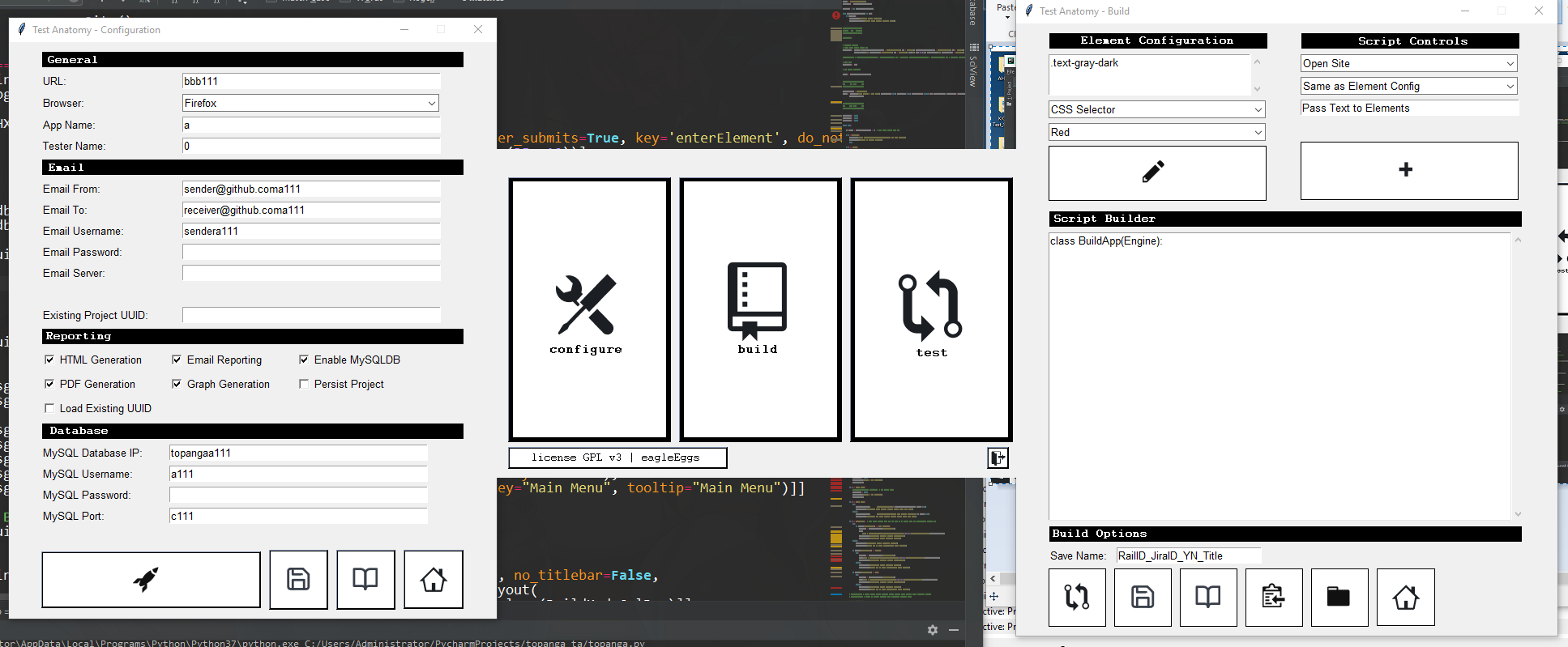
Not sure if this issue needs to stay open?
eagleEggs
on 17 Nov 2018
This is incredible looking... wow.... I'm impressed. Thanks for posting it! It will give people some ideas of how they can design their GUIs.
And happy to see PyCharm is working out for you :-)
MikeTheWatchGuy
on 17 Nov 2018
Thanks! Yea it's hard work and made much easier with your tool definitely :D BTW no joke about the order of IF statements in the main loop. If something is further down and doesn't work completely or sometimes, moving it up the loop fixes it. Same thing with window issues. Strange.
Either that, or I have so much in the main loop that I'm the only one that had those issues >.<
eagleEggs
on 18 Nov 2018
That was using the design pattern I posted?
MikeTheWatchGuy
on 18 Nov 2018
You were using a lot of weird designs that I kept trying to get you to stop using and use the recommended one. I can't support stuff that's randomly put together until it happens to work.
MikeTheWatchGuy
on 18 Nov 2018
Yes I went to your design pattern. If you could, I'll post the entire loop if you have time to evaluate.
eagleEggs
on 18 Nov 2018
I sure do.. post it. I know I've got issues with Qt, but tkinter should be OK now. If not, I want to fix it.
MikeTheWatchGuy
on 18 Nov 2018
Cool. I just cleaned it up a bit: https://gist.github.com/eagleEggs/f15c87472acc7f2f31dee5b94f1e9f51
Not having issues anymore - But if you see anything I should clean up let me know! Thanks.
eagleEggs
on 18 Nov 2018
I need the layout, window calls, etc.
I need to be able to actually run it if you want me to debug the problem.
MikeTheWatchGuy
on 18 Nov 2018
Updated.
eagleEggs
on 18 Nov 2018
If the if location is making a difference, then I have a race condition somewhere that needs fixing.
MikeTheWatchGuy
on 18 Nov 2018
There are images everywhere... it's not going to run without the whole project or unless you strip out the images.
MikeTheWatchGuy
on 18 Nov 2018
and variables like this: shelfdb, ddVals
etc etc
MikeTheWatchGuy
on 18 Nov 2018
Oh I thought you were just going to peruse it lol. I'll look at stripping those but it will take time, will probably do that a bit later.
But interesting about the race condition idea - I'll add some more logging to see if I can track that down.
eagleEggs
on 18 Nov 2018
It'll be somewhere in my code rather than yours
MikeTheWatchGuy
on 18 Nov 2018
Aah ok, I'll strip it down so you can test it then in a bit.
eagleEggs
on 18 Nov 2018
Just looking at it... it does look like you've got a good design pattern. I may be able to generate my own race condition by setting the second read to have a timeout.
MikeTheWatchGuy
on 18 Nov 2018
I just checked in another change to the way windows close, particularly with an X and on non-blocking windows.
_Please give it a try with both your "if" cases._
Hopefully I don't break anything you already have working.
MikeTheWatchGuy
on 18 Nov 2018
Just posted ANOTHER change that will help with multiple windows where BOTH windows have timeout != 0. This time for SURE, right?
MikeTheWatchGuy
on 18 Nov 2018
In honor of your excellent job of pushing the bugs out of the multiple window code, I made a multi-window tutorial on YouTube. I know, "great, now you made one after I'm done."
MikeTheWatchGuy
on 18 Nov 2018
REALLY anxious for you to try newest PySimpleGUI.py
I've been working really hard on this multi-window thing and I think I've finally got it working for all combinations of windows, including multi-windows where each window is using a non-zero timeout. I was struggling for a while with windows where both were using timeout values. It's why I recommended that everyone use a timeout=0 value for the second window.
Can you please try with this latest release or point me to your code that I can actually run? I want to try with your if statements in multiple locations (particularly in the locations where they didn't work before).
MikeTheWatchGuy
on 19 Nov 2018
Wow great! I need to get you this main loop to check out.
I did test out the latest code. Let me get that main loop code to you first and then I'll detail some things properly.
Also great video!
eagleEggs
on 19 Nov 2018
That doesn't sound good.... did it have issues still?
MikeTheWatchGuy
on 19 Nov 2018
Well it ran the same functionally, which is good. Except that the exit button which I have in the main loop no longer works and hangs the application. Might be on my side but it works fine with the previous PSG.
if b == "exit":
        logging.info("Window 1: Pressed Exit")
        break
It's at the top of the main loop on the main window loop. Worked great before.
But once I give you the loop it may make more sense.
eagleEggs
on 19 Nov 2018
shit...
I need your entire application so that I can actually run it.
You're sure the button is not reading? It never returns from the Read(timeouyt=xxx) call?
That's not a valid statement with the break on the end
MikeTheWatchGuy
on 19 Nov 2018
It does read the button, makes the custom log there, and apparently crashes on break.
eagleEggs
on 19 Nov 2018
wha? That would be your code my friend
What happens after you break from your loop or whatever you're in?
MikeTheWatchGuy
on 19 Nov 2018
Once you leave PySimpleGUI code, you're executing your code. PySimpleGUI does not run in a thread... there's no way PySimpleGUI could be crashing unless you've made a call to it and it crashes inside. This one has to be yours, right?
As I mentioned before, that break on the end is a syntax error
You can't just stick a break on the end of another statement.
MikeTheWatchGuy
on 19 Nov 2018
I have no idea... It's working now, that exit issue is gone.... Ok so that's great.
Also it wasn't all on one line. I can never get formatting working on github comments.
eagleEggs
on 19 Nov 2018
Wait, what? You've got me mega confused... it works, doesn't work, crashes, hangs, gone, great....
How about starting over. Does it work with the new code?
Do you realize that you cannot have this statement and expect it to work
    if b == "exit":
        logging.info("Window 1: Pressed Exit")
        break
Was that syntax error your problem? PyCharm should have flagged that. You shouldn't have been able to even run the program.
MikeTheWatchGuy
on 19 Nov 2018
The actual code was this:
if b == "exit":
logging.info("Window 1: Pressed Exit")
break
I didn't format correctly. It's like that in the gist I made before as well.
But yea, it's not happening anymore.
eagleEggs
on 19 Nov 2018
And....
You're telling me that the break crashes? And you think that's PySimpleGUI code?
Are you running a debugger with this? I'm STILL confused.
MikeTheWatchGuy
on 19 Nov 2018
It was crashing, but not anymore lol. I copied environments to test with the new PSG - That may have had something to do with it. My goal is not to waste your time trust me :) Probably an issue when doing that to test your new code.
eagleEggs
on 19 Nov 2018
38 minutes is how long this conversation has been going.... that I consider to be a waste of my time... especially when it was a setup issue on your side. Please don't assume a crash, in your code, is a crash in mine until you really know that. Dude.... not good...not good.
MikeTheWatchGuy
on 19 Nov 2018
Evidently it works. Closing..
MikeTheWatchGuy
on 19 Nov 2018
Well, this issue wasn't just about that. You helped with restructuring my overall main loop earlier in the thread, which lead you to make changes on the timeouts in PSG. Was trying to help you out with testing the new code but don't like doing it with my main environment and code so I moved it first. So yea, my bad. But this is what happens when you try to be nice often and support other people's work - With my own time as well. I just though we were collaborating but maybe I was just wasting your time. Apologies then.
eagleEggs
on 19 Nov 2018
Overall we are collaborating... working together... I didn't mean for you to setup a whole new environment, I meant with your normal code. The only waste of time in this thread was the past 38 minutes where I've been sifting through my code, searching for how I could be causing a hang, and then a crash. Overall it's been fine and I appreciate the help. Just a blip of a problem today with this issue.
Just be really careful with the claims of problems and chase things down fully. Then state them in a logical, FULLY explained manner. I don't need to hear every step of your debugging, especially if there's any chance of a problem not related to what we're testing. But I do need as much information as possible. This is why you'll see me asking, over and over, for a complete setup that I can run. If not, then I need something that demonstrates it. If not that, then a I need a very complete description of your code, what your behavior is doing.
Logical, step by step, detailed explanations are going to be what works.
I've been trying to solve a problem you, and only you, have been having. It's been a 1 on 1 technical support thing. If you want me to solve your problem, I need your help. I can't do it on my own. I'm trying to communicate how that can happen.
MikeTheWatchGuy
on 19 Nov 2018
Hey. I know I don't take the time to explain the issues in detail - That is something I'm working on. But I wanted to come back and let you know I did a demo today of my app and the GUI was a hit. So, great work on your part in providing this library - Also, I'll probably be back making issues at some point (maybe, things are working perfectly as it is now), when I do I'll work on laying it out technically for you with some example code :D
eagleEggs
on 21 Nov 2018
Congrats on the big payoff for your hard work. They must be even more impressed that you came back with a completely different design / look and feel for your program after getting their initial input. I'm really impressed with what you've done. Hoping that PySimpleGUI can keep up with you.
MikeTheWatchGuy
on 21 Nov 2018
It's definitely grown since it's inception. Have a good core code base now. With this new GUI it's super simple, fast, and does things that paid automation apps do in an even simpler way (more to come). I was super happy last night when I easily got threading working from my 4th window which kicks off the tests in the background. Allowing you to open other windows including a live database graph of the progress... Full app is still usable during the entire processing time! Amazing how quick it is to put this stuff together with PSG. Thanks.
eagleEggs
on 21 Nov 2018
Funny I just upgraded this app for the first time since May because I want to use your new features you've mentioned. I've worked out the code changes I need to bring it up to speed with latest PSG build. However I now have the 'X' crashes the application again... so strange. I'm trying to work it out now. Before upgrading I could use all windows at any time while they were all open, close any and all remained functional always... lol. Memories. Hope all is well!
eagleEggs
on 27 Sep 2019
We can re-open this issue if you want.
I need a LOT more info than "X" crashes the application again. Like the exact error text produced. You're checking for None when the window is closed? What version are you running? etc.
Otherwise I really won't be able to help you. Take a look at the form that must accompany new Issues and take a look at the code and errors people are including. This is what is required in order for me to not have 6 back and forth questions and answers conversations through GitHub. This Issue may be the longest of all user reported Issues with 73 posts. I realize we were working on some difficult problems and so some of that is clearly from the difficulty of what we faced, but I also recall an chronic problem of missing data.
I really enjoy working with you. I'm impressed with your work and innovations. This request for more information is not a reflection of anything personally about you as a person either. It's just a simple fact about debugging and the large amounts of data that is required in order for a person without the program and at this point without any code or error info at all to do anything but listen on the sidelines, unable to provide assistance. I hope you understand how much I care about users and any bugs that may exist in the code. I work really hard to do all I can to minimize bugs/crashes and I find it personally distressing to hear of major problems. That's my problem to deal with. I am simply conveying the situation.
Let's solve this problem.
 PySimpleGUI
on 27 Sep 2019
PySimpleGUI
on 27 Sep 2019
Thanks Mike. Like I said over another channel this was def not an official request :) And didn't mean to cause any confusion. I thought it was funny that this came back is all - If I can't get it worked out I'll post officially. Thanks again buddy :D I really enjoy working with you as well!
eagleEggs
on 27 Sep 2019
There was code that must have served a purpose long ago which now must not work due to some PSG internal changes - It's not a bad thing!
        if b4 == 'Exit' or b4 is None:
            testWindow_active = False
            logging.info("Window 4 Set Inactive, Clicked Exit")
            testWindow.Close()
Removing [or b4 is None] fixes it. I suppose in the past None was not passed when closing between windows but now perhaps is when hitting X. So now, X no longer crashes the app, and all balance has been restored :)
I had this on all windows, so I guess None was being read across all of them... Anyway no biggie you don't need to spend time on this.
Unfortunately my loop is way too long and has custom things in it, way too much to get some sample code. It's working - That's what I care about right now haha. But if this is strange to you I could pull out some test code for you to look at based on my main loop.
eagleEggs
on 28 Sep 2019
And back to confused as ever..... None is exactly what you should be getting when the window is closed with an X, but seeing the 4 lines of code floating in space without any context doesn't help. I Still don't know the "Crash" details.
Maybe just skip posting these in the future until you've thoroughly researched them and believe they are bugs in your code. Speculating that there was a change withing PySimpleGUI caused this along with the inability to understand why this is happening along with an offer to send more info if I find this strange (I found it strange from the beginning) again leads me to believe there's a problem but I'm again left with no data.
Let's just agree not to post here within Issues until you have either determined for sure you've got a bug that you fixed and want to tell people about it, or you have collected the proper information that I need in order to find and fix potential PySimpleGUI bugs.
As I tried to explain these posts I find simultaneously distressing and exasperating as I want the quality of the PySimpleGUI package to be as high as it can possibly be but I'm unable to do that with no data supplied.
PySimpleGUI
on 28 Sep 2019
I do see where you are coming from. And I'm not looking to argue it. But it's disappointing. I use PSG extensively and have in the past helped you make many changes for both features and bugs. These aren't bugs I needed to fix or features I had to have, I was eager to work with you to improve the product, instead of ignoring it or working around it, and my use cases were a great proponent to that as well as general testing.
Over the last 2 days I built an oracle automation tool using PSG (super fast!) and it was great and fluid building out the GUI - However I stumbled on 3 bugs which, at this point I don't care to mention in any form. They will eventually be weeded out, sure. But I'm not going to post three bug reports, for use cases I've decided aren't worth that and I'd rather bypass using it and making a workaround or design change instead of possibly meeting some conversation like above.
Again, awesome product and Ill be using it for a long time probably. Simply awesome. But the way you treat your users, or at least me, will keep me from now on, behind the curtain making pip upgrades of your latest builds and just ignoring the bugs.
Ultimately I don't have time to fit your regulations on conversation syntax or lack of patience if that's what it is, and can just work around whatever issues come up. And I don't want to mistakenly think I can have a conversation without being chastised. it was fun before but shit changes. Hopefully enough people speak up and use it enough to keep it going and get bugs out and pipe features in - You have a great product, I'm looking forward to seeing what comes out of it as it progresses more.
Have a good one man.
eagleEggs
on 4 Oct 2019
I'm really sorry it's sucking badly for the both of us. Damn. You most certainly have been a supporter going wwwaaaayyyy back. I'm saddened by the exchanges.
You're right, things have changed. I found I was unable to provide the level of support that both the users and myself are happy with. The solution was to implement a real "bug database" versus the free-form Issues on GitHub. It's helped greatly, perhaps at the expense of the users filling out the stupid form and gathering the needed information. Other users have benefited from the new bug reports which is a nice thing and has often led to workarounds being posted so that a new bug isn't needed.
Let's take a break. I'm encouraged and happy to hear that this set of exchanges has not dampened your use of PySimpleGUI. That would have been a tragedy to have caused. Thrilled to hear of your recent success with Oracle + PSG too.
If you do get the point that you are unable to work around a problem and need help, how about dropped me an email at [email protected] first? Then we can work out what I need and what you can provide, privately, rather than in Issues like this.
If you are too busy to file a bug, using the new bug system, I don't quite know what to do about that at the moment. Regardless, let's talk about it when you get to that point via email first. It'll be better for the both of us to not have disagreements in an open forum.
I want fully acknowledge the support and help you've provided to this project. It wouldn't be as good as it is without the help of you and others like you.
Please don't let my problems become yours by stopping using the package. I wish you well and hope you keep finding successes. I'll see ya around.
PySimpleGUI
on 4 Oct 2019
Related issues
 yogesh-aggarwal
·
3Comments
MikeTheWatchGuy
·
3Comments
yogesh-aggarwal
·
3Comments
MikeTheWatchGuy
·
3Comments
 ncotrb
·
4Comments
ncotrb
·
4Comments
 mozesa
·
5Comments
mozesa
·
5Comments
 DKatarakis
·
6Comments
DKatarakis
·
6Comments
Most helpful comment