Pysimplegui: [Request] Material Design colour options for sg.ChangeLookAndFeel
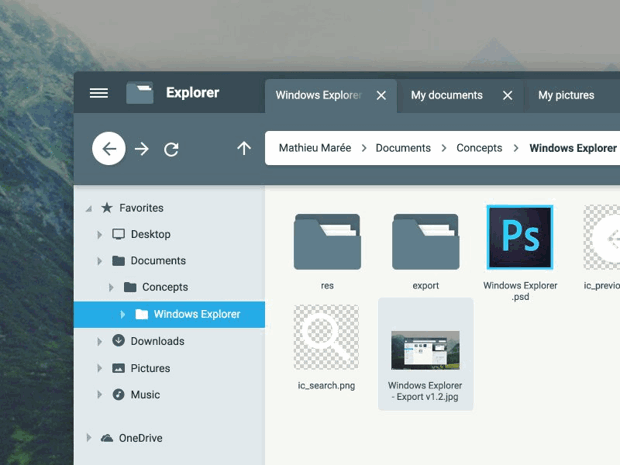
I was wondering if you could add Material Design colours for sg.ChangeLookAndFeel...I personally think it would looks super nice!
Another feature could be material icons/material buttons.

 sidbmw
All 8 comments
Sure, I would be happy to add one.
Users have the ability to create their own look and feels.
All you have to do is fill out this table for me and I'll include it:
'Topanga': {'BACKGROUND': '#282923',
'TEXT': '#E7DB74',
'INPUT': '#393a32',
'TEXT_INPUT': '#E7C855',
'SCROLL': '#E7C855',
'BUTTON': ('#E7C855', '#284B5A'),
'PROGRESS': DEFAULT_PROGRESS_BAR_COLOR,
'BORDER': 1, 'SLIDER_DEPTH': 0,
'PROGRESS_DEPTH': 0,
'ACCENT1': '#c15226',
'ACCENT2': '#7a4d5f',
'ACCENT3': '#889743'},
To get a completely flat look, set the border to 0.
Accent colors are not used anywhere but are simply made available to the user so that they can make buttons with multiple colors that will match the color scheme.
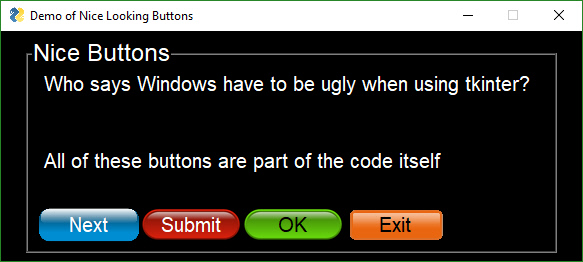
I can't do anything about button graphics. That's going to be up the user to define. I would suggest making your own Button definitions that set the image to the appropriate image (e.g. Oval.png, rectangular.png, etc, so that your window layout definition isn't cluttered up with these button definitions).
Check out the file Demo_Buttons_Nice_Graphics.py to see one way of doing alternate button looks. These are not flat buttons of course. You can define them however you want.
 MikeTheWatchGuy
on 9 Nov 2018
MikeTheWatchGuy
on 9 Nov 2018
Cool! I'll try adding some when I have some time this weekend and I will make sure to send them if they look good.
sidbmw
on 9 Nov 2018
'Material': {'BACKGROUND': '#FAFAFA',
                  'TEXT': '#000000',
                  'INPUT': '#004EA1',
                  'TEXT_INPUT': '#FFFFFF',
                  'SCROLL': '#5EA7FF', #I can't see it change, so I don't know it is good color.
                  'BUTTON': ('#FFFFFF', '#0079D3'), #based on Reddit color
                  'PROGRESS': DEFAULT_PROGRESS_BAR_COLOR,
                  'BORDER': 0, 'SLIDER_DEPTH': 0,
                  'PROGRESS_DEPTH': 0,
                  'ACCENT1': '#FF0266',
                  'ACCENT2': '#FF5C93',
                  'ACCENT3': '#C5003C'}
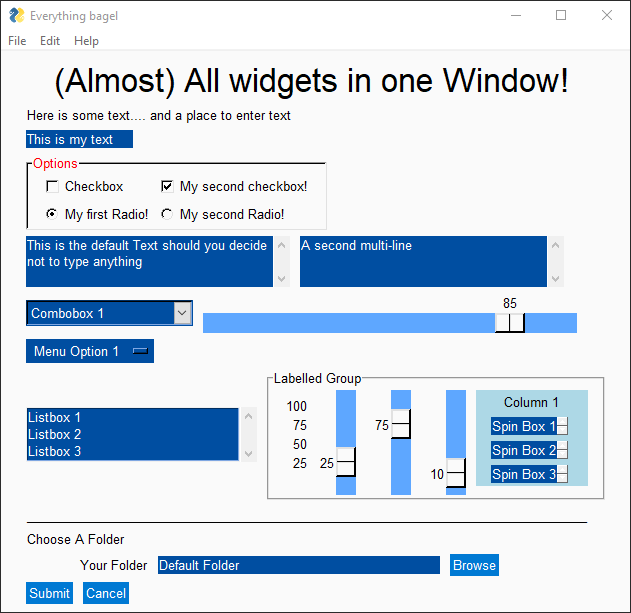
I made this color set here.
It looks like this.


Note that button color is 'ACCENT1'.
I hope @sidbmw like this. How do you think?
 dhnam
on 17 Sep 2019
dhnam
on 17 Sep 2019
Or what about this?
'Material': {'BACKGROUND': '#E3F2FD',
                  'TEXT': '#000000',
                  'INPUT': '#86A8FF',
                  'TEXT_INPUT': '#000000',
                  'SCROLL': '#86A8FF', #I can't see it change, so I don't know it is good color.
                  'BUTTON': ('#FFFFFF', '#5079D3'),
                  'PROGRESS': DEFAULT_PROGRESS_BAR_COLOR,
                  'BORDER': 0, 'SLIDER_DEPTH': 0,
                  'PROGRESS_DEPTH': 0,
                  'ACCENT1': '#FF0266',
                  'ACCENT2': '#FF5C93',
                  'ACCENT3': '#C5003C'}


dhnam
on 17 Sep 2019
LOVE IT!
I'll add whatever color schemes you guys come up with. PLEASE, by all means submit these kinds of new entries for the look and feel table!!!
More more more more
These will certainly be added!
 PySimpleGUI
on 17 Sep 2019
PySimpleGUI
on 17 Sep 2019
Damn this post is old. Thanks for the reply/post but uh currently in University we're learning (I haven't learnt anything yet :/ ) basics of python. When we get to GUI's this is my go to and I'll try using the new theme. Really nice!
sidbmw
on 17 Sep 2019
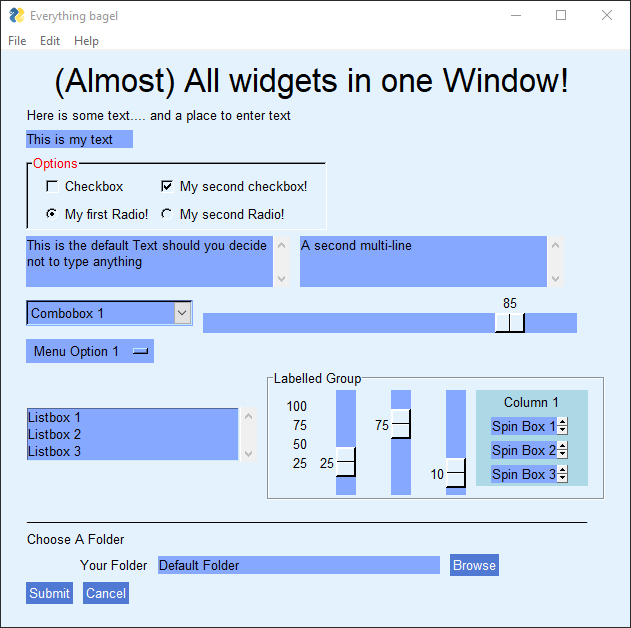
Two new Look And Feel settings added.... Material1 and Material2
I like Material1 the best of these as it has a background color for the entire window. Material2 has a gray background. Kinda tired of gray.
Thanks for posting these. I've spent days working on color combinations for this package so I know it's time consuming to put together all these settings.
One way to test them out is to use the Demo Program Demo_All_Widgets.py which should show you everything. I should have used the accent colors for the column background. Maybe I'll change that one. Or experiment with setting the background to some of the other colors in the entry.
Anyone that wants to try them can download the latest PySimpleGUI.py from GitHub and off you go!
PySimpleGUI
on 17 Sep 2019
@sidbmw what do you mean you're just starting to learn Python? You did a large project already with Python, using PySimpleGUI. You didn't get hit in the head and lose all that knowledge did you? Damn, I hope you're OK. Maybe it's the college girls on the brain? Whatever it is, drop a GUI on a professor sometime when they're not expecting it and blow their mind. 😏
PySimpleGUI
on 18 Sep 2019
Related issues
 OndoyManing
·
4Comments
OndoyManing
·
4Comments
 yogesh-aggarwal
·
3Comments
yogesh-aggarwal
·
3Comments
 eyeonus
·
6Comments
eyeonus
·
6Comments
 flowerbug
·
4Comments
flowerbug
·
4Comments
 ECOM-Klaus
·
4Comments
ECOM-Klaus
·
4Comments