Pysimplegui: Qt or Android? Which PySimpleGUI is next?
I recently started working on PySimpleGUI-Qt which is the PySimpleGUI SDK running on top of Qt instead of tkinter. Your application should not know the difference. The difference will be mostly in how your application looks. There will be some "extension" elements possible in Qt perhaps.
I'm now starting to lean towards making an Android version of PySimpleGUI. Wouldn't it be cool to make android applications with the same ease as these little Windows/Mac/Linux programs we've been running? I think it would be cool. It will be based on Kivy as the native GUI framework that I would interface to.
While Qt may have a larger appeal, the Kivy one is the most unique among them all. How about running on our phones for a change?
I may not all work out quite so easy, but then again, maybe it will. It's been pretty "simple" so far... if it stays that way I don't see why Android can't be tackled.
 MikeTheWatchGuy
All 20 comments
If you can tackle both desktop & mobile Python GUI development, you'll be officially my hero!
 AltoRetrato
on 31 Oct 2018
AltoRetrato
on 31 Oct 2018
It'll be a in "Simple" way. There are a lot of fancy widgets, features in Kivy that won't immediately translate. One of the things that I'll have to spend time on that I really DON'T want to spend time on is the installation part. It's gotta just "work", quickly. It took me 2 days to get Kivy up on my Windows machine.
We'll see... I would be happy with really basic Kivy applications running. Just something that opens the door for people to run on their devices. Just like PySimpleGUI started out simple, basic, and primitive so will this one. This was the state of PySimpleGUI on July 11 when I checked in the 1.0 version. I had very few Elements working.

MikeTheWatchGuy
on 31 Oct 2018
After playing with Kivy for a while, I can see some huge differences not just in the APIs, but in the types of things the GUI Framework provides. Kivy is very graphics oriented. It's no surprise I suppose. It's less about the traditional "Widgets". To be honest, I don't know if I possess enough of a background in graphics to pull off a Kivy translation.
If you step back and look at what PySimpleGUI is, you'll see it's my interpretation of the tkinter widget set. It's my own primitive, simplified view of the tkinter widget world. I was able to wrap my head around the individual tkinter widgets with no problem. I don't have to experience of working with rotating, zooming, touch interfaces that I think would be required to write a translation from Kivy to something more simple.
The simplification that I applied to tkinter was to treat the GUI as a series of Rows. Those rows are stacked up using an auto-packer with the result being a window. Mobile screens / applications don't follow that kind of design.
What is needed is a simplified, Python-oriented, view of Kivy and I'm not yet the person that can pull that off. Perhaps with some help.
Qt, at least some tiny fraction of Qt, could be simplified into a PySimpleGUI widget set, this I'm confident of because it has that traditional widget set like tkinter's.
So.... now it's time to take a crack at what a PySimpleGUI-qt would look like....
I still don't know what Qt package to use for a PySimpleGUI-qt project.
Despite reading about, being told about, pondering, which of the Qt packages to use, I'm still at a loss as to what is going to be the right one. I do know that Qt5 is the way I want to go in terms of version.
I would like a license that goes well with the LGPL3+ license that PSG has, and that means free, not paid.
In summary, it looks like Qt may be the better fit for the next platform.... that is until I can design a Python-friendly interface for mobile SDKs, because that's what is needed. Maybe it'll all come to me some night in a dream, but until then I'm swapping over to looking at a Qt version.
MikeTheWatchGuy
on 3 Nov 2018
To better comment on this, could you tell us what do you want to accomplish by having PySimpleGUI working with Qt? Just different "looks"?
For me, PySimpleGUI benefits are simplicity, easy of use, portability, readability and requiring only Tkinter ("Python's de-facto standard GUI package") and Tcl/Tk.
While Tkinter is ubiquitous and relatively small, Qt is a very large framework (used not only for GUIs) and with plenty of requirements. If someone is already willing to use Qt, I'm not sure that PySimpleGUI could bring those benefits...
AltoRetrato
on 3 Nov 2018
It's look and feel primarily, but also advanced widgets.
Some people really feel strongly about the "aged" look of tkinter.
As you said, Qt has a lot more than GUIs, but I'm carving out only the GUI piece. None of the other Qt capabilities will be used so my hope is that the install won't be quite so problematic.
I think it's quite possible to do a Qt version. I'm back feeling like a Kivy version is possible too after more research. What I would like to get away from is that .kv file and do everything programmaticaly.
So, yea, mostly different looks. If I can pull off making the basics of Qt "simple" to code, I think that would be quite a good thing.
For me, PySimpleGUI benefits are simplicity, easy of use, portability, readability and requiring only Tkinter ("Python's de-facto standard GUI package") and Tcl/Tk.
I would like to keep all of those reasons you've listed, except do it on Qt.
MikeTheWatchGuy
on 3 Nov 2018
Maybe Kivy isn't so far off after all....
I was getting thrown by following examples in Kivy that focused on dividing the screen up into panels that you can swipe, etc. But, ignoring those kinds of rich widgets for a moment, it's possible to use the PySimpleGUI notation system, a row at a time, to create GUIs that look like these:


These GUIs are using the same kinds of widgets represented today.
The approach I take is to look at screens like these and envision exactly what the PySimpleGUI code would look like if you wanted to implement that screen. That is exactly how PySimpleGUI came to be... it was my attempt to compact down GUIs into a series of objects or function calls. I was able to "see" the code the way I wanted to represent the GUI.
This approach still looks possible with Kivy, so I'm going to stick with it a bit longer.
Regardless of Kivy, I still want to pursue a Qt version too. I think the Qt version will be a more straightforward mapping of PySimpleGUI calls to Qt calls. I need to start by choosing a Qt package and I'm stumped as to what one to use.
MikeTheWatchGuy
on 3 Nov 2018
I need to start by choosing a Qt package and I'm stumped as to what one to use.
Do you mean PyQt vs PySide vs Qt for Python (PySide2)?
AltoRetrato
on 3 Nov 2018
Yes, exactly what I mean.... Any thoughts on this?
MikeTheWatchGuy
on 3 Nov 2018
Forget PySide: it's old (last release was on 2015) and doesn't support Qt 5.x.
Your real choices are PyQt5 and Qt for Python (a.k.a. PySide2).
While PyQt5 is more mature, it is "released under the GPL v3 license and under a commercial license", while "Qt for Python is available under GPL, LGPL and commercial license". PySimpleGUI is LGPL, so I'd go with that.
OTOH, Qt for Python / PySide2 seems to be a bit behind, but perhaps only on rarely used features (see PyQt or 'Qt for Python' (PySide2)?, from July).
AltoRetrato
on 4 Nov 2018
So PySide2 is what I should be working with?
MikeTheWatchGuy
on 4 Nov 2018
That's what I think should give you the least to worry about.
AltoRetrato
on 4 Nov 2018
Ok! I'm up and running.... I had to do some Anaconda uninstalls, but after that it is up and running! It was a much simpler install than Kivy was.
I'll start looking at this... next stop is to buy a book or two on Qt. I don't do well with electronic books. I need physical books to work with. I want something that doesn't use the designer to teach GUIs since I won't be using the designer.
MikeTheWatchGuy
on 4 Nov 2018
I'm curious: an .EXE produced by pyinstaller with PySimpleGUI has around 8 MB (I managed to get it down to 5 MB by removing some libraries). What size is produced when you include PySide2?
AltoRetrato
on 4 Nov 2018
The good news is that my program compiled and produced an EXE that RUNS!
The not so good news is that it's 210 MB. Ouch!
MikeTheWatchGuy
on 5 Nov 2018
Text and Input Elements are Done
2 down, 19 to go!
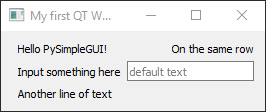
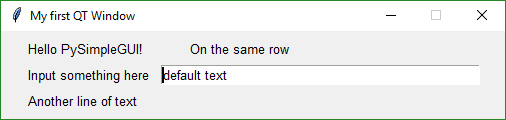
The Text and InputText Elements are done. I even have the default text working.
Check out this PSG code and the resulting window! This is exciting stuff to see despite it not being such an exciting GUI. The fact that I can simply change the import at the top and get either tkinter windows or Qt windows is awesome.
PySimpleGUI is going to easily map into the Qt framework.
Then again, I've not yet tackled Buttons so we'll see if I still say that in a little while.
QT:
Tkinter:
import PySimpleGUI_Qt as sg

layout = [[sg.Text('Hello PySimpleGUI!'),sg.Text(' '*5), sg.Text('On the same row'), ],
          [sg.Text('Input something here'), sg.Input('default text')],
          [sg.Text('Another line of text')]]

window = sg.Window('My first QT Window').Layout(layout)

event, values = window.Read()
Core Widgets Done
import PySimpleGUI_Qt as sg
layout = [
        [sg.Text('Hello PySimpleGUI!'),sg.Text(' '*5), sg.Text('On the same row'), ],
        [sg.Text('Input something here'), sg.Input('default text')],
        [sg.Combo(['Combo 1', 'Combo 2', 'Combo 3'])],
        [sg.Listbox(['Listbox Item 1', 'Listbox Item 2', 'Listbox Item 3'], size=(30,10)),
        sg.Slider((1,100))],
        [sg.Slider((1,100), orientation='h')],
        [sg.Checkbox('Checkbox 1')],
        [sg.Checkbox('Checkbox 2')],
        [sg.Checkbox('Checkbox 3')],
        [sg.Radio('Radio1', group_id=1),sg.Radio('Radio2', group_id=1)],
        [sg.Spin([1,2,3,4])],
        [sg.Button('My Button')],
          ]
window = sg.Window('My first QT Window').Layout(layout)
event, values = window.Read()
Once again the same source code, just different imports.

The "Core Widgets" are done!
I don't yet return values for them when I "Read" the window, but I've got the layout working. This has come together much quicker than expected. Hoping to have a "release" working this week that I can release that will be functional and allow you to do simple GUIs using Qt.
It looks great on Linux too. I thought I would run into installation problems, but PySide2 installed with zero issues on Mint Linux. I ran the same PySimpleGUI for Qt code and it produced this window...

MikeTheWatchGuy
on 5 Nov 2018

MikeTheWatchGuy
on 6 Nov 2018
Clearly made the Qt decision.... and it was the right choice for now! It helps guide me as to what it'll be like to do the Kivy one. I fully expect there will be a Kivy one down the road.
MikeTheWatchGuy
on 9 Nov 2018
I'm looking forward the kivy version, when will it released?
 yumoqing
on 30 Jun 2019
yumoqing
on 30 Jun 2019
Unfortunately Kivy is at the end of the line at the moment. It's got 3 other ports ahead of it. Qt is in Alpha, Wx is an engineering release with some pretty thorny problems that need solving in the design. and the Web port is perhaps 70% complete. Kivy could be a few months down the road or next year.
MikeTheWatchGuy
on 30 Jun 2019
Related issues
 ECOM-Klaus
·
4Comments
ECOM-Klaus
·
4Comments
 thelou1s
·
4Comments
MikeTheWatchGuy
·
5Comments
thelou1s
·
4Comments
MikeTheWatchGuy
·
5Comments
 OndoyManing
·
4Comments
OndoyManing
·
4Comments
 eyeonus
·
6Comments
eyeonus
·
6Comments