Pysimplegui: Update Docs - include the latest parameters. Add Update method definitions
I don't know how many people use docs instead of their IDE. I rely 100% on PyCharm to get my call definitions.
I would like to hear from anyone that relies entirely on the written docs. It may get you a bit more priority if you speak up. Otherwise I assume you're like me and use the IDE / source code.
 MikeTheWatchGuy
All 27 comments
Out of town all this week. I mostly use the demos. I use a markdown app,
but have to open a browser to really read the docs. Looking for a better
app or will use PDF.
On Fri, Oct 5, 2018, 2:45 PM MikeTheWatchGuy notifications@github.com
wrote:
I don't know how many people use docs instead of their IDE. I rely 100% on
PyCharm to get my call definitions.I would like to hear from anyone that relies entirely on the written docs.
It may get you a bit more priority if you speak up. Otherwise I assume
you're like me and use the IDE / source code.—
You are receiving this because you are subscribed to this thread.
Reply to this email directly, view it on GitHub
https://github.com/MikeTheWatchGuy/PySimpleGUI/issues/422, or mute the
thread
https://github.com/notifications/unsubscribe-auth/AGKiYqn0eAH_ypxaLNp_gPH5FYPWja7nks5uh9MWgaJpZM4XK-K7
.
 john144
on 6 Oct 2018
john144
on 6 Oct 2018
I have PySimpleGUI.py open and usually just do a quick search for "class nameofobject" and that usually answers my question. Documenting this would be a beast. Maybe someone in the community could take that on while you work on more pertinent changes. i wouldn't want to miss out on updates because you're working on docs :/
I should try that addon again in Sublime for code completion though.
 eagleEggs
on 6 Oct 2018
eagleEggs
on 6 Oct 2018
Documenting this would be a beast.
Documenting that was and continues to be a beast. I think if you look at the docs what you're explaining should be done has already been done.
I do this on an ongoing basis. The same thing you see when you search for class is exactly what the readme has in it, only with comments about each parameter. Some of them are a bit out of date however. And some elements have not had the latest parameters explained.
Each Element has all of the parameters defined and then explained. Or, as in this recent addition, both done at the same time:
def Table(values - Your table's array
          headings - list of strings representing your headings, if you have any
          visible_column_map - list of bools. If True, column in that position is shown.  Defaults to all columns
          col_widths - list of column widths
          def_col_width - default column width. defaults to 10
          auto_size_columns - bool. If True column widths are determined by table contents
          max_col_width - maximum width of a column. defaults to 25
          select_mode - table rows can be selected, but doesn't currently do anything
          display_row_numbers - bool. If True shows numbers next to rows
          scrollable - if True table will be scrolled
          font - font for table entries
          justification - left, right, center
          text_color - color of text
          background_color - cell background color
          size - (None, number of rows).
          pad - element padding for packing
          key - key used to lookup element
          tooltip - tooltip text
The older Elements have the information broken out into a form something like this:
Checkbox Element
Checkbox elements are like Radio Button elements. They return a bool indicating whether or not they are checked.
layout = [[sg.Checkbox('My first Checkbox!', default=True), sg.Checkbox('My second Checkbox!')]]

Checkbox(text,
         default=False,
         size=(None, None),
         auto_size_text=None,
         font=None,
         background_color = None,
         text_color = None,
         change_submits = False
         key = None):
.
 text - Text to display next to checkbox
 default- Bool + None.  Initial state. True = Checked, False = unchecked, None = Not available (grayed out)
 size - (width, height) size of element in characters
 auto_size_text- Bool.  True if should size width to fit text
 font- Font type and size for text display
 background_color - color to use for the background
 text_color - color to use for the typed text
 change_submits - causes window read to immediately return if the checkbox value changes
 key = Dictionary key to use for return values
Making each of the element's headings available in the outline is what I've spent the evening doing. Then at least people will quickly find the documentation that's already been written.
I spend about 15% of my time working on the docs, maybe 20%. It's not a non-zero amount. There wouldn't be a couple hundred pages of documentation if that were not the case.
Tonight I also discovered the the design patterns in the document did not match what is currently being suggested. For example calls to LayoutAndRead were all over the place. After this evening's changes there are none in the readme (and I hope none left in the code).
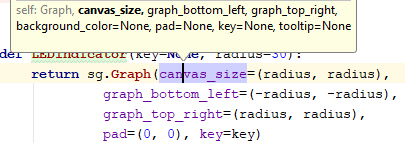
My hope is that people that use an IDE know how to use the IDE features that will make these sorts of searches unnecessary. By typing Control+P in Pycharm you'll see all of the parameters available to you. This is where having up to date Docstrings would help greatly. At least now you can minimally get the entire list of options available to you.
Here is what I see when I type Ctrl+P when entering in parameters to a call to sg.Graph:
MikeTheWatchGuy
on 6 Oct 2018
That all looks great. I think having documentation will go a long way with the legitimacy of your project as well. So perhaps with that in mind it shouldn't be overlooked. Good job!
eagleEggs
on 6 Oct 2018
Take a look at the Demo program just uploaded called Demo_PSG_SDK_Quick_Ref.py and see if that would be of help in your day to day programming.
I don't want to create yet more work to do, but at the same time if this kind of tool really is of value to people that are not using an IDE then I'm OK with updating it on occasion, or maybe someone else takes a liking to the package enough to lend a helping hand with the documentation. Beginners don't have to know anything at all about Python coding to make a contribution to the docs
MikeTheWatchGuy
on 6 Oct 2018
The Sublime code navigator / scroll bar.... is there anything like it for PyCharm?

Since you mentioned Sublime, I thought I would look at it.
I REALLY like the code navigator thing on the right side. It would save me a lot of time to be able to visualize the entire file like that and scroll within it.
Is there a feature / plugin for PyCharm that does this??
MikeTheWatchGuy
on 6 Oct 2018
Found this from a quick search - Not sure on the stability of it though. Don't blame me if it crashes everything XD: https://plugins.jetbrains.com/plugin/7275-codeglance
eagleEggs
on 6 Oct 2018
OMG IT WORKS!!
THIS is going to really change things in my world of Python Development. Wow, yet another "power-up". The tools situation has gotten to be such a rich environment.
Dang, when I went to college, we still used punch cards and submitted batch jobs to the IBM370. I'm guessing there's at least a 1000 to 1 difference in productivity. We ran a quick-print of the deck/program so it could be desk-checked for syntax errors. Was a lot quicker to sit down and check your code than to get back a crashed job because of a syntax error and then having to wait ANOTHER 4 hours. AND I walked backwards in the snow, uphill, to class.
MikeTheWatchGuy
on 6 Oct 2018
Yikes. Yea I kind of think the same if I were to switch to a reliable code completion IDE. It just keeps bugging out in my fav IDE :(
Did you get code completion working while you were using sublime?
eagleEggs
on 6 Oct 2018
I didn't try... PyCharm rocks my world... code completion even on functions I've renamed. It'll be pried from my cold dead hands.
MikeTheWatchGuy
on 6 Oct 2018
Haha. I just got it back on, we'll see if it bugs out again. I'll try pycharm if this doesn't stick this time because it does save a lot of time overall
eagleEggs
on 6 Oct 2018
If you can run PyCharm, what's the excuse for not running it?
I can't imagine living without it in a Python world.
MikeTheWatchGuy
on 6 Oct 2018
I fell in love with Sublime about a year and a half ago. My coding increased so much. It's irrational and emotional, not logical :)
I have not tried pycharm though, but I will this week to see if it's a better fit.
eagleEggs
on 6 Oct 2018
And what if your coding DOUBLED again? Just try it for 2 days. Learn 4 or 5 shortcut keys like Control+P. You are worth the investment.
MikeTheWatchGuy
on 6 Oct 2018
I will check it out this weekend. Was thinking the same thing maybe it will double again lol.
Actually grabbing it now to check it out.
eagleEggs
on 6 Oct 2018
Awesome... I'll expect a status report by monday then! Of course post if you have questions / problems.
MikeTheWatchGuy
on 6 Oct 2018
Wow. I can manage my databases from within the IDE.... I'm sold. OMG
eagleEggs
on 6 Oct 2018
Good grief....
MikeTheWatchGuy
on 6 Oct 2018
I'm not sure which of us is going to have the biggest jump in productivity. This _CodeGlance_ plugin is AMAZING. With a single file as large as PSG has become, this is exactly what I needed. I could see this capability being extended to Word, PDF files, etc. It's quite an upgrade to a normal the scroll bar... and it can be applied all over the place! Thank you for the introduction to it!
What other cool features are in Sublime that I should be learning about?
Hmmm... I need to spend some time playing with it so that I can take more of their features and find plugins for PyCharm.
MikeTheWatchGuy
on 7 Oct 2018
I'll see if I can find anything to share but I think that's it. Pycharm is really advanced. Have you used Shift+F11?
eagleEggs
on 7 Oct 2018
Shift F11+1 currently dumps me into the Tree Element code. I use it to jump back and between class definition at the top of the program and where I use it down lower. They are a significant distance apart so scrolling became a real headache when adding new elements.
Shift+F6 will become a friend, especially if you're dealing with files a lot using their file explorer. It renames both variables and files.
MikeTheWatchGuy
on 7 Oct 2018
Corey Schafer teaches Python videos on YouTube. He has a couple videos on
how he configures Sublime Text for a Python Dec environment. I keep
switching back and forth between PyCharm and ST.
On Sat, Oct 6, 2018, 7:23 PM MikeTheWatchGuy notifications@github.com
wrote:
Shift F11+1 currently dumps me into the Tree Element code. I use it to
jump back and between class definition at the top of the program and where
I use it down lower. They are a significant distance apart so scrolling
became a real headache when adding new elements.Shift+F6 will become a friend, especially if you're dealing with files a
lot using their file explorer. It renames both variables and files.—
You are receiving this because you commented.
Reply to this email directly, view it on GitHub
https://github.com/MikeTheWatchGuy/PySimpleGUI/issues/422#issuecomment-427620430,
or mute the thread
https://github.com/notifications/unsubscribe-auth/AGKiYhVc3vzqD9U5h-GqcYeXtfJEgB9pks5uiWWwgaJpZM4XK-K7
.
john144
on 7 Oct 2018
There is another PyCharm feature that I use A LOT during the day.... "scratches".
Control+ALT+SHIFT+Insert.
I copy and past code there... work on it... copy paste back. Usually it's other people's code that I've downloaded or I'm testing a feature using the Demo code as a starting point. It will even do the paste for you if you open it up right after a copy.
MikeTheWatchGuy
on 9 Oct 2018
Oh! I forgot a really important one...
CONTROL+SHIFT+BACKSPACE
It steps backwards through the locations in code where you made changes.
With it you can be writing code, then maybe you need to scroll all the way to the top of the file to look at a class definition. Rather than manually scrolling back down, press that key combination and it'll return you right to the spot you were editing.
I wish I knew how to do this in Visual Studio!
MikeTheWatchGuy
on 16 Oct 2018
PySimpleGUI is awesome! And so is PyCharm, but unlike the previous, it's a bit heavy/slow for me. I end up using the docs at lot, as sometimes I'm away from the computer but still reading the docs on a tablet or phone.
Also, remember a lot of people will find about this great project via a Google Search, so docs (especially the cookbook) are also good for that.
 AltoRetrato
on 29 Oct 2018
AltoRetrato
on 29 Oct 2018
Since you look at the docs for calls, be sure an look at the program Demo_PSG_SDK_Quick_Ref.py. I use it during the tutorials to show all the parameters. I have made sure it stays up to date... although at the moment it's one release behind so I'll get on that right away. You may want to add a hot-key to launch it.
MikeTheWatchGuy
on 29 Oct 2018
I'm closing this as the major update is "done" but still continuing over the next couple of weeks at least.
MikeTheWatchGuy
on 8 Aug 2019
Related issues
 lucasea777
·
3Comments
lucasea777
·
3Comments
 eyeonus
·
6Comments
eyeonus
·
6Comments
 ncotrb
·
4Comments
MikeTheWatchGuy
·
3Comments
MikeTheWatchGuy
·
6Comments
ncotrb
·
4Comments
MikeTheWatchGuy
·
3Comments
MikeTheWatchGuy
·
6Comments
Most helpful comment
Wow. I can manage my databases from within the IDE.... I'm sold. OMG