Pysimplegui: Multiple Progress bars on One Window?
Having an issue with this. not sure if this is a known issue but having two progress bars makes the second one not update, and the simply stays maxed out even when calling to change it. First one works regardless very well.
I've created them exactly the same and on on the same column but with different keys.
 eagleEggs
All 38 comments
I just found the issue... If I try to override the color directly it breaks it. I also have a custom color within LookAndFeel - This may be conflicting?
Check it out: https://gist.github.com/eagleEggs/20cebbee1270147719f0a3dc64b717c0
Maybe you already know this?
eagleEggs
on 3 Oct 2018
Have you looked at the Chatterbot demo? It has 20 progress bars on one.
 MikeTheWatchGuy
on 3 Oct 2018
MikeTheWatchGuy
on 3 Oct 2018
The Gist is incomplete. It stops after a few lines
MikeTheWatchGuy
on 3 Oct 2018
Colors.... hmmmm... that could be a styles issue then
Does it work without any color changes?
MikeTheWatchGuy
on 3 Oct 2018
Works great when you don't change colors :)
eagleEggs
on 3 Oct 2018
Well, then, there you have it! Stop doing that to yourself
MikeTheWatchGuy
on 3 Oct 2018
MAAAAh it turns out the default looks great. So, yea.
eagleEggs
on 3 Oct 2018
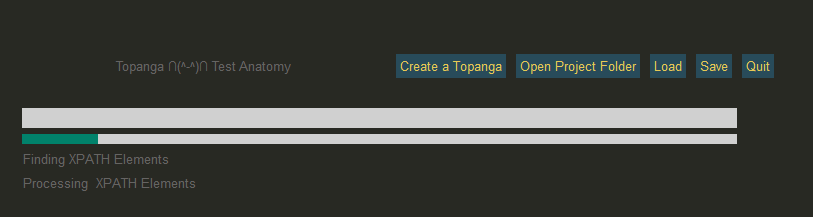
:D
eagleEggs
on 3 Oct 2018
I just found the issue... If I try to override the color directly it breaks it. I also have a custom color within LookAndFeel - This may be conflicting?
It's only if you mix colors on the same window? I'm a little fuzzy on exactly what works and doesn't.
You can use different colors, just not your own?
MikeTheWatchGuy
on 3 Oct 2018
Does this cause your trouble or show the problem?
#!/usr/bin/env python
import sys
if sys.version_info[0] >= 3:
    import PySimpleGUI as sg
else:
    import PySimpleGUI27 as sg
import time

sg.ChangeLookAndFeel('GreenTan')
sg.SetOptions(progress_meter_color=('red', 'white'))

prog_layout = [[sg.T('PROGRESS TEST', size=(20, 1), font=('Helvetica', 17))],
                   [sg.ProgressBar(100, size=(30,4), key='_prog1_')],
                   [sg.ProgressBar(100, size=(30,4), key='_prog2_')],
                   [sg.RButton('Run')],
                   ]

window = sg.Window('Progress Bars', auto_size_text=True, default_element_size=(30, 2)).Layout(prog_layout)

# ---===--- Loop taking in user input and using it to query HowDoI web oracle --- #
while True:
    button, values = window.Read()
    if button is None:
        break
    if button == 'Run':
        for i in range(100):
            window.FindElement('_prog1_').UpdateBar(i+1)
            for j in range(100):
                window.FindElement('_prog2_').UpdateBar(j+1)
            time.sleep(.1)
I'm able to set the color and run 2 of them at the same time.
MikeTheWatchGuy
on 3 Oct 2018
It works better than I have now. But you cannot set two colors:
`
[sg.ProgressBar(100, size=(30,4), key='_prog1_', bar_color=("#282923", "#282923"))], ##282923
[sg.ProgressBar(50, size=(30,4), key='_prog2_', bar_color=("#56D8EF", "#666463"))],
`
Yea I don't get how you're formatting code here lol... I'm using the code button.
eagleEggs
on 3 Oct 2018
You can’t set the same color because they’re exactly the same size…. Try varying the size and let me know if that worked
MikeTheWatchGuy
on 3 Oct 2018
I did try that, same color result.
Aah ok it works. So it's the size parameter. i thought you meant total amount. Ok great!
eagleEggs
on 3 Oct 2018
This will get you 2 colors for 2 bars.... lemme know if it works for you and I'll fix this weird thing I did.
#!/usr/bin/env python
import sys
if sys.version_info[0] >= 3:
    import PySimpleGUI as sg
else:
    import PySimpleGUI27 as sg
import time

sg.ChangeLookAndFeel('GreenTan')
# sg.SetOptions(progress_meter_color=('red', 'white'))
MAX_PROG_BARS = 20              # number of training sessions
prog_layout = [[sg.T('PROGRESS TEST', size=(20, 1), font=('Helvetica', 17))],
                   [sg.ProgressBar(100, size=(31,4), key='_prog1_')],
                   [sg.ProgressBar(100, size=(30,4), key='_prog2_', bar_color=('red', 'white'))],
                   [sg.RButton('Run')],
                   ]

window = sg.Window('Progress Bars', auto_size_text=True, default_element_size=(30, 2)).Layout(prog_layout)

# ---===--- Loop taking in user input and using it to query HowDoI web oracle --- #
while True:
    button, values = window.Read()
    if button is None:
        break
    if button == 'Run':
        for i in range(100):
            window.FindElement('_prog1_').UpdateBar(i+1)
            for j in range(100):
                window.FindElement('_prog2_').UpdateBar(j+1)
            time.sleep(.1)
Aah ok it works. So it's the size parameter. i thought you meant total amount. Ok great!
eagleEggs
on 3 Oct 2018
Sorry about that.... I hacked something together, clearly, when I wrote it... now that there are keys I may have a better solution.
MikeTheWatchGuy
on 3 Oct 2018
It would be cool. Because I'll have to have a shorter bar... but I can change the justification a bit around it to center it.
eagleEggs
on 3 Oct 2018
I'll fix it... give me a few minutes or so... I have something else happening at the moment
MikeTheWatchGuy
on 3 Oct 2018
No rush, it's fine for now:
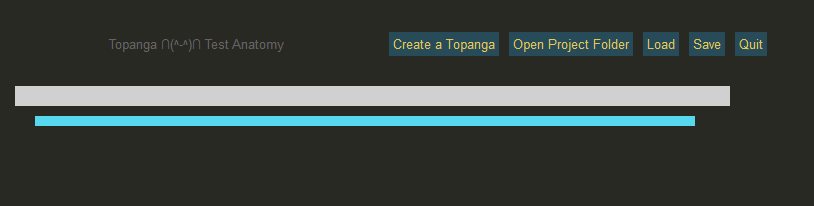
eagleEggs
on 3 Oct 2018
The problem is that I don't understand ttk Styles... slowly learning, but still struggling....
MikeTheWatchGuy
on 3 Oct 2018
ok, try what's in Master Branch to see if it does what you're wanting. You don't have to vary the length now. Just make sure you use a key that's different for each bar that you want a new style for.
MikeTheWatchGuy
on 3 Oct 2018
Have you managed to work tool tips into this monster of yours?
MikeTheWatchGuy
on 3 Oct 2018
I haven't even looked at it!
eagleEggs
on 3 Oct 2018
Hmmm yes tooltips are cool!
eagleEggs
on 3 Oct 2018
Dunno how much it'll buy you in terms of looks, but you can now set the "background color for tab groups"
Here it's set to green....
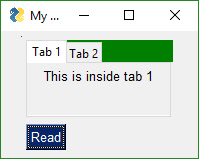
That's all I have for now. Individual tab colors are more problematic.
MikeTheWatchGuy
on 3 Oct 2018
Hmmm yes tooltips are cool!
I finally figured out a good use for them beyond "help". I used them in the latest color chart demo. When you hover over the color it gives you the RGB values.
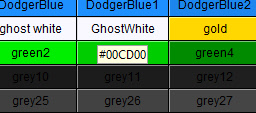
MikeTheWatchGuy
on 3 Oct 2018
Oh that HEX conversion idea is good
eagleEggs
on 3 Oct 2018
OK, closing this one since it's fixed.
MikeTheWatchGuy
on 3 Oct 2018
Funny thing is, the way I'm using TabGroup, the backgroud_color doesn't take effect :(
https://gist.github.com/eagleEggs/fb5e7777734c8cac33b9d83579aa32f8#file-tabgroup
I tested it without nesting that colm and it works. But I need colm visible across all tabs which is why I have it like that.
eagleEggs
on 3 Oct 2018
But looking into that led me to a pretty cool thing:
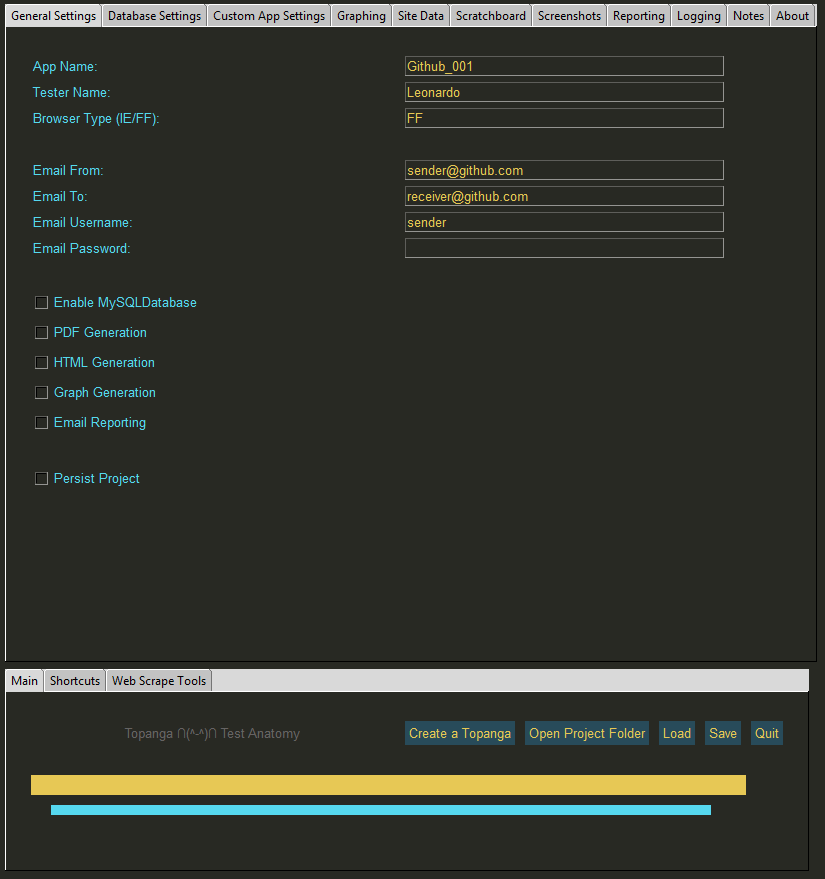
More tabs!
eagleEggs
on 3 Oct 2018
Funny thing is, the way I'm using TabGroup, the backgroud_color doesn't take effect :(
https://gist.github.com/eagleEggs/fb5e7777734c8cac33b9d83579aa32f8#file-tabgroup
I tested it without nesting that colm and it works. But I need colm visible across all tabs which is why I have it like that.
I dunno what that means.
Does it mean the feature doesn't work at all?
What is colm?
MikeTheWatchGuy
on 3 Oct 2018
Here is my entire layout with tabs and columns. Something I'm doing messes up the background color. If I just do a basic tab / column it works so it's something in my code. I think it's because I'm declaring a TabGroup, but also below it I'm also declaring other things.
https://gist.github.com/eagleEggs/7faa0184d4ec025d5848af3f0405e9ef
it's as if for background_color to work on a TabGroup - You can't declare anything else in the layout for that defined element.
Notice here I add more to layout after first TabGroup:
layout =  [[sg.TabGroup([[
            sg.Tab('General Settings', tab1),
            sg.Tab('Database Settings', tab2),
            sg.Tab('Custom App Settings', tab3),
            sg.Tab('Graphing', tab4),
            sg.Tab('Site Data', tab10),
            sg.Tab('Scratchboard', tab11, border_width =0),
            sg.Tab('Screenshots', tab5),
            sg.Tab('Reporting', tab6),
            sg.Tab('Logging', tab7),
            sg.Tab('Notes', tab8),
            sg.Tab('About', tab9)]], background_color = "black")],

             # if I stop here, it works - But adding below it breaks it:

          [sg.TabGroup([[sg.Tab('Main', tab12), sg.Tab('Shortcuts', tab12), sg.Tab('Web Scrape Tools', tab12)]], background_color = "black")],

          [sg.Text('')],
          #[sg.Column(colm, background_color = "#282923")],
          [sg.Text('', text_color = "#282923", justification = "center")]]
If I don't add
 [sg.TabGroup([[sg.Tab('Main', tab12), sg.Tab('Shortcuts', tab12), sg.Tab('Web Scrape Tools', tab12)]], background_color = "black")],
          [sg.Text('')],
          #[sg.Column(colm, background_color = "#282923")],
          [sg.Text('', text_color = "#282923", justification = "center")]]
It works. But with it, it doesn't color correctly.
eagleEggs
on 3 Oct 2018
It works, when reversing the order in the Layout. So it seems TabGroup background_color really wants to be last :):
layout =  [[sg.Column(colm, background_color = "#282923"), sg.TabGroup([[
            sg.Tab('General Settings', tab1),
            sg.Tab('Database Settings', tab2),
            sg.Tab('Custom App Settings', tab3),
            sg.Tab('Graphing', tab4),
            sg.Tab('Site Data', tab10),
            sg.Tab('Scratchboard', tab11),
            sg.Tab('Screenshots', tab5),
            sg.Tab('Reporting', tab6),
            sg.Tab('Logging', tab7),
            sg.Tab('Notes', tab8),
            sg.Tab('About', tab9)]], background_color = "black")]]
OK, I clearly have more work to do on it... I warned you that I don't understand these style things.
None of these problems should be happening so it's not something you're doing wrong.
MikeTheWatchGuy
on 3 Oct 2018
I hacked it to work... It doesn't mind being in the middle :) This makes the background_color take effect:
layout =  [[sg.T("", size = (0,0)), sg.TabGroup([[
            sg.Tab('General Settings', tab1),
            sg.Tab('Database Settings', tab2),
            sg.Tab('Custom App Settings', tab3),
            sg.Tab('Graphing', tab4),
            sg.Tab('Site Data', tab10),
            sg.Tab('Scratchboard', tab11),
            sg.Tab('Screenshots', tab5),
            sg.Tab('Reporting', tab6),
            sg.Tab('Logging', tab7),
            sg.Tab('Notes', tab8),
            sg.Tab('About', tab9)]], background_color = "black")],

          [sg.Text('')],
          [sg.Column(colm, background_color = "#282923")]
          [sg.Text('', text_color = "#282923", justification = "center")]]
I'm not following what you're saying about ordering or that the background color has to be last. The layout always has to be before the background color argument, but I'm sure that's not what you mean. I'll go through your post in more detail tomorrow.
MikeTheWatchGuy
on 3 Oct 2018
I have fixed all of these tab problems... if not, please open a real issue since I keep fucking it up.
Someone else posted about positions, so check that one for the valid locations. It's basically all combinations... top, bottom, left, right, topleft, ...
MikeTheWatchGuy
on 3 Oct 2018
Related issues
 mozesa
·
4Comments
mozesa
·
4Comments
 scmanjarrez
·
5Comments
scmanjarrez
·
5Comments
 thelou1s
·
4Comments
thelou1s
·
4Comments
 OndoyManing
·
4Comments
MikeTheWatchGuy
·
5Comments
OndoyManing
·
4Comments
MikeTheWatchGuy
·
5Comments
Most helpful comment
ok, try what's in Master Branch to see if it does what you're wanting. You don't have to vary the length now. Just make sure you use a key that's different for each bar that you want a new style for.