Using the Print Sheets command I am printing by sheet list.
- The sheet list has a filter by issue date
- The printer is Bluebeam PDF
- The Page settings are a company standard sheet, grayscale
- I checked the combine into one PDF box
It all prints out as expected. The problem is in the Project Browser. The sheets that are printed thru the Print Sheets command have a character prefix added (an arrow pointing right) to the sheet number. This character doesn't print but the printed sheets sent to the bottom of the Project Browser sheet list. I have to rename each sheet that was printed to the original sheet number to get them to go back to their original sheet order.
 Papala18
All 9 comments
I have the same problem. It got so bad that the length of the sheet number increased to more than 200 (which might be the limit for Revit). After a while the sheet number (gradually) vanished from the Project Browser making it impossible to open the sheet!

Seems like a serious bug as it's not visible until the sheet vanishes.
I wrote a Dynamo-Script that cleans the sheet numbers. As I didn't know if it's only prefix or even suffix that get added just ran it against all characters + some special characters from my region. It might help some, adapt the special characters to your needs.

# Load the Python Standard and DesignScript Libraries
import sys
import clr
clr.AddReference('ProtoGeometry')
from Autodesk.DesignScript.Geometry import *

import string

# The inputs to this node will be stored as a list in the IN variables.
dataEnteringNode = IN

# Place your code below this line
list_in = IN[0]
list_out = []

def listAlphabet():
  temp = list(string.ascii_lowercase) + list(string.ascii_uppercase)
  special = ["ö","Ö","ä","Ä","å","Å","-","_"," "]
  for i in range(10):
    special.append(str(i))
  return temp+special

chars = listAlphabet()

for sheet_number in list_in:
    sheet_number_out = ""
    for character in sheet_number:
        if character in chars:
            sheet_number_out = sheet_number_out + character
        else:
            pass
    list_out.append(sheet_number_out)

# Assign your output to the OUT variable.
OUT = list_out
 monsieurhannes
on 23 Feb 2021
monsieurhannes
on 23 Feb 2021
Does this happen every time or sometimes? Also, look at the command tooltip. If you SHIFT+CLICK on the command, it will popup and ask you for documents that you want it to remove all these empty characters from. :/ I'll take another look at the tool
 eirannejad
on 28 Feb 2021
eirannejad
on 28 Feb 2021
It does not happen every time but most of the time. I'll try the shift/click option. Thanks.
Sent from my Verizon, Samsung Galaxy smartphone
-------- Original message --------
From: Ehsan Iran-Nejad notifications@github.com
Date: 2/27/21 9:07 PM (GMT-05:00)
To: eirannejad/pyRevit pyRevit@noreply.github.com
Cc: Tom Langebartels tlangebartels@frpinc.com, Author author@noreply.github.com
Subject: Re: [eirannejad/pyRevit] Print Sheets (#1167)
Does this happen every time or sometimes? Also, look at the command tooltip. If you SHIFT+CLICK on the command, it will popup and ask you for documents that you want it to remove all these empty characters from. :/ I'll take another look at the tool
—
You are receiving this because you authored the thread.
Reply to this email directly, view it on GitHubhttps://link.edgepilot.com/s/0b61ea4a/HXrJHQC3J0SbFVryPqK1hA?u=https://github.com/eirannejad/pyRevit/issues/1167%23issuecomment-787219684, or unsubscribehttps://link.edgepilot.com/s/1471f381/_ZMb1WS0eEWzbJ6lqT7tGA?u=https://github.com/notifications/unsubscribe-auth/AS2RDXXLFOTWFRTIQYZDMN3TBGQLRANCNFSM4XRCQT6Q.
Links contained in this email have been replaced. If you click on a link in the email above, the link will be analyzed for known threats. If a known threat is found, you will not be able to proceed to the destination. If suspicious content is detected, you will see a warning.
Fink Roberts & Petrie, Inc | 9449 Priority Way West Drive, Ste. 200 | Indianapolis, IN 46240 | (317) 872-8400 ph | (317) 876-2408 fax
Confidentiality Notice: All contents of this email and any attachments may contain confidential or proprietary information and is intended solely for the recipient(s) identified above and should not be opened, read or utilized by any other party. If you have received this email in error, please notify the sender immediately and destroy all copies of the message.
Papala18
on 28 Feb 2021
@Papala18 do you even get the prefix when you have a successful print? Is the number of prefixes increasing after each print or could it be a left over from a previously failed print? I can't really reproduce that problem at the moment. Since I "cleaned" the sheet numbers all works as expected.
monsieurhannes
on 28 Feb 2021
@eirannejad Thanks for the tip with the shift+click. I didn't notice the tooltip 😄
Maybe that's a warning that should appear when "Combine Sheets" is selected. But I don't really know how that process works. In a best case scenario there shouldn't be anything left of the prefix. I hope my pull request helps in that direction.
monsieurhannes
on 28 Feb 2021
Thanks for all the input. I'm a novice with dynamo and really any coding. I'm a Revit user and I'm old so new things come more slowly than they used to. With the shift+click tool, what should I be shift+clicking on? I'm not sure where to apply it. Thanks.
Papala18
on 1 Mar 2021
Hej @Papala18,
You left-click on the Print Sheets-icon while holding the shift key on your keyboard.
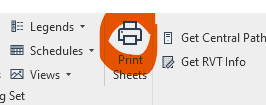
That prompts a window to pop up and you can chose the revit files that you want to "clean", meaning that it goes through ALL sheets in the selected Revit files and removes the invisible prefix characters. It's very fast and needs no Dynamo experience, much better than my solution!
Note that it only shows open Revit files. Ideally you even close all sheets and views apart from one, sync and reliquish before fixing the sheet number. That way you won't run into problems with locked sheets.
monsieurhannes
on 2 Mar 2021
Thanks so much Monsieurhannes!
Papala18
on 4 Mar 2021
Merged #1179 as a fix for this. Thank you @monsieurhannes !!
eirannejad
on 14 Mar 2021
Related issues
 varunbose
·
4Comments
varunbose
·
4Comments
 thumDer
·
4Comments
thumDer
·
4Comments
thumDer
·
4Comments
thumDer
·
4Comments
 pmcmm
·
3Comments
pmcmm
·
3Comments
 alitehami
·
4Comments
alitehami
·
4Comments