pyRevit is not compatible with Keynote Manager
Describe the bug
pyRevit and Keynote Manager are not compatible in the same Revit session, even if not using the Keynote Manager feature in pyRevit. Already contacted Steve at Revolution Design to alert the developer for that application that this is an issue.
To Reproduce
Steps to reproduce the behavior:
- With Keynote Manager from Revolution Design installed, click Show Palette in Keynote Manager from Revolution Design
- Application throws error
- Ungracefully crashes
Expected behavior
Well....... not a crashing Revit instance would be a solid start. :)
Screenshots
Nothing to show.
Desktop (please complete the following information):
- OS: Windows 10
- pyRevit Version 19
 kraftwerk15
All 28 comments
Sorry for double posting. I was able to identify that pyRevit was the issue when trying to run Keynote Manager by Revolution Design by disabling pyRevit. Keynote Manager by Revolution Design will then function correctly.
kraftwerk15
on 23 May 2019
What is the error? What is the source of conflict? Try 4.6.22 and see if the error is still there.
 eirannejad
on 23 May 2019
eirannejad
on 23 May 2019
Emailed you back, but could you provide Revit journal files for a session that crashes? That would help to identify the crash source.
 swfaust
on 24 May 2019
swfaust
on 24 May 2019
@eirannejad Here is a journal file showing the error.
journal.0086.txt
kraftwerk15
on 24 May 2019
Strange, it's getting an invalid window handle on the palette... @eirannejad The palette uses the code Process.GetCurrentProcess().MainWindowHandle to get the Revit window handle to display, would pyRevit mess with that somehow? Not sure what else would cause that error, I believe that's the only place I have anything to do with window handles.
@kraftwerk15 you may try the dockable pane mode. Since that's internal to Revit it doesn't use window handles and would probably avoid this error.
swfaust
on 24 May 2019
@swfaust I just installed the trial and this is what I get. Revit doesn't crash
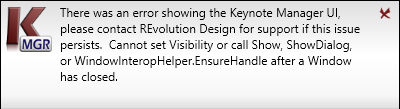
Testing more
eirannejad
on 24 May 2019
@swfaust Seems like somehow during load time, Keynote MGR is grabbing the handle for pyRevit output window instead of Revit's output window. If I don't close the output window, K MGR works fine and Show/Hiding the KMGR using the GUI button actually toggles both the pyRevit output window and the KMGR window.
@kraftwerk15 As a temporary fix, set pyRevit to no-logging in settings window so it doesn't open its output window during Revit startup. This fixes the window handle conflict temporarily until we fix the root issue.
eirannejad
on 24 May 2019
@swfaust Grabbing window handle from Process is proving tricky since it depends on the currently active window it seems. How about we get the handle safely from Autodesk.Windows.ComponentManager.ApplicationWindow ?
eirannejad
on 24 May 2019
Just got off the phone with a user that is experiencing the same issue. We confirmed that if you disable pyRevit the error goes away.
@kraftwerk15 another workaround for now is to use the dockable pane mode instead of palette mode. This is not a separate window per se so would not have the same issue.
@eirannejad Let me look into that method instead. I also believe Autodesk actually put something in to get the main Revit window handle in one of the recent versions but I will need to look it up to see... stay tuned.
swfaust
on 24 May 2019
@swfaust Awesome. I reworked pyRevit to get handle safely from Autodesk.Windows
Feel free to pull from release/4.6.23 and test
eirannejad
on 24 May 2019
Looks like 2019 added Application.MainWindowHandle. I will switch to that and do some testing.
swfaust
on 24 May 2019
Sweet. Adjusted pyRevit window handle getter to use native api >= 2019
eirannejad
on 24 May 2019
I'm out this afternoon and weekend so not able to test thoroughly right now but @kraftwerk15 and anyone else that wants to run a test here is a link to a new build with this change: https://www.dropbox.com/s/xy55wd9fraradn1/Keynote%20Manager%2015.0.7084.0%20Setup.exe?dl=0
swfaust
on 24 May 2019
@swfaust Tested on mine and the issue is fixed.
eirannejad
on 24 May 2019
@kraftwerk15 Closing this issue. Feel free to open again if it is not fixed on yours.
eirannejad
on 24 May 2019
Dang guys. You got after that quickly. I pulled KMGR from Steve's dropbox link. It appears to be working correctly in R19.
I then went back to R18 and I turned off the Startup Window from pyRevit in settings. With KMGR Palatte option, not the dockable pane, it works correctly. The Startup Window must be set to off for this to work.
I tested with branch 4.23 and it appears to work in R19 without issues.
kraftwerk15
on 24 May 2019
I'll publish 4.6.23 this weekend
eirannejad
on 24 May 2019
Posted KM build 15.0.7088.0 this morning that should take care of the issue on my side.
swfaust
on 28 May 2019
Same here. Published 4.6.23 this weekend with the fix.
eirannejad
on 28 May 2019
Just downloaded the KMGR from RD site. While this solution is working for R19 and up, this is not working in R18. I am sending back to @swfaust via email and we will stop hijacking the Repo.
If we find an issue that pertains to the repo, I will come back and post.
kraftwerk15
on 29 May 2019
@kraftwerk15 This is the proper place for the convos on bugs. @ mention him here and he'll get an email. It's important that these convos are documented for others having the same or similar issues.
eirannejad
on 29 May 2019
@eirannejad Well, I thought this was just a KMGR bug from my last post, so I wanted to make sure that was in RD's court, as I thought it was no longer an issue that dealt with pyRevit. From working yesterday, it still appears to be an issue when pyRevit is installed in Revit 2018 that the application crashes.
To be clear, everything does seem to be fixed in R19 and above, but I am working currently in R18 and then upgrading content as I go. So, I am attaching keynotes to the content in R18.
Having pyRevit's ApplicationInitialized Dialog box turned off in settings does not solve the issue in R18. Having KMGR in Palatte vs. Dockable Pane mode in R18 does not solve the issue.
As both you and @swfaust were doing tests as part of this issue, were you working in R20 / R19 / R18? All?
kraftwerk15
on 30 May 2019
I tested my changes in Revit >= 2019
The window handler getter change is only available in Revit >=2019 API so the issue still stays the same with versions below that.
@kraftwerk15 Try renaming the pyRevit.addin manifest file in %APPDATA%/Autodesk/Revit/Addons/<verison> to ZZpyRevit.addin. This would push it to the last addon to be loaded. It might fix the issue.
eirannejad
on 30 May 2019
@eirannejad Well, what do you know. That works. I was thinking that KMGR's addin file would start with a "K". But, it is RDES.KMPlus.addin. So, the "R" addin loaded after the "p" from pyRevit.
I left the other manifest files alone in R19 and greater. I'll keep testing and follow back if any further issues.
If there is an update that you build, it would "create" a new pyRevit.addin manifest in the appdata location because one does not technically exist. So, we need to make sure to not update pyRevit in R18 via .exe? Running an update from inside the R18 addin does not recreate the manifest, correct?
kraftwerk15
on 30 May 2019
@kraftwerk15 Ya the current cli can read the attachment from the renamed manifest file but if another attachment is requested e.g. pyrevit attach dev 277 2018 it will create another pyRevit.addin file.
- [ ] I'll make the CLI smart about reusing existing attachments so there are no duplication. Next CLI update should not mess with your current state of attachments.
eirannejad
on 30 May 2019
well I follow all the suggestions and updated both software, the still a problem in 2020. revit enter in a not responding phase, only unloading pyrevit solved the problem.
 wrartes21
on 30 Aug 2019
wrartes21
on 30 Aug 2019
This was fixed for Revit 2019 but is still an issue in Revit 2020. I am currently running the latest release of Revit 2020.2.1 with pyRevit 4.7.4 and Keynote Manager 16.0.7321.0. As soon as I open keynote manager palette it crashes Revit the only fix as stated previously is to uninstall pyRevit.
 donnando85
on 19 Feb 2020
donnando85
on 19 Feb 2020
Hi all, through debugging with some users I believe I have pinpointed and fixed the issue. I'm doing some more internal testing before making this a public build, but anyone who is interested in testing out the fix can do so by downloading from here: https://www.dropbox.com/s/z7tbjhy3ac2ts6h/Keynote%20Manager%2016.0.7368.0%20Setup.exe?dl=0
@eirannejad FYI looking at .dmp files from users that were having this issue, it was pointing to an exception trying to add a Behavior to a behavior collection on a control. This would based in the System.Windows.Interactivity library and probably a version conflict in my experience. I didn't specifically see a reference to that in your installed dll's but I was only using it a small bit of code and was able to refactor to remove my dependency on that library entirely. Once I did so it fixed the issue for the users experiencing the issue. The above link is the updated installer with this fix.
swfaust
on 4 Mar 2020
Related issues
 thazell
·
5Comments
thazell
·
5Comments
 alitehami
·
4Comments
alitehami
·
4Comments
 TheBIMsider
·
5Comments
TheBIMsider
·
5Comments
 jkcameron
·
5Comments
jkcameron
·
5Comments
 Arsany123
·
4Comments
Arsany123
·
4Comments