Pyrevit: Keynote Manager - Conversion failed! Connection Lock
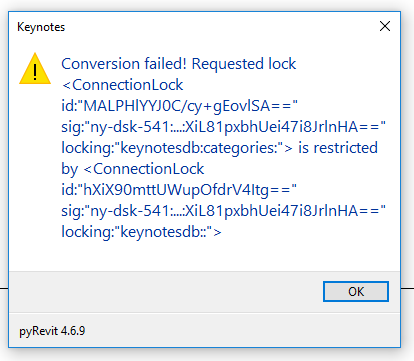
The conversion keeps failing for me in the keynote manager. I updated the encoding to be UCS-2 LE BOM (which I saw you suggest in another post), however I continue to have the same error. I have attached an image of the error message below. Thanks in advance!
 Alexandra-Nelson
All 25 comments
Start a fresh text file and use import to import the previous keynotes and let me know if it works.
 eirannejad
on 2 Jan 2019
eirannejad
on 2 Jan 2019
Thanks for your quick response! I wasn't sure how to import the keynotes into the new file, but I tried creating a fresh text file with only 2 lines and it did not work.
Alexandra-Nelson
on 3 Jan 2019
by Fresh text file I meant an empty text file. It doesn’t need conversion so it opens empty. Then hit the import button and import the original keynote file
eirannejad
on 3 Jan 2019
That doesn't seem to be working for me.
Alexandra-Nelson
on 3 Jan 2019
Hmm okay. Which Revit version? Is the txt file on the network drive?
eirannejad
on 3 Jan 2019
I am in Revit 2018 and yes, the txt file is on the network drive.
Alexandra-Nelson
on 3 Jan 2019
@anelsonBIM I still can't replicate this issue. Do you have more info on this?
eirannejad
on 4 Jan 2019
I tried uninstalling pyRevit and then reinstalling it, which didn't work. I also tested it in 2018 and 2019, neither of which worked. It may be that the computer's security of network files is limiting access to the file by encrypting it every time it tries to access and convert it? I will test it on my personal laptop this weekend and see if I have any luck.
Alexandra-Nelson
on 4 Jan 2019
I'm getting the same message.
What I've done so far:
- I have tried the default RevitKeynotes_Imperial.txt file.
- I have created a completely blank txt file on my desktop, keynotes.txt
- I have tried both workshared and non-workshared files, also on my desktop.
- Both 2018.3.1 and 2019.1
It is able to create the backup file, however it changes the current file contents to this:
# @datastore("txt") @source("C:\Users\clays\Desktop\Keynotes\Keynotes.txt") @version("0.1") @encoding("UTF-16")
# ===================== @db(txn_db:"Internal DB")
# --------------------- @table(locks_table:"Locks Table") @sep("\t") @internal(yes) @tags(yes) @history(no) @encap(no) @headers(no) @key(lock_uuid) @uuid(lock_uuid:"") @text(lock_source:"") @text(lock_requester:"") @uuid(lock_conn_uuid:"") @text(lock_dbname:"") @text(lock_tablename:"") @text(lock_recordkey:"")
# JfCFBRa5RE6pYHg28YeT7A==  c04463229   clays   ZowarF01rEuphukDdWjT8g==    keynotesdb  NULL    NULL
# ===================== @db(keynotesdb:"pyRevit Keynotes Manager DB")
I am currently booting up my spare box to see if it could be network related.
 need4mospd
on 7 Jan 2019
need4mospd
on 7 Jan 2019
Remove this line and see if it works or the line comes back. This line defines the lock that is causing the fail.
# JfCFBRa5RE6pYHg28YeT7A== c04463229 clays ZowarF01rEuphukDdWjT8g== keynotesdb NULL NULL
eirannejad
on 7 Jan 2019
Alright, it opened up after removing that line!
need4mospd
on 7 Jan 2019
@need4mospd Okay so I guess something happens during the conversion process that fails to remove that lock. Did you Revit ever crash when converting or playing with the keynote manager?
eirannejad
on 7 Jan 2019
This was the first time I got it open so far and... well let me just say the interface looks great! ;)
Unfortunately, I'm running into the same type of errors when trying to import keynotes from another file or create new categories. It's adding lines to the txt file similar to the one I just deleted. Then I got a crash after messing around too much I guess. Getting my other machine booted up now.
need4mospd
on 7 Jan 2019
My revit file crashed everytime I opened the keynote manager in one of my
empty project templates, but not in another template file that I had.
Alexandra-Nelson
on 7 Jan 2019
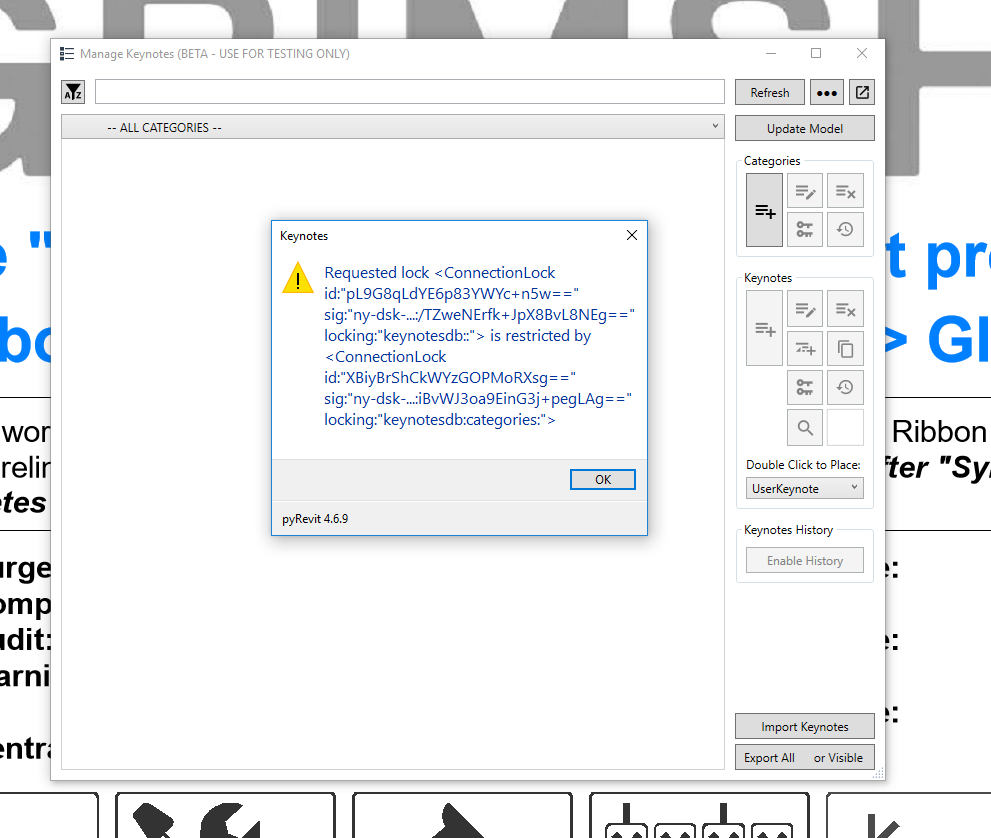
I'm having the same outcome. Removing that line opened up the keynotes manager for me for the first time, but it is blank and not showing my keynotes. I also get the same error message when I try to import keynotes in that window.
Alexandra-Nelson
on 7 Jan 2019
@anelsonBIM @need4mospd Would one of you please email me your original keynotes file so I can test?
eirannejad
on 7 Jan 2019
Alexandra-Nelson
on 7 Jan 2019
After removing that line and then opening the keynote manager my .txt.bak looked like this.

..and my .txt file looked like this..

Alexandra-Nelson
on 7 Jan 2019
@anelsonBIM This is so odd. It runs with no issues on my machine and imports all keynotes without any errors. Hmmm. We can discuss this over a Zoom meeting so I get to play with the import and see the debug messages. Before that if you don't mind, create a clean txt file and run the keynote manager again so you're in an empty keynote file. Then Hold CTRL and run the keynote manager again and import the original keynotes. This time, the keynote manager opens an output window and spits our a lot of output. I'd appreciate if you can save that output when the import is done or is stuck on an error and email me. There is a save button on the output window title bar.
eirannejad
on 7 Jan 2019
Ok great, thanks. I'll try that. My email is Alexandra.Nelson at grimshaw.global and I'll make sure to be available anytime after 3pm.
Alexandra-Nelson
on 7 Jan 2019
@anelsonBIM @need4mospd Found the bug. It's a string comparison between a lowercase and the original string. In case of @anelsonBIM it compares alexandranelson with AlexandraNelson and fails to recognize the lock inside the text file actually belongs to the user. Quick fix is to use a lowercase username in your Revit settings and the keynote manager should work. I'll fix this and will publish with pyRevit 4.6.10 very soon.
eirannejad
on 8 Jan 2019
That's awesome! I was finally able to get it all working! It's working as described, just about perfectly so far. If I had to critique it, I'd like to cut out the encoding step if possible...
Looking forward to the update! Glad you were able to sort out this little bug with @anelsonBIM!
need4mospd
on 8 Jan 2019
@need4mospd I'm working on revising the import process to support both utf-8 and utf-16 files. The created keynote database file is however will remain utf-16 to be able to support all languages.
eirannejad
on 8 Jan 2019
Resolved and will be pushed with 4.6.10
eirannejad
on 8 Jan 2019
Wonderful news! Appreciate your work on this. So glad to hear that you found the fix! I will keep my eyes peeled for the 4.6.10 release.
Alexandra-Nelson
on 8 Jan 2019
Related issues
 jkcameron
·
5Comments
jkcameron
·
5Comments
 thumDer
·
4Comments
thumDer
·
4Comments
 alitehami
·
4Comments
alitehami
·
4Comments
 pmcmm
·
3Comments
pmcmm
·
3Comments
 amastrobera
·
3Comments
amastrobera
·
3Comments
Most helpful comment
Resolved and will be pushed with 4.6.10