Pyrevit: Sheets - "Copy Sheets to Open Document" Ends and Rolls Back Entire Transaction if View-Specific Elements are Detected in the View
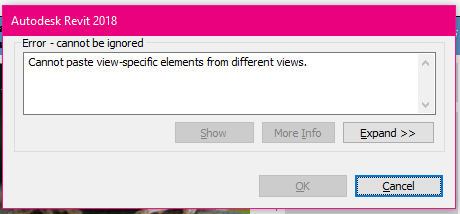
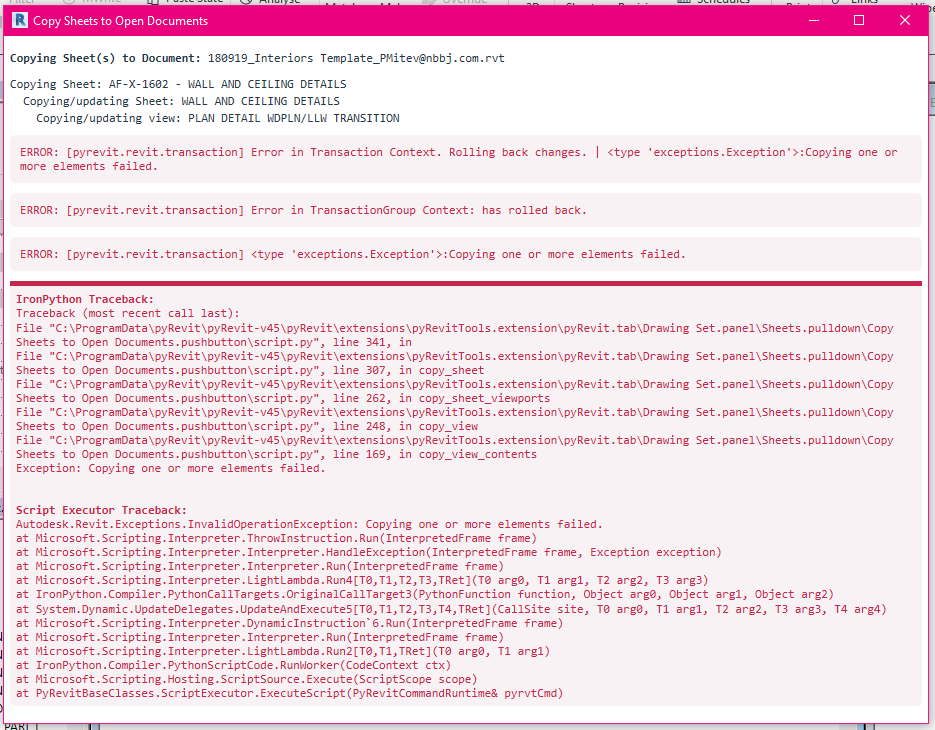
When transferring sheets between projects using the "Copy Sheets to Open Document" tool, the batch process is interrupted if one of the Viewports on a given sheet has view-specific elements such as a section or detail call-outs. This can be a hassle if you selected a bunch of sheets for example, and the process fails, and you have to re-make your selection set and try the transfer again.
 mitevpi
All 12 comments
Got it. Thanks. Will get it tested now.
 eirannejad
on 24 Sep 2018
eirannejad
on 24 Sep 2018
In the commit above I just added a logger like you did for the other methods.
An alternative could also be to add a "brute-force" option. AKA - if a transfer fails because of one of these issues, copy the elements in that view one-by-one with a try/except so that you copy all other elements except for the view dependent one. Or pre-filter the view-dependent ones somehow, and remove them from the elements_ids list in the first place.
mitevpi
on 24 Sep 2018
I'll add a check before the copy/paste process of the elements to filter out the ones that cause the issues.
eirannejad
on 24 Sep 2018
@mitevpi Is it okay to skip all those elements? The trouble is that those references might be to model views that can not be copied easily. I'm thinking skip for now and then add an issue for enhancement to the tool so it can copy model views as well.
eirannejad
on 24 Sep 2018
@eirannejad I think for now, skipping those elements or views entirely as fine - just so long as the entire operation doesn't have to terminate.
Copying model views is something I've been thinking of writing for a while now - so I think this might be timely. Not to create a new model view, but to turn a model view into a drafting view - ex. a detail drawing which is a model view because it's showing one piece of modeled casework - realistically, the drafting components and notes are the only thing important in there.
mitevpi
on 24 Sep 2018
Okay pushed a fix and also added support for copying sheet guide grids. Test please
eirannejad
on 24 Sep 2018
@eirannejad thanks - is there an easy way to get that update actualized, or should I just replace the script.py manually. I have pyRevit installed via the installer currently, rather than referencing the cloned repo. Should I do the latter?
mitevpi
on 24 Sep 2018
The installer clones the git repo. So technically you should be able to use the 'Update' tool in pyRevit general panel to update.
eirannejad
on 24 Sep 2018
That's what I thought, but the script didn't update when I did it just now, so I thought I may be remembering wrong.
mitevpi
on 24 Sep 2018
hmm. I've gotten comments on it. It's next on the line to get fixed. Github security change messed up a lot of git functions.
eirannejad
on 24 Sep 2018
No worries - I'll manually update and let you know when I've tested.
mitevpi
on 24 Sep 2018
I'm closing this since it's 90% fixed. Keep the conversation if you see any errors. Thanks for the bug report! :)
eirannejad
on 28 Sep 2018
Related issues
 thumDer
·
4Comments
thumDer
·
4Comments
 alitehami
·
4Comments
alitehami
·
4Comments
 Robbo1234
·
4Comments
Robbo1234
·
4Comments
 varunbose
·
4Comments
varunbose
·
4Comments
 kuldeep3618x
·
4Comments
kuldeep3618x
·
4Comments