WARNING: this feature is being developed on the mutaplasmids branch. If you're interested in checking it out, feel free, however be warned that this has changes to the user database, It is unknown if downgrading back to a stable release would work
Initial discussion was started here: #1530
Mutated items seem to be a completely new item (different item ID). These items are not populated with the required attributes (see below)... CCP keeps track of what the base item was, and I assume will be using the base item and simply substituting the dynamic attribute value over the "mutatable" ones.
[+] 10MN Abyssal Afterburner
  [+|n] medPower
  [+|y] moduleBonusAfterburner
  [+|n] online
  [+|y] overloadSelfSpeedBonus
  [+] capacity: 0
  [+] mass: 1.0
  [+] radius: 1.0
  [+] requiredSkill1: 3450.0
  [+] requiredSkill1Level: 4.0
  [+] volume: 25.0
At it's most basic form, I think this would be a relatively easy thing to accomplish. pyfa could have a mutators table that is linked to a module.ID and references an attribute with it's new value, and when the module loads, it loads any mutators that it has with it. Should look into the current attribute override functionality to see if there's anything in there that we can reuse, or if this is going to require something new.
The biggest problem right now is the fact that Multiplasmid definitions are not available from CCP yet. I've requested access to this data, and also want it implemented via ESI (see https://github.com/esi/esi-issues/issues/928). But without this data, I'm not able to programatically look up which items have multiplasmids, and which attributes are enabled to be "mutatable".
I was able to find the RES file that I think contains these definitions bu looking at the resfileindex, however it's in FSD format and I don't have the skills to decode it. So until this data is available for us, this feature is going to be on hold. Technically I could work on certain assumptions, but I don't want to get caught in a situation where my assumptions are completely wrong and have to rework the feature once the data becomes available. :/
Import / Export
The mutated modules are literally a new type, so if you have a mutated afterburner on your rupture, pyfa will currently assume that it's the literal item. That being said, sounds like CCP are working on an ESI endpoint that allows you to get the base item for an itemID, as well as the attributes for that mutated module. This means that we should be able to import, look up the item to get and convert to the base module, and then add the mutators. CCP says that sometime this week (week of 5/20) they should have an idea on what this endpoint looks like.
 blitzmann
All 18 comments
Need to delve into this a bit, but thanks to @inomares:
blitzmann
on 23 May 2018
So that pastebin seems to be exactly what I want. There's still the fact that I can't access this information myself, and am relying on a third party, but I hope to have a remedy for that eventually.
I've created a branch mutaplasmids that will track this feature. be warned though, this is a largish feature, and I seriously doubt it'll be ready in time for the expansion release. It'll be worked on piece by piece as I have time.
blitzmann
on 24 May 2018
Moved this to In Progress, though I still think it's going to be slow work.
I've done a bit of preliminary research and testing on mutated attributes. Keep in mind that no GUI has been developed for any of this, it's simply database and code hacking so far.
Mutated attributes - supported
The good news is that it seems to be incredibly easy to support custom attribute values per module, with very little tweaks to the codebase. As stated, there's a new table mutators that links back to modules as a one to many. The mutators work in much the same way as attribute overrides do: whenever we "get original" attribute value, we look for the value in this order: mutator > overrides > base value.
Base item attribute loading for abyssal modules - in progress
The next thing was to determine how exactly to get an abyssal module to load it's base module's attributes. This proved to be pretty tricky - the original thought was to simply usurp the attributes on module load time so that all calculations point to the base attributes.
        if self.__item:
            if self.__baseItem:
                self.__itemModifiedAttributes.original = self.__baseItem.attributes
                self.__itemModifiedAttributes.overrides = self.__baseItem.overrides
                self.__hardpoint = self.__calculateHardpoint(self.__baseItem)
                self.__slot = self.__calculateSlot(self.__baseItem)
            else:
                self.__itemModifiedAttributes.original = self.__item.attributes
                self.__itemModifiedAttributes.overrides = self.__item.overrides
                self.__hardpoint = self.__calculateHardpoint(self.__item)
                self.__slot = self.__calculateSlot(self.__item)
            self.__itemModifiedAttributes.mutators = self.mutators
(very rough draft code)
This... kinda worked,but not well enough.
I determined that the best scenario would be to get the Abyssal module with the correct attributes from the get go, and came up with this: https://github.com/pyfa-org/Pyfa/blob/3944545721aa3d5689cf44e0b91787e67b7f7f44/eos/db/gamedata/queries.py#L101
This is not my preferred method. My preferred method would be to designate a custom relationship that correctly fetches the attributes it needs via the query and be done with it.
The way that it's currently implemented works but is hacky. It takes the to items, and merges the base item's attributed with it's own. Then... it expunges the abyssal object! This is required due to the way SQLAlchemy handles it's identity mapping. If you call for item 1, and then call item 1 again, it's going to look at it's identity cache and return the same object for each. For abyssal modules, this is unwanted behavior, since even though we want the same abyssal module for multiple instances, they are going to have different base items and attributes. So was can't fetch the one that we've already gotten. Hence the expunge - once we have the object that we need, we basically hide it from the session so that the next time we do a "get abyssal web", for example, it returns a brand new object.
Expunging from sessions shouldn't cause any issues considering that the eve database is supposed to be read only. This is the first time that I can recall we've ever had to modify EVE objects in pyfa - we normally load them up and use them as is.
Anyway, it seems to work. I'd like to revisit it at a later time to figure out a better way of doing it, but for now it's fine. Lots more testing is required of course, but the abyssal modules seem to act just like their base counterparts. See below: two Abyssal Webs using Web I and Web II as their base.
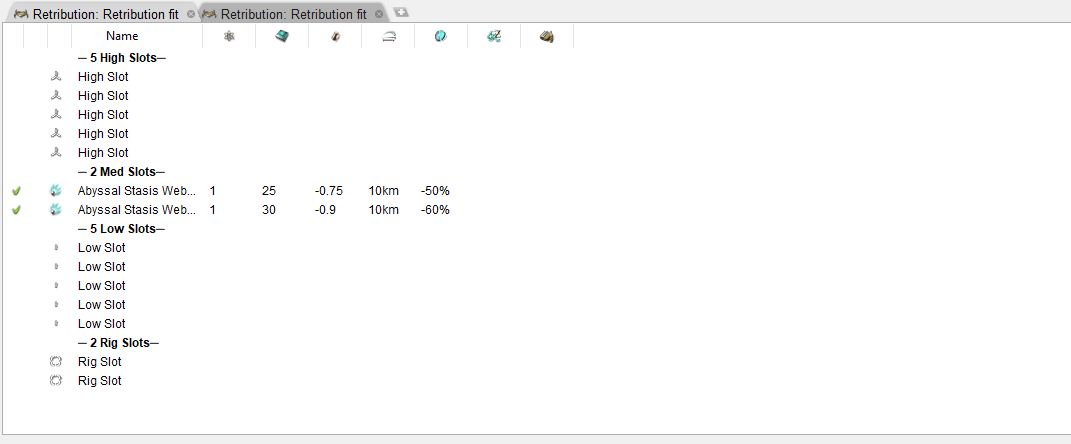
GUI - not started
Next up would be a GUI to handle this stuff. This is probably going to take the bulk of the effort. Conceptually, it's easy, but there's a few middle-level services that need to be modified / created, and GUI work is usually time consuming to begin with. Then testing / error handling / constraint development. I can see this feature still being 2 weeks away, but will keep this issue updated with progress :)
blitzmann
on 27 May 2018
Small update:
Got a context menu up that converts an applicable item to an Abyssal module, using the mutaplasmid selected.
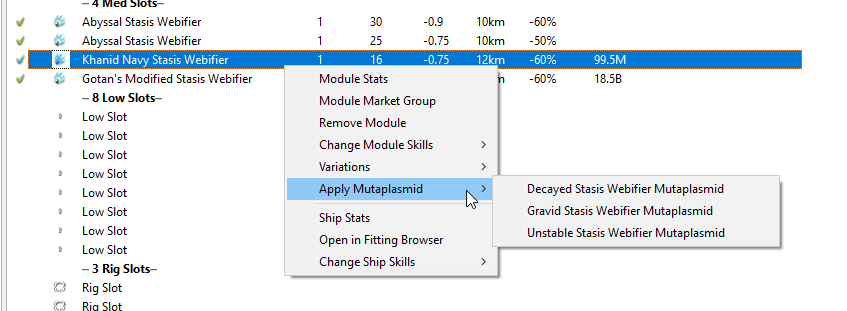
This seems to work fine - saves to and loads from the database just fine. There's also a revert option for those that have been covnerted
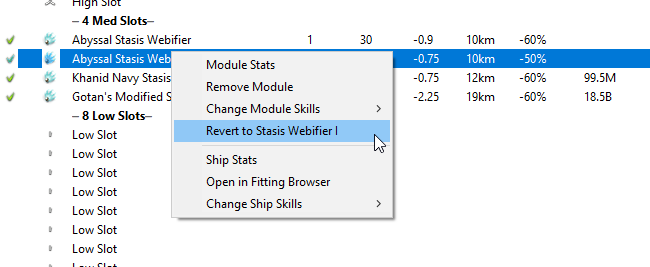
The next step would be to add support for modifying mutable attributes (in the GUI, should already work in the backend). I believe I'm going to stick this in the Item Stats window in it's own tab. The plan is to also support swapping out mutaplasmids changing the supported range of mutable values), and swap out the base module with one from a list of applicable types. There will probably be a few fit and finish things to do after that (like... what the hell do we do if you try to move this module to cargo? We can't save mutated attributes in that case... just don't allow it?)
After I get the item stats done (should be this week) I'll get a beta build out for folks to test it break it. :)
blitzmann
on 4 Jun 2018
I think this thread is going to turn into a mini blog about this feature development, lol. If you're interested in the techiness, continue reading. If you're only interested in the end product, see the last gyazo link
Attempt 1 of mutated attribute display: wx.Slider
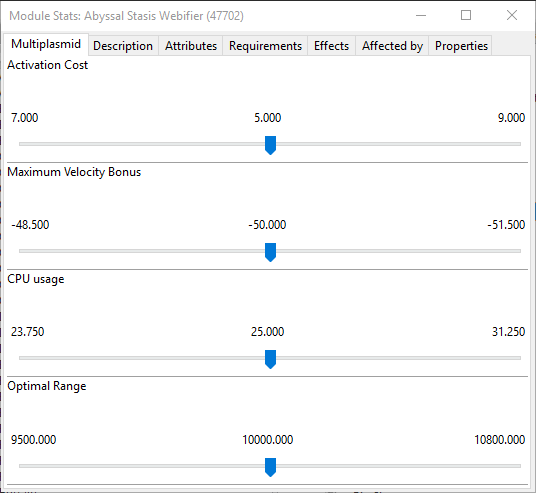
Note: this is an image of an attempt that is no longer in development
The original plan was to use a wx.Slider, however there were some difficulties to overcome. I want to touch on three of them for documentation purposes:
1) The attribute min/max skew. So are mutable attributes which give uneven min and max values (for example, 80% - 150%). Using the default slider, you would have deal with the "base" value being skewed in either direction. This was ultimately solved by abstracting the literal slider out and developing a custom panel that contained it. This would allow us to have a slider that went form -100 to 100, with 0 being the base value, and then the panel would convert them to what the user would see. However, this did end up with odd situations in which values would increment / decrement faster on one side than the other due to the skew, but overall this worked well and was considered solved
2) A much bigger shortfall was the fact that it only accepts integers as part of it's range and value, whereas we need it to accept a float. I was able to get around this somewhat by developing a custom panel as described above that would allow us to convert our floats to an integer representation on the slider. Of course, since the slider only uses integers, this forbids us from getting values such as 25.33%. There is a fix to this - instead of representing the slider as -100,100, represent it as -10000,10000. This way we can store the decimal places (in this case it would be stored as a value of 2533). So again, I has considered this solved
3) The biggest issue though comes from the fact that we will eventually support importing abyssal modules from EVE, which have a very specific values. This presented a problem: the slider was the one that determined the value, and due to various rounding errors with not only the abyssal attributes but the conversions from slider to user-format, I wasn't able to stabilize inputs in a way that was satisfactory. It was at this stage I abandoned this attempt, for now. I plan to keep the Slider code withing the pyfa repo, and we may very well provide it later down the road if there's sufficient request for such a specific widget.
Attempt 2: fancy gauges
So this is a thing:
https://gyazo.com/cd290f1621d8086083b24578d5a33194
Spent tonight working on this. It was pretty fun taking pyfa's custom gauges and turning them into something like this - a bidirectional gauge of sorts. This (albeit short) GIF demos the functionality of this custom-drawn widget, complete with animation, display of different sizes, and leading edge. Spent way too long on this, making sure the pixels were calculated perfectly , but I think it came out pretty nice.
In contrast to the sliders, which are user-interactable, this is strictly for display and fanciness. Surrounding these graphs will be information on min - max range, as well as an input that users can use to put in their own values. I don't quite have a good idea on how this is going to look, but I'll get something up and running by the end of the week probably.
blitzmann
on 5 Jun 2018
Just letting you know there is a ESI endpoint to get attributes of a certain abyssal module and itemid (from assets). Its GET /dogma/dynamic/items/{type_id}/{item_id}/. I haven't had a play with it yet thou.
 Neugeniko
on 8 Jun 2018
Neugeniko
on 8 Jun 2018
Yep, I've taken a look at it. Not much we can do with it off the bat. I was thinking the EVE Fittings feature would utilize this, but then I realized that we don't get itemIDs for that (it's just a generic saved fitting, not an actual fit in the game)
I can definitely see us expanding to including asset search for our EVE fittings window, though, which would probably utilize that endpoint.
blitzmann
on 8 Jun 2018
A bit of a curveball: there exists mutaplasmids that for a negative value. That is, there is no chance to roll high with these ones. Kinda throws a wrench into the gauge since I was expecting to use both sides as a range, but now there exists attributes that will only have one set used, just one extreme isn't as bad as the other extreme.
Nothing too bad, but something I'll have to keep in mind as this continues development. Efforts are focused right now on hooking it all up to the GUI, making it look decent, and calculate the numbers correctly.
EDIT: This also makes it so that, whenever I convert to an abyssal module, I'll have to take a look at the min and max and determine if the base attribute even fits in there. If not, take one depending on situation.
blitzmann
on 8 Jun 2018
Current progress:
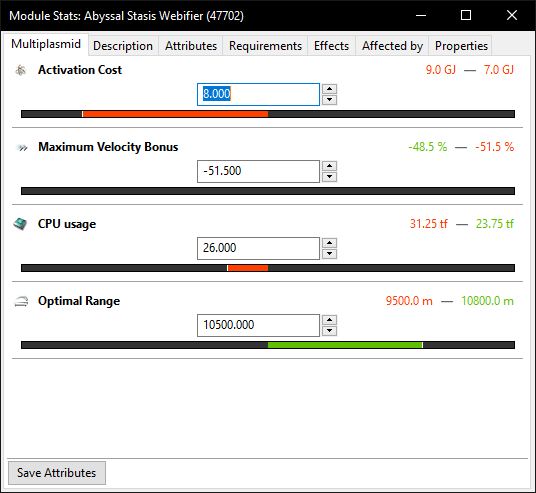
Still buggy (see the second one, it's not working due to negative value I think) and it's not actually hooked up to saving / loading the values, but graphically it's pretty :P
blitzmann
on 9 Jun 2018
Hmm, also still a bug with determining which is good and which is bad
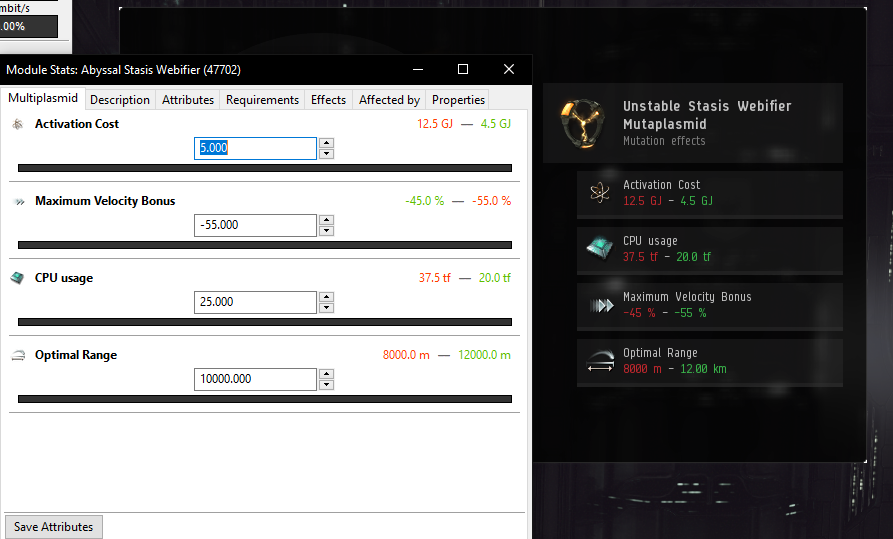
See Velocity Bonus. Almost positive this has to do with it being a nagative value as well
blitzmann
on 9 Jun 2018
I think this will be ready for a pre-release in a couple of days. Still need to work out a proper migration for the database and make sure shit doesn't break in that regard (shouldn't, it's just new tables / columns) before I release it for community testing.
I also just realized I've been pushing to my private git server instead of github, so none of this code is available >.<. Will have to fix that lol.
blitzmann
on 12 Jun 2018
Actually making a release tonight.
Listing known issues here:
https://github.com/pyfa-org/Pyfa/issues?utf8=%E2%9C%93&q=is%3Aissue+label%3Aabyss+
blitzmann
on 13 Jun 2018
The gauges look really nice. Will experiment with this today to see if I can find any issues with it.
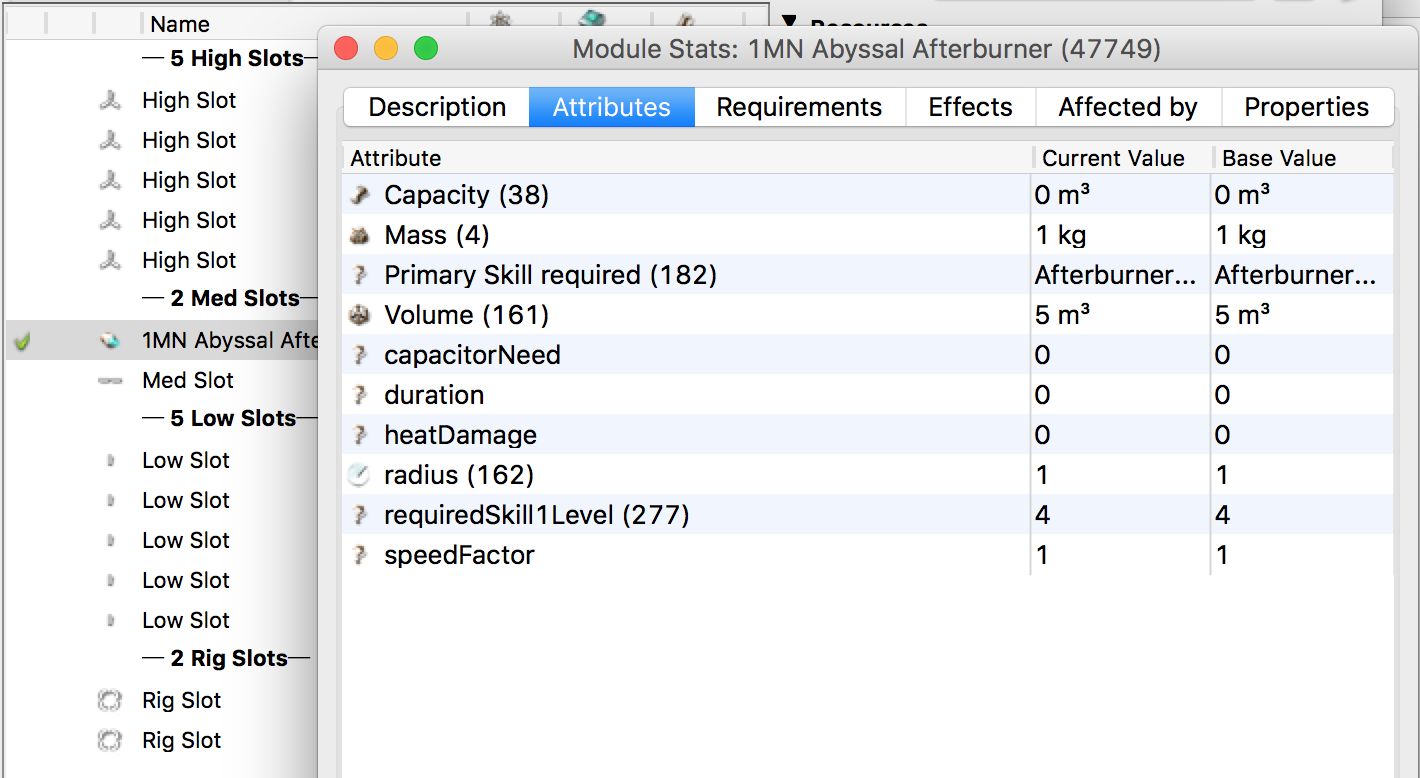
Edit: Looks like if I turn a module into an Abyssal one, then amend it's stats and move it from the fitting into the cargo, then back to the fitting when I right click on it and open the module stats it loses the page with the gauges on so I can't change it's stats any more. It also no longer appears to have any stats at all.
 burnsypet
on 13 Jun 2018
burnsypet
on 13 Jun 2018
Ah, yeah, I forgot to check how to work with cargos and swapping and all that jazz. Nice find! And glad it's generally working for you!
The reason for that is that the mutator's are assigned to the module. When moving a module from the fit to the cargo, it's moved from module table to cargo table, and thus it loses critical information such as it's base item (which is why it doesn't have any attributes when moving back), and it's mutators.
Think I will warn the user that it will be converted to it's base module when moving to cargo... I don't think I have the time or energy to make sure these things track correctly, at least not right now.
blitzmann
on 13 Jun 2018
It would also be nice to have a button on the show info window to reset all the mutators to default. I can probably try and add this if you want to take a break from it.
burnsypet
on 13 Jun 2018
It would also be nice to have a button on the show info window to reset all the mutators to default. I can probably try and add this if you want to take a break from it.
That would be good! Also need to implement a "random" button, if you're feeling interested. We could have a reset() and randomize() method on the Mutator class, and depending on the button press it loops through them and calls whichever method
Also, the "Save Attributes" button currently does nothing. I forgot to remove it <_<
blitzmann
on 13 Jun 2018
This is pretty cool:
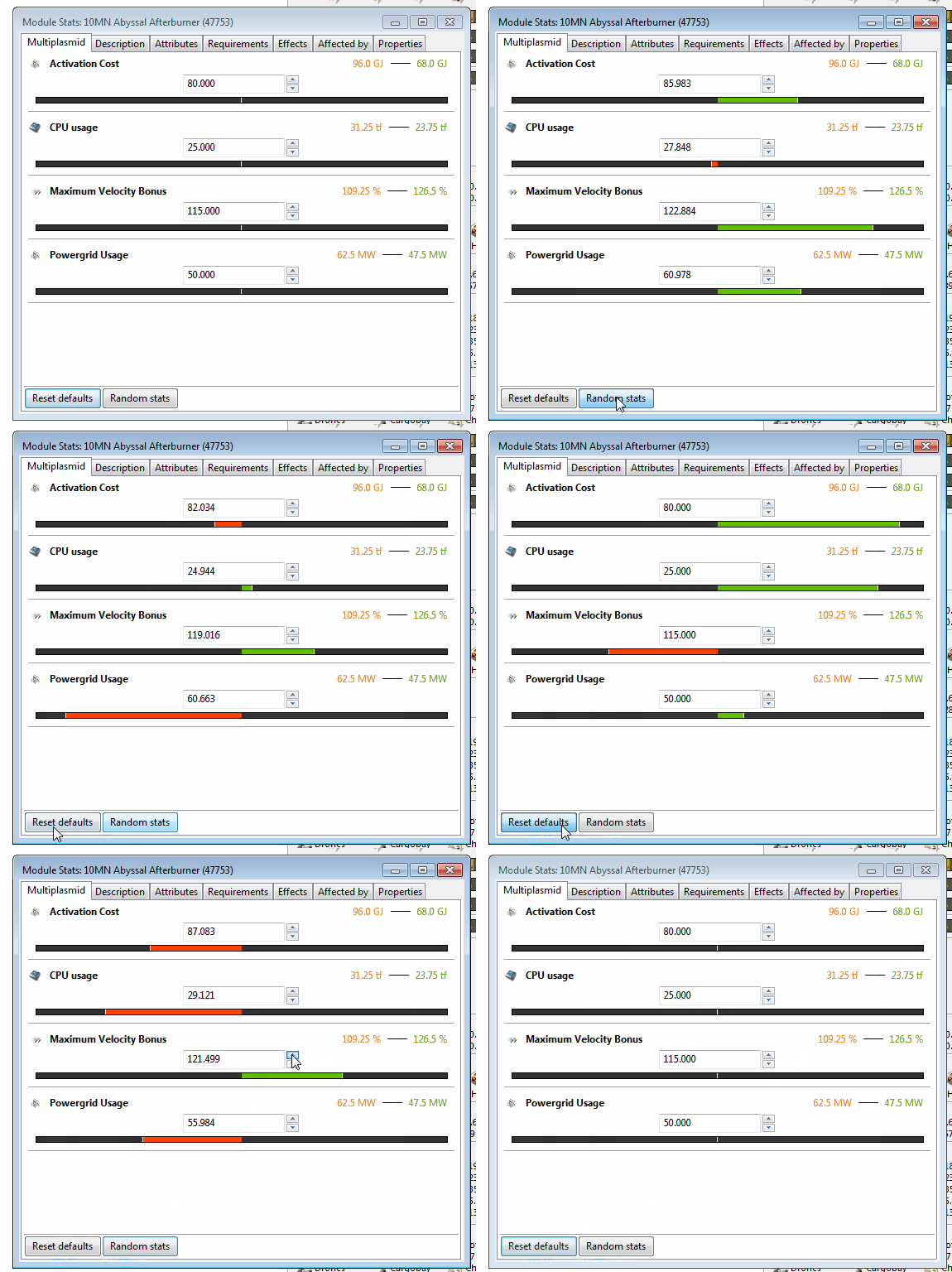
Should have something to submit pretty soon.
burnsypet
on 13 Jun 2018
Merged, thanks so much! May tweak a few things about it, but all in all impressive!
blitzmann
on 14 Jun 2018
Related issues
 UsernameByCommittee
·
9Comments
Neugeniko
·
11Comments
UsernameByCommittee
·
9Comments
Neugeniko
·
11Comments
 fonsui
·
12Comments
fonsui
·
12Comments
 sup3rb
·
3Comments
sup3rb
·
3Comments
 MarHelmer
·
5Comments
MarHelmer
·
5Comments
Most helpful comment
This is pretty cool:
Should have something to submit pretty soon.