Pydicom: How to: from 2 DICOM files take 2nd one and make it overlay for the first?
I'm trying to add an overlay to an already exhisting DICOM file. The idea is to have an original image, a segmantation of the original, and to add an overlay to the original image from the segmentation. Both images have the same dimension. I can't seem to be able to do it. The result is a garbled repeating pattern. I don't quite understand what I'm doing, so this is just an attempt. Any help is appreciated.
Here's a little bit of code I tried.
import numpy as np
import pydicom
import matplotlib.pyplot as plt

orig = pydicom.dcmread("IM-0001-0084.dcm")
over = pydicom.dcmread("segm_IM-0001-0084.dcm")

# original
im_data_orig = orig[0x7fe00010].value
rows_orig = orig[0x00280010].value
cols_orig = orig[0x00280011].value

# segmented
im_data_over = over.pixel_array
# binarize segmented
im_data_over = np.where(im_data_over > 0, 1, 0)
im_data_over = im_data_over.astype('uint8')
im_data_over_bytes = im_data_over.tobytes()
descrip = 'segmentation'

# Overlay fields
# filling in only Type 1 (mandatory) fields
orig.add_new([0x6000, 0x0010], 'US', rows_orig)  # Overlay Rows
orig.add_new([0x6000, 0x0011], 'US', cols_orig)  # Overlay Columns
orig.add_new([0x6000, 0x0015], 'US', 1)          # Overlay number of frames
orig.add_new([0x6000, 0x0022], 'LO', descrip)    # Overlay description
orig.add_new([0x6000, 0x0040], 'CS', 'G')        # Overlay Type ('R','G'), ROI or Graphics
orig.add_new([0x6000, 0x0050], 'SS', [1, 1])     # Overlay Origin
orig.add_new([0x6000, 0x0051], 'US', 1)          # Image Frame Origin
orig.add_new([0x6000, 0x0100], 'US', 1)          # Overlay Bits Allocated, mandatory fixed value = 1!!
orig.add_new([0x6000, 0x0102], 'US', 0)          # Overlay Bit Position, mandatory fixed value = 0!!
orig.add_new([0x6000, 0x1001], 'CS', 'mask')     # Overlay Activation Layer
orig.add_new([0x6000, 0x3000], 'OW', im_data_over_bytes)  # PixelData

orig.save_as("orig_with_overlay.dcm")
The result looks like this:
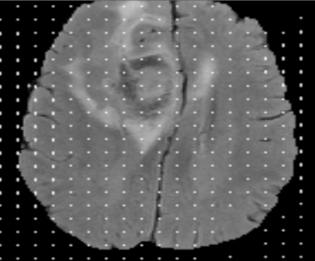
Edit: removed DICOMs. Sorry, they're not mine.
 gladomat
All 2 comments
It looks like you have missed the step to pack the bytes of the overlay image into a bit array. There is a function in the numpy handler that does this - I think you can use it directly, or at least check how it can be done.
 mrbean-bremen
on 4 Dec 2019
mrbean-bremen
on 4 Dec 2019
Good catch, thanks! Here are the additional lines of code necessary to make it work:
Import the pack_bits function:
from pydicom.pixel_data_handlers.numpy_handler import pack_bits
Reshape to 1D array and replace the to_bytes() call with this one:
im_data_over_bytes = pack_bits(im_data_over)
The result looks like it should now:

gladomat
on 4 Dec 2019
Related issues
 vsoch
·
9Comments
vsoch
·
9Comments
 amandagb
·
8Comments
amandagb
·
8Comments
 GavrielHabib123
·
7Comments
GavrielHabib123
·
7Comments
 wanghaisheng
·
8Comments
wanghaisheng
·
8Comments
 tenggyut
·
3Comments
tenggyut
·
3Comments
Most helpful comment
It looks like you have missed the step to pack the bytes of the overlay image into a bit array. There is a function in the numpy handler that does this - I think you can use it directly, or at least check how it can be done.