Pyatv: No "connection lost" and "connection closed" events
Hi Pierre,
thanks for this great library. It was really easy to use and does pretty much everything...
I have a small issue.
Using
python3 atvscript.py push_updates
I'm not getting connection lost or connection closed events, i. e. when disconnecting the Apple TVs network cable or the Apple TVs power cable. Am I missing something?
I'm using the library in a script that runs indefinitely, so it's important to know, when I need to reconnect. Ideally pyatv would reconnect automatically when the connection is lost.
Thank you and cheers,
Sathya
 hfedcba
All 29 comments
Hey!
Thanks for using pyatv! 😀
This is a common issue that I've been bothered with. The cases you mention are even more special, since it's not possible to know when this happens. But... now that I think of it, I should definitely add TCP keep-alive to the connection. That should hopefully solve a bunch of problems. I will create an issue for it and hopefully prepare. PR tonight or so that you can try out. I will get back to your once there is something to test!
 postlund
on 9 Jun 2020
postlund
on 9 Jun 2020
Created #709 for suggested fix.
postlund
on 9 Jun 2020
Thanks - that was fast :smiley:! I think this issue can then be closed.
hfedcba
on 9 Jun 2020
Btw. I'm available tonight. So if there is something to test, I will happily do it.
hfedcba
on 9 Jun 2020
Great! I will prepare something to test. Which platforms (Windows/Linux/macOS) do you have possibility to test on? API is a bit different on each, so must be tested on all of them in some way.
postlund
on 9 Jun 2020
I'm mainly using Linux. But I could also test it on Windows and MacOS.
hfedcba
on 9 Jun 2020
If it's not too big of a problem it would great if you could try it out on all platforms and report back. My proposed changes are in #711. The timeout should be 20s (give or take) on all platforms. So, from pulling the network cable to your Apple TV it should take around 20 seconds to get a timeout in the script. That's basically what needs to be tested a few times on each platform.
postlund
on 9 Jun 2020
On Linux it works perfectly. I'm working on Windows and MacOS.
hfedcba
on 9 Jun 2020
On Windows I'm getting:
PS C:\Users\slaufer\AppData\Local\Programs\Python\Python38-32\Lib\site-packages\pyatv\scripts> python.exe .\atvscript.py push_updates
{"result": "success", "datetime": "2020-06-09T23:22:44.532001+02:00", "power_state": "off"}
{"result": "failure", "datetime": "2020-06-09T23:22:44.533011+02:00", "error": "Exception in callback _ProactorReadPipeTransport._loop_reading()", "exception": "'_ProactorReadPipeTransport' object has no attribute '_empty_waiter'", "stacktrace": "Traceback (most recent call last):\n  File \"C:\\Users\\slaufer\\AppData\\Local\\Programs\\Python\\Python38-32\\lib\\asyncio\\proactor_events.py\", line 299, in _loop_reading\n    self._read_fut = self._loop._proactor.recv(self._sock, 32768)\n  File \"C:\\Users\\slaufer\\AppData\\Local\\Programs\\Python\\Python38-32\\lib\\asyncio\\windows_events.py\", line 441, in recv\n    self._register_with_iocp(conn)\n  File \"C:\\Users\\slaufer\\AppData\\Local\\Programs\\Python\\Python38-32\\lib\\asyncio\\windows_events.py\", line 714, in _register_with_iocp\n    _overlapped.CreateIoCompletionPort(obj.fileno(), self._iocp, 0, 0)\nOSError: [WinError 6] Das Handle ist ung\u00fcltig\n\nDuring handling of the above exception, another exception occurred:\n\nTraceback (most recent call last):\n  File \"C:\\Users\\slaufer\\AppData\\Local\\Programs\\Python\\Python38-32\\lib\\asyncio\\events.py\", line 81, in _run\n    self._context.run(self._callback, *self._args)\n  File \"C:\\Users\\slaufer\\AppData\\Local\\Programs\\Python\\Python38-32\\lib\\asyncio\\proactor_events.py\", line 309, in _loop_reading\n    self._fatal_error(exc, 'Fatal read error on pipe transport')\n  File \"C:\\Users\\slaufer\\AppData\\Local\\Programs\\Python\\Python38-32\\lib\\asyncio\\proactor_events.py\", line 131, in _fatal_error\n    self._force_close(exc)\n  File \"C:\\Users\\slaufer\\AppData\\Local\\Programs\\Python\\Python38-32\\lib\\asyncio\\proactor_events.py\", line 134, in _force_close\n    if self._empty_waiter is not None and not self._empty_waiter.done():\nAttributeError: '_ProactorReadPipeTransport' object has no attribute '_empty_waiter'\n"}
{"result": "success", "datetime": "2020-06-09T23:22:44.540012+02:00", "hash": "ca496c14642c78af6dd4250191fe175f6dafd72b4c33bcbab43c454aae051da1", "media_type": "unknown", "device_state": "idle", "title": null, "artist": null, "album": null, "genre": null, "total_time": null, "position": null, "shuffle": "off", "repeat": "off", "app": null, "app_id": null}
{"result": "success", "datetime": "2020-06-09T23:22:44.541002+02:00", "push_updates": "finished"}
{"result": "failure", "datetime": "2020-06-09T23:22:44.559001+02:00", "error": "Task was destroyed but it is pending!"}
Under MacOS it's still not showing "connection lost".
hfedcba
on 9 Jun 2020
Ok, at least the easy one is working. I will do some digging and try to come up with a solution to the other ones.
postlund
on 10 Jun 2020
Regarding windows... This I believe is due to a bug in the IOCP event loop that is used in python 3.8 by default. Seems like other projects have similar issues. Running with earlier python should work or reverting back to the asyncio event loop. As a hack, I switched event loop policy on Windows as a test in the commit so it should hopefully work if you try again. Only for atvscript though.
And macOS then... I think I found the missing calls I had to make to set all timers correct, so this should hopefully work OK now as well.
postlund
on 10 Jun 2020
On MacOS it's working perfectly now.
On Windows I'm still getting
PS C:\Users\slaufer\AppData\Local\Programs\Python\Python38-32\Lib\site-packages\pyatv\scripts> python.exe .\atvscript.py push_updates
{"result": "success", "datetime": "2020-06-10T10:16:05.120621+02:00", "power_state": "off"}
{"result": "failure", "datetime": "2020-06-10T10:16:05.120621+02:00", "error": "Exception in callback _ProactorReadPipeTransport._loop_reading()", "exception": "'_ProactorReadPipeTransport' object has no attribute '_empty_waiter'", "stacktrace": "Traceback (most recent call last):\n  File \"C:\\Users\\slaufer\\AppData\\Local\\Programs\\Python\\Python38-32\\lib\\asyncio\\proactor_events.py\", line 299, in _loop_reading\n    self._read_fut = self._loop._proactor.recv(self._sock, 32768)\n  File \"C:\\Users\\slaufer\\AppData\\Local\\Programs\\Python\\Python38-32\\lib\\asyncio\\windows_events.py\", line 441, in recv\n    self._register_with_iocp(conn)\n  File \"C:\\Users\\slaufer\\AppData\\Local\\Programs\\Python\\Python38-32\\lib\\asyncio\\windows_events.py\", line 714, in _register_with_iocp\n    _overlapped.CreateIoCompletionPort(obj.fileno(), self._iocp, 0, 0)\nOSError: [WinError 6] Das Handle ist ung\u00fcltig\n\nDuring handling of the above exception, another exception occurred:\n\nTraceback (most recent call last):\n  File \"C:\\Users\\slaufer\\AppData\\Local\\Programs\\Python\\Python38-32\\lib\\asyncio\\events.py\", line 81, in _run\n    self._context.run(self._callback, *self._args)\n  File \"C:\\Users\\slaufer\\AppData\\Local\\Programs\\Python\\Python38-32\\lib\\asyncio\\proactor_events.py\", line 309, in _loop_reading\n    self._fatal_error(exc, 'Fatal read error on pipe transport')\n  File \"C:\\Users\\slaufer\\AppData\\Local\\Programs\\Python\\Python38-32\\lib\\asyncio\\proactor_events.py\", line 131, in _fatal_error\n    self._force_close(exc)\n  File \"C:\\Users\\slaufer\\AppData\\Local\\Programs\\Python\\Python38-32\\lib\\asyncio\\proactor_events.py\", line 134, in _force_close\n    if self._empty_waiter is not None and not self._empty_waiter.done():\nAttributeError: '_ProactorReadPipeTransport' object has no attribute '_empty_waiter'\n"}
{"result": "success", "datetime": "2020-06-10T10:16:05.123623+02:00", "hash": "ca496c14642c78af6dd4250191fe175f6dafd72b4c33bcbab43c454aae051da1", "media_type": "unknown", "device_state": "idle", "title": null, "artist": null, "album": null, "genre": null, "total_time": null, "position": null, "shuffle": "off", "repeat": "off", "app": null, "app_id": null}
{"result": "success", "datetime": "2020-06-10T10:16:05.126623+02:00", "push_updates": "finished"}
Exception ignored in: <function _ProactorBasePipeTransport.__del__ at 0x03058850>
Traceback (most recent call last):
  File "C:\Users\slaufer\AppData\Local\Programs\Python\Python38-32\lib\asyncio\proactor_events.py", line 116, in __del__
    self.close()
  File "C:\Users\slaufer\AppData\Local\Programs\Python\Python38-32\lib\asyncio\proactor_events.py", line 108, in close
    self._loop.call_soon(self._call_connection_lost, None)
  File "C:\Users\slaufer\AppData\Local\Programs\Python\Python38-32\lib\asyncio\base_events.py", line 719, in call_soon
    self._check_closed()
  File "C:\Users\slaufer\AppData\Local\Programs\Python\Python38-32\lib\asyncio\base_events.py", line 508, in _check_closed
    raise RuntimeError('Event loop is closed')
RuntimeError: Event loop is closed
{"result": "failure", "datetime": "2020-06-10T10:16:05.162643+02:00", "error": "Task was destroyed but it is pending!"}
(I double checked the patch is really in atvscript.py)
I can try an older Python version later.
hfedcba
on 10 Jun 2020
In Python 3.7 on Windows I'm getting:
PS C:\Users\SLaufer\AppData\Local\Programs\Python\Python37\Lib\site-packages\pyatv\scripts> python.exe .\atvscript.py push_updates
{"result": "success", "datetime": "2020-06-10T10:29:41.476460+02:00", "power_state": "on"}
{"result": "failure", "datetime": "2020-06-10T10:29:41.477460+02:00", "exception": "", "stacktrace": "Traceback (most recent call last):\n  File \".\\atvscript.py\", line 308, in appstart\n    print(args.output(await _handle_command(args, abort_sem, loop)), flush=True)\n  File \".\\atvscript.py\", line 194, in _handle_command\n    return await _run_command(atv, args, abort_sem, loop)\n  File \".\\atvscript.py\", line 218, in _run_command\n    await wait_for_input(loop, abort_sem)\n  File \".\\atvscript.py\", line 96, in wait_for_input\n    await loop.connect_read_pipe(lambda: reader_protocol, sys.stdin)\n  File \"C:\\Users\\SLaufer\\AppData\\Local\\Programs\\Python\\Python37\\lib\\asyncio\\base_events.py\", line 1449, in connect_read_pipe\n    transport = self._make_read_pipe_transport(pipe, protocol, waiter)\n  File \"C:\\Users\\SLaufer\\AppData\\Local\\Programs\\Python\\Python37\\lib\\asyncio\\base_events.py\", line 451, in _make_read_pipe_transport\n    raise NotImplementedError\nNotImplementedError\n"}
Great regarding macOS, just the beast left... Perhaps the policy must be applied before getting the event loop. Can you try switching the two statements in atvscript.py and see if that works? If you comment out policy change it should work in python 3.7 I think. Worth trying,
postlund
on 10 Jun 2020
If you comment out policy change it should work in python 3.7 I think. Worth trying,
The error above already is with the line commented (should've mentioned that).
With Python 3.8 with the two lines switched I'm getting the same error as in Python 3.7:
{"result": "success", "datetime": "2020-06-10T10:36:42.020221+02:00", "power_state": "on"}
{"result": "failure", "datetime": "2020-06-10T10:36:42.021224+02:00", "exception": "", "stacktrace": "Traceback (most recent call last):\n  File \".\\atvscript.py\", line 308, in appstart\n    print(args.output(await _handle_command(args, abort_sem, loop)), flush=True)\n  File \".\\atvscript.py\", line 194, in _handle_command\n    return await _run_command(atv, args, abort_sem, loop)\n  File \".\\atvscript.py\", line 218, in _run_command\n    await wait_for_input(loop, abort_sem)\n  File \".\\atvscript.py\", line 96, in wait_for_input\n    await loop.connect_read_pipe(lambda: reader_protocol, sys.stdin)\n  File \"C:\\Users\\slaufer\\AppData\\Local\\Programs\\Python\\Python38-32\\lib\\asyncio\\base_events.py\", line 1525, in connect_read_pipe\n    transport = self._make_read_pipe_transport(pipe, protocol, waiter)\n  File \"C:\\Users\\slaufer\\AppData\\Local\\Programs\\Python\\Python38-32\\lib\\asyncio\\base_events.py\", line 480, in _make_read_pipe_transport\n    raise NotImplementedError\nNotImplementedError\n"}
Argh, I was hoping that was gonna work. I will have to continue doing some research then. If you have any ideas, I'm all ears. Windows and python in conjunction is not my area of expertise.
postlund
on 10 Jun 2020
Based on what I have found, changing the keep-alive values should work like I've done in the PR. But perhaps not with asyncio, doesn't seem like anyone has tried that or something. Maybe worth creating a bug report for.
There is however another issue here. Changing the initial delay and interval for the keepalive messages doesn't solve our main issue, because we need to set TCP_KEEPCNT, which perhaps is only supported on Windows 10. At least I think so. If that is indeed the case, then there's not much that can be done except for checking if it's supported and just put out a warning I case it's not. I will have to check, perhaps the other parameters can be set with the regular API as well.
postlund
on 10 Jun 2020
Perhaps you can try with my latest push? Would be interesting to know what happens.
postlund
on 10 Jun 2020
Same errors with Python 3.7 and Python 3.8...
If you have any ideas, I'm all ears. Windows and python in conjunction is not my area of expertise.
I'm no Python expert at all ;-). I only know how to write Python modules in C/C++.
hfedcba
on 10 Jun 2020
Just as a sidenote: I'm getting the same error on Python 3.7 and Python 3.8 with the master branch. So this has nothing to do with the keep alives.
I. e.:
PS C:\Users\SLaufer\AppData\Local\Programs\Python\Python37\Lib\site-packages\pyatv\scripts> python.exe .\atvscript.py push_updates
{"result": "success", "datetime": "2020-06-10T14:30:33.405408+02:00", "power_state": "off"}
{"result": "failure", "datetime": "2020-06-10T14:30:33.406410+02:00", "exception": "", "stacktrace": "Traceback (most recent call last):\n  File \".\\atvscript.py\", line 308, in appstart\n    print(args.output(await _handle_command(args, abort_sem, loop)), flush=True)\n  File \".\\atvscript.py\", line 194, in _handle_command\n    return await _run_command(atv, args, abort_sem, loop)\n  File \".\\atvscript.py\", line 218, in _run_command\n    await wait_for_input(loop, abort_sem)\n  File \".\\atvscript.py\", line 96, in wait_for_input\n    await loop.connect_read_pipe(lambda: reader_protocol, sys.stdin)\n  File \"C:\\Users\\SLaufer\\AppData\\Local\\Programs\\Python\\Python37\\lib\\asyncio\\base_events.py\", line 1449, in connect_read_pipe\n    transport = self._make_read_pipe_transport(pipe, protocol, waiter)\n  File \"C:\\Users\\SLaufer\\AppData\\Local\\Programs\\Python\\Python37\\lib\\asyncio\\base_events.py\", line 451, in _make_read_pipe_transport\n    raise NotImplementedError\nNotImplementedError\n"}
Oh, that is interesting somehow. Thanks, that will give me some additional angles to look at.
postlund
on 10 Jun 2020
And: The TCP keep alives are working on Windows ;-). I just commented out the wait_for_input. Also see: https://stackoverflow.com/questions/31510190/aysncio-cannot-read-stdin-on-windows.
hfedcba
on 10 Jun 2020
It also works with Python 3.8. Setting the event loop policy is not necessary.
hfedcba
on 10 Jun 2020
Awesome, great work! Figuring out the exception is the next part then, but that can be taken care of in a separate issue/PR. So I need to add some guards in case the syscalls are not supported or available and update the documentation a bit. Should be possible to do by tonight or so!
postlund
on 10 Jun 2020
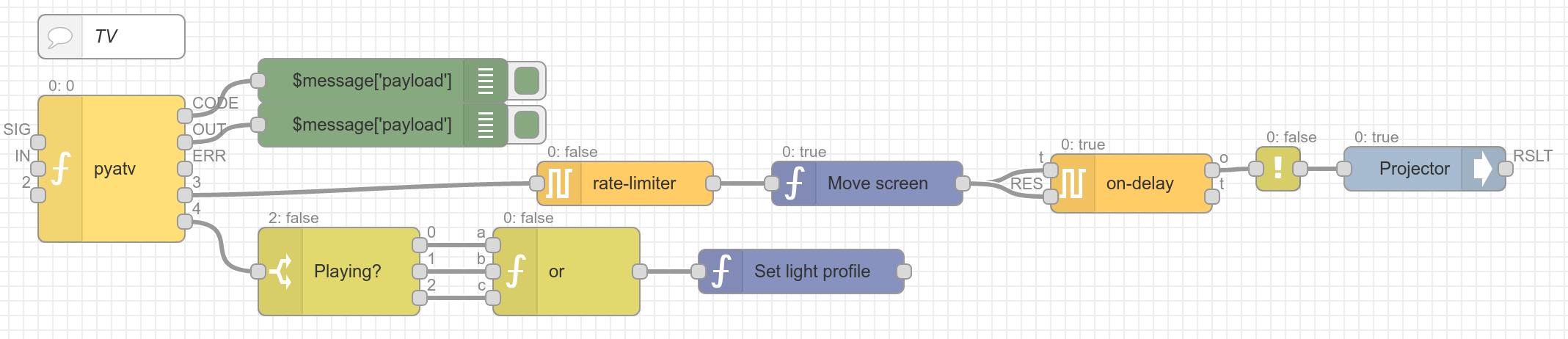
Thanks a lot for fixing this so quickly. I'm using the library in the software Homegear to switch my projector on and move the motor screen down when the Apple TV is switched on and switch the projector off and the screen up when it is switched off again. Also the lights are switched off when playback starts and switched on again when playback stops. Only thing missing now is figuring out, how to not detect the Netflix preview as playback...
hfedcba
on 10 Jun 2020
No worries, I'm thankful you brought some attention to this so I finally can get it fixed 😊 Sounds like a cool set up! The Netflix preview thing is a bug in the app that I thought was fixed (will adjust documentation for that). As a workaround you can disable automatic previews, but I think that's the only way around it at the moment. Tried to report it to Netflix, but I guess it's not a priority.
https://help.netflix.com/sv/node/2102
I pushed an update with the code I intend to merge, can you verify that it works before I do so? Don't want mess this up...
postlund
on 10 Jun 2020
Sounds like a cool set up!
The aim was: Only one remote... ;-)
The Netflix preview thing is a bug in the app that I thought was fixed (will adjust documentation for that).
Oh, that's good to know.
I pushed an update with the code I intend to merge, can you verify that it works before I do so? Don't want mess this up...
The current pull request works on Windows, MacOS and Linux.
hfedcba
on 10 Jun 2020
The aim was: Only one remote... ;-)
Yeah, one Remote is enough. I currently rely on Alexa for turning on/off tv, receiver and Apple TV and then use my phone as remote for the Apple TV. So no "traditional" remote at all 😉
Oh, that's good to know.
Haven't tried it myself, but I assume that it should work.
The current pull request works on Windows, MacOS and Linux.
Perfect! Then I will merge it now! Again, thanks for helping out and testing this!
postlund
on 11 Jun 2020
Merged! 🎉
postlund
on 11 Jun 2020
Related issues
 sofakng
·
17Comments
sofakng
·
17Comments
 Krocko
·
10Comments
Krocko
·
10Comments
 cramo1207
·
17Comments
cramo1207
·
17Comments
 rephlex00
·
8Comments
rephlex00
·
8Comments
 micke
·
9Comments
micke
·
9Comments
Most helpful comment
Merged! 🎉