Pyatv: problem with top_menu in new releases
Hi, i was trying the last updates and the function of top_menu isn't working like should, is not going to the first app in te screen.
Thanks for your help.
 cramo1207
All 17 comments
It depends on how you look at it. It does go to the main screen and I haven't defined anywhere that it should go to the "first app", so it technically does what it should. I do understand that it simplifies scripting when navigating the menus when doing this, but there's no real "API" for accomplishing this behavior, so it's not something that I want to do in the first place. You can emulate the behavior you want by first calling top_menu and then menu afterwards though.
 postlund
on 8 May 2020
postlund
on 8 May 2020
I'm agree with you but i felt free to report because in the past version
was working that command, i have other instance with the past version and
its working great!
Thank you for take the time to answer
El jue., 7 de mayo de 2020 11:32 p. m., Pierre Ståhl <
[email protected]> escribió:
It depends on how you look at it. It does go to the main screen and I
haven't defined anywhere that it should go to the "first app", so it
technically does what it should. I do understand that it simplifies
scripting when navigating the menus when doing this, but there's no real
"API" for accomplishing this behavior, so it's not something that I want to
do in the first place. You can emulate the behavior you want by first
calling top_menu and then menu afterwards though.—
You are receiving this because you authored the thread.
Reply to this email directly, view it on GitHub
https://github.com/postlund/pyatv/issues/644#issuecomment-625624319, or
unsubscribe
https://github.com/notifications/unsubscribe-auth/APISOGB2E4AERHB6LBV53RTRQODODANCNFSM4M2CFFPA
.
cramo1207
on 8 May 2020
Hmm, ok, that's interesting. I changed the behavior for 0.6 in #522. I know that the behavior of the Home button can be changed (see https://support.apple.com/guide/tv/set-the-home-button-atvbe7706127/tvos), perhaps the previous behavior actually "pressed" the home button? Maybe you can try changing it to "TV app" and see if top_menu goes to the TV app in 0.5.x? If that is the case, I can add a home button to the API for this.
postlund
on 8 May 2020
I need to verify this, but perhaps the existing menu is wrong and should really be what top_menu was previous to my change.
postlund
on 1 Jun 2020
I'm no expert, but from my perspective, the previous functionality for each of those commands (pre-6.0) was perfect. "Menu" would navigate back to previous sections within an app and "Top Menu" would exit out to the home screen. I actually relied on this for my "turn off" sequence, and that no longer works for me with the way Top Menu currently works.
 bcmitri
on 1 Jun 2020
bcmitri
on 1 Jun 2020
I think we have two different ways of going to the main menu and that is the problem. One is holding the menu button and one is holding the TV button (with action configured for going to main menu). Perhaps this is what causes the confusion, can anyone check the behavior? I don't have the possibility to do so right now.
postlund
on 1 Jun 2020
After some thinking, what I'm gonna do is this... I will keep behavior for top_menu as-is and add a "hold" variant to menu that simulated pressing the menu button for a while. This mimics the iOS remote with regards to how menu works (since behavior of holding menu can be changed) but still provides means for always going to the main menu via top_menu. That is what makes most sense to me at least.
This depends on #472, so I will have to do that first.
postlund
on 1 Jun 2020
I think I've figured it out. I didn't know there was a long-press feature for the Menu button. Now that I've tested, I see that it mimics the TV button, with one key difference: the TV button will jump to the first tile on the Home screen.
Here is what I've found in my testing:
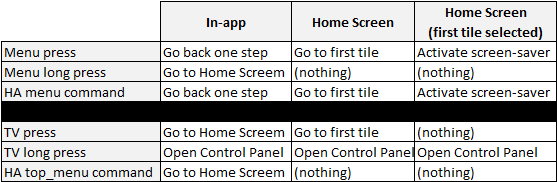
As I mentioned, the way it was pre-6.0 would perfect for me.
bcmitri
on 1 Jun 2020
That's a good summary! Pressing the TV button (which is called the Home button by Apple) can be changed to either open the TV app or go to main screen. That only affects one of the actions in your table though. But mimicking the app seems like the best approach and that is what I will do (like described in my previous post).
postlund
on 1 Jun 2020
What I like about mimicking the TV / Home button, is that it gives a nice way to jump to the first tile on the Home screen, which I use in my "turn off" sequence.
That being said, if you can simulate a hold, are you able to make do the same for the TV / Home button? In a perfect world, I think we'd see short press and long press versions of the Menu and TV / Home buttons using the menu and top_menu commands respectively.
With a long-press TV / Home command, the turn off script could be even simpler than what I have now.
bcmitri
on 1 Jun 2020
If anyone is curious, here is my "turn off" script (which used to work wonderfully, but now doesn't):
alias: Apple TV - Off
sequence:
- entity_id: input_boolean.appletv
service: input_boolean.turn_off - data:
command: right
entity_id: remote.appletv
service: remote.send_command - delay:
milliseconds: 500 - data:
command: top_menu
entity_id: remote.appletv
service: remote.send_command - delay: 00:00:01
- data:
command: top_menu
entity_id: remote.appletv
service: remote.send_command - delay:
milliseconds: 500 - data:
command: select
entity_id: remote.appletv
service: remote.send_command - delay: 00:00:01
- data:
command: select
entity_id: remote.appletv
service: remote.send_command
This assumes the Settings tile is in the first position and that "Sleep Now" now is highlighted (from the previous time).
bcmitri
on 1 Jun 2020
Yeah, with the interface changes I'm making it will be possible to do more or less any type of "press" with any button. So you will in the end get:
menusupporting single tap and holdHome("TV button") supporting single tap and holdtop_menusupporting single tap
So everything will be supported in the same way as in the app. top_menu will be a special button on the side more or less.
postlund
on 1 Jun 2020
I'm in!
bcmitri
on 1 Jun 2020
Just in case you didn't know, there's the home_hold button that's simulated holding the home button (duh). You can use that to bring out control center and put the device to sleep to sleep from there. The same thing is done by turn_off in the power interface, which isn't used by the HA component yet. It is however beta tested in #672. An additional note is that this particular button will be deprecated once the new interface changes are implemented, since the interface is more generic.
postlund
on 1 Jun 2020
Interesting... I must have missed that. Thanks for letting me know.
bcmitri
on 1 Jun 2020
So, I have pushed #688 which adds support for different input actions. It can be tested like this:
$ atvremote ... home=X
Where X=0 for single tap, X=1 for double tap and X=3 for holding. This is supported for arrow keys, home, select and menu. Please give this a test before I merge it.
I also reverted the behavior of topmenu to previous behavior as that is likely more usable now.
postlund
on 4 Jun 2020
Still looking for feedback to the changes I've made. So if you have the time, please let me know if it works!
postlund
on 15 Jun 2020
Related issues
postlund
·
10Comments
 cpohli
·
4Comments
cpohli
·
4Comments
 jjlawren
·
4Comments
postlund
·
7Comments
jjlawren
·
4Comments
postlund
·
7Comments
 Gio76
·
3Comments
Gio76
·
3Comments