Px4-autopilot: Nuttx cmath: FMU target compilation error
Describe the bug
This commit is stopping me from building the Firmware on my computer.
I get compilation errors of the following form while building any of the fmu targets.
In file included from NuttX/nuttx/include/cxx/cmath:46:0,
                 from ../../src/lib/ecl/ecl.h:99,
                 from ../../src/lib/ecl/geo/geo.cpp:46:
/usr/include/newlib/math.h:18:3: error: '__ULong' does not name a type
   __ULong i[2];
   ^~~~~~~
compilation terminated due to -Wfatal-errors.
Do I have to upgrade anything? Does anybody else have the same issue?
@dagar FYI
 kamilritz
All 39 comments
What's your development environment and which version of the toolchain (arm-none-eabi-gcc) are you using? We really only support one particular version at a time (currently 7-2017-q4-major). https://github.com/PX4/Firmware/blob/bbd37ada415785507e4bfaea1cefd36190974e5f/Tools/setup/ubuntu.sh#L156
Additionally,
 dagar
on 22 Nov 2019
dagar
on 22 Nov 2019
Using Ubuntu 18.04 and arm-none-eabi-gcc version 6.3.1
kamilritz
on 22 Nov 2019
You should update to GCC 7 from https://developer.arm.com/tools-and-software/open-source-software/developer-tools/gnu-toolchain/gnu-rm/downloads or run this script in tree (https://github.com/PX4/Firmware/blob/master/Tools/setup/ubuntu.sh).
You can often get away with running different versions of the toolchain, but we're not in a position to support that. Separately I think we should also remove most of the
We'll hopefully be jumping to GCC 9 soon. https://github.com/PX4/Firmware/pull/13448
dagar
on 22 Nov 2019
Thank you very much. I had an old arm-none-eabi-gcc version installed that I had to remove first. After that the toolchain installation did the rest. Thanks I can build current master again
kamilritz
on 22 Nov 2019
Using Ubuntu 16.04LTS and gcc-arm-none-eabi-4_9-2015q3-20150921-linux, i meet same problem
 JeffC0227
on 4 Jan 2020
JeffC0227
on 4 Jan 2020
We only support this version:
https://github.com/PX4/Firmware/blob/342e0da7961f9a3301706ed3835cfc163b14b2ed/Tools/setup/ubuntu.sh#L141
Please use this script to update your system.
 julianoes
on 14 Feb 2020
julianoes
on 14 Feb 2020
Hello I am having the same issue:
/usr/include/newlib/math.h:18:3: error: '__ULong' does not name a type
__ULong i[2];
^~~
Upon checking the versin of gcc by the following command I get:
$ arm-none-eabi-gcc --version
I get:
arm-none-eabi-gcc (GNU Tools for Arm Embedded Processors 7-2017-q4-major) 7.2.1 20170904 (release) [ARM/embedded-7-branch revision 255204]
Copyright (C) 2017 Free Software Foundation, Inc.
This is free software; see the source for copying conditions. There is NO
warranty; not even for MERCHANTABILITY or FITNESS FOR A PARTICULAR PURPOSE.
which means the version of the gcc is as desired.
I am using Ubuntu 18.04 operating system. Any help will be appreciated.
Regards,
Kashish Dhal
 kashishdhal
on 4 Mar 2020
kashishdhal
on 4 Mar 2020
@kashishdhal
You should update to GCC 7 from https://developer.arm.com/tools-and-software/open-source-software/developer-tools/gnu-toolchain/gnu-rm/downloads or run this script in tree (https://github.com/PX4/Firmware/blob/master/Tools/setup/ubuntu.sh).
julianoes
on 4 Mar 2020
@julianoes
I already checked the gcc version using $ arm-none-eabi-gcc --version.
It is GCC 7-2017-q4-major. Is that not correct?
DO I still need to do a reinstall?
kashishdhal
on 4 Mar 2020
@julianoes
As per your suggestion, upon running the script in tree (which I did before as well) I get following:
E: Unable to locate package gdb-arm-none-eabi
Installing GCC to: /home/gnclab/gcc-arm-none-eabi-7-2017-q4-major
GCC already installed.
RESTART YOUR COMPUTER to complete installation of PX4 development toolchain
Since gdb-arm-none-eabi seems to be missing, I installed it manually from arm website (https://packages.ubuntu.com/xenial/gdb-arm-none-eabi) but it needed a lot of dependencies so I installed them one by one manually. However, while installing gdb-arm-none-eabi I get the error which is:
gpg: skipped "[email protected]": No secret key
gpg: dpkg-sign.5s8QG8jk/gdb-arm-none-eabi_9_amd64.buildinfo: clear-sign failed: No secret key
dpkg-buildpackage: error: failed to sign .buildinfo file
I thought this is just a signature error and should be fine.
Please let me know what am I doing wrong here?
Regards,
Kashish Dhal
kashishdhal
on 4 Mar 2020
Since gdb-arm-none-eabi seems to be missing, I installed it manually from arm website
It's not missing, check which arm-none-eabi-gdb.
julianoes
on 5 Mar 2020
It returns:
/home/gnclab/gcc-arm-none-eabi-7-2017-q4-major/bin/arm-none-eabi-gdb
kashishdhal
on 5 Mar 2020
@julianoes
Hello, please let me know what should I do next to correct it? I am not able to run make command. I already showed you the error I am getting in the above message. Please help. I will appreciate your help.
@kamilritz
Since you were able to fix it, do you have any suggestions? Please help.
kashishdhal
on 6 Mar 2020
@kamilritz Now that you are using the correct gcc, what build command are you using?
Do a make distclean and then try to rebuild. What error, if any are you seeing?
 hamishwillee
on 6 Mar 2020
hamishwillee
on 6 Mar 2020
Hello @hamishwillee
I am using make px4_fmu-v4_default to build.
I am still getting the same error after using make distclean:
/usr/include/newlib/math.h:18:3: error: '__ULong' does not name a type
__ULong i[2];
However, when I source ubuntu.sh this time then I don't see
E: Unable to locate package gdb-arm-none-eabi
E: Unable to locate package gcc-arm-none-eabi
So I guess that part is solved.
kashishdhal
on 6 Mar 2020
@kashishdhal I assume you are building the master codeline?
I just tried this on a vanilla Ubuntu 18.04.4 using the setup script ubuntu.sh. All worked rather nicely.
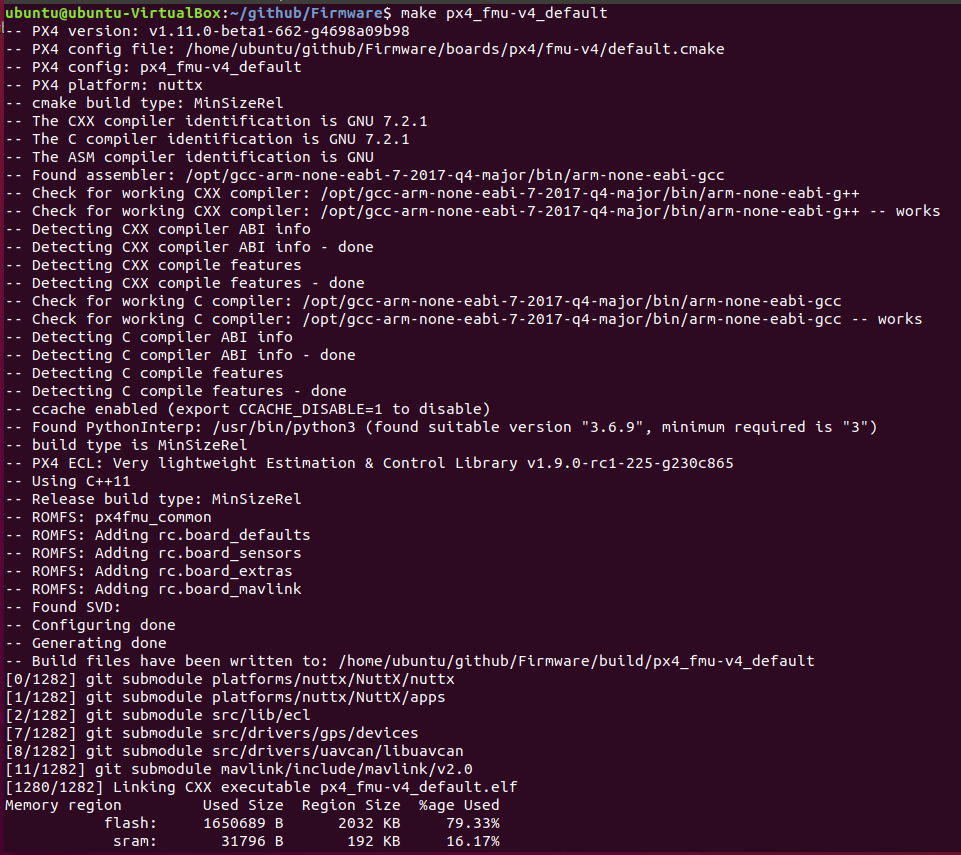
Can you put your full build output into a gist and link here. That might help @julianoes advise - I'm a bit out of my depth.
hamishwillee
on 6 Mar 2020
Hello what is master codeline?
I am using the same Firmware directory which was used for SITL so maybe I will create another Firmware directory and try to build again from there. If still unsuccessful, will post the code here as you asked.
kashishdhal
on 6 Mar 2020
You need to remove the toolchain that you have installed again, probably:
sudo apt-get remove gdb-arm-none-eabi gcc-arm-none-eabi
I created another folder named Firmware2 and inside that I cloned Firmware again. So when I bash ubuntu_sim_nuttx.sh , I get the following:
gnclab@system76-pc:~/Firmware2/Firmware$ sudo bash ubuntu_sim_nuttx.sh
[sudo] password for gnclab:
Downloading dependent script 'ubuntu_sim.sh'
--2020-03-06 14:47:16--  https://raw.githubusercontent.com/PX4/Devguide/v1.9.0/build_scripts/ubuntu_sim.sh
Resolving raw.githubusercontent.com (raw.githubusercontent.com)... 151.101.48.133
Connecting to raw.githubusercontent.com (raw.githubusercontent.com)|151.101.48.133|:443... connected.
HTTP request sent, awaiting response... 200 OK
Length: 1576 (1.5K) [text/plain]
Saving to: ‘STDOUT’

-                   100%[===================>]   1.54K  --.-KB/s    in 0s

2020-03-06 14:47:16 (252 MB/s) - written to stdout [1576/1576]

Downloading dependent script 'ubuntu_sim_common_deps.sh'
--2020-03-06 14:47:16--  https://raw.githubusercontent.com/PX4/Devguide/v1.9.0/build_scripts/ubuntu_sim_common_deps.sh
Resolving raw.githubusercontent.com (raw.githubusercontent.com)... 151.101.48.133
Connecting to raw.githubusercontent.com (raw.githubusercontent.com)|151.101.48.133|:443... connected.
HTTP request sent, awaiting response... 200 OK
Length: 2839 (2.8K) [text/plain]
Saving to: ‘STDOUT’

-                   100%[===================>]   2.77K  --.-KB/s    in 0s

2020-03-06 14:47:16 (10.0 MB/s) - written to stdout [2839/2839]

We must first remove modemmanager
Reading package lists... Done
Building dependency tree
Reading state information... Done
Package 'modemmanager' is not installed, so not removed
The following packages were automatically installed and are no longer required:
  binutils-arm-none-eabi libgraphviz-dev libgvc6-plugins-gtk
  libnewlib-arm-none-eabi libnewlib-dev libopenal-dev libqtpropertybrowser4
  libstdc++-arm-none-eabi-newlib libxdot4
Use 'sudo apt autoremove' to remove them.
0 upgraded, 0 newly installed, 0 to remove and 126 not upgraded.
Installing common dependencies
Hit:1 http://packages.osrfoundation.org/gazebo/ubuntu-stable bionic InRelease
Hit:2 http://linux.teamviewer.com/deb stable InRelease
Hit:3 http://ppa.launchpad.net/system76-dev/stable/ubuntu bionic InRelease
Hit:4 http://archive.ubuntu.com/ubuntu bionic InRelease
Hit:5 http://security.ubuntu.com/ubuntu bionic-security InRelease
Hit:6 http://packages.ros.org/ros/ubuntu bionic InRelease
Hit:7 http://archive.ubuntu.com/ubuntu bionic-updates InRelease
Reading package lists... Done
Reading package lists... Done
Building dependency tree
Reading state information... Done
Note, selecting 'libimage-exiftool-perl' instead of 'exiftool'
build-essential is already the newest version (12.4ubuntu1).
zip is already the newest version (3.0-11build1).
astyle is already the newest version (3.1-1ubuntu2).
genromfs is already the newest version (0.5.2-2build3).
libimage-exiftool-perl is already the newest version (10.80-1).
ninja-build is already the newest version (1.8.2-1).
qtcreator is already the newest version (4.5.2-3ubuntu2).
git is already the newest version (1:2.17.1-1ubuntu0.5).
cmake is already the newest version (3.10.2-1ubuntu2.18.04.1).
The following packages were automatically installed and are no longer required:
  binutils-arm-none-eabi libgraphviz-dev libgvc6-plugins-gtk
  libnewlib-arm-none-eabi libnewlib-dev libopenal-dev libqtpropertybrowser4
  libstdc++-arm-none-eabi-newlib libxdot4
Use 'sudo apt autoremove' to remove them.
0 upgraded, 0 newly installed, 0 to remove and 126 not upgraded.
/usr/bin/xxd
Reading package lists... Done
Building dependency tree
Reading state information... Done
Note, selecting 'libpython2.7-stdlib' instead of 'python-argparse'
python-dev is already the newest version (2.7.15~rc1-1).
python-numpy is already the newest version (1:1.13.3-2ubuntu1).
python-empy is already the newest version (3.3.2-1build1).
python-toml is already the newest version (0.9.3-1).
libpython2.7-stdlib is already the newest version (2.7.17-1~18.04).
python-pip is already the newest version (9.0.1-2.3~ubuntu1.18.04.1).
The following packages were automatically installed and are no longer required:
  binutils-arm-none-eabi libgraphviz-dev libgvc6-plugins-gtk
  libnewlib-arm-none-eabi libnewlib-dev libopenal-dev libqtpropertybrowser4
  libstdc++-arm-none-eabi-newlib libxdot4
Use 'sudo apt autoremove' to remove them.
0 upgraded, 0 newly installed, 0 to remove and 126 not upgraded.
DEPRECATION: Python 2.7 reached the end of its life on January 1st, 2020. Please upgrade your Python as Python 2.7 is no longer maintained. A future version of pip will drop support for Python 2.7. More details about Python 2 support in pip, can be found at https://pip.pypa.io/en/latest/development/release-process/#python-2-support
Requirement already up-to-date: pip in /usr/local/lib/python2.7/dist-packages (20.0.2)
DEPRECATION: Python 2.7 reached the end of its life on January 1st, 2020. Please upgrade your Python as Python 2.7 is no longer maintained. A future version of pip will drop support for Python 2.7. More details about Python 2 support in pip, can be found at https://pip.pypa.io/en/latest/development/release-process/#python-2-support
Requirement already satisfied: pandas in /usr/local/lib/python2.7/dist-packages (0.24.2)
Requirement already satisfied: jinja2 in /usr/local/lib/python2.7/dist-packages (2.11.1)
Requirement already satisfied: pyserial in /usr/lib/python2.7/dist-packages (3.4)
Requirement already satisfied: pyyaml in /usr/lib/python2.7/dist-packages (3.12)
Requirement already satisfied: numpy>=1.12.0 in /usr/lib/python2.7/dist-packages (from pandas) (1.13.3)
Requirement already satisfied: python-dateutil>=2.5.0 in /usr/lib/python2.7/dist-packages (from pandas) (2.6.1)
Requirement already satisfied: pytz>=2011k in /usr/lib/python2.7/dist-packages (from pandas) (2018.3)
Requirement already satisfied: MarkupSafe>=0.23 in /usr/local/lib/python2.7/dist-packages (from jinja2) (1.1.1)
DEPRECATION: Python 2.7 reached the end of its life on January 1st, 2020. Please upgrade your Python as Python 2.7 is no longer maintained. A future version of pip will drop support for Python 2.7. More details about Python 2 support in pip, can be found at https://pip.pypa.io/en/latest/development/release-process/#python-2-support
Requirement already satisfied: pyulog in /usr/local/lib/python2.7/dist-packages (0.7.0)
Requirement already satisfied: numpy in /usr/lib/python2.7/dist-packages (from pyulog) (1.13.3)
Installing FastRTPS to: /home/gnclab/eProsima_FastRTPS-1.7.1-Linux
 FastRTPS already installed.
Installing jMAVSim simulator dependencies
Reading package lists... Done
Building dependency tree
Reading state information... Done
ant is already the newest version (1.10.5-3~18.04).
openjdk-8-jdk is already the newest version (8u242-b08-0ubuntu3~18.04).
openjdk-8-jre is already the newest version (8u242-b08-0ubuntu3~18.04).
The following packages were automatically installed and are no longer required:
  binutils-arm-none-eabi libgraphviz-dev libgvc6-plugins-gtk
  libnewlib-arm-none-eabi libnewlib-dev libopenal-dev libqtpropertybrowser4
  libstdc++-arm-none-eabi-newlib libxdot4
Use 'sudo apt autoremove' to remove them.
0 upgraded, 0 newly installed, 0 to remove and 126 not upgraded.
Cloning PX4 to: /home/gnclab/src.
 Firmware already cloned.
Installing Gazebo9
Reading package lists... Done
Building dependency tree
Reading state information... Done
libeigen3-dev is already the newest version (3.3.4-4).
protobuf-compiler is already the newest version (3.0.0-9.1ubuntu1).
libopencv-dev is already the newest version (3.2.0+dfsg-4ubuntu0.1).
The following packages were automatically installed and are no longer required:
  binutils-arm-none-eabi libgraphviz-dev libgvc6-plugins-gtk
  libnewlib-arm-none-eabi libnewlib-dev libopenal-dev libqtpropertybrowser4
  libstdc++-arm-none-eabi-newlib libxdot4
Use 'sudo apt autoremove' to remove them.
0 upgraded, 0 newly installed, 0 to remove and 126 not upgraded.
--2020-03-06 14:47:25--  http://packages.osrfoundation.org/gazebo.key
Resolving packages.osrfoundation.org (packages.osrfoundation.org)... 52.52.171.73
Connecting to packages.osrfoundation.org (packages.osrfoundation.org)|52.52.171.73|:80... connected.
HTTP request sent, awaiting response... 200 OK
Length: 1772 (1.7K) [application/octet-stream]
Saving to: ‘STDOUT’

-                   100%[===================>]   1.73K  --.-KB/s    in 0s

2020-03-06 14:47:25 (123 MB/s) - written to stdout [1772/1772]

OK
Hit:1 http://linux.teamviewer.com/deb stable InRelease
Hit:2 http://security.ubuntu.com/ubuntu bionic-security InRelease
Hit:3 http://packages.osrfoundation.org/gazebo/ubuntu-stable bionic InRelease
Hit:4 http://packages.ros.org/ros/ubuntu bionic InRelease
Hit:5 http://ppa.launchpad.net/system76-dev/stable/ubuntu bionic InRelease
Hit:6 http://archive.ubuntu.com/ubuntu bionic InRelease
Hit:7 http://archive.ubuntu.com/ubuntu bionic-updates InRelease
Reading package lists... Done
Reading package lists... Done
Building dependency tree
Reading state information... Done
gazebo9 is already the newest version (9.12.0-1~bionic).
The following packages were automatically installed and are no longer required:
  binutils-arm-none-eabi libgraphviz-dev libgvc6-plugins-gtk
  libnewlib-arm-none-eabi libnewlib-dev libopenal-dev libqtpropertybrowser4
  libstdc++-arm-none-eabi-newlib libxdot4
Use 'sudo apt autoremove' to remove them.
0 upgraded, 0 newly installed, 0 to remove and 126 not upgraded.
Reading package lists... Done
Building dependency tree
Reading state information... Done
libgazebo9-dev is already the newest version (9.12.0-1~bionic).
The following packages were automatically installed and are no longer required:
  binutils-arm-none-eabi libgraphviz-dev libgvc6-plugins-gtk
  libnewlib-arm-none-eabi libnewlib-dev libopenal-dev libqtpropertybrowser4
  libstdc++-arm-none-eabi-newlib libxdot4
Use 'sudo apt autoremove' to remove them.
0 upgraded, 0 newly installed, 0 to remove and 126 not upgraded.
Reading package lists... Done
Building dependency tree
Reading state information... Done
autoconf is already the newest version (2.69-11).
bison is already the newest version (2:3.0.4.dfsg-1build1).
flex is already the newest version (2.6.4-6).
libtool is already the newest version (2.4.6-2).
python-serial is already the newest version (3.4-2).
zlib1g-dev is already the newest version (1:1.2.11.dfsg-0ubuntu2).
libftdi-dev is already the newest version (0.20-4build3).
openocd is already the newest version (0.10.0-4).
texinfo is already the newest version (6.5.0.dfsg.1-2).
libncurses5-dev is already the newest version (6.1-1ubuntu1.18.04).
The following packages were automatically installed and are no longer required:
  binutils-arm-none-eabi libgraphviz-dev libgvc6-plugins-gtk
  libnewlib-arm-none-eabi libnewlib-dev libopenal-dev libqtpropertybrowser4
  libstdc++-arm-none-eabi-newlib libxdot4
Use 'sudo apt autoremove' to remove them.
0 upgraded, 0 newly installed, 0 to remove and 126 not upgraded.
Reading package lists... Done
Building dependency tree
Reading state information... Done
E: Unable to locate package gdb-arm-none-eabi
E: Unable to locate package gcc-arm-embedded
Installing GCC to: /home/gnclab/gcc-arm-none-eabi-7-2017-q4-major
 GCC already installed.
RESTART YOUR COMPUTER to complete installation of PX4 development toolchain
And for make px4_fmu-v4_default I get the following:
gnclab@system76-pc:~/Firmware2/Firmware$ sudo make px4_fmu-v4_default
-- PX4 version: v1.11.0-beta1-572-gcf47c2155f
-- PX4 config file: /home/gnclab/Firmware2/Firmware/boards/px4/fmu-v4/default.cmake
-- PX4 config: px4_fmu-v4_default
-- PX4 platform: nuttx
-- cmake build type: MinSizeRel
-- The CXX compiler identification is unknown
-- The C compiler identification is unknown
-- The ASM compiler identification is unknown
-- Found assembler: arm-none-eabi-gcc
CMake Error at CMakeLists.txt:190 (project):
  The CMAKE_CXX_COMPILER:

    arm-none-eabi-g++

  is not a full path and was not found in the PATH.

  Tell CMake where to find the compiler by setting either the environment
  variable "CXX" or the CMake cache entry CMAKE_CXX_COMPILER to the full path
  to the compiler, or to the compiler name if it is in the PATH.


CMake Error at CMakeLists.txt:190 (project):
  The CMAKE_C_COMPILER:

    arm-none-eabi-gcc

  is not a full path and was not found in the PATH.

  Tell CMake where to find the compiler by setting either the environment
  variable "CC" or the CMake cache entry CMAKE_C_COMPILER to the full path to
  the compiler, or to the compiler name if it is in the PATH.


CMake Error at CMakeLists.txt:190 (project):
  The CMAKE_ASM_COMPILER:

    arm-none-eabi-gcc

  is not a full path and was not found in the PATH.

  Tell CMake where to find the compiler by setting either the environment
  variable "ASM" or the CMake cache entry CMAKE_ASM_COMPILER to the full path
  to the compiler, or to the compiler name if it is in the PATH.


-- Warning: Did not find file Compiler/-ASM
-- Configuring incomplete, errors occurred!
See also "/home/gnclab/Firmware2/Firmware/build/px4_fmu-v4_default/CMakeFiles/CMakeOutput.log".
See also "/home/gnclab/Firmware2/Firmware/build/px4_fmu-v4_default/CMakeFiles/CMakeError.log".
Error: /home/gnclab/Firmware2/Firmware/build/px4_fmu-v4_default is not a directory
Makefile:198: recipe for target 'px4_fmu-v4_default' failed
make: *** [px4_fmu-v4_default] Error 1
kashishdhal
on 6 Mar 2020
Hello @julianoes and @hamishwillee
I was successfully able to build it this time.
Here is what I was doing wrong:
Your bash script was downloading Firmware again into ~/src/Firmware However, I already cloned that and was working on ~/Firmware.
environment path for gcc is set but when you type sudo, environment variables changes and the path is not there anymore. Solution is to use sudo in the whole terminal using sudo -s. Then afterwards run this command export PATH=/home/gnclab/gcc-arm-none-eabi-7-2017-q4-major/bin:$PATH which will again set the path of gcc we want to use.
For instance, environment variables without sudo:
PATH=/opt/ros/melodic/bin:/home/gnclab/gcc-arm-none-eabi-7-2017-q4-major/bin:/home/gnclab/.local/bin:/usr/local/sbin:/usr/local/bin:/usr/sbin:/usr/bin:/sbin:/bin:/usr/games:/usr/local/games:/snap/bin:/usr/local/MATLAB/R2019b/bin
environment variables with sudo:
PATH=/usr/local/sbin:/usr/local/bin:/usr/sbin:/usr/bin:/sbin:/bin:/snap/bin
After fixing these two errors, it was build successfully.
Thanks to the community for their help. A suggestion for them, since PX4 is used quite a bit among aerospace community and they do not have enough understanding of compiling the packages. These things should be simplified.
Regards,
Kashish Dhal
kashishdhal
on 7 Mar 2020
Did you do as it tells you at the end of the script?
RESTART YOUR COMPUTER to complete installation of PX4 development toolchain
Yes I did. That did not help.
After you restart your computer you get path of GCC set up in environment. But if you execute make command with sudo. You won't see that path and it will complain gcc not found.
If you do without sudo then it will say permission denied.
kashishdhal
on 9 Mar 2020
But if you execute make command with sudo. You won't see that path and it will complain gcc not found.
Why do you ever use sudo to build? That should not be required. And if you used it once then you will have build files owned by root, so you need to clean up with sudo before the permission errors go away.
Try:
sudo make clean
or:
sudo rm -rf build
And then build without sudo again.
julianoes
on 10 Mar 2020
I guess you are right, every time I have to access the firmware directory, I have to use sudo now. I installed Qt creater and it can only access the files when launched from terminal with sudo command.
I did that because it was not letting me make saying permission denied. So you are saying that I should clean the firmware directory using the sudo make clean and then rebuild by make px4...... and then it won't complain about permissions?
Also, another question I like to modify the firmware to accept the individual motor commands for quad, I saw on PX4 website that I need to modify mixer file but it was not much clear to me.
Do you know how to do that? If yes, would you be able to help a bit.
Regards,
Kashish Dhal
kashishdhal
on 10 Mar 2020
So you are saying that I should clean the firmware directory using the sudo make clean and then rebuild by make px4
That is what I wrote above.
For other questions, please use https://discuss.px4.io or Slack, and check the docs:
https://dev.px4.io/master/en/concept/mixing.html
julianoes
on 11 Mar 2020
Hello @julianoes ,
I did what you said and now I am getting the following:
gnclab@system76-pc:~/src/Firmware$ make px4_fmu-v4
[0/1284] git submodule src/drivers/uavcan/libuavcan
[1/1284] Generating mixer_multirotor_6dof.generated.h
FAILED: src/lib/mixer/MultirotorMixer/mixer_multirotor_6dof.generated.h
cd /home/gnclab/src/Firmware/build/px4_fmu-v4_default/src/lib/mixer/MultirotorMixer && /usr/bin/python3 /home/gnclab/src/Firmware/src/lib/mixer/MultirotorMixer/geometries/tools/px_generate_mixers.py --sixdof -f /home/gnclab/src/Firmware/src/lib/mixer/MultirotorMixer/geometries/dodeca_bottom_cox.toml /home/gnclab/src/Firmware/src/lib/mixer/MultirotorMixer/geometries/dodeca_top_cox.toml /home/gnclab/src/Firmware/src/lib/mixer/MultirotorMixer/geometries/hex_cox.toml /home/gnclab/src/Firmware/src/lib/mixer/MultirotorMixer/geometries/hex_plus.toml /home/gnclab/src/Firmware/src/lib/mixer/MultirotorMixer/geometries/hex_t.toml /home/gnclab/src/Firmware/src/lib/mixer/MultirotorMixer/geometries/hex_x.toml /home/gnclab/src/Firmware/src/lib/mixer/MultirotorMixer/geometries/octa_cox.toml /home/gnclab/src/Firmware/src/lib/mixer/MultirotorMixer/geometries/octa_cox_wide.toml /home/gnclab/src/Firmware/src/lib/mixer/MultirotorMixer/geometries/octa_plus.toml /home/gnclab/src/Firmware/src/lib/mixer/MultirotorMixer/geometries/octa_x.toml /home/gnclab/src/Firmware/src/lib/mixer/MultirotorMixer/geometries/quad_deadcat.toml /home/gnclab/src/Firmware/src/lib/mixer/MultirotorMixer/geometries/quad_h.toml /home/gnclab/src/Firmware/src/lib/mixer/MultirotorMixer/geometries/quad_plus.toml /home/gnclab/src/Firmware/src/lib/mixer/MultirotorMixer/geometries/quad_s250aq.toml /home/gnclab/src/Firmware/src/lib/mixer/MultirotorMixer/geometries/quad_vtail.toml /home/gnclab/src/Firmware/src/lib/mixer/MultirotorMixer/geometries/quad_wide.toml /home/gnclab/src/Firmware/src/lib/mixer/MultirotorMixer/geometries/quad_x_cw.toml /home/gnclab/src/Firmware/src/lib/mixer/MultirotorMixer/geometries/quad_x.toml /home/gnclab/src/Firmware/src/lib/mixer/MultirotorMixer/geometries/quad_x_pusher.toml /home/gnclab/src/Firmware/src/lib/mixer/MultirotorMixer/geometries/quad_y.toml /home/gnclab/src/Firmware/src/lib/mixer/MultirotorMixer/geometries/tri_y.toml /home/gnclab/src/Firmware/src/lib/mixer/MultirotorMixer/geometries/twin_engine.toml -o mixer_multirotor_6dof.generated.h
Failed to import toml: No module named 'toml'

You may need to install it using:
    pip3 install --user toml

[3/1284] Generating mixer_multirotor_normalized.generated.h
FAILED: src/lib/mixer/MultirotorMixer/mixer_multirotor_normalized.generated.h
cd /home/gnclab/src/Firmware/build/px4_fmu-v4_default/src/lib/mixer/MultirotorMixer && /usr/bin/python3 /home/gnclab/src/Firmware/src/lib/mixer/MultirotorMixer/geometries/tools/px_generate_mixers.py --normalize -f /home/gnclab/src/Firmware/src/lib/mixer/MultirotorMixer/geometries/dodeca_bottom_cox.toml /home/gnclab/src/Firmware/src/lib/mixer/MultirotorMixer/geometries/dodeca_top_cox.toml /home/gnclab/src/Firmware/src/lib/mixer/MultirotorMixer/geometries/hex_cox.toml /home/gnclab/src/Firmware/src/lib/mixer/MultirotorMixer/geometries/hex_plus.toml /home/gnclab/src/Firmware/src/lib/mixer/MultirotorMixer/geometries/hex_t.toml /home/gnclab/src/Firmware/src/lib/mixer/MultirotorMixer/geometries/hex_x.toml /home/gnclab/src/Firmware/src/lib/mixer/MultirotorMixer/geometries/octa_cox.toml /home/gnclab/src/Firmware/src/lib/mixer/MultirotorMixer/geometries/octa_cox_wide.toml /home/gnclab/src/Firmware/src/lib/mixer/MultirotorMixer/geometries/octa_plus.toml /home/gnclab/src/Firmware/src/lib/mixer/MultirotorMixer/geometries/octa_x.toml /home/gnclab/src/Firmware/src/lib/mixer/MultirotorMixer/geometries/quad_deadcat.toml /home/gnclab/src/Firmware/src/lib/mixer/MultirotorMixer/geometries/quad_h.toml /home/gnclab/src/Firmware/src/lib/mixer/MultirotorMixer/geometries/quad_plus.toml /home/gnclab/src/Firmware/src/lib/mixer/MultirotorMixer/geometries/quad_s250aq.toml /home/gnclab/src/Firmware/src/lib/mixer/MultirotorMixer/geometries/quad_vtail.toml /home/gnclab/src/Firmware/src/lib/mixer/MultirotorMixer/geometries/quad_wide.toml /home/gnclab/src/Firmware/src/lib/mixer/MultirotorMixer/geometries/quad_x_cw.toml /home/gnclab/src/Firmware/src/lib/mixer/MultirotorMixer/geometries/quad_x.toml /home/gnclab/src/Firmware/src/lib/mixer/MultirotorMixer/geometries/quad_x_pusher.toml /home/gnclab/src/Firmware/src/lib/mixer/MultirotorMixer/geometries/quad_y.toml /home/gnclab/src/Firmware/src/lib/mixer/MultirotorMixer/geometries/tri_y.toml /home/gnclab/src/Firmware/src/lib/mixer/MultirotorMixer/geometries/twin_engine.toml -o mixer_multirotor_normalized.generated.h
Failed to import toml: No module named 'toml'

You may need to install it using:
    pip3 install --user toml

[4/1284] Generating mixer_multirotor.generated.h
FAILED: src/lib/mixer/MultirotorMixer/mixer_multirotor.generated.h
cd /home/gnclab/src/Firmware/build/px4_fmu-v4_default/src/lib/mixer/MultirotorMixer && /usr/bin/python3 /home/gnclab/src/Firmware/src/lib/mixer/MultirotorMixer/geometries/tools/px_generate_mixers.py -f /home/gnclab/src/Firmware/src/lib/mixer/MultirotorMixer/geometries/dodeca_bottom_cox.toml /home/gnclab/src/Firmware/src/lib/mixer/MultirotorMixer/geometries/dodeca_top_cox.toml /home/gnclab/src/Firmware/src/lib/mixer/MultirotorMixer/geometries/hex_cox.toml /home/gnclab/src/Firmware/src/lib/mixer/MultirotorMixer/geometries/hex_plus.toml /home/gnclab/src/Firmware/src/lib/mixer/MultirotorMixer/geometries/hex_t.toml /home/gnclab/src/Firmware/src/lib/mixer/MultirotorMixer/geometries/hex_x.toml /home/gnclab/src/Firmware/src/lib/mixer/MultirotorMixer/geometries/octa_cox.toml /home/gnclab/src/Firmware/src/lib/mixer/MultirotorMixer/geometries/octa_cox_wide.toml /home/gnclab/src/Firmware/src/lib/mixer/MultirotorMixer/geometries/octa_plus.toml /home/gnclab/src/Firmware/src/lib/mixer/MultirotorMixer/geometries/octa_x.toml /home/gnclab/src/Firmware/src/lib/mixer/MultirotorMixer/geometries/quad_deadcat.toml /home/gnclab/src/Firmware/src/lib/mixer/MultirotorMixer/geometries/quad_h.toml /home/gnclab/src/Firmware/src/lib/mixer/MultirotorMixer/geometries/quad_plus.toml /home/gnclab/src/Firmware/src/lib/mixer/MultirotorMixer/geometries/quad_s250aq.toml /home/gnclab/src/Firmware/src/lib/mixer/MultirotorMixer/geometries/quad_vtail.toml /home/gnclab/src/Firmware/src/lib/mixer/MultirotorMixer/geometries/quad_wide.toml /home/gnclab/src/Firmware/src/lib/mixer/MultirotorMixer/geometries/quad_x_cw.toml /home/gnclab/src/Firmware/src/lib/mixer/MultirotorMixer/geometries/quad_x.toml /home/gnclab/src/Firmware/src/lib/mixer/MultirotorMixer/geometries/quad_x_pusher.toml /home/gnclab/src/Firmware/src/lib/mixer/MultirotorMixer/geometries/quad_y.toml /home/gnclab/src/Firmware/src/lib/mixer/MultirotorMixer/geometries/tri_y.toml /home/gnclab/src/Firmware/src/lib/mixer/MultirotorMixer/geometries/twin_engine.toml -o mixer_multirotor.generated.h
Failed to import toml: No module named 'toml'

You may need to install it using:
    pip3 install --user toml

[5/1284] Generating uORB topic headers
FAILED: uORB/topics/actuator_armed.h uORB/topics/actuator_controls.h uORB/topics/actuator_outputs.h uORB/topics/adc_report.h uORB/topics/airspeed.h uORB/topics/airspeed_validated.h uORB/topics/battery_status.h uORB/topics/camera_capture.h uORB/topics/camera_trigger.h uORB/topics/cellular_status.h uORB/topics/collision_constraints.h uORB/topics/collision_report.h uORB/topics/commander_state.h uORB/topics/cpuload.h uORB/topics/debug_array.h uORB/topics/debug_key_value.h uORB/topics/debug_value.h uORB/topics/debug_vect.h uORB/topics/differential_pressure.h uORB/topics/distance_sensor.h uORB/topics/ekf2_timestamps.h uORB/topics/ekf_gps_drift.h uORB/topics/ekf_gps_position.h uORB/topics/esc_report.h uORB/topics/esc_status.h uORB/topics/estimator_innovations.h uORB/topics/estimator_sensor_bias.h uORB/topics/estimator_status.h uORB/topics/follow_target.h uORB/topics/geofence_result.h uORB/topics/gps_dump.h uORB/topics/gps_inject_data.h uORB/topics/home_position.h uORB/topics/hover_thrust_estimate.h uORB/topics/input_rc.h uORB/topics/iridiumsbd_status.h uORB/topics/irlock_report.h uORB/topics/landing_gear.h uORB/topics/landing_target_innovations.h uORB/topics/landing_target_pose.h uORB/topics/led_control.h uORB/topics/log_message.h uORB/topics/logger_status.h uORB/topics/manual_control_setpoint.h uORB/topics/mavlink_log.h uORB/topics/mission.h uORB/topics/mission_result.h uORB/topics/mount_orientation.h uORB/topics/multirotor_motor_limits.h uORB/topics/obstacle_distance.h uORB/topics/offboard_control_mode.h uORB/topics/onboard_computer_status.h uORB/topics/optical_flow.h uORB/topics/orbit_status.h uORB/topics/parameter_update.h uORB/topics/ping.h uORB/topics/position_controller_landing_status.h uORB/topics/position_controller_status.h uORB/topics/position_setpoint.h uORB/topics/position_setpoint_triplet.h uORB/topics/power_button_state.h uORB/topics/power_monitor.h uORB/topics/pwm_input.h uORB/topics/rpm.h uORB/topics/qshell_req.h uORB/topics/qshell_retval.h uORB/topics/radio_status.h uORB/topics/rate_ctrl_status.h uORB/topics/rc_channels.h uORB/topics/rc_parameter_map.h uORB/topics/safety.h uORB/topics/satellite_info.h uORB/topics/sensor_accel.h uORB/topics/sensor_accel_fifo.h uORB/topics/sensor_accel_integrated.h uORB/topics/sensor_accel_status.h uORB/topics/sensor_baro.h uORB/topics/sensor_combined.h uORB/topics/sensor_correction.h uORB/topics/sensor_gyro.h uORB/topics/sensor_gyro_fifo.h uORB/topics/sensor_gyro_integrated.h uORB/topics/sensor_gyro_status.h uORB/topics/sensor_mag.h uORB/topics/sensor_preflight.h uORB/topics/sensor_selection.h uORB/topics/servorail_status.h uORB/topics/subsystem_info.h uORB/topics/system_power.h uORB/topics/task_stack_info.h uORB/topics/tecs_status.h uORB/topics/telemetry_status.h uORB/topics/test_motor.h uORB/topics/timesync_status.h uORB/topics/trajectory_waypoint.h uORB/topics/transponder_report.h uORB/topics/tune_control.h uORB/topics/uavcan_parameter_request.h uORB/topics/uavcan_parameter_value.h uORB/topics/ulog_stream.h uORB/topics/ulog_stream_ack.h uORB/topics/vehicle_acceleration.h uORB/topics/vehicle_air_data.h uORB/topics/vehicle_angular_acceleration.h uORB/topics/vehicle_angular_velocity.h uORB/topics/vehicle_attitude.h uORB/topics/vehicle_attitude_setpoint.h uORB/topics/vehicle_command.h uORB/topics/vehicle_command_ack.h uORB/topics/vehicle_constraints.h uORB/topics/vehicle_control_mode.h uORB/topics/vehicle_global_position.h uORB/topics/vehicle_gps_position.h uORB/topics/vehicle_imu.h uORB/topics/vehicle_land_detected.h uORB/topics/vehicle_local_position.h uORB/topics/vehicle_local_position_setpoint.h uORB/topics/vehicle_magnetometer.h uORB/topics/vehicle_odometry.h uORB/topics/vehicle_rates_setpoint.h uORB/topics/vehicle_roi.h uORB/topics/vehicle_status.h uORB/topics/vehicle_status_flags.h uORB/topics/vehicle_trajectory_waypoint.h uORB/topics/vtol_vehicle_status.h uORB/topics/wheel_encoders.h uORB/topics/wind_estimate.h
cd /home/gnclab/src/Firmware/msg && /usr/bin/python3 tools/px_generate_uorb_topic_files.py --headers -f actuator_armed.msg actuator_controls.msg actuator_outputs.msg adc_report.msg airspeed.msg airspeed_validated.msg battery_status.msg camera_capture.msg camera_trigger.msg cellular_status.msg collision_constraints.msg collision_report.msg commander_state.msg cpuload.msg debug_array.msg debug_key_value.msg debug_value.msg debug_vect.msg differential_pressure.msg distance_sensor.msg ekf2_timestamps.msg ekf_gps_drift.msg ekf_gps_position.msg esc_report.msg esc_status.msg estimator_innovations.msg estimator_sensor_bias.msg estimator_status.msg follow_target.msg geofence_result.msg gps_dump.msg gps_inject_data.msg home_position.msg hover_thrust_estimate.msg input_rc.msg iridiumsbd_status.msg irlock_report.msg landing_gear.msg landing_target_innovations.msg landing_target_pose.msg led_control.msg log_message.msg logger_status.msg manual_control_setpoint.msg mavlink_log.msg mission.msg mission_result.msg mount_orientation.msg multirotor_motor_limits.msg obstacle_distance.msg offboard_control_mode.msg onboard_computer_status.msg optical_flow.msg orbit_status.msg parameter_update.msg ping.msg position_controller_landing_status.msg position_controller_status.msg position_setpoint.msg position_setpoint_triplet.msg power_button_state.msg power_monitor.msg pwm_input.msg rpm.msg qshell_req.msg qshell_retval.msg radio_status.msg rate_ctrl_status.msg rc_channels.msg rc_parameter_map.msg safety.msg satellite_info.msg sensor_accel.msg sensor_accel_fifo.msg sensor_accel_integrated.msg sensor_accel_status.msg sensor_baro.msg sensor_combined.msg sensor_correction.msg sensor_gyro.msg sensor_gyro_fifo.msg sensor_gyro_integrated.msg sensor_gyro_status.msg sensor_mag.msg sensor_preflight.msg sensor_selection.msg servorail_status.msg subsystem_info.msg system_power.msg task_stack_info.msg tecs_status.msg telemetry_status.msg test_motor.msg timesync_status.msg trajectory_waypoint.msg transponder_report.msg tune_control.msg uavcan_parameter_request.msg uavcan_parameter_value.msg ulog_stream.msg ulog_stream_ack.msg vehicle_acceleration.msg vehicle_air_data.msg vehicle_angular_acceleration.msg vehicle_angular_velocity.msg vehicle_attitude.msg vehicle_attitude_setpoint.msg vehicle_command.msg vehicle_command_ack.msg vehicle_constraints.msg vehicle_control_mode.msg vehicle_global_position.msg vehicle_gps_position.msg vehicle_imu.msg vehicle_land_detected.msg vehicle_local_position.msg vehicle_local_position_setpoint.msg vehicle_magnetometer.msg vehicle_odometry.msg vehicle_rates_setpoint.msg vehicle_roi.msg vehicle_status.msg vehicle_status_flags.msg vehicle_trajectory_waypoint.msg vtol_vehicle_status.msg wheel_encoders.msg wind_estimate.msg -i /home/gnclab/src/Firmware/msg -o /home/gnclab/src/Firmware/build/px4_fmu-v4_default/uORB/topics -e templates/uorb -t /home/gnclab/src/Firmware/build/px4_fmu-v4_default/msg/tmp/headers -q
Failed to import em: No module named 'em'

You may need to install it using:
    pip3 install --user empy

[6/1284] Generating serial_params.c
FAILED: generated_params/serial_params.c
cd /home/gnclab/src/Firmware/build/px4_fmu-v4_default/src/lib/parameters && /usr/bin/cmake -E make_directory /home/gnclab/src/Firmware/build/px4_fmu-v4_default/generated_params && /usr/bin/python3 /home/gnclab/src/Firmware/Tools/serial/generate_config.py --params-file /home/gnclab/src/Firmware/build/px4_fmu-v4_default/generated_params/serial_params.c --serial-ports GPS1:/dev/ttyS3 TEL1:/dev/ttyS1 TEL2:/dev/ttyS2 --config-files /home/gnclab/src/Firmware/src/lib/battery/module.yaml /home/gnclab/src/Firmware/src/drivers/distance_sensor/cm8jl65/module.yaml /home/gnclab/src/Firmware/src/drivers/distance_sensor/leddar_one/module.yaml /home/gnclab/src/Firmware/src/drivers/distance_sensor/sf0x/module.yaml /home/gnclab/src/Firmware/src/drivers/distance_sensor/tfmini/module.yaml /home/gnclab/src/Firmware/src/drivers/distance_sensor/ulanding_radar/module.yaml /home/gnclab/src/Firmware/src/drivers/dshot/module.yaml /home/gnclab/src/Firmware/src/drivers/gps/module.yaml /home/gnclab/src/Firmware/src/drivers/rc_input/module.yaml /home/gnclab/src/Firmware/src/drivers/roboclaw/module.yaml /home/gnclab/src/Firmware/src/drivers/telemetry/frsky_telemetry/module.yaml /home/gnclab/src/Firmware/src/drivers/telemetry/hott/hott_telemetry/module.yaml /home/gnclab/src/Firmware/src/drivers/telemetry/iridiumsbd/module.yaml /home/gnclab/src/Firmware/src/modules/battery_status/module.yaml /home/gnclab/src/Firmware/src/modules/mavlink/module.yaml
Failed to import jinja2: No module named 'jinja2'

You may need to install it using:
    pip3 install --user jinja2

[8/1284] ROMFS: copying, generating airframes
FAILED: genromfs/init.d/rcS genromfs/init.d/rc.serial genromfs/init.d/rc.autostart genromfs/init.d/rc.autostart.post ROMFS/romfs_copy.stamp
cd /home/gnclab/src/Firmware/build/px4_fmu-v4_default/ROMFS && /usr/bin/cmake -E remove_directory /home/gnclab/src/Firmware/build/px4_fmu-v4_default/genromfs && /usr/bin/cmake -E copy_directory /home/gnclab/src/Firmware/ROMFS/px4fmu_common /home/gnclab/src/Firmware/build/px4_fmu-v4_default/genromfs && /usr/bin/cmake -E remove_directory /home/gnclab/src/Firmware/build/px4_fmu-v4_default/genromfs/init.d-posix && /usr/bin/cmake -E remove_directory /home/gnclab/src/Firmware/build/px4_fmu-v4_default/genromfs/mixers-sitl && /usr/bin/cmake -E remove /home/gnclab/src/Firmware/build/px4_fmu-v4_default/genromfs/mixers/CMakeLists.txt && /usr/bin/cmake -E remove /home/gnclab/src/Firmware/build/px4_fmu-v4_default/genromfs/init.d/CMakeLists.txt && /usr/bin/cmake -E remove /home/gnclab/src/Firmware/build/px4_fmu-v4_default/genromfs/init.d/airframes/CMakeLists.txt && /usr/bin/python3 /home/gnclab/src/Firmware/Tools/px_process_airframes.py --airframes-path /home/gnclab/src/Firmware/build/px4_fmu-v4_default/genromfs/init.d --start-script /home/gnclab/src/Firmware/build/px4_fmu-v4_default/genromfs/init.d/rc.autostart --board px4_fmu-v4 && /usr/bin/python3 /home/gnclab/src/Firmware/Tools/serial/generate_config.py --rc-dir /home/gnclab/src/Firmware/build/px4_fmu-v4_default/genromfs/init.d --serial-ports GPS1:/dev/ttyS3 TEL1:/dev/ttyS1 TEL2:/dev/ttyS2 --config-files /home/gnclab/src/Firmware/src/lib/battery/module.yaml /home/gnclab/src/Firmware/src/drivers/distance_sensor/cm8jl65/module.yaml /home/gnclab/src/Firmware/src/drivers/distance_sensor/leddar_one/module.yaml /home/gnclab/src/Firmware/src/drivers/distance_sensor/sf0x/module.yaml /home/gnclab/src/Firmware/src/drivers/distance_sensor/tfmini/module.yaml /home/gnclab/src/Firmware/src/drivers/distance_sensor/ulanding_radar/module.yaml /home/gnclab/src/Firmware/src/drivers/dshot/module.yaml /home/gnclab/src/Firmware/src/drivers/gps/module.yaml /home/gnclab/src/Firmware/src/drivers/rc_input/module.yaml /home/gnclab/src/Firmware/src/drivers/roboclaw/module.yaml /home/gnclab/src/Firmware/src/drivers/telemetry/frsky_telemetry/module.yaml /home/gnclab/src/Firmware/src/drivers/telemetry/hott/hott_telemetry/module.yaml /home/gnclab/src/Firmware/src/drivers/telemetry/iridiumsbd/module.yaml /home/gnclab/src/Firmware/src/modules/battery_status/module.yaml /home/gnclab/src/Firmware/src/modules/mavlink/module.yaml && /usr/bin/cmake -E touch romfs_copy.stamp
Failed to import jinja2: No module named 'jinja2'

You may need to install it using:
    pip3 install --user jinja2

ninja: build stopped: subcommand failed.
Makefile:205: recipe for target 'px4_fmu-v4' failed
make: *** [px4_fmu-v4] Error 1
When I try to install pip3 packages it says:
Without sudo:
gnclab@system76-pc:~/src/Firmware$ pip3 install --user toml
Collecting toml
  Using cached https://files.pythonhosted.org/packages/a2/12/ced7105d2de62fa7c8fb5fce92cc4ce66b57c95fb875e9318dba7f8c5db0/toml-0.10.0-py2.py3-none-any.whl
Installing collected packages: toml
Exception:
Traceback (most recent call last):
  File "/usr/lib/python3/dist-packages/pip/basecommand.py", line 215, in main
    status = self.run(options, args)
  File "/usr/lib/python3/dist-packages/pip/commands/install.py", line 360, in run
    prefix=options.prefix_path,
  File "/usr/lib/python3/dist-packages/pip/req/req_set.py", line 784, in install
    **kwargs
  File "/usr/lib/python3/dist-packages/pip/req/req_install.py", line 851, in install
    self.move_wheel_files(self.source_dir, root=root, prefix=prefix)
  File "/usr/lib/python3/dist-packages/pip/req/req_install.py", line 1064, in move_wheel_files
    isolated=self.isolated,
  File "/usr/lib/python3/dist-packages/pip/wheel.py", line 247, in move_wheel_files
    prefix=prefix,
  File "/usr/lib/python3/dist-packages/pip/locations.py", line 153, in distutils_scheme
    i.finalize_options()
  File "/usr/lib/python3.6/distutils/command/install.py", line 351, in finalize_options
    self.create_home_path()
  File "/usr/lib/python3.6/distutils/command/install.py", line 581, in create_home_path
    os.makedirs(path, 0o700)
  File "/usr/lib/python3.6/os.py", line 220, in makedirs
    mkdir(name, mode)
PermissionError: [Errno 13] Permission denied: '/home/gnclab/.local/lib/python3.6/site-packages'
With Sudo:
gnclab@system76-pc:~/src/Firmware$ sudo pip3 install --user toml
The directory '/home/gnclab/.cache/pip/http' or its parent directory is not owned by the current user and the cache has been disabled. Please check the permissions and owner of that directory. If executing pip with sudo, you may want sudo's -H flag.
The directory '/home/gnclab/.cache/pip' or its parent directory is not owned by the current user and caching wheels has been disabled. check the permissions and owner of that directory. If executing pip with sudo, you may want sudo's -H flag.
Requirement already satisfied: toml in /home/gnclab/.local/lib/python3.6/site-packages
Is there anything else I would have to remove now?
kashishdhal
on 11 Mar 2020
It looks like your Python or Pip installation is screwed up.
Please paste the output of these commands:
which python
which python3
which pip
which python3
python --version
python3 --version
pip --version
pip3 --version
gnclab@system76-pc:~$ which python
/usr/bin/python
gnclab@system76-pc:~$ which python3
/usr/bin/python3
gnclab@system76-pc:~$ which pip
/usr/local/bin/pip
gnclab@system76-pc:~$ which python3
/usr/bin/python3
gnclab@system76-pc:~$ python --version
Python 2.7.17
gnclab@system76-pc:~$ python3 --version
Python 3.6.9
gnclab@system76-pc:~$ pip --version
pip 20.0.2 from /usr/local/lib/python2.7/dist-packages/pip (python 2.7)
gnclab@system76-pc:~$ pip3 --version
pip 9.0.1 from /usr/lib/python3/dist-packages (python 3.6)
kashishdhal
on 25 Mar 2020
Sorry, I forgot which pip3.
But I would clean out all pip and python things from /usr/local and then do:
sudo apt-get reinstall python python3 python-pip python3-pip
Hello @julianoes
Here is the output:
gnclab@system76-pc:~$ which pip3
/usr/bin/pip3
Now should I manually delete all these files?
Regards,
Kashish Dhal
kashishdhal
on 25 Mar 2020
I would suggest to remove everything related to Python in /usr/local unless you have a good reason for it. Then I would run the ubuntu.sh script again which now should work fine.
julianoes
on 26 Mar 2020
Hello @julianoes ,
I did what was suggested and additionally removed python stuff from /usr/.local. However, make still fails with following error:
ccache: error: Failed to create temporary file for /home/gnclab/.ccache/tmp/tmp.cpp_stderr: Permission denied
kashishdhal
on 30 Mar 2020
Did you do a make clean And can you paste the whole build output?
julianoes
on 30 Mar 2020
Here is the whole build output:
gnclab@system76-pc:~/src/Firmware$ make px4_fmu-v4_default
[15/1152] Generating nuttx/fs/libfs.a
FAILED: NuttX/nuttx/fs/libfs.a
cd /home/gnclab/src/Firmware/build/px4_fmu-v4_default/NuttX/nuttx && find fs -type f -name *.o -delete && make -C fs --quiet --no-print-directory all TOPDIR=/home/gnclab/src/Firmware/build/px4_fmu-v4_default/NuttX/nuttx KERNEL=y EXTRADEFINES=-D__KERNEL__
ccache: error: Failed to create temporary file for /home/gnclab/.ccache/tmp/tmp.cpp_stderr: Permission denied
Makefile:97: recipe for target 'fs_initialize.o' failed
make[1]: *** [fs_initialize.o] Error 1
[16/1152] Generating nuttx/libs/libc/libc.a
FAILED: NuttX/nuttx/libs/libc/libc.a
cd /home/gnclab/src/Firmware/build/px4_fmu-v4_default/NuttX/nuttx && find libs/libc -type f -name *.o -delete && make -C libs/libc --quiet --no-print-directory all TOPDIR=/home/gnclab/src/Firmware/build/px4_fmu-v4_default/NuttX/nuttx KERNEL=n EXTRADEFINES=
ccache: error: Failed to create temporary file for /home/gnclab/.ccache/tmp/tmp.cpp_stderr: Permission denied
Makefile:158: recipe for target 'bin/arch_memcpy.o' failed
make[1]: *** [bin/arch_memcpy.o] Error 1
[24/1152] Generating apps/builtin/registry/px4_sih_main.bdat
ninja: build stopped: subcommand failed.
Makefile:198: recipe for target 'px4_fmu-v4_default' failed
make: *** [px4_fmu-v4_default] Error 1
It looks to me that my permissions are messed up. Let me do a make clean
kashishdhal
on 30 Mar 2020
Hello @julianoes ,
It worked this time! Thanks for the help!
kashishdhal
on 31 Mar 2020
Hello @julianoes,
Since I am able to build the firmware now, I would like to know that what is the easiest way to get started to play with firmware files to edit them for my desired missions. I would like to learn the whole architecture so that I can edit the firmware when needed.
Also, I am running into another issue since last one month. I am trying to push the VICON data through /mavros/vision_pose/pose as specified in the https://dev.px4.io/v1.9.0/en/ros/external_position_estimation.html and when I echo /mavros/local_position/pose I see the data given by vicon for atleat 1-2 min after every rebbot.
However, after 1-2 min of reboot local pose shows x = 0; y =0 and z some random value. Also, when I am pushing the vicon data, the orientation is never getting updated. It shows the imu orientation. Please let me know if you would be able to help.
Should I just edit EKF2 file to read vicon data for now?
Regards,
Kashish Dhal
kashishdhal
on 31 Mar 2020
Please don't add to an issue.
And for questions ask in discuss.px4.io.
julianoes
on 31 Mar 2020
Okay thanks @julianoes
kashishdhal
on 31 Mar 2020
The same '__ULong' error happened when I change from PX4 v1.10.2 to v1.11.0. As the solution above, after I executed 'Firmware/Tools/setup/ubuntu.sh', the error disappeared.
 bigbellmercy
on 6 May 2020
bigbellmercy
on 6 May 2020
Related issues
 bthnekn
·
4Comments
bthnekn
·
4Comments
 kainism
·
4Comments
julianoes
·
3Comments
kainism
·
4Comments
julianoes
·
3Comments
 huangwen0907
·
3Comments
julianoes
·
3Comments
huangwen0907
·
3Comments
julianoes
·
3Comments