Pwa-studio: Cart Edit screen should allow just to edit and update single parameter ( ex: qty) also for configurable product.
Description:
After adding configurable product to cart > Edit Item > if user updates only qty and hit update cart button then qty is not getting updated. Edit item feature only works if user updates all configurable parameters like color, size and qty.
Steps to reproduce the behavior:
- Go to Venia storefront and a add product to cart.
- Now click on edit item option present under more options (3 vertical dots).
- Update qty and click on Update Cart button.
Expected behavior:
Shopping Cart right drawer should be displayed with updated qty.
Actual:
Shopping cart doesn't get updated with new qty.
Note - If user updates all configurable parameters like color, size and qty and then clicks on Update Cart button then cart is updated.
Coalescing all the acceptance criteria from the comments below:
- [ ] Existing configured options are pre-selected in the edit item panel
- [ ] A toast that displays as soon as the user hit "update cart" reading "Cart item updated" or similar
 dpatil-magento
All 14 comments
Some technical details. There is an issue with this REST request where if it doesn't contain all configurable options that were previously set (fashion_color, fashion_size), it throws this error. I don't agree with this functionality, but given this would be migrated to GraphQL soon, we should probably just adhere to the API.
To resolve, we would just need to make sure that all configurable options are passed with each PUT, regardless if they change. I think the API assumes you received the item from the API, and you manipulated it, and are passing the entire object back, you can't just pass back pieces that you want to modify.
 tjwiebell
on 15 Feb 2019
tjwiebell
on 15 Feb 2019
Just chiming in here, from a UI perspective and regardless of GraphQL refactoring, wouldn't it be more concise when chosen variants are populated when entering the edit panel? This is not the case in the current set up, see screen print of latest https://magento-venia.now.sh/ build.
Variants not populated in cart edit panel

Populating the variants in the edit panel, will likely solve the REST error (see video below) where a user only wants to change the quantity but does not select or change any of the variants. Additionally it helps a user, in case she wants to change one of the variants, to remember what she had actually chosen before.
Edit cart item error when variant is not selected
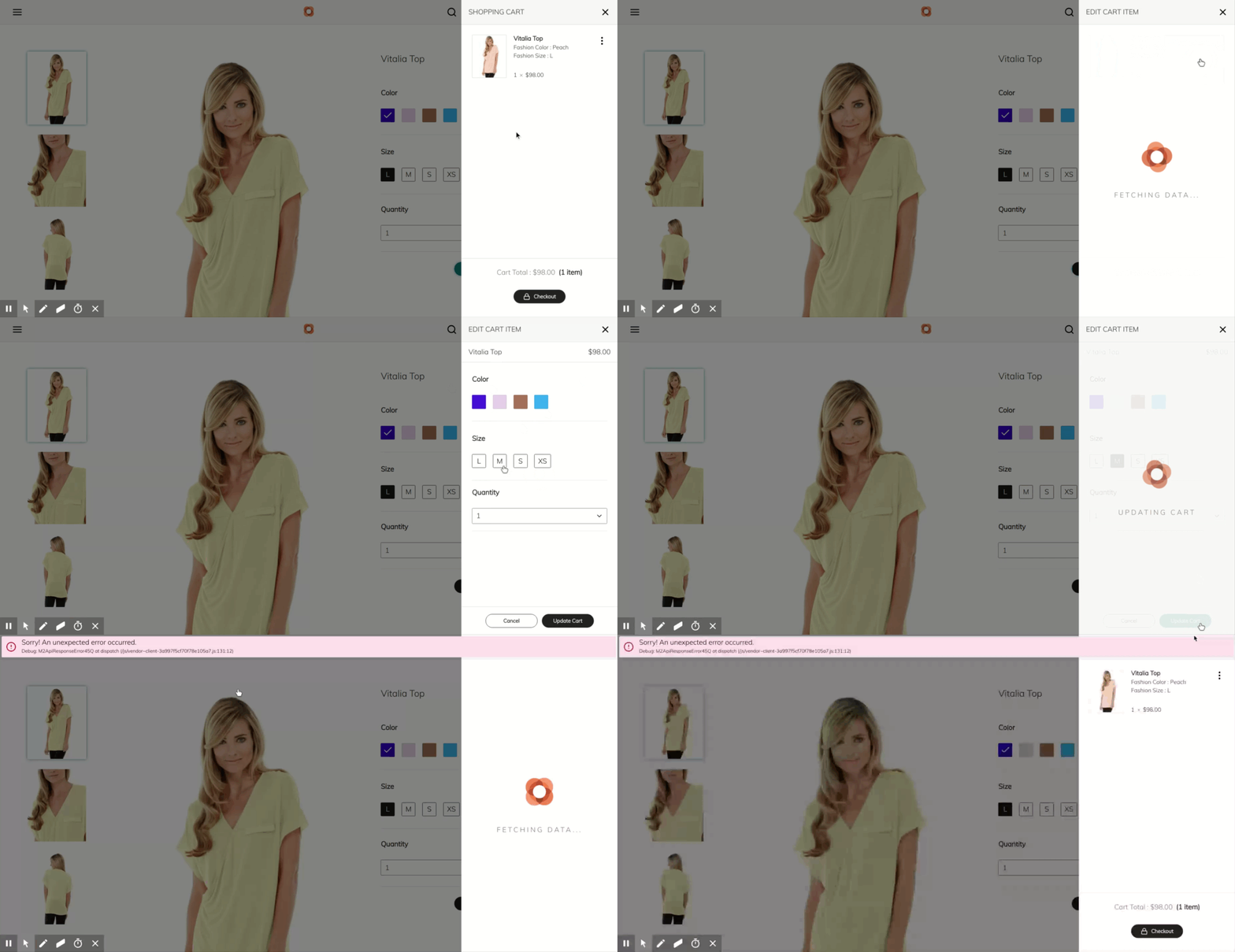
cc @Serunde , @soumya-ashok - not sure what the specs where when this functionality was added, but it seems a good UI enhancement to me.
 ennostuurman
on 23 Feb 2019
ennostuurman
on 23 Feb 2019
@ennostuurman The original intent is definitely to show the previously selected configuration as in this screen - https://magento.invisionapp.com/share/2NQOOWFVQP6
Shopper makes a change to color and taps the "Update Cart" button - https://magento.invisionapp.com/share/2NQOOWFVQP6
After the change has been saved - https://magento.invisionapp.com/share/Z5QOOYBQ9AH
Please let me know if you have any other questions.
 soumya-ashok
on 25 Feb 2019
soumya-ashok
on 25 Feb 2019
Completely agree with both @ennostuurman and @soumya-ashok. This bug is present because edit item functionality doesn't adhere to the design, and aligning functionality with the design would resolve the bug. Acceptance criteria should include:
- Existing configured options are pre-selected in the edit item panel
- Clicking "Update Cart" saves the changes and updates button content to confirm success. This action should not close the panel.
- Changing any options after updating the cart should return the button back to the initial "Update Cart" state (@soumya-ashok please confirm)
tjwiebell
on 25 Feb 2019
@tjwiebell
- Changing any options within the edit screen after tapping the "Update Cart" button should return the button back to the initial "Update Cart" state - Yes
soumya-ashok
on 25 Feb 2019
I agree, the cart options drawer should initialize with the previously selected options. Some technical info on why this was a separate issue:
- One of the tricky parts about getting cart options working was that the data describing the currently selected options originates from REST (stored in redux), and the available variants come from GraphQL. As a result, there is a considerable naming and structural mismatch where the currently selected options come back with a
labeland avalue, but to select a variant when opening the options drawer we need itsattribute_codeandvalue_index. It can be determined that an option exists with the data in the cart, but there is still no reliable way to match the selected option to its GQL variant.
- The
ProductOptionscomponent doesn't seem to accept any props for an initial selection, and it doesn't seem that it's meant to. Currently, the only way to accomplish the desired result would be to manually firehandleSelectionChange()for each selected option in the cart, and in order to do that we need proper option data as noted above.
It seems that some cart operations are now available with the latest updates to GraphQL, so implementing this feature could be much easier now. However, I think it might be best to tackle something like this after asyncActions is updated to use GQL.
 Serunde
on 25 Feb 2019
Serunde
on 25 Feb 2019
Adding one more issue - On Iphone 5/SE User cant update cart for configurable products as buttons are hidden on edit screen. The only way to access the cart is to reload the browser.
 dpatil-magento
on 14 Mar 2019
dpatil-magento
on 14 Mar 2019
Moving to groomed, prior to moving to ready needs final review from @soumya-ashok
 awilcoxa
on 10 Jun 2019
awilcoxa
on 10 Jun 2019
@awilcoxa I've gone over the issue, and most of it is still valid. A couple of things.
As for the original point about wanting to just update the quantity - it is actually possible to do that without entering the "edit item" screen because quantity is more commonly changed in the cart when applicable as opposed to other parameters. If the shopper wants to make a more involved changed such as to color, or size then they would need to go to the "edit item" screen, where they could also change the quantity if needed. Are we fine with keeping this the way it is, or should we discuss moving all editable parameters into the "edit item" screen? We would need to user test that change if that is the case.
One thing I had wanted to add to this was a toast that would display as soon as the user hit "update cart" and returned to their cart is a toast that would read "Cart item updated" or similar. Is it possible to add that to the scope of this issue?
soumya-ashok
on 11 Jun 2019
@awilcoxa please review the question in my previous comment.
soumya-ashok
on 27 Jul 2019
As for the original point about wanting to just update the quantity - it is actually possible to do that without entering the "edit item" screen because quantity is more commonly changed in the cart when applicable as opposed to other parameters.
Not sure when this changed, but this is no longer the case in version 3.0.0: https://veniapwa.com/
 supernova-at
on 6 Aug 2019
supernova-at
on 6 Aug 2019
@supernova-at I see. That's odd. There will likely be changes to how we are handling cart item edits in the future, so in the interest of not adding scope at the moment, we can keep all editable parameters within the "edit" mode.
Any thoughts on my toast question in the previous comment?
soumya-ashok
on 7 Aug 2019
Any thoughts on my toast question in the previous comment?
Loved it and added it to the acceptance criteria 😄
supernova-at
on 12 Aug 2019
Putting this on hold until #1328 (#1515) is resolved because this adds functionality on top of the List component that is being refactored in #1328.
Note to future self: If
- Configurable items can't be added to the mini-cart without the user selecting options first
- Those options appear immediately when editing an item
- Options can't be deselected
Then there is no need to ever disable the "Update Item" button on the edit cart screen.
supernova-at
on 12 Aug 2019
Related issues
supernova-at
·
3Comments
 larsroettig
·
6Comments
larsroettig
·
6Comments
 vitalics
·
4Comments
vitalics
·
4Comments
 ericerway
·
6Comments
ericerway
·
6Comments
 revanth0212
·
6Comments
revanth0212
·
6Comments