node version :10.14.1
npm version:6.4.1
error found
Using environment variables from .env
Unexpected token < in JSON at position 0
The current default backend for Venia development is:
https://release-dev-rxvv2iq-zddsyhrdimyra.us-4.magentosite.cloud/
The configured MAGENTO_BACKEND_URL in the current environment is
http://localhost/magento223/
Consider updating your .env file or environment variables to resolve the reported issues.
 aliaathil
All 15 comments
@aliaathil
1) Does your PWA Studio install work with the pre configured backend url?
2) Two (wild) guesses based upon the info that you provided:
- I am not sure if http://localhost/magento223/ will work so try to change configured backend url to a valid domain preferably served from https , like https://magento223.local/ .
- do you use git ? An unexpected
<token might indicate an unresolved git conflict like having<<<<<<< HEADin a JSON somewhere or it might be a typing error having added a<erroneously.
So in case above suggestions didn't help, could you provide more info on the exact issue:
- i.e. error logs, so for what JSON file has the error been reported?
- on what OS are you running?
- what Version of Magento 2.3 are you running?
- do you use Docker, Vagrant or Valet Plus for your Magento instance?
- where / how do you run PWA Studio?
 ennostuurman
on 9 Dec 2018
ennostuurman
on 9 Dec 2018
Thank for reply
im using ubuntu 16.04 LTS
Magento version. 2.3.0
Error log
0 info it worked if it ends with ok
1 verbose cli [ '/usr/bin/node', '/usr/bin/npm', 'run', 'build' ]
2 info using [email protected]
3 info using [email protected]
4 verbose run-script [ 'prebuild', 'build', 'postbuild' ]
5 info lifecycle @magento/[email protected]~prebuild: @magento/[email protected]
6 info lifecycle @magento/[email protected]~build: @magento/[email protected]
7 verbose lifecycle @magento/[email protected]~build: unsafe-perm in lifecycle true
8 verbose lifecycle @magento/[email protected]~build: PATH: /usr/lib/node_modules/npm/node_modules/npm-lifecycle/node-gyp-bin:/var/www/html/pwa-studio/node_modules/.bin:/usr/local/sbin:/usr/local/bin:/usr/sbin:/usr/bin:/sbin:/bin:/snap/bin
9 verbose lifecycle @magento/[email protected]~build: CWD: /var/www/html/pwa-studio
10 silly lifecycle @magento/[email protected]~build: Args: [ '-c', 'npx lerna run --stream build -- -s' ]
11 silly lifecycle @magento/[email protected]~build: Returned: code: 1 signal: null
12 info lifecycle @magento/[email protected]~build: Failed to exec build script
13 verbose stack Error: @magento/[email protected] build: npx lerna run --stream build -- -s
13 verbose stack Exit status 1
13 verbose stack at EventEmitter.
13 verbose stack at EventEmitter.emit (events.js:182:13)
13 verbose stack at ChildProcess.
13 verbose stack at ChildProcess.emit (events.js:182:13)
13 verbose stack at maybeClose (internal/child_process.js:962:16)
13 verbose stack at Process.ChildProcess._handle.onexit (internal/child_process.js:251:5)
14 verbose pkgid @magento/[email protected]
15 verbose cwd /var/www/html/pwa-studio
16 verbose Linux 4.8.0-36-generic
17 verbose argv "/usr/bin/node" "/usr/bin/npm" "run" "build"
18 verbose node v10.14.1
19 verbose npm v6.4.1
20 error code ELIFECYCLE
21 error errno 1
22 error @magento/[email protected] build: npx lerna run --stream build -- -s
22 error Exit status 1
23 error Failed at the @magento/[email protected] build script.
23 error This is probably not a problem with npm. There is likely additional logging output above.
24 verbose exit [ 1, true ]
aliaathil
on 10 Dec 2018
hey @aliaathil looking at issue https://github.com/magento-research/pwa-studio/issues/626 . Seems you solved this issue because you managed to go a step further in the build now by using a valid domain http://magento223.local instead of http://localhost/magento223/ ?
Can you please confirm so we can close this one?
ennostuurman
on 10 Dec 2018
@aliaathil Could you explain how to fix above issue?
 khoimm92
on 10 Dec 2018
khoimm92
on 10 Dec 2018
i have changed the url to http://magento223.local solved the issue thanks @ennostuurman
aliaathil
on 11 Dec 2018
thanks @aliaathil for the confirmation and closing the issue. cc: @khoimm92 , here ^^ you have your answer ;-)
ennostuurman
on 11 Dec 2018
Hi @ennostuurman hope you are doing good :)
can you please help me regarding this error that is when i run this command _sudo npm run build_
please follow the screenshots urls
Console:

Log file:
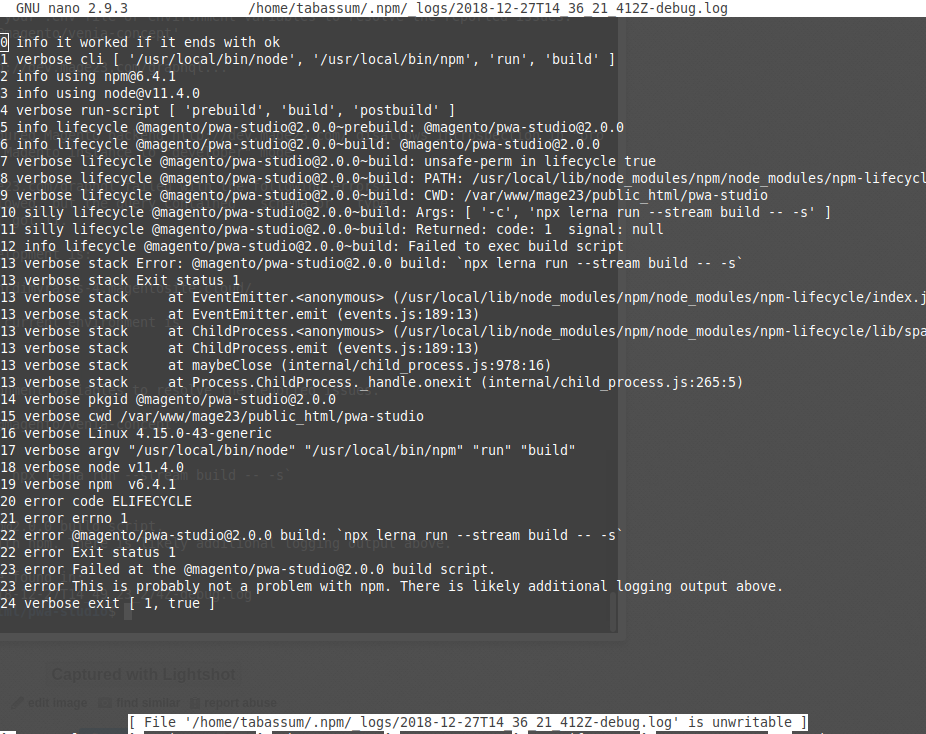
Note: i can bypass this error when i run build with -f flag but i want to fix this error.
 muhammadbt
on 27 Dec 2018
muhammadbt
on 27 Dec 2018
@ennostuurman bro my problem is resolved, i have just set mode to developer and install some required packages (readdir-enhanced ,virtual-module-webpack-plugin and graphql-playground-middleware-express), and everything is working fine :)
muhammadbt
on 27 Dec 2018
hello @Muhammad-Bin-Tabassum glad you solved it, the best issues are the ones that are solved by .... yourself, often asking a question to someone else makes the issue suddenly more clear to yourself ;-) .
I see that the error messages are luckily verbose enough when you run against a Magento instance in production mode, i.e. "Cannot validate queries because the configured backend ... disallows introspection in "production mode" .
Just for my understanding:
1) curious why you missed the NPM packages as they're all defined in pwa-buildpack package.json , so running npm install from project root should suffice to install the NPM packages?
2) was there anything in the install documentation unclear to you?
ennostuurman
on 28 Dec 2018
Hi @ennostuurman actually documentation is clear but after cloning pwa-studio and run npm install everything was fine but during running build i got above dependency errors, as i have also checked in pwa-studio package.json file but didn't find these in it, I have new setup of linux but this shouldn't be a reason for these dependencies.
muhammadbt
on 31 Dec 2018
hi @Muhammad-Bin-Tabassum thanks for explaining, understood from your comments in PR 718 that this was a local issue.
ennostuurman
on 2 Jan 2019
Yes @ennostuurman it might be my local problem but still i'm eager to know why it has happened anyhow i will find some way.
muhammadbt
on 3 Jan 2019
@ennostuurman please help me to regarding this error. i attached screen shot. i have used this link to install https://magento-research.github.io/pwa-studio/venia-pwa-concept/setup/
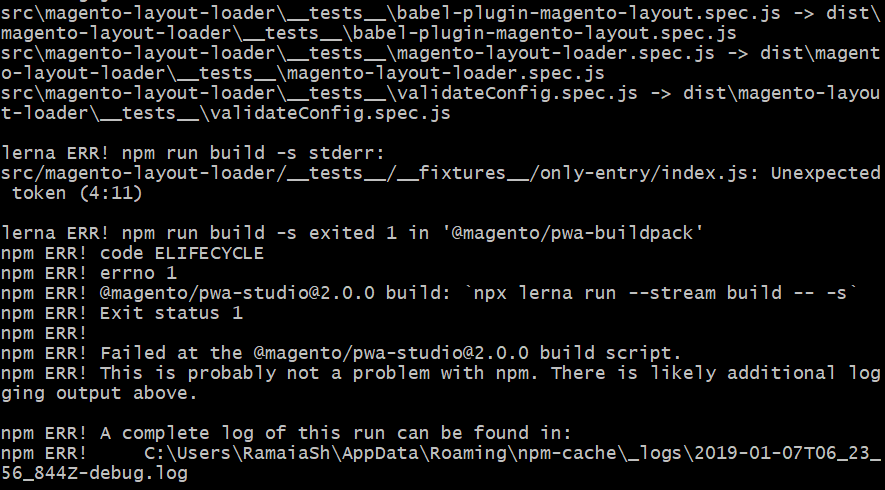
thanks
sharath
 sharathr3
on 7 Jan 2019
sharathr3
on 7 Jan 2019
@ennostuurman please help me to regarding this error. i attached screen shot. i have used this link to install https://magento-research.github.io/pwa-studio/venia-pwa-concept/setup/
thanks
sharath
can you attach compete log
Reomve node modules and run npm intsall and try again may solve issue
aliaathil
on 7 Jan 2019
@sharathr3 did you manage to get PWA studio running as per recommendations from @aliaathil ?
So from PWA Studio project root:
1) npm run clean:all
2) npm install
3) npm run build
ennostuurman
on 11 Jan 2019
Related issues
 sruthitechfriar
·
4Comments
sruthitechfriar
·
4Comments
 ericerway
·
6Comments
ericerway
·
6Comments
 larsroettig
·
5Comments
larsroettig
·
5Comments
 senthil134
·
7Comments
senthil134
·
7Comments
 supernova-at
·
4Comments
supernova-at
·
4Comments