Pulseeffects: [PROPOSAL] Integrate RNNoise within PulseEffects
I was visiting this project NoiseTorch
and I just thought that could be very interesting to use PulseEffects to do the same job.
As I've seen in it's based on a library called RNNoise.
Thank you for this amazing project. The convolver is my favorite tool combined with AutoEq presets.
 M0Rf30
All 56 comments
There is already Noise Suppression in WebRTC plugin, and You can use filter or gate for it as well... You can try my preset in Wiki or at https://gist.github.com/Mlocik97/03c87007af2a4af4ffc2f464e1e2b640
I had no problem to reduce noise.... ofc, it's not AI, but I don't think, there is big advantage of it. (Had tested Krisp for some time, and it's not better, than my presset).
 Mlocik97-issues
on 19 Jul 2020
Mlocik97-issues
on 19 Jul 2020
I had no problem to reduce noise.... ofc, it's not AI, but I don't think, there is big advantage of it.
RNNoise works markedly better than the WebRTC noise suppression.
Anyway, it shouldn't be hard. This adapts RNNoise into an LADSPA/LV2 plugin, which can be used straight in GStreamer.
There is also work being done to add RNNoise directly as a GStreamer element: https://gitlab.freedesktop.org/gstreamer/gst-plugins-rs/-/merge_requests/332
 angelsl
on 19 Jul 2020
angelsl
on 19 Jul 2020
There is also direct/native RNNoise in FFmpeg/libavfilter.
 richardpl
on 19 Jul 2020
richardpl
on 19 Jul 2020
GStreamer now has RNNoise: https://gitlab.freedesktop.org/gstreamer/gst-plugins-rs/-/merge_requests/332 was merged 2 weeks ago.
angelsl
on 1 Sep 2020
GStreamer now has RNNoise: https://gitlab.freedesktop.org/gstreamer/gst-plugins-rs/-/merge_requests/332 was merged 2 weeks ago.
Good to know. It will definitely make things easier.
 wwmm
on 2 Sep 2020
wwmm
on 2 Sep 2020
Any updates on this? How can I help?
 luigifcruz
on 12 Nov 2020
luigifcruz
on 12 Nov 2020
Any updates on this? How can I help?
I admit I forgot about this. The first thing to do is understanding how this GStreamer's plugin is supposed to be used. I have no idea. At least the webrtc plugin was quite tricky to integrate in PulseEffects because it needs a probe running in another pipeline. This rnnoise plugin was written as a rust plugin and is not yet in an official Arch Linux package. But I found a non official package in the AUR https://aur.archlinux.org/packages/gst-plugins-rs/. I will try to find time to install and test it. But in the mean time any help in understanding how the plugin has to be used is welcome.
wwmm
on 12 Nov 2020
It should be simpler than that. This is just a single filter, nothing like webrtcechoprobe needed.
I will take a look in a couple of weeks when I have more time, if it has not been done already.
angelsl
on 12 Nov 2020
I tried to build the aur package for gst-plugins-rs but it is failing when trying to compile libsodium-sys. I don't know why yet.
wwmm
on 14 Nov 2020
@wwmm I've created this for you https://aur.archlinux.org/packages/gst-plugins-rs-git/ :)
/usr/lib/gstreamer-1.0/libgstrsaudiofx.so is included
M0Rf30
on 15 Nov 2020
Thanks @M0Rf30! I was able to install it.
gst-inspect-1.0 output
wallace@wwmm ~/myfiles/code/cpp/pulseeffects/_build/src $ gst-inspect-1.0 audiornnoise
Factory Details:
  Rank                     none (0)
  Long-name                Audio denoise
  Klass                    Filter/Effect/Audio
  Description              Removes noise from an audio stream
  Author                   Philippe Normand <[email protected]>

Plugin Details:
  Name                     rsaudiofx
  Description              Rust AudioFx Plugin
  Filename                 /usr/lib/gstreamer-1.0/libgstrsaudiofx.so
  Version                  0.6.0-f434360
  License                  MIT/X11
  Source module            gst-plugin-audiofx
  Source release date      2020-11-12
  Binary package           gst-plugin-audiofx
  Origin URL               https://gitlab.freedesktop.org/gstreamer/gst-plugins-rs

GObject
 +----GInitiallyUnowned
       +----GstObject
             +----GstElement
                   +----GstBaseTransform
                         +----AudioRNNoise

Pad Templates:
  SRC template: 'src'
    Availability: Always
    Capabilities:
      audio/x-raw
                 format: F32LE
                   rate: 48000
               channels: [ 1, 2147483647 ]
                 layout: interleaved

  SINK template: 'sink'
    Availability: Always
    Capabilities:
      audio/x-raw
      audio/x-raw
Factory Details:
  Rank                     none (0)
  Long-name                Audio denoise
  Klass                    Filter/Effect/Audio
  Description              Removes noise from an audio stream
  Author                   Philippe Normand <[email protected]>

Plugin Details:
  Name                     rsaudiofx
  Description              Rust AudioFx Plugin
  Filename                 /usr/lib/gstreamer-1.0/libgstrsaudiofx.so
  Version                  0.6.0-f434360
  License                  MIT/X11
  Source module            gst-plugin-audiofx
  Source release date      2020-11-12
  Binary package           gst-plugin-audiofx
  Origin URL               https://gitlab.freedesktop.org/gstreamer/gst-plugins-rs

GObject
 +----GInitiallyUnowned
       +----GstObject
             +----GstElement
                   +----GstBaseTransform
                         +----AudioRNNoise

Pad Templates:
  SRC template: 'src'
    Availability: Always
    Capabilities:
      audio/x-raw
                 format: F32LE
                   rate: 48000
               channels: [ 1, 2147483647 ]
                 layout: interleaved

  SINK template: 'sink'
    Availability: Always
    Capabilities:
      audio/x-raw
                 format: F32LE
                   rate: 48000
               channels: [ 1, 2147483647 ]
                 layout: interleaved

Element has no clocking capabilities.
Element has no URI handling capabilities.

Pads:
  SINK: 'sink'
    Pad Template: 'sink'
  SRC: 'src'
    Pad Template: 'src'

Element Properties:
  name                : The name of the object
                        flags: readable, writable, 0x2000
                        String. Default: "audiornnoise0"
  parent              : The parent of the object
                        flags: readable, writable, 0x2000
                        Object of type "GstObject"
  qos                 : Handle Quality-of-Service events
                        flags: readable, writable
                        Boolean. Default: false
This plugin has no parameter for the user to configure. Is that right?
wwmm
on 15 Nov 2020
And it accepts only 48000 kHz as sampling rate. Just like it happens with the webrtc plugin resampling will be unavoidable in some situations.
wwmm
on 15 Nov 2020
If everything goes well this week I will add it to PulseEffects.
wwmm
on 15 Nov 2020
GStreamer's rnnoise plugin is already available in the master branch under the name Noise Reduction. Feedback will be welcome. Specially because I do not know what to expect from this plugin. So people that have used rnnoise before will have to tell me if it is actually being usefull. Help to improve its documentation is also welcome https://github.com/wwmm/pulseeffects/blob/master/help/C/rnnoise.page.
So I far I see one issue with this plugin. When used before the crystalizer or the convolver it makes PE crash. I will look at this in more detail in the next days but I have an idea of the reason. The convolver and the crystalizer plugin use the zita-convolver and this library needs buffer sizes that follow a power of 2. Gstreamer's audiornnoise is probably changing the buffer size to something different. So far I see 2 solutions. The first would be not using this plugin in our "output effects" pipeline and have it only in the microphone pipeline. If there is no use case for this plugin when not using a mic it is fine to do that because neither the convolver or the crystalizer plugin are in the mic pipeline. The second solution would be to use PulseEffects built-in buffer size adapter plugin to force the buffer size after audiornnoise to follow a power of 2. It will work but it will add latency.
wwmm
on 16 Nov 2020
That gstreamer plugin does not support custom noise profiles.
richardpl
on 16 Nov 2020
@wwmm did you make the rnnoise plugin interface with the scrollable window like the others?
 Digitalone1
on 16 Nov 2020
Digitalone1
on 16 Nov 2020
did you make the rnnoise plugin interface with the scrollable window like the others?
It should be scrollable. Most of the code written was copied and pasted from the delay plugin code. Including the glade files. I just changed the classes names and whatever else was needed.
wwmm
on 16 Nov 2020
But as this GStreamer plugin has no parameter the only thing in its interface are the input/output gain sliders.
wwmm
on 16 Nov 2020
I tested it now. It is scrollable.
wwmm
on 16 Nov 2020
I don't think this plugin really makes sense in an output pipeline. It's really meant for voice input, to remove background noise and isolate the voice.
angelsl
on 16 Nov 2020
In a video conference(Teams, Skype, Hangouts) could it be used to remove noise from the other participants microphone? If yes then it makes sense to have it in the output pipeline. As it does not use a probe it should be possible.
wwmm
on 16 Nov 2020
Hm, I suppose so, yes. Although I think the NN is trained on direct recordings rather than voice that has been piped through a voice codec, so I'm not sure how well that will work.
angelsl
on 16 Nov 2020
@wwmm I've tested the latest commit with samples here, but I can't reach a noise suppression like in the webpage. For now I only perceived a lower gain on the output, but nothing comparable. Maybe I'm doing something wrong. I keep investigating. Thanks for your efforts
M0Rf30
on 16 Nov 2020
@M0Rf30 I see the same. So far I would say that this GStreamer plugin is useless :-(
wwmm
on 16 Nov 2020
I still think that is weird that this plugin has no user parameter. The test in the page you linked has user controls. I wonder if this GStreamer plugin is really finished...
wwmm
on 16 Nov 2020
@wwmm
I wonder if this GStreamer plugin is really finished...
It is. It just uses the default RNNoise model. The RNNoise library (and the Rust port that this GStreamer plugin is using) otherwise has no other parameters. The controls on the test page probably just switch between different models.
angelsl
on 16 Nov 2020
Honestly now I am considering to write a GStreamer plugin based on RNNoise from scratch. That one from GStreamer's Rust branch won't get us nowhere. If any of you find RNNoise code examples let me know. Mostly what I need to see is how I can use it to remove noise from an array of floats(audio buffer). With luck I won't need as much work to write this plugin as I needed to write the convolver and the crystalizer.
wwmm
on 16 Nov 2020
@wwmm
The original RNNoise is here, and there is a code example here. Literally you just pass it a PCM 16-bit frame sampled at 48 kHz and it spits out a frame in the same format.
I think most applications that use RNNoise use this modified version of the library. This improved library seems to be able to adapt the model on-the-fly to different sample rates. But it's otherwise the same.
Anyway, sorry that I haven't had time to help much. When I do get time I'll see if I can figure out why that Rust plugin isn't working.
angelsl
on 16 Nov 2020
I tried out the latest commit with the Noise Reduction option and concluded it's not working as expected. Pretty much what @M0Rf30 said. It's a night and day difference between the RNNoise implementation from OBS and the one provided by gst-plugin-rs.
Sorry for not being able to contribute more. I'm not familiar with the pipeline used by PulseEffects.
luigifcruz
on 17 Nov 2020
I am taking the plugin boilerplate from our current convolver plugin. I think it will be enough. But as there isn't a rnnoise package in Arch Linux repositories I will also have to spend some time writing a pkgbuild for it.
wwmm
on 17 Nov 2020
@wwmm If we can share the efforts, let me know of what you need and I will create the PKGBUILDs
M0Rf30
on 17 Nov 2020
@M0Rf30 Unless rnnoise has a dependency that is not available in the Arch repositories a package for it should be enough https://github.com/xiph/rnnoise
wwmm
on 17 Nov 2020
I would recommend using rnnoise-nu instead. Seems like most projects use that instead of the original.
angelsl
on 17 Nov 2020
Ok.
wwmm
on 17 Nov 2020
All right guys, librnnoise and librnnoise-nu are available on AUR. Using different suffixes (-nu), you can install both of them.
I've checked with ldd and there aren't any runtime deps. Because of missing tags or releases, I use (as in many official packages), the latest buildable commit (in this case the latest ones of master branches)
M0Rf30
on 17 Nov 2020
So far I am unable to link to rnnoise-nu. Meson finds the library and /usr/lib/librnnoise-nu.so is added to the link flags. But it fails with undefined reference to rnnoise_get_model(char const*)'...
wwmm
on 17 Nov 2020
I am lokking at this example https://github.com/GregorR/rnnoise-nu/blob/master/examples/rnnoise_demo.c. Could it be that the function used to initialize the model has changed?
wwmm
on 17 Nov 2020
The header file is probably not adapted for C++. You should probably put the include in an extern "C" block.
i.e.
extern "C" {
#include ...
}
Thanks @angelsl! Now it links! It was the first time I had to wrap an include with extern... I imagine the reason are those RNNOISE_EXPORT in rrnoise include...
wwmm
on 17 Nov 2020
No, nothing to do with those. It's just that rnnoise (and -nu) is in C but pulseeffects is in C++. C mangles its exports differently from C++. Most libraries that support both C and C++ will wrap their declarations in extern "C" based on whether __cplusplus is defined. RNNoise was probably not written with C++ in mind at all.
angelsl
on 17 Nov 2020
The first version of our built-in rnnoise plugin is available on the master branch for testing. But there is still a lot to be done:
- Allow rnnoise-nu built-in models to be selected
- Allow the model to be loaded from a file
- Making this plugin output buffer sizes that follow a power of two.
Lots of rough edges but at least now I can hear it making a difference :-). For some reason even on rnnoise-nu we are forced to use buffers of 480 elements. I was hoping I would not have to spend time with GStreamer's buffer adapter but there is no other way... This means I had to follow a similar path to their Rust plugin. Long story short the harder path...
nnoise-nu has a function called rnnoise_model_from_file that probably will make my life easier when exposing support to model file loading. Does anyone have a model file that I could use to test?
wwmm
on 17 Nov 2020
By the way having this plugin on the output pipeline made my life a lot easier when I had to do tests. Way more convenient than having to record something on my mic with background noise. I will keep this plugin on both pipelines.
wwmm
on 17 Nov 2020
@wwmm I just tested the latest commit and it's working very well now! Thanks!
luigifcruz
on 17 Nov 2020
Since this plugin is made from rnnoise-nu, the credit in the interface should be "Based on rnnoise-nu", right?
Digitalone1
on 18 Nov 2020
Since this plugin is made from rnnoise-nu, the credit in the interface should be "Based on rnnoise-nu", right?
Yes. It is written "Gstreamer" because I started with its Rust plugin. As soon as I start to add widgets to this new plugin interface I will change the credits.
wwmm
on 18 Nov 2020
@wwmm some models are available here https://github.com/GregorR/rnnoise-models
M0Rf30
on 18 Nov 2020
New plugin version available for testing:
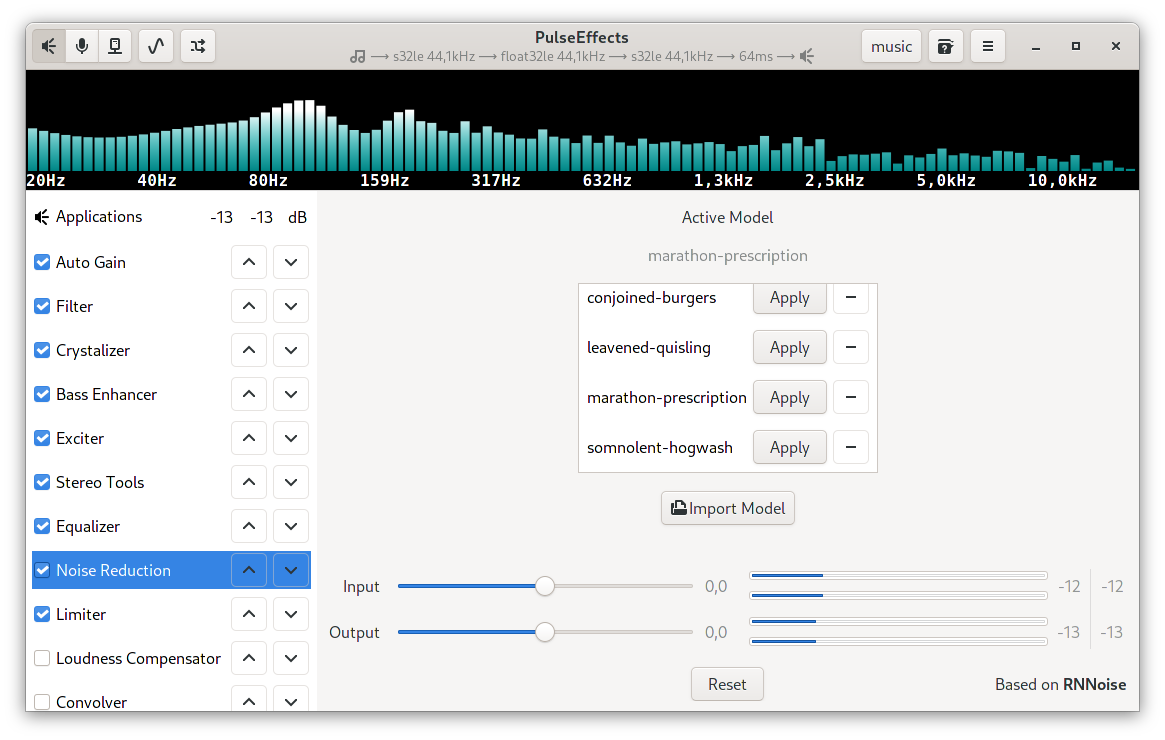
Models can be imported and the selected one is saved to the preset. In the end I was forced to go from RNNoise-nu to RNNoise. Using rnnoise_model_from_file on the fly in RNNoise-nu was a nightmare. For some reason once you use it calls to rnnoise_destroy causes "double free" segmentation faults. On RNNoise this does not happen so I will use it. And the RRNoise-nu github repository does not have an "issues page" to report this crash. In the long term it will be better to be on RNNoise.
So far I could not hear any difference between the models available at https://github.com/GregorR/rnnoise-models. But this is probably dependent on the audio content being given.
wwmm
on 20 Nov 2020
As far as I can see rnnoise is more maintained than nu version. The latest commit is from two years ago.
Anyway @wwmm wait for me to update the Italian translation before to release the new version. Maybe I can also shape the interface a little better.
Digitalone1
on 20 Nov 2020
As far as I can see rnnoise is more maintained than nu version. The latest commit is from two years ago.
The last substantial commit to the original RNNoise is in October 2017.
Anyway, I don't think there's much of a difference between the two.
angelsl
on 20 Nov 2020
Anyway @wwmm wait for me to update the Italian translation before to release the new version. Maybe I can also shape the interface a little better.
Before making a new release I will take a look at #826. Allowing the pipeline pause timeout to be configured in the settings menu should not require much work.
wwmm
on 20 Nov 2020
Anyway, I don't think there's much of a difference between the two.
So far the only difference I saw is that RNNoise-nu allows the maximum attenuation and the sampling rate to be set. I've played a little with the maximum attenuation parameter and I could not hear any difference. Honestly it is not the end of the world not having these controls.
wwmm
on 20 Nov 2020
Seems to works like a charm and in my optimistic vision could be of inspiration to train more optimized models.
I hope that aur/librnnoise will be moved in official Arch Linux binary repos.
M0Rf30
on 20 Nov 2020
Things to do:
- [x] Write a short documentation about new Noise Reduction plugin
- [x] Update translation of the new plugin
- [x] Update Arch PKGBUILD to include rnnoise in makedepends and optdepends
- [x] Update Changelog reporting the Noise Reduction as a new feature and leaving a note to packagers to compile against rnnoise
- [x] Update the Readme with the new Noise Reduction plugin
Digitalone1
on 21 Nov 2020
@Mlocik97 @a554335752 Other translations should be done for the new Noise Reduction plugin.
Digitalone1
on 21 Nov 2020
You need to know that builtin model is not available as file officially. So there should be way to use filter without models.... aka using builtin model only.
richardpl
on 25 Nov 2020
@richardpl the filter can be used without loading a model file. So I do not understand what you mean.
wwmm
on 25 Nov 2020
Related issues
 servimo
·
7Comments
servimo
·
7Comments
 marioortizmanero
·
5Comments
Mlocik97-issues
·
4Comments
marioortizmanero
·
5Comments
Mlocik97-issues
·
4Comments
 mbb78
·
3Comments
mbb78
·
3Comments
 tnilzon
·
5Comments
tnilzon
·
5Comments
Most helpful comment
If everything goes well this week I will add it to PulseEffects.