Pulseeffects: [Question] [GUI] Why can I move applications vertically?
I'm guessing that the order might matter if multiple applications are applied simultaneously?
 TZubiri
All 11 comments
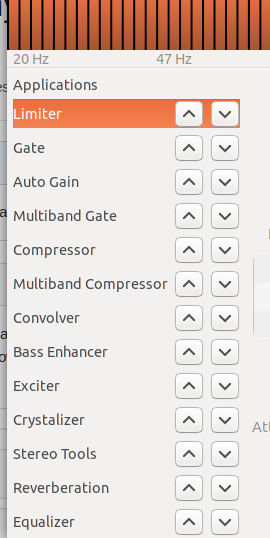
Move applications? Are you talking about being able to move the plugins names up and down by dragging the mouse or by using the up and down buttons? If yes your guess is right. Plugins order may be important in some situations.
 wwmm
on 19 Aug 2019
wwmm
on 19 Aug 2019
Yep, that's it, thank you for clarifying.
FYI, the GUI calls them applications.
TZubiri
on 19 Aug 2019
It is a little confusing indeed. But word application in this case refers to the audio applications section that is shown by default when PE window is shown. If you click over the name Applications you go back to the audio apps section.
wwmm
on 19 Aug 2019
But on a second look it feels like a title for the plugins section. This possibility never crossed my mind XD
wwmm
on 19 Aug 2019
@wwmm when I first time opened app, I thought it same as title... Propably because text is placed in box with smaller height. I have one idea... Before names, put dots and arrows from one dot to another. Which will represent order. (Similiar like are using some "Train apps")
 Mlocik97-issues
on 20 Aug 2019
Mlocik97-issues
on 20 Aug 2019
Good point. I will try to do that :-)
wwmm
on 20 Aug 2019
And when we are talking about GUI, I found some ugly things... like in Bass Enhancer in "Amount" I have 2dB... but in Exciter in "Amoun" only number 2 without unit... there are some other similiar things.. For example numbers are in few inputs centered, and in few inputs not... on few places are values maybe missing minus before number.
Mlocik97-issues
on 20 Aug 2019
Thanks. I think that the db icon must have been unintentionally removed at some point. I did not notice. Fixed!
It would be good to have images about the centering problem. Only negative numbers should have minus before them. Sometimes the db value is negative sometimes it isn't. So this doesn't seem to be a problem.
wwmm
on 20 Aug 2019
video, at start look on "harmonic input value", there are differences about few pixels (and not only value, but all layout, text "výstup" for example text "Výstup" (output)),... same for differences between same "tools" input(mic) and output(speaker)... etc etc. I know there things are not very important. But it irritates me... and I don't know, but Loudness Range bar is always red.
Mlocik97-issues
on 20 Aug 2019
When switching between the exciter and the bass enhancer I can notice it. I wonder if there is anything I can do about it. It feels like a GTK decision to do this shift.
The range value is positive. So that is ok. This parameter is related to the audio content dynamic range. Having it red is not a problem. It just means that the range is large.
wwmm
on 20 Aug 2019
In some places the numbers are not centered because of the unit icon. But I don't know if there is a way to compensate for that. Maybe people more experienced with GTK know how to deal with this. At this moment I have no idea XD
wwmm
on 20 Aug 2019
Related issues
Mlocik97-issues
·
4Comments
 ZeroDot1
·
7Comments
ZeroDot1
·
7Comments
 Mlocik97
·
5Comments
Mlocik97
·
5Comments
 marioortizmanero
·
5Comments
marioortizmanero
·
5Comments
 mbb78
·
3Comments
mbb78
·
3Comments
Most helpful comment
@wwmm when I first time opened app, I thought it same as title... Propably because text is placed in box with smaller height. I have one idea... Before names, put dots and arrows from one dot to another. Which will represent order. (Similiar like are using some "Train apps")
https://lh3.googleusercontent.com/cuEAQ8mCs5ze04UNcNKIzSi3oBv9FVxaLwhE4ABFFRAQdT9C11ui9-AxEMeGBPM5Ew=w2000