Ptvs: No Official Python 3.8 Support for Visual Studio 16.4
While we work to fully support code analysis for the recent inclusions to Python 3.8, below are a list of the language-specific features that our parser will not be able to recognize and will surface as ‘red squiggles’ in the IDE:
• Assignment Expressions
• Positional-Only Parameters
• f-strings debug specifier support
Using any one of these features may trigger a warning message when you launch the project:
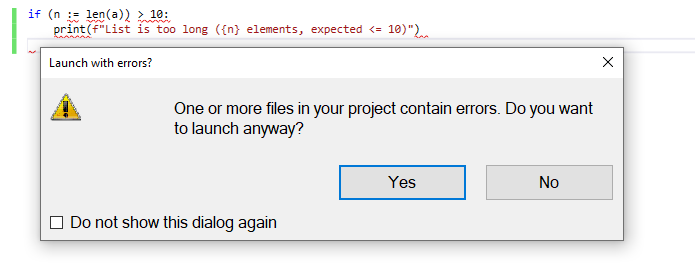
To avoid this, disable the warning by navigating to Tools > Options > Python > Debugging and deselecting the option _Prompt before running when errors are present_.
Moreover, for f-strings support, our current code analysis will not offer completions.
There are also some known issues with using the legacy debugger to attach to a running Python process (see GH5853).
The following capabilities that you know and love will continue to function as normal in Visual Studio for python environments such as:
• Debugging (both Native Debugging and Standard Debugging)
• Virtual/Conda Environments
• Package Manager
• Testing (pytest and unittest, Code Coverage)
• Interactive Window
• Intellisense in most scenarios
 Anapo14
All 43 comments
Is this supported in the VS Preview versions?
 hawkerm
on 12 Feb 2020
hawkerm
on 12 Feb 2020
Is there any news on when this feature will be released?
 Serene-Arc
on 16 Feb 2020
Serene-Arc
on 16 Feb 2020
Is there an update for 3.8 python support in visual studio?
 Analytics206
on 19 Feb 2020
Analytics206
on 19 Feb 2020
why python not supporting visual studio any more 😥😥😥
 Praptomark
on 1 Mar 2020
Praptomark
on 1 Mar 2020
Is there an update for 3.8 python support in visual studio?
Also looking to use python 3.8 in Visual Studio 2017 or 2019
 artcrespo
on 5 Mar 2020
artcrespo
on 5 Mar 2020
Do all Python 3.8 applications not work in Visual Studio?
 besart951
on 26 Mar 2020
besart951
on 26 Mar 2020
Looking to use python 3.8 and selenium for web test automation.
Looking to use python 3.8 for RESTful api testing.
Is this doable ?
 PythonAutomate
on 27 Mar 2020
PythonAutomate
on 27 Mar 2020
If you don't use the new 3.8 language features in the files you are editing, then it should be fine for the most part. Please refer to the top of this issue for details on what the issues are and some workarounds.
 huguesv
on 27 Mar 2020
huguesv
on 27 Mar 2020
Hi huguesv, thanks for the reply.
On Windows 10 using VS 2017 Pro, my python environment is a "custom" one that points to the 3.7 language. Flask was able to bring up a localhost webpage in chrome, but my webpage is on the qa server on the network. So no particular set up has worked for me, and there doesn't appear to be any documentation for python selenium test automation in VS 2017 or 2019 either.
PythonAutomate
on 27 Mar 2020
@PythonAutomate I'm not familiar with using selenium, from what I've read it's a library for automating the browser and you give it the url to open in the code. If you can tell me a little more about your setup and what you are doing / trying to do, I may be able to provide some advice. Please open another issue for this, to keep this discussion here focused on Python 3.8 support.
huguesv
on 28 Mar 2020
Do anybody has the resolution how to fix this program
 elez2019
on 6 Apr 2020
elez2019
on 6 Apr 2020
For now,it works
 Nyx5211
on 14 Apr 2020
Nyx5211
on 14 Apr 2020
It feels like there might be more to this.
Almost May and still not rectified. I hope its just politics and not related to COVID-19.
 Terafugia
on 27 Apr 2020
Terafugia
on 27 Apr 2020
Why?When will it be launched?
 sieminngsuan
on 28 Apr 2020
sieminngsuan
on 28 Apr 2020
Please post a comment when the 3.8 support is complete, and tell how to update VS (both 2017 and 2019). That way, I and others suscribing to this issue will get notified.
Thanks, Michael.
 mrolle45
on 3 May 2020
mrolle45
on 3 May 2020
Any update?
 khjian
on 20 May 2020
khjian
on 20 May 2020
Happy June!
Just updated to VS Community 2019 on version 16.6.1
Still no support?
 2kCarlos
on 3 Jun 2020
2kCarlos
on 3 Jun 2020
Still no support?
 setzer17
on 4 Jun 2020
setzer17
on 4 Jun 2020
Anything update?
 5nophilwu
on 5 Jun 2020
5nophilwu
on 5 Jun 2020
09্/june/2020 - Python 3.8 isn't supported.
 localhost443
on 9 Jun 2020
localhost443
on 9 Jun 2020
@bschnurr do you think someone can chime in here and give us some ETA or news, so we can avoid anymore "Still no support" comments?
 johnwc
on 9 Jun 2020
johnwc
on 9 Jun 2020
We have plans to address this issue but its a complex process and we will update this again with more info in a few weeks.
 bschnurr
on 10 Jun 2020
bschnurr
on 10 Jun 2020
Update here https://github.com/microsoft/PTVS/issues/5210#issuecomment-652098821
bschnurr
on 1 Jul 2020
Hi,
Am I right in saying Python 3.8 released its first alpha in February 2019, released in October 2019 and it's now August 2020 and it is still not officially supported in Visual Studio?
What is going on with this? Is Microsoft shifting people to Visual Studio Code instead as this seems to be supported there.
 Phoebian
on 4 Aug 2020
Phoebian
on 4 Aug 2020
Yes, I've noticed this as well. It seems to be that the freebie VSCode is getting way more attention to new features than the full blown VS, that has developers and enterprises paying high rates every year for. What's going on, can VS get some love too?
johnwc
on 4 Aug 2020
Everything that @Phoebian and @johnwc said above.
Thankfully VS warned me about this on first Python launch - so rather than bother with VS, I'll switch to PyCharm right now. VS is starting to look like a really expensive way to maintain just two small C# projects which I could probably do in VS Code without paying for VS. Oh look, the PyCharm project example code includes print(f - so you know they're with the program.
 AlexHeylin
on 8 Aug 2020
AlexHeylin
on 8 Aug 2020
Sounds like it's actively being worked on now that pylance is go in vscode.
Shout once again @bschnurr once it's rolling into preview builds please :)
 tyeth
on 12 Sep 2020
tyeth
on 12 Sep 2020
Any idea when this will be implemented into a non preview build?
 kethan1
on 17 Sep 2020
kethan1
on 17 Sep 2020
@tyeth, @kethan1, we are working on getting VS to use Pylance. Excited and eager to get the functionality and performance of Pylance to VS. Will get the dates out as soon as we have more clarity and on roadmap, costs, and thereafter, schedule. Thanks!
 judej
on 17 Sep 2020
judej
on 17 Sep 2020
I am using Visual Studio 2019 version 16.7.4.
I can use Python 3.8.2 but I run into problems with Python/C++, mixed mode debugging.
 naughtong
on 28 Sep 2020
naughtong
on 28 Sep 2020
Python 3.9 stable is already out and VS is stuck 2 versions behind.
 alexolog
on 11 Oct 2020
alexolog
on 11 Oct 2020
An year later, any updates?
 Brunocostenaro
on 20 Oct 2020
Brunocostenaro
on 20 Oct 2020
Vs 2019 r 16.8 no support for Pyhton 3.8
 IvanTImo
on 11 Nov 2020
IvanTImo
on 11 Nov 2020
Vs 2019 r 16.8 no support for Pyhton 3.8
Neither in 16.9 preview 1
Python 3.7 official end of support (other than security updates) was 2020-06-27
Python 3.8 official end of support (other than security updates) will be 2021-04. just 5 months away.
alexolog
on 14 Nov 2020
Any updates? It's been a year already since Python 3.8 release...
 estepankevich
on 27 Nov 2020
estepankevich
on 27 Nov 2020
I guess Microsoft wants everyone to use Visual Studio Code when it comes to Python development ...
 gha-zund
on 27 Nov 2020
gha-zund
on 27 Nov 2020
Does VSC have an integrated debugger?
alexolog
on 27 Nov 2020
This is still work in progress, at this moment Visual Studio doesn't have complete support for Python 3.8 or 3.9. I would recommend using 3.7 instead, but if you must use 3.8 or 3.9, use VS Code with some Python plugins or use PyCharm.
 VladPutinEu
on 14 Dec 2020
VladPutinEu
on 14 Dec 2020
I guess Microsoft wants everyone to use Visual Studio Code when it comes to Python development ...
Most software engineers recommend using VS Code or PyCharm for Python.
VladPutinEu
on 14 Dec 2020
Microsoft really needs to work on Python support for Visual Studio. Companies pay a lot of money for Visual Studio and it doesn't even support a Python version which was released over a year ago. Yet its free counterpart, VS Code, supports the latest Python version, 3.9 Even free competitor IDEs such as PyCharm Community Edition support it. Come on Microsoft, add support for Python 3.8 and 3.9 already. Please.
VladPutinEu
on 14 Dec 2020
I am using python 3.9 without undue difficulty, but I have less confidence during debugging.
 dbinette
on 16 Dec 2020
dbinette
on 16 Dec 2020
That is exactly my problem with visual studio 2019 and Python 3.8, it runs into problems with debugging, particularly mixed mode (Python / C++) debugging.
Sent from Yahoo Mail on Android
On Wed, 16 Dec 2020 at 20:14, dbinettenotifications@github.com wrote:
I am using python 3.9 without undue difficulty, but I have less confidence during debugging.
—
You are receiving this because you commented.
Reply to this email directly, view it on GitHub, or unsubscribe.
naughtong
on 16 Dec 2020
I recommend using PyCharm or VS Code with some plugins if you want the new versions of Python.
VladPutinEu
on 21 Dec 2020
Related issues
huguesv
·
4Comments
 xiaofeng0123
·
6Comments
xiaofeng0123
·
6Comments
 kyanha
·
3Comments
kyanha
·
3Comments
 malicemana
·
5Comments
malicemana
·
5Comments
 joseortiz3
·
3Comments
joseortiz3
·
3Comments
Most helpful comment
Is there any news on when this feature will be released?