Ptvs: Intellisense fails to scrape modules from other projects
Upgraded to VS2017 15.4.2 today, was pleased that error highlighting has been fixed. However, modules still fail to import from other projects.
Steps to reproduce:
- Install VS2017 15.4.2 with Python Support
- Create new solution with project inside (here, its called PythonApplication1)
- Create another project in the solution (here, its called other_module), with other_project.py inside.
- Add to PythonApplication1's _Search Paths_ the directory of other_module.
- Attempt to import other module.
- Observe failure of Intellisense to recognize other_module.
- Refreshing DB does nothing. Adding other_module to _References_ does nothing.
Screenshots of various behaviors observed:


Importing modules from other projects was supported at one time, so I assume this is a bug. I still have one computer with VS2017 _15.3_ on it, everything works great in that version.
Here is the gist of the python tools diagnostic
https://gist.github.com/joseortiz3/def9d14386aa82ec176401d88cff1013
My setup: Anaconda 5.0.0, Python 3.6, VS2017 Community install with Python Tools option without optional Python 3.6
 joseortiz3
All 30 comments
We are experiencing the same issue. VS 15.4.2, Python 2.7 64-bit. This is problematic because we use a custom project template for non-developers, and without intellisense they are lost
 wernervn
on 2 Nov 2017
wernervn
on 2 Nov 2017
I haven't been able to reproduce this yet, but I will continue trying.
 zooba
on 2 Nov 2017
zooba
on 2 Nov 2017
Can people confirm that if you close and reopen the solution, you get Intellisense? But then if you change other_module (from the above example) the changes are not reflected? Also that adding a search path does not affect editors until you close/reopen the solution?
zooba
on 2 Nov 2017
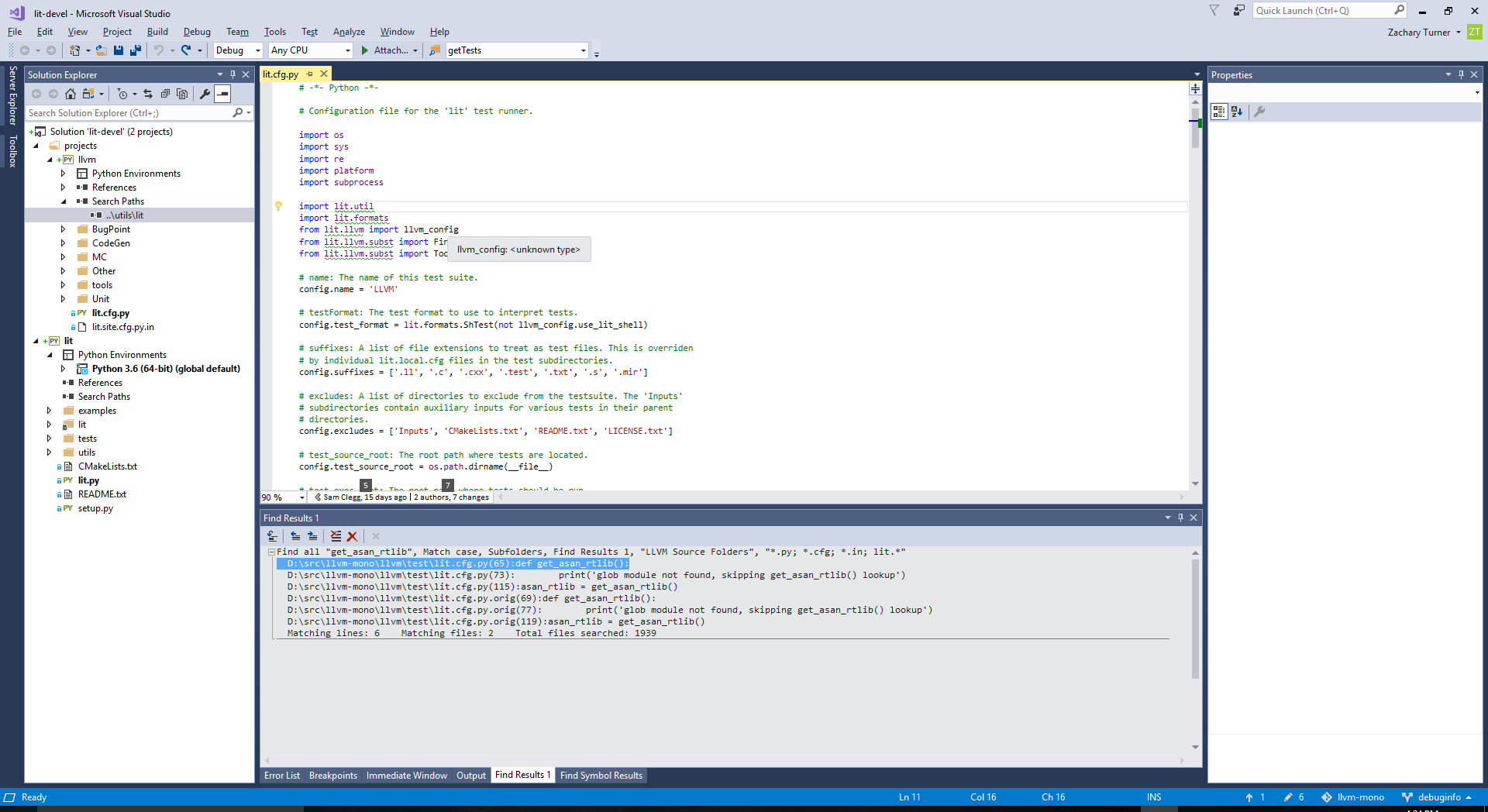
I can confirm that I am still having issues. I can give you a very easy repro (well, relatively speaking).
clone this repo: https://github.com/llvm-project/llvm-project-20170507
go to
llvm\llvm\utilsand create a folder calledptvsNew Python Project From Existing Code. Point the source to
llvm\llvm\utils\lit. Save the.pyprojand.slninllvm\llvm\utils\ptvsRight click Solution -> Add -> New Project -> From Existing Python Code. Point the source to
llvm\llvm\test. Save the.pyprojinllvm\llvm\utils\ptvs. Close and re-open the original solution since it didn't actually add it to the existing solution, then Add -> Existing Project.For the project created in step 4, set the search path to
..\utils\lit. This is really just the search path of the other project, but since References doesn't seem to work correctly, this is what I use.Open up
llvm\test\lit.cfg.pyand look at the imports from lines 12-16. They all have squigglies. They go away if you refresh DB, but this doesn't make intellisense start working for those imports.
 zjturner
on 3 Nov 2017
zjturner
on 3 Nov 2017
What I'm most interested in is whether closing and reopening the solution at this point gives you cross-project completions. (In my testing I got one good snapshot across projects by doing this, but it didn't update as you modified things.)
zooba
on 3 Nov 2017
I can try several more times, but so far after 5-6 reopens I have not gotten anything.
zjturner
on 3 Nov 2017
I tried closing and reopening the solution, and removing / adding search path and all permutations of those. Seems like nothing different.
Going to try uninstalling reinstalling VS.
joseortiz3
on 3 Nov 2017
One time just now it opened without squigglies (normally I have to force a refresh before it will do this), but that still didn't give me IntelliSense. And as soon as I started typing the squigglies showed up again.
(Edit: Also, sorry for not catching this earlier. I actually did try to build PTVS locally after our last thread, but I couldn't get the install to work properly so I gave up).
zjturner
on 3 Nov 2017
@zjturner Can you try renaming lit.py so it doesn't conflict with the package? We may be picking that up rather than lit\__init__.py and everything is going wrong from there rather than the issue I think this started as.
zooba
on 3 Nov 2017
@zooba nice catch, but alas, no luck. Same problem. Incidentally, when I tried renaming it (by editing the name inline in the solution explorer), I got a popup with "Object Reference Not Set to an Instance of an Object". I should probably file another bug about that.
zjturner
on 3 Nov 2017
@zjturner We've fixed that bug already - it'll be in for 15.6. Might be worth another close/reopen though, I don't remember how corrupt we were leaving analysis state after hitting that issue.
zooba
on 3 Nov 2017
Oh yea, I closed and reopened it again, but still no IntelliSense :(
zjturner
on 3 Nov 2017
Very interesting thing: When I do a fresh install, other_module _is_ recognized during the first typing of import oth... But then something bad happens and I cannot get it back....investigating.
Update: Actually it appears to work for any new solution for the first import other_mod... but then it fails somewhere between typing that the first time and typing other_module. the first time.
Update: Actually closing and reopening the solution causes import o... to suggest other_module successfully once. Once. And then something bad happens. So its something that goes wrong during each new session I think, not per solution or per install.
joseortiz3
on 3 Nov 2017
So, I'm not sure why I didn't think to try this before, but it happens even if I remove the lit project entirely. I mean, really there's no reason the lit project has to be in there to repro this, because the search path is an explicit folder anyway. So you actually only need 1 project to repro it, and just point the search path to the right place.
zjturner
on 3 Nov 2017
Updated, simplified repro steps:
clone this repo: https://github.com/llvm-project/llvm-project-20170507
New Python Project From Existing Code. Point the source to
llvm\test. Choose defaults for everything else.Set the search path to
llvm\utils\litOpen up
lit.cfg.pyfrom the solution and look at the imports from lines 12-16. You may or may not get squigglies under the module name, but no matter what, hovering over the object / variable being imported just says unknown type.
zjturner
on 3 Nov 2017
Okay, I figured out why I was getting slightly different behavior - I had the experimental feature to disable completion DBs enabled. When I turn that off, I get exactly the same behavior even on trivial cases.
So the good news is that the problem will go away _eventually_ (when 15.6 becomes available), but the bad news is I don't have a great solution for right now :( I'm out of time for today, but I'll dig in some more tomorrow and see what I can get in to an earlier release - it's likely to be 15.5 rather than another 15.4 servicing update, but will have to see how scary the change ends up being.
Thanks for helping out!
zooba
on 3 Nov 2017
:( Is this experimental feature something that we can also enable? I don't mind hacking my registry if I need to.
zjturner
on 3 Nov 2017
^ Yeah I would be willing to do almost anything to get this feature working. This is a really important feature when you have big complicated solutions. On the other hand VS 2015 has working project scraping, but some things are different, and old.
joseortiz3
on 3 Nov 2017
See the second-from-top blog post at https://aka.ms/pythonblog, but be warned that you’ll probably notice new Intellisense problems as you’ve all got quite an early preview.
If you’re prepared to build out of master and run in the Experimental hive there are fairly simple build instructions on the wiki here – you can’t build an installer though, so it’s not much good if you need to deploy to other machines. But it’s the earliest possible look at what’s coming and I think it’s pretty exciting.
zooba
on 3 Nov 2017
I can try the local build again. But one that I couldn't figure out last time is which files to install. When you run the build you end up with a ton more stuff in the output directory than it appears are installed. Should I only be overwriting existing files?
If I get all this working and build out of master and run in Experimental, is all of this stuff just "working" so I should see correct behavior out-of-the-box?
zjturner
on 3 Nov 2017
Yeah, we’ve improved the build, so F5 should be pretty smooth. If you want to do a “proper” install it gets messier, but that’s what the layout output directory is for. Probably 90% of those should just copy into Extensions and remove the old extension, but there are a few special files, so be careful if you go this route.
zooba
on 3 Nov 2017
What about if you build an installer with the fix and attach it to this issue so it doesn't get too much publicity and you don't have to support it, but at least the people affected seriously enough to find their way here can get it? ;-) A man can dream, anyway.
zjturner
on 3 Nov 2017
Yeah, unfortunately we don't have the infrastructure to do that right now. When we moved to being a component of VS 2017 we used our internal setup tools, which were the only ones available at the time, and now switching to the publicly available ones (which also support in-place upgrades) is a big task with such limited value and such high risk that we haven't wanted to touch it yet :)
zooba
on 3 Nov 2017
Hmm, fair enough. Would it be possible to write a powershell script or something and upstream it that literally just copies files? That was the manual approach suggested above anyway, and you could still print a big message when running the script that says it's unsupported. Only reason I'm pushing on this is because if there had been an easier way to install, even if in an unsupported configuration, I would have found this before Preview 2 had gone out :(
zjturner
on 3 Nov 2017
FWIW, I can confirm that after using the registry setting described at your link, the probelm goes away. Will file other bugs separately if I encounter issues in this new experimental configuration.
zjturner
on 3 Nov 2017
Finding it _in_ Preview 2 is okay though - that's the point of the previews, and why we put in so much effort to make it easy to have a preview and a stable install side-by-side. Once you start messing with the contents of the install directory it's hard to recover (for example, I totally broke Roslyn on my machine yesterday with an extra folder I put in there months ago... took half a day to figure it out).
Good to know it's not in the new engine. That'll make it easier to find and fix. Thanks!
zooba
on 3 Nov 2017
Actually it seems it's better, but not entirely fixed. I'll file a separate issue.
zjturner
on 3 Nov 2017
Yeah, like I said, it's very limited right now. There's been so much churn in this area that it's going to be hard to find meaningful issues in the released preview, and we aren't ready to commit to being stable for 15.5, which means we can't push newer work into preview either.
I've had to spend most of today so far dealing with a major localization issue, but I'll spend the rest figuring out what fix we _can_ make for 15.5 to get search paths working properly again, probably not against the no DB experiment.
zooba
on 3 Nov 2017
🤦♂️
The good news is, I have a fix that I can certainly bring in for 15.5. The bad news is that I feel really stupid about it :)
Won't make it into the next preview or the next 15.4 update, but it should show up in 15.5's future, so you won't have to wait for too long.
zooba
on 3 Nov 2017
I can confirm project module imports work in VS2017 Preview 15.5 v4.0
joseortiz3
on 19 Nov 2017
Related issues
 kyanha
·
3Comments
kyanha
·
3Comments
 huguesv
·
3Comments
huguesv
·
3Comments
huguesv
·
4Comments
huguesv
·
3Comments
huguesv
·
3Comments
huguesv
·
4Comments
 malicemana
·
5Comments
malicemana
·
5Comments
Most helpful comment
🤦♂️
The good news is, I have a fix that I can certainly bring in for 15.5. The bad news is that I feel really stupid about it :)
Won't make it into the next preview or the next 15.4 update, but it should show up in 15.5's future, so you won't have to wait for too long.