Prusaslicer: When sequential printing, z axis doesn't home after each object
Version
2.2.0+win64
Operating system type + version
Windows 10 1909 x64 Pro
3D printer brand / version + firmware version (if known)
Monoprice Select Mini V2
stock firmware
Behavior
I was trying to do a kind of speed test of my printer, to check at what speed I can print PETG filament without quality loss.
I created 4 20x20mm cubes, and each one I assigned a different perimeter speed (from 35mm/s to 50mm/s)
I placed the cubes on the bed well spaced from each other to prevent collisions, from front to back and from left to right as suggested in Prusa Knowledge Base.
- _Describe the problem_
After printing the first cube (35mm/s), the nozzle started printing the second cube at the same z height, thus printing at mid-air and creating spaghetti. - _Steps needed to reproduce the problem_
Add multiple objects and enable "Complete individual objects" option. - _Expected Results_
After finishing the previous object, the printer should home the z axis and start to print from the ground. - _Actual Results_
After finishing the previous object, the printer moves the nozzle on x and y axes and start printing mid-air.
- _Screenshots from __PrusaSlicer__ preview are preferred_
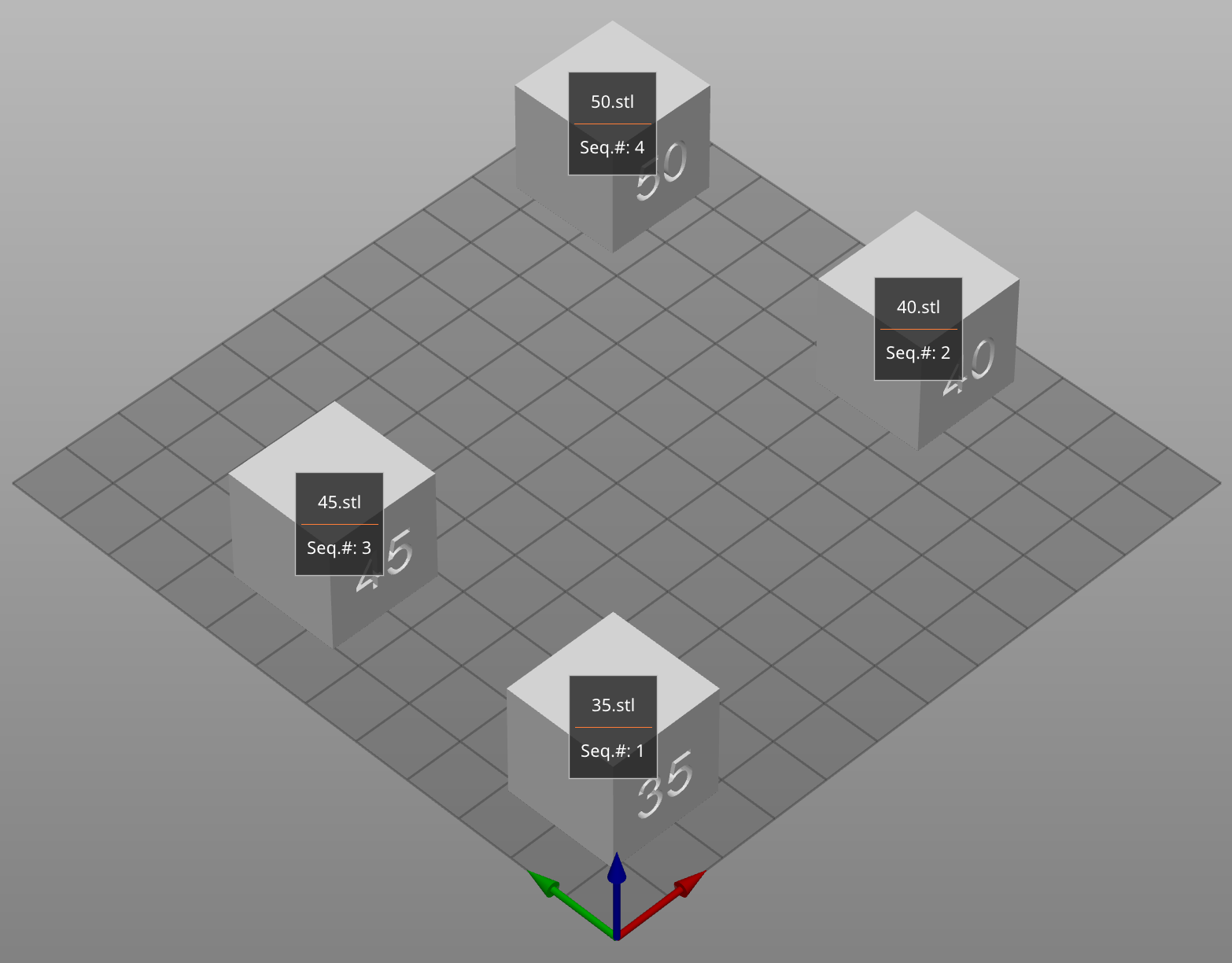
- _Screenshots from __PrusaSlicer__ preview are preferred_
_Is this a new feature request?_
No
Project File (.3MF) where problem occurs
 mlazzarotto
All 14 comments
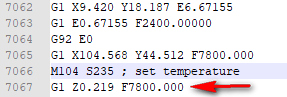
I was unable to reproduce it with your 3MF project. It shouldn't home Z axis after each object, it should only move to the first layer Z height. It looks OK in my gcode, see the screenshot.
I can check your gcode, if you will attach it.
 rtyr
on 11 Jul 2020
rtyr
on 11 Jul 2020
Sure, here is the gcode.
7-10_0.2188 - Fast_PETG Basicfil_test velocita petg.gcode.txt
mlazzarotto
on 13 Jul 2020
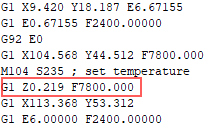
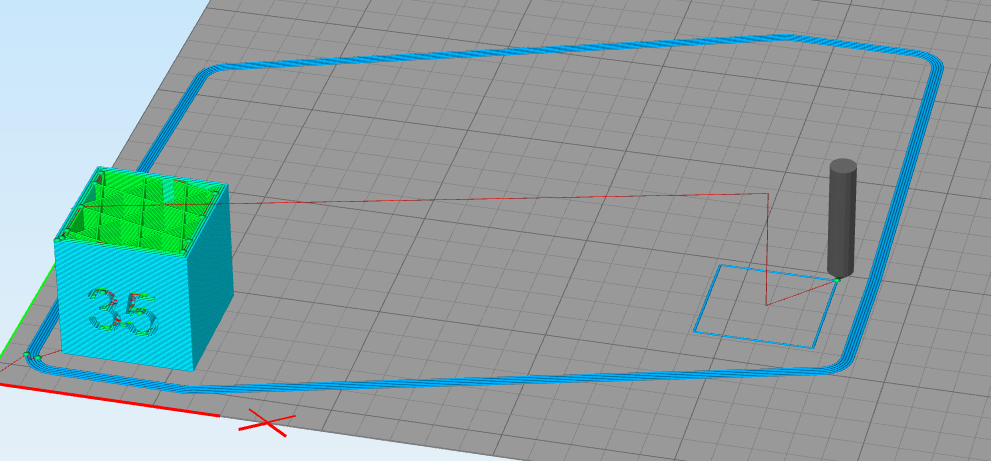
Thank you. The gcode seems OK, so the issue is probably not PrusaSlicer related, does it happen everytime?
rtyr
on 13 Jul 2020
May be related but that Z axis movement feedrate is very high. I was recently involved in a thread on the Prusa Forum where a non prusa printer user was having problems with homing at start as the Z feedrate speed that Slicer inserts between start code and start of print is based on travel speed x60 and his printer couldn't do that rate. Of course the travel speed was fine for normal X/Y movements and when doing normal printing the Z axis doesn't move that quickly. It may be that the printer is not moving back down to the bed between objects as the Z axis cant do that speed.
As an experiment you could reduce the travel speed setting in slicer to something much lower and see if that works. If so then you have found the issue.
It may need z travel feedrates to be decoupled from X/Y travel feedrates.
 neophyl
on 13 Jul 2020
neophyl
on 13 Jul 2020
Yes, it may be related, but z axis speed should be limited by the firmware. He have 12mm/s feedrate / 500 acceleration in machine limits. I am not sure if Monoprice Select Mini can handle such Z speed/acceleration or not.
rtyr
on 13 Jul 2020
I was recently involved in a thread on the Prusa Forum where a non prusa printer user was having problems with homing at start as the Z feedrate speed that Slicer inserts between start code and start of print is based on travel speed x60 and his printer couldn't do that rate.
People tend to use our printer profiles as a template for different printers without checking/modifying machine limits (which will override default firmware values).
rtyr
on 13 Jul 2020
I agree that it should be limited by firmware, however as it seems that more than one person is having trouble with fast commanded Z movements it may be that not all firmwares are behaving correctly, or the limits set in eeprom may not be correct so their machines are doing more than they can handle.
As I say its easy to test by temporarily dropping the travel speed down and doing a sequential print. How the OP goes from there to 'fix' the issue I leave to others :)
rtyr - saw you just added another post while I was typing, the user in question had already selected rep/rap to remove the Marlin inserted machine limits already which had removed them from the gcode (that was the first thing we suggested). However between the last gcode lines from his start and at layer change code he had a similar Z travel at a very fast feedrate as the extruder moved to the start location. He found that if he manually post processed his gcode to remove that high feedrate at just that line his printer would start perfectly and go on to print fine. He couldn't find where the rate was being generated from. Eventually we figured out that it was always Travel Speed x60.
neophyl
on 13 Jul 2020
Later I will try another sequential printing.
In the meantime, these are the machine limits I've got from the printer.
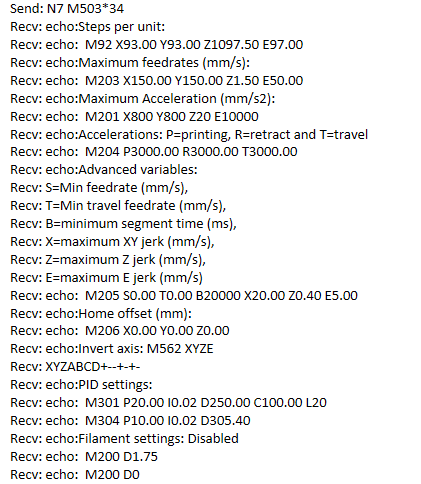
I still not an expert, please tell me if I should change my settings profile on PrusaSlicer.
These are the limits on PrusaSlicer, I never changed them
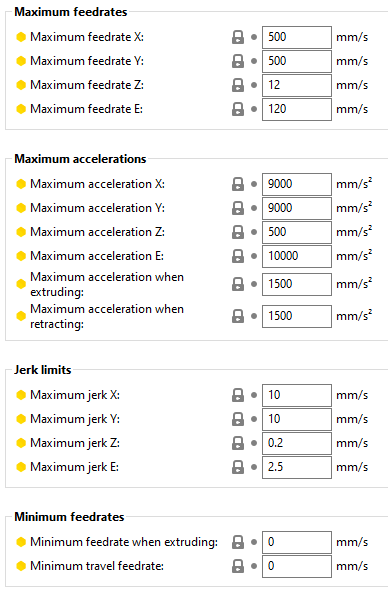
mlazzarotto
on 13 Jul 2020
Yes, it explains your issues with Z axis. It should be like this (according to firmware - you can use lower values for example for XY jerk):
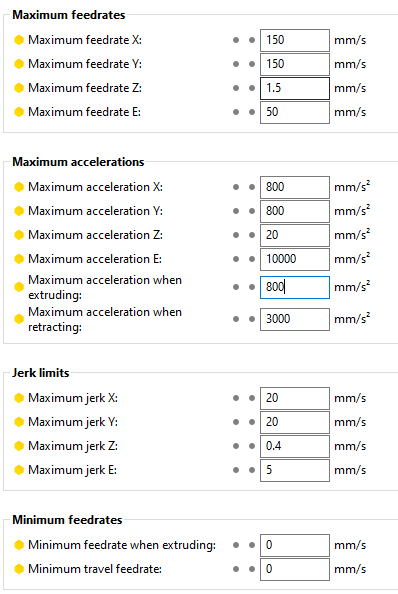
rtyr
on 13 Jul 2020
Can we close this issue?
rtyr
on 14 Jul 2020
Can we close this issue?
Unfortunately no.
Today I print the same 4 cube project, but with the updated machine limit you posted yesterday.
And I've got the same result.
This is a video I recorded
7-14_test velocita petg.3mf (0.2188 - Fast)_PETG Basicfil_test velocita petg.gcode.txt
mlazzarotto
on 14 Jul 2020
You probably forgot to reslice it with new machine limits. I can see old values in the gcode.
Did you hear anything weird while recording the video? (like skipping steps).

rtyr
on 14 Jul 2020
Try this.
rtyr
on 14 Jul 2020
You probably forgot to reslice it with new machine limits. I can see old values in the gcode.
Yep, totally forgot, sorry.
Did you hear anything weird while recording the video? (like skipping steps).
Yes I can hear something but I can't say what it is trying to do.
I reuploaded the video on YT with audio. You can hear the sound at 00:07
Try this.
Yep, now it's working as expected!! Thank you so much!!
You can definitely close the issue.
mlazzarotto
on 14 Jul 2020
Related issues
 RossKor
·
3Comments
RossKor
·
3Comments
 Bubolz
·
3Comments
Bubolz
·
3Comments
 kakou-fr
·
4Comments
kakou-fr
·
4Comments
 pricedev
·
4Comments
pricedev
·
4Comments
 i-make-robots
·
3Comments
i-make-robots
·
3Comments