Prusaslicer: Disable / control bottom interface layers
Version
2.2.0 Win64
Behavior
When generating support, interface layers make a dramatic difference to the quality of the supported layer but in my experience, the bottom interface layers almost always cause more problems than they prevent.
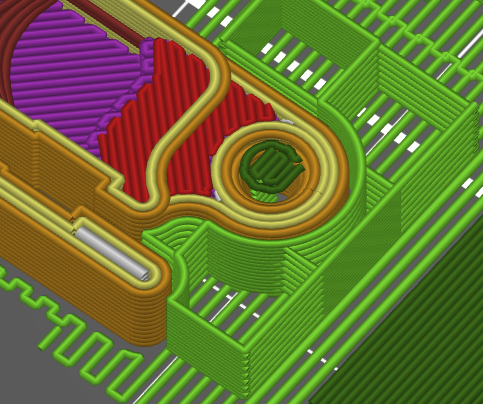
I'm printing links in a chain, and the holes have chamfers to facilitate insertion of the link pins. You can see that interface layers are being generated all along the chamfer as is "intended":
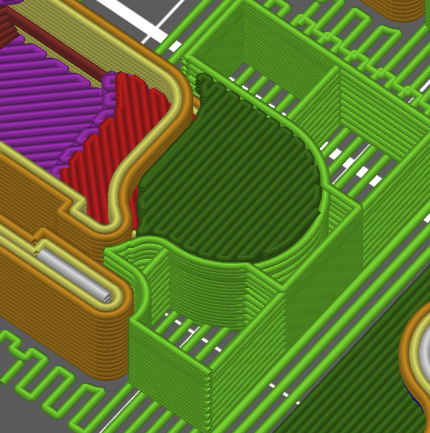
This is what the finished interface looks like:
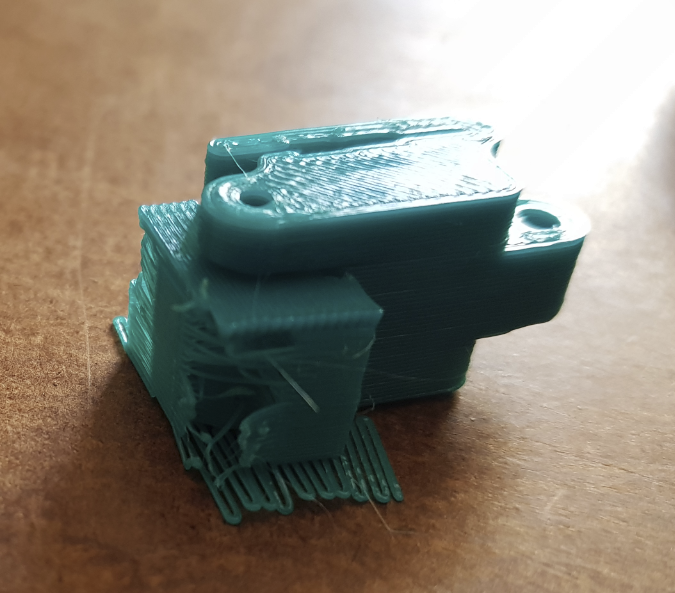
The problems begin when the print is finished. These bottom layers are completely fused with the part, and cannot be removed. The following parts were printed in PETG with 0.3mm layer heights:
After "removal" (left side is the top, and right side is the bottom):
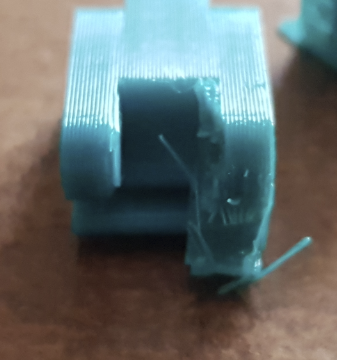
This picture was taken after hand removal, then pliers, _then_ sidecutters, then using a special tool to drive out the rest of the "support" through the hole. You can see that the surface has now shattered, and the part is completely unusable.
The default functionality has completely destroyed every print I've ever had that has any bottom interfacing layers, I struggle to even understand why it works the way it does. Turning off interface layers allows for easy removal, but the surface finish is sub-par. This cannot be worked around using height-range modifiers either.
Thanks for checking this out, and hopefully this is something you'll be able to take care of
 Pun-e
Pun-e
>All comments
Slic3r ++ has separate settings for top and bottom supports separation. It would not be bad to include this feature in PrusaSlicer as well.
 liftbag
on 20 May 2020
liftbag
on 20 May 2020
Related issues
 TimothyGold
·
4Comments
TimothyGold
·
4Comments
 Tirpitz93
·
3Comments
Tirpitz93
·
3Comments
 RossKor
·
3Comments
RossKor
·
3Comments
 tkircher
·
3Comments
tkircher
·
3Comments
 karek314
·
4Comments
karek314
·
4Comments
Most helpful comment
Slic3r ++ has separate settings for top and bottom supports separation. It would not be bad to include this feature in PrusaSlicer as well.