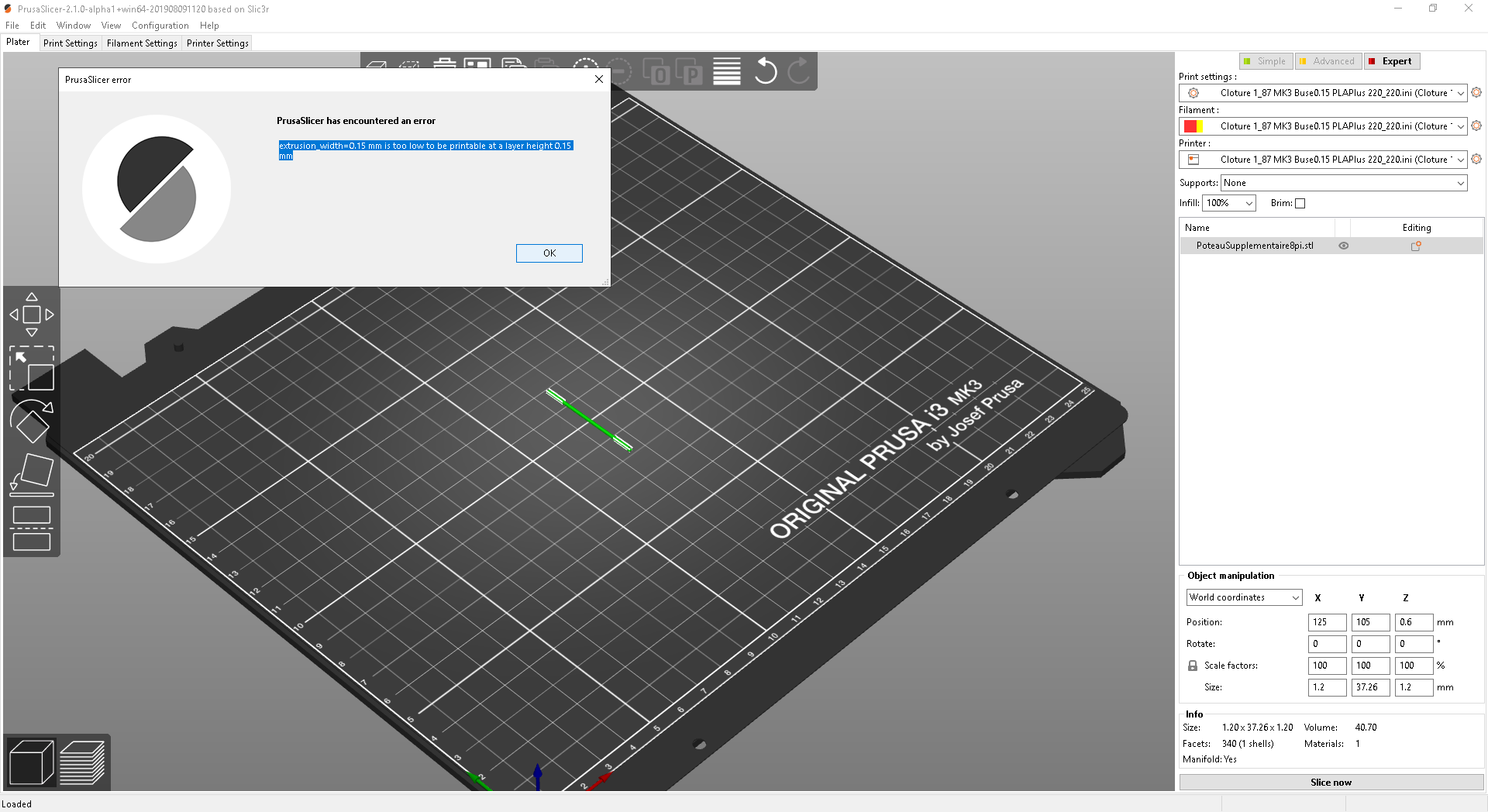
Prusaslicer: False error: "extrusion_width=0.15mm is to low to be printed at a layer height 0.15mm"
Version
PrusaSlicer 2.1.0-alpha1
Windows 10
Why this release shows this error : "extrusion_width=0.15mm is to low to be printed at a layer height 0.15mm" ? I have set the nozzle dia. to 0.15mm because I am using a 0.15mm nozzle of course. I attach the screen shot of the error, the .stl file and the .ini as zip files
I am printing hundreds of fine scale miniature things with a 0.15mm nozlle with this setting for over 6 month with Slic3r 1.41.3+win64 and have excellent results. Please can use just put a warning if you don't want to remove the message, so I can use this new version.
 Schrunch
All 13 comments
extrusion_width_min <= layer_height then no joy
You can't do that anymore. Use 0.149 layer heights
Why? Issue #2715
 Jebtrix
on 21 Aug 2019
Jebtrix
on 21 Aug 2019
Why I can`t, it works fine with 1.143.3 and older?
De : Jebtrix notifications@github.com
Envoyé : 20 août 2019 18:30
À : prusa3d/PrusaSlicer PrusaSlicer@noreply.github.com
Cc : Schrunch schel@videotron.ca; Author author@noreply.github.com
Objet : Re: [prusa3d/PrusaSlicer] False error: "extrusion_width=0.15mm is to
low to be printed at a layer height 0.15mm" (#2790)
extrusion_width_min <= layer_height then no joy
You can't do that anymore. Use 0.151 layer heights
You are receiving this because you authored the thread.
Reply to this email directly, view it on GitHub
4DFVREXG43VMVBW63LNMVXHJKTDN5WW2ZLOORPWSZGOD4X3IVA#issuecomment-523220052> ,
or mute the thread
.gif>
Schrunch
on 21 Aug 2019
I'm not a fan of by the book limit values chosen either. Its still alpha so we just have to petition for some limit relaxing. Some fudge factor room.
Jebtrix
on 21 Aug 2019
Thanks for your answer. I am new to github. How can we petition for some
limit relaxing the limits?
De : Jebtrix notifications@github.com
Envoyé : 20 août 2019 19:17
À : prusa3d/PrusaSlicer PrusaSlicer@noreply.github.com
Cc : Schrunch schel@videotron.ca; Author author@noreply.github.com
Objet : Re: [prusa3d/PrusaSlicer] False error: "extrusion_width=0.15mm is to
low to be printed at a layer height 0.15mm" (#2790)
I'm not a fan of by the book limit values chosen either. Its still alpha so
we just have to petition for some limit relaxing. Some fudge factor room.
You are receiving this because you authored the thread.
Reply to this email directly, view it on GitHub
4DFVREXG43VMVBW63LNMVXHJKTDN5WW2ZLOORPWSZGOD4X6BPA#issuecomment-523231420> ,
or mute the thread
.gif>
Schrunch
on 21 Aug 2019
Your doing it right now :)
Jebtrix
on 21 Aug 2019
You can also comment on other related issues or just give a post thumbs up.
Jebtrix
on 21 Aug 2019
Extrusion width equal to extrusion height equals to a round extrusion. How well does a round extrusion stick on top of a round extrusion? It looks like you over-extrude, otherwise the round extrusions would not stick.
 bubnikv
on 21 Aug 2019
bubnikv
on 21 Aug 2019
A nozzle has a flat surface around his hole. The slicer should deliver enough filament to have a flat surface on the extrusion when flattening by the flat surface of the nozzle.
The sides will have a lot bigger diameter because of the compression.
De : Vojtěch Bubník notifications@github.com
Envoyé : 21 août 2019 03:38
À : prusa3d/PrusaSlicer PrusaSlicer@noreply.github.com
Cc : Schrunch schel@videotron.ca; Author author@noreply.github.com
Objet : Re: [prusa3d/PrusaSlicer] False error: "extrusion_width=0.15mm is to low to be printed at a layer height 0.15mm" (#2790)
Extrusion width equal to extrusion height equals to a round extrusion. How well does a round extrusion stick on top of a round extrusion?
—
You are receiving this because you authored the thread.
Reply to this email directly, https://github.com/prusa3d/PrusaSlicer/issues/2790?email_source=notifications&email_token=AHVXKKND5OM4J3SZ6G2UIADQFTWG5A5CNFSM4IN5CBVKYY3PNVWWK3TUL52HS4DFVREXG43VMVBW63LNMVXHJKTDN5WW2ZLOORPWSZGOD4YXYKQ#issuecomment-523336746 view it on GitHub, or https://github.com/notifications/unsubscribe-auth/AHVXKKPXL63MXZIVRVQNKY3QFTWG5ANCNFSM4IN5CBVA mute the thread. https://github.com/notifications/beacon/AHVXKKIPWDKV4YIZ32MKNF3QFTWG5A5CNFSM4IN5CBVKYY3PNVWWK3TUL52HS4DFVREXG43VMVBW63LNMVXHJKTDN5WW2ZLOORPWSZGOD4YXYKQ.gif
Schrunch
on 21 Aug 2019
it doesn't matter what anyone thinks about if it'll work or not. If the program is in expert we should be able to do whatever we want with the settings.
This error isn't just a warning it removes the ability to slice at all, and there's no way to turn it off.
whoever made this change needs a kick in the seat.
fix this.
 screwyluie
on 21 Aug 2019
screwyluie
on 21 Aug 2019
@screwyluie There are two reasons additional checks were introduced.
One is to prevent crashes in the software, because even though I understand your desire to do whatever the hell you want, there are limits where the internal logic stops working (e.g. https://github.com/prusa3d/PrusaSlicer/issues/2715).
Second reason is to stop the user from entering values for which the internal logic stops making sense, even though it does not crash. You can read an outline of flow calculation here. Of course you are an expert, you don't make mistakes and therefore don't need any checks on any config values. But not everyone is like that (although many think so).
whoever made this change needs a kick in the seat.
fix this.
Either voice your opinion politely or go somewhere else. In this case you're insulting the lead PrusaSlicer developer @bubnikv and reading you questioning his expertise actually seems kinda funny. We are open to discussion and can make the limit more tolerant if we are convinced it is ok to do. Also, we're not going to obey your direct commands, there is no need to write them. Thanks.
 lukasmatena
on 22 Aug 2019
lukasmatena
on 22 Aug 2019
that was me being polite, if you don't like it... well whatever.
One is to prevent crashes in the software
this is from their default profile. This is something that has worked perfectly fine for every single version of slicer to date. This is not an error and it doesn't crash anything.
Second reason is to stop the user from entering values for which the internal logic stops making sense
that should be a warning, not a full stop. If it were a warning this would just be annoying. But it's not, it completely stops the program from working.
Also you should be able to turn it off.
Of course you are an expert, you don't make mistakes and therefore don't need any checks on any config values
ah yes, as expected, tell me to be nice but you can be as passive aggressive as you want... how typical.
screwyluie
on 22 Aug 2019
@Schrunch, you've definitely failed to understand the underlying physical mechanism at work here. Like bubnikv said, if you have a 0.15mm nozzle with properly calibrated extrusion, you will produce a cylinder of material with a diameter of 0.15mm. Which means if your layer heights are 0.15mm, your cross section will consist of barely-touching circles, not squished layers. If you are relying on your extrusion multiplier being set incorrectly in order to extrude enough filament, it means you are using the wrong nozzle size.
 tkircher
on 23 Aug 2019
tkircher
on 23 Aug 2019
The 0.15mm round extrusion theory is good when there is noting under a
nozzle that dont move and the extrusion is just falling down. Also at this
position the output filament diameter is less influenced by the pressure and
acceleration made in the nozzle by the rate of the input filament (that is
habitually a lot larger then the output extrusion). When the nozzle is
moving over something (or the table under depending of the printer), the
output filament (extrusion) have to bend 90 degrees (we still supposed a
0.15mm dia.nozzle, with a height of 0.15mm). At this moment its upper part
(just under the nozzle) has to do a square bend but his lower part do a
round bend. Also there is a velocity made to have the filament going out of
the nozzle and it is in relation with the moving speed of the nozzle
depending of the rate put into gcode by the slicer and also influenced by
the software and hardware of the printer.
But in any case the extrusion could be perfectly round after being laid
despite any adjustment made because the extrusion his in a melting stage and
his influenced by the velocity that vary form up to down while the extrusion
is being laid (compression modulus on top is different then the stretch
modulus at the bottom and make some delamination that induce deformations).
Also the down velocity force the filament to stick to a plate or to melt
with the printing material under. If you try this with a rigid steel wire
it will simply broke because of an impossible square bent. The brake will
appears to the round under because the travel is much larger there. If
someone want to go further
I understand well that someone put a restriction of bending a filament so
tight but maybe I want to print rows of extrusion just aside one to another
to make some nice looking on the last layer of one of my creation or art
stuff. Is it also possible that I want to print a bridge of a linear rope of
0.15mm between two balls for example, I dont see the difficulty of
printing those but I do understand that it is impossible to figure all the
case into the slicer code or logic. It is why I am asking to have a warning
instead of a fatal error. If I do something stupidly wrong, I will be the
one who have to repair my printer!
NB: I know that I could draw a 0.16mm rope or line aside one to the other
(lot of work!), and put 0.151mm width and play with a negative flow or put
a negative overlap ( I am surprised that this one is available but please
live it there, may be with a warning
)
I cant call me an expert, I am a creative person who want to explore and do
things I want and do sometimes something that is not expected to be printed
by a slicer. I have a strong logic but there always limits and have to do
trials and errors and
also some mistakes (that make me better!)
Expert is only the name of a level into the Prusa slicer and it I dont know
a better way to call it (may be a trial and error mode could be add
)
Note to Thomas Kircher: accusing someone to definitely failed to understand
something is a personal attack that add absolutely no pertinent information
to the discussion.
De : Thomas Kircher notifications@github.com
Envoyé : 22 août 2019 23:10
À : prusa3d/PrusaSlicer PrusaSlicer@noreply.github.com
Cc : Schrunch schel@videotron.ca; Mention mention@noreply.github.com
Objet : Re: [prusa3d/PrusaSlicer] False error: "extrusion_width=0.15mm is to
low to be printed at a layer height 0.15mm" (#2790)
@Schrunch https://github.com/Schrunch , you've definitely failed to
understand the underlying physical mechanism at work here. Like bubnikv
said, if you have a 0.15mm nozzle with properly calibrated extrusion, you
will produce a cylinder of material with a diameter of 0.15mm. Which means
if your layer heights are 0.15mm, your cross section will consist of
barely-touching circles, not squished layers. If you are relying on your
extrusion multiplier being set incorrectly in order to extrude enough
filament, it means you are using the wrong nozzle size.
You are receiving this because you were mentioned.
Reply to this email directly, view it on GitHub
4DFVREXG43VMVBW63LNMVXHJKTDN5WW2ZLOORPWSZGOD467UOY#issuecomment-524155451> ,
or mute the thread
.gif>
Schrunch
on 23 Aug 2019
Related issues
 i-make-robots
·
3Comments
tkircher
·
3Comments
i-make-robots
·
3Comments
tkircher
·
3Comments
 DROBORD
·
3Comments
DROBORD
·
3Comments
 alexiri
·
4Comments
alexiri
·
4Comments
 yschroeder
·
3Comments
yschroeder
·
3Comments
Most helpful comment
Extrusion width equal to extrusion height equals to a round extrusion. How well does a round extrusion stick on top of a round extrusion? It looks like you over-extrude, otherwise the round extrusions would not stick.