Prusaslicer: [Request] Dont dsicard all modified settings when switching profiles
Version
1.4.0.0beta+
Operating system type + version
Mac OSX 10.13.4
Feature Request
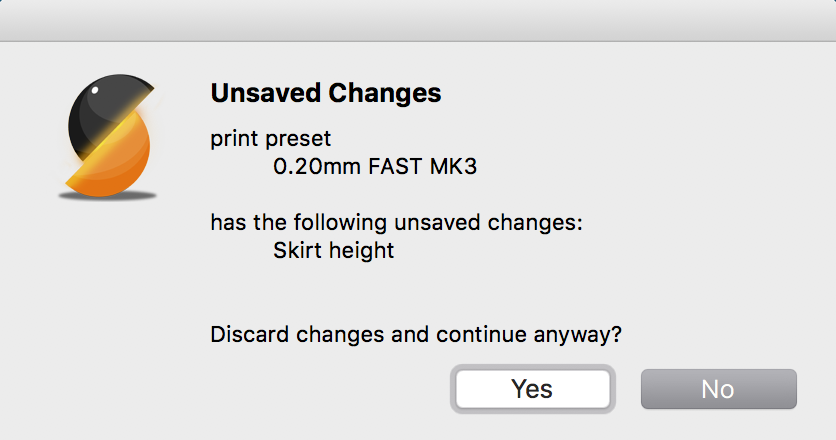
When changing profiles after changing some settings, Slic3r asks if you want to discard these changes because the other profile would change them. You can only change the profile and loose all the changed settings or not change the profile at all. There should be an option to keep these changed settings AND change the profile.
This would save a lot of time when checking for example how long a print would take with different nozzle sizes and layer heights and not the standard profile settings. Otherwise it gets annoying really because you have to redo all the changes several times when switching back and forth.
 Technofrikus
All 9 comments
Maybe I don't quite understand your proposal. Why don't you just clock no, then save the profile and then switch the profile? Is this sequence of steps too long to you?
 bubnikv
on 11 Jun 2018
bubnikv
on 11 Jun 2018
This would be a solution, you are right. But for me personally not a good one. There is always one or two settings that I change because of the specific part I want to print and the specific geometry or purpose. So it is not really necessary or practical to have a profile for each possible part/combination.
Technofrikus
on 11 Jun 2018
I think I understand you now.
You want to keep many profiles modified without saving, not just the
current one, right?
On Mon, Jun 11, 2018 at 5:09 PM, Technofrikus notifications@github.com
wrote:
This would be a solution, you are right. But for me personally not a good
one. There is always one or two settings that I change because of the
specific part I want to print and the specific geometry or purpose. So it
is not really necessary or practical to have a profile for each possible
part/combination.—
You are receiving this because you commented.
Reply to this email directly, view it on GitHub
https://github.com/prusa3d/Slic3r/issues/969#issuecomment-396277777, or mute
the thread
https://github.com/notifications/unsubscribe-auth/AFj5I1A0x8bZu0C5kW8y9N1RcNKTzB_9ks5t7ogYgaJpZM4UhvNQ
.
bubnikv
on 11 Jun 2018
Kind of. I want to have one (or very few per Material) base profile that works well. And then change just some settings because this part needs to be very strong so I increase the perimeters. And then I want to check, how long printing this will take with different layer heights and different nozzle size. But every time I change the nozzle size or layer height, I again have to change the perimeters. So this gets frustrating pretty quickly, especially when there is more then just one setting I changed.
But making a different "strong profile" with more perimeters doesnt make sense for me either, because the next part has a different wall thickness and needs to support even more weight, so I want to have even more perimeters. So I would have a strong and very strong profile? This would get out of hand very fast if I would add a profile for every scenario I come across. Especially with combinations of settings. Or how do you handle these situations?
Basically I want to change nozzle size and layer height without loosing all other changed settings. This would encourage tinkering with these settings more, especially for beginners, to get a feeling how long a print will take with different settings. Also in combination with the feature that the print time is displayed immediately after slicing and not only after exporting the G code. But I know you guys are already working on that :)
Technofrikus
on 11 Jun 2018
A solution would be to not reset the user modified parameters, when the profile is changed. Then these parameters would be marked as changed or not according to the new selected profile.
 Panayiotis-git
on 12 Jun 2018
Panayiotis-git
on 12 Jun 2018
A solution would be to not reset the user modified parameters, when the profile is changed. Then these parameters would be marked as changed or not according to the new selected profile.
Then you're no longer loading a profile, just a subset of a profile. I can see that leading to unexpected results for most unsuspecting souls.
There are two solutions IMO:
- keep as-is,
- add a third option to the existing dialog, which keeps the fields that were modified in the previous profile... but this may leave you with an inconsistent set of options, so care is needed.
 tracernz
on 12 Jun 2018
tracernz
on 12 Jun 2018
The second solution fits perfectly my needs.
Panayiotis-git
on 12 Jun 2018
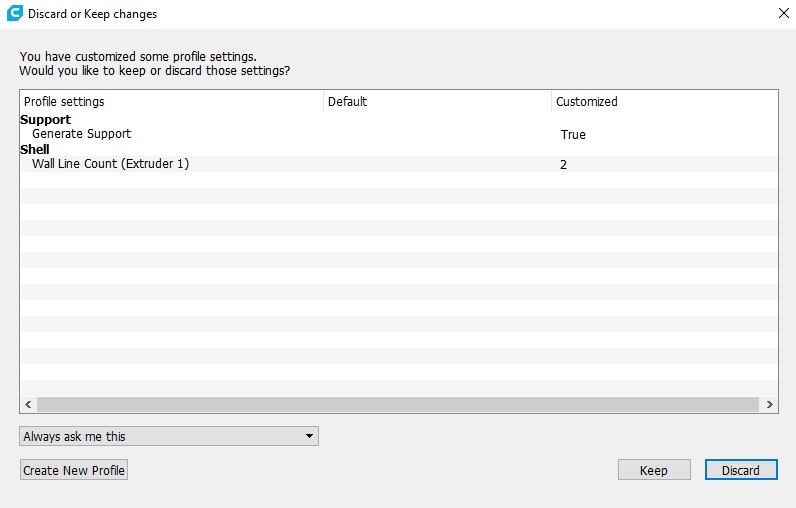
There is the possibility of settings that dont make sense together, that is true, but I think that danger is pretty small. If people change these settings, they should know what they are doing. Or learn from their mistakes.
Cura does it like this, which is a pretty good solution in my opinion:
Technofrikus
on 12 Jun 2018
ok, it makes sense.
On Tue, Jun 12, 2018 at 5:09 PM, Technofrikus notifications@github.com
wrote:
There is the possibility of settings that dont make sense together, that
is true, but I think that danger is pretty small. If people change these
settings, they should know what they are doing. Or learn from their
mistakes.Cura does it like this, which is a pretty good solution in my opinion:
[image: discard or keep changes 2018-06-12 09 03 15]
https://user-images.githubusercontent.com/319375/41299008-c91d6bde-6e62-11e8-8c2e-fdc9298366ca.jpg—
You are receiving this because you commented.
Reply to this email directly, view it on GitHub
https://github.com/prusa3d/Slic3r/issues/969#issuecomment-396624575, or mute
the thread
https://github.com/notifications/unsubscribe-auth/AFj5I8FZj_QGVilzI_dt_Aj6UDgNY9SFks5t79mRgaJpZM4UhvNQ
.
bubnikv
on 12 Jun 2018
Related issues
 yschroeder
·
3Comments
yschroeder
·
3Comments
 tkircher
·
3Comments
tkircher
·
3Comments
 TimothyGold
·
4Comments
TimothyGold
·
4Comments
 pricedev
·
4Comments
pricedev
·
4Comments
 kakou-fr
·
4Comments
kakou-fr
·
4Comments
Most helpful comment
There is the possibility of settings that dont make sense together, that is true, but I think that danger is pretty small. If people change these settings, they should know what they are doing. Or learn from their mistakes.
Cura does it like this, which is a pretty good solution in my opinion: