Prusaslicer: Feature request: seam position modifier
Version
1.40.0-beta+
Behavior
- I would like to be able to change the seam position setting across different parts within a single print by using modifiers. For instance, use nearest as the default but override it with random for certain round parts. Ideally, different settings should be applicable within a single layer (this will require some arbitration in case the modifier only covers part of a contour), but it would already be helpful if it would only be allowed for ‘slab’ lambdas.
_Is this a new feature request?_
Yes
 DrLex0
All 11 comments
In the meantime before having a big overhaul to enable this interactive seam placement, another thought would be options for:
- Seam at sharp corner (aligned or random corner)
- Seam aligned at tangency point between face and rad (aligned or random vertex around profile)
- Seam at nearest to adjacent profile (closest to neighboring profile eg. to hide seam in armpit or between legs on human model printed upright)
- Seam toward / away from model centroid (all seams will be facing toward center most point of model eg. mesh style model all seams on inside)
Another nice feature would be an "aligned seam stagger" value. So you could have the seams overlap back and fourth like a zipper / brick to help lock the outermost layer together and not have a single line that could fail.
 DjjC13
on 20 Jun 2018
DjjC13
on 20 Jun 2018
Have you seen this pull request?
It uses lambdas together with a "custom" seam positioning mode where the seam will be placed as close as possible to the X/Y-coordinations of the lambda - i.e. to the model centroid or in the armpit.
It is possible to use several lambdas at different heights, allowing to change the desired position as the model builds up. It does provide a "strict" value, if set to low values, overhanging areas will be avoided.
I'm aware that this differs from the idea of @DrLex0 because it does not allow to use the "random" behavior for certain sections of the model, but it shows how seams and lambdas could work together and could be improved to match the ideas of @DrLex0 and @DjjC13.
You can download a compiled package for Win 64bit of that pull request if you want to test.
 dartrax
on 22 Jun 2018
dartrax
on 22 Jun 2018
I have seen it and it certainly is a step forward, but I'm not entirely happy with the way it works. If I understand it correctly, it creates a point-sized lambda that acts as a magnet for seam position. This works well for cylindrical objects but lately I had to print a spiral-like object and I wanted the seam position to follow the spiral at all times. To do that with the feature as currently implemented, I would need to manually position a lot of lambdas across the whole spiral, and positioning things in this UI is a bit awkward to begin with.
Also, UI-wise it isn't clear in what zone the point-shaped lambda will have an effect. It feels a bit strange that one needs to add a second lambda to cancel out the effect of the previous.
Intuitively I would expect this kind of feature to work like other modifiers as follows. An imported mesh or generic lambda would be placed such that it overlaps with the object in the zone where the seam is desired. When a ‘seam position’ setting is assigned to the modifier, it gets priority over the global setting. The seam is placed within the overlapping zone(s). There would be two choices for the seam position within this zone: ‘nearest’ (which I think should be renamed to ‘best’) or ‘random’. Nearest uses the usual algorithm of preferring the most concave corner and so on. Random places the seam at a random point within the zone. More options could be added as proposed by @DjjC13. The weight parameter as in the current system can prevent placing the seam on an overhang, with fallback to the global setting.
This would offer more flexibility in determining where seams will end up. For the common case of forcing the seam across a section of a cylindrical object, it would be practical to have a new generic that is a vertical half-plane with a certain Z start and height, and the option to rotate it around Z.
Of course this method introduces a possible conflict if both ‘nearest’ and ‘random’ seam position modifiers are present across the same contour. In that case some arbitration will be needed (e.g. the last modifier is authoritative).
DrLex0
on 22 Jun 2018
I have seen it and it certainly is a step forward, but I'm not entirely happy with the way it works. If I understand it correctly, it creates a point-sized lambda that acts as a magnet for seam position. This works well for cylindrical objects but lately I had to print a spiral-like object and I wanted the seam position to follow the spiral at all times. To do that with the feature as currently implemented, I would need to manually position a lot of lambdas across the whole spiral, and positioning things in this UI is a bit awkward to begin with.
You understood it correctly. The UI is indeed difficult to handle, I think this should be improved.
Also, UI-wise it isn't clear in what zone the point-shaped lambda will have an effect. It feels a bit strange that one needs to add a second lambda to cancel out the effect of the previous.
That's true, I thougt about an upwards pointing cone to make it clearer, but that's not the ideal solution. Better would be a cylinder with a defined start and end point. The point that prevented me using a cylinder was the fact that the UI does not provide a way to change the heigh of a cylinder after it has been created. So, the point-shaped lambda is just the result of me being too lazy to touch the whole lambda UI.
Intuitively I would expect this kind of feature to work like other modifiers as follows. An imported mesh or generic lambda would be placed such that it overlaps with the object in the zone where the seam is desired. When a ‘seam position’ setting is assigned to the modifier, it gets priority over the global setting. The seam is placed within the overlapping zone(s). There would be two choices for the seam position within this zone: ‘nearest’ (which I think should be renamed to ‘best’) or ‘random’. Nearest uses the usual algorithm of preferring the most concave corner and so on. Random places the seam at a random point within the zone. More options could be added as proposed by @DjjC13. The weight parameter as in the current system can prevent placing the seam on an overhang, with fallback to the global setting.
I think this is an interesting concept. It allows for very specific seam positioning by having a small overlapping zone where the seam must be positioned and for more intelligence within that zone than a simple "nearest is best" approach.
This would offer more flexibility in determining where seams will end up. For the common case of forcing the seam across a section of a cylindrical object, it would be practical to have a new generic that is a vertical half-plane with a certain Z start and height, and the option to rotate it around Z.
What I needed for daily work was to be able to place the seam inside of a cylindrical object. I think the vertical half-plane needs a setting to limit the length of the plane, so that it will be smaller than the diameter of the cylindrical object?
dartrax
on 22 Jun 2018
The point that prevented me using a cylinder was the fact that the UI does not provide a way to change the heigh of a cylinder after it has been created.
Yeah, I have been wanting to be able to do that many times… The modifier/lambda system is very powerful and I find myself using it a lot to add for instance special top layers to certain parts or increase perimeters for dome shapes, but the UI needs some improvements.
I think the vertical half-plane needs a setting to limit the length of the plane, so that it will be smaller than the diameter of the cylindrical object?
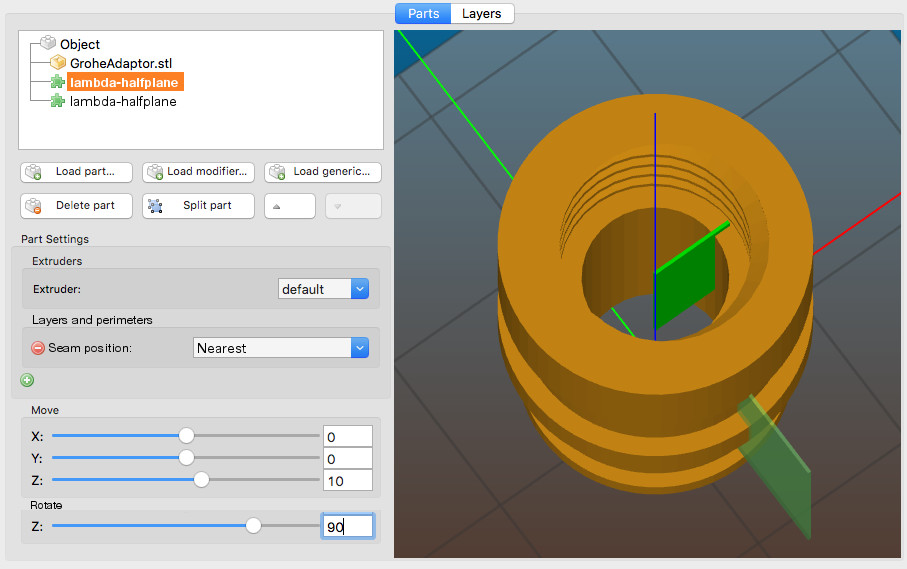
Indeed, and it would also need a start position so it is easier to position a plane on outside surfaces only. I have made some mock-ups of what it could look like:
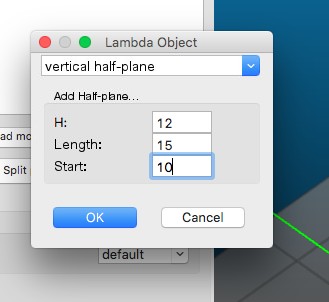
I used very thin boxes here to simulate planes. Here the outside seam would be at a 90° angle compared to the inside seam.
DrLex0
on 22 Jun 2018
Nice!
Now we should add some handles so you can manipulate the lambdas wysiwyg in the 3d view =)
dartrax
on 25 Jun 2018
From the 1.41.1 beta description:
"We are aware, that it is quite difficult to position the modifier meshes with the current user interface. The next release will provide 3D gizmos for easy manipulation of objects and their modifiers. We also plan to make the overhang angle threshold configurable for the support enforcers."
...Seam modifiers would benefit from that, too, if they would get implemented :)
dartrax
on 28 Sep 2018
Hi there, anything new concerning custom seam positions?
Thanks, best!
 rhinosan
on 10 Jun 2020
rhinosan
on 10 Jun 2020
@rhinosan This is planned for 2.3 or 2.4 release. It has quite high priority.
 lukasmatena
on 10 Jun 2020
lukasmatena
on 10 Jun 2020
This are great news! 👍
dartrax
on 10 Jun 2020
PrusaSlicer 2.3.0 introduces a paint-on seam. The alpha will be out in a few days, we'd be glad if you could test it so all bugs can be fixed.
Closing the issue.
lukasmatena
on 16 Oct 2020
Related issues
 devilhunter84
·
4Comments
devilhunter84
·
4Comments
 frakman1
·
4Comments
frakman1
·
4Comments
 i-make-robots
·
3Comments
i-make-robots
·
3Comments
 kakou-fr
·
4Comments
kakou-fr
·
4Comments
 alexiri
·
4Comments
alexiri
·
4Comments
Most helpful comment
@rhinosan This is planned for 2.3 or 2.4 release. It has quite high priority.