Prusaslicer: Soluble Interface Printing in Wrong Material (PLA)
Slic3r Prusa Edition 1.36.2
macOS Sierra 10.12.6
I'm having an issue slicing models with the 0.20mm NORMAL SOLUBLE INTERFACE preset (no modifications). It appears correctly in the Slic3r preview, with 4 layers of soluble interface (shown in red) on top of the support structure (shown in orange). However, when it prints, it prints some of the top interface layers in PLA, thus fusing the supports to the model. When it does this, it will successfully load the soluble material, then immediately unload it and load PLA before leaving the purge tower area. I've had this happen on two different models so far.
Example 1:
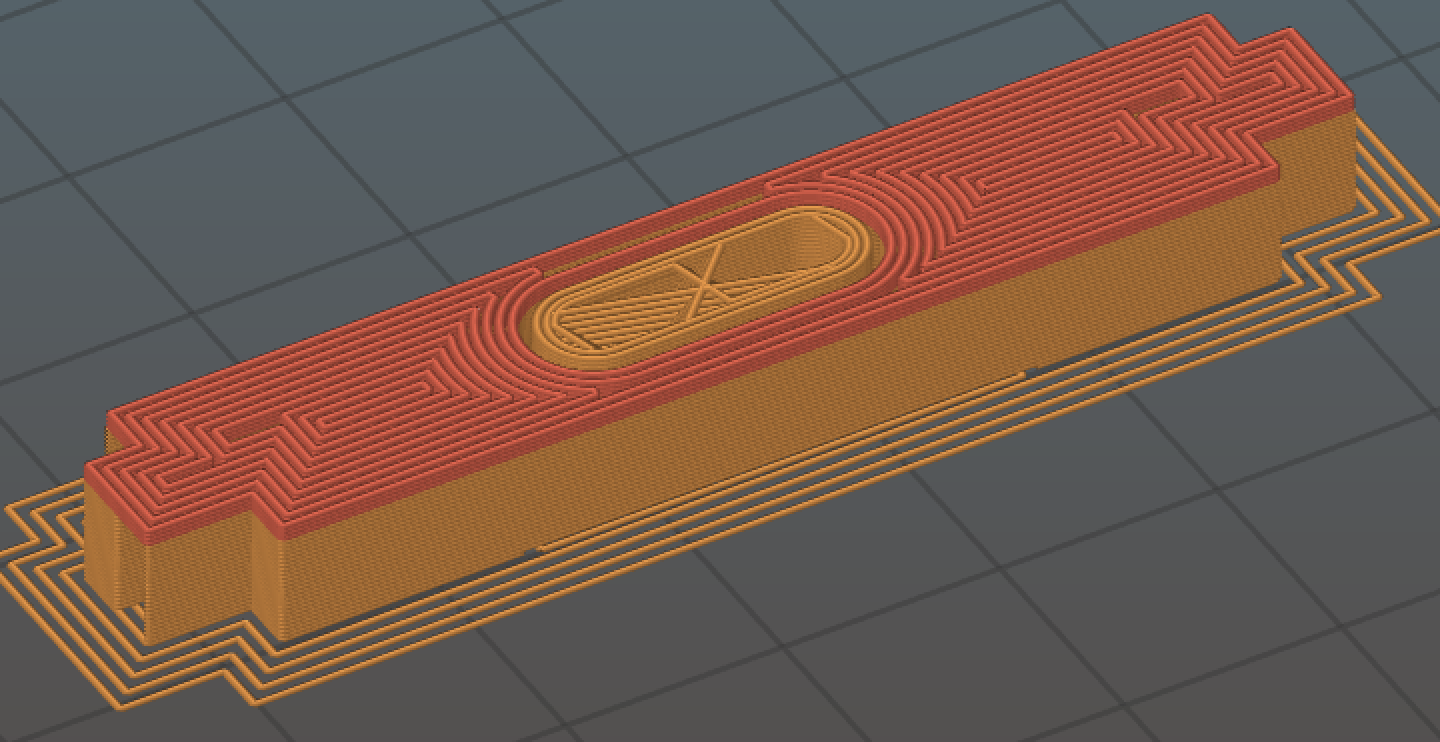
You can see the support structure with the soluble interface layers in this Slic3r preview screenshot.
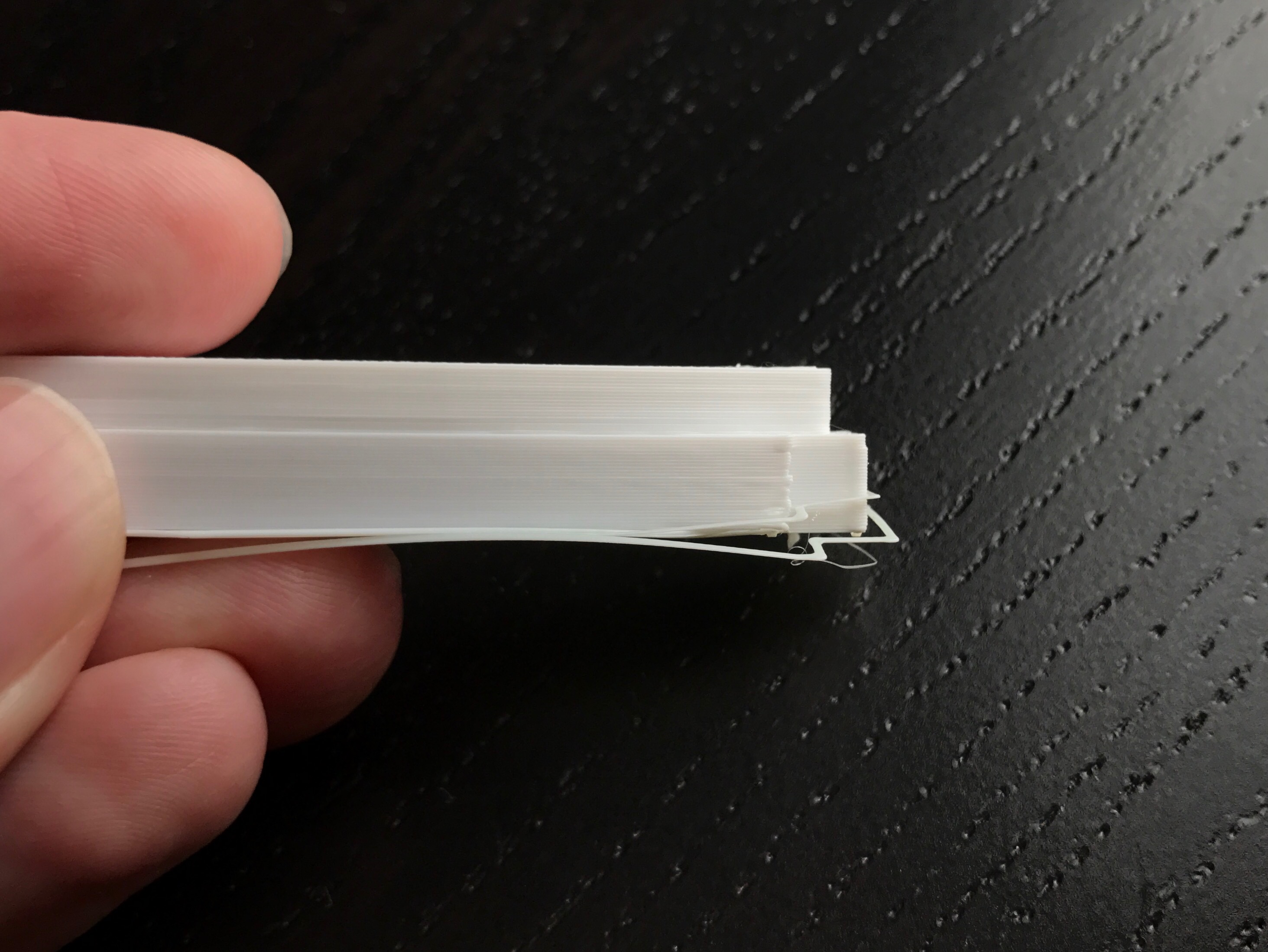
However, those interface layers all printed in PLA, as seen in this photo.
Example 2:
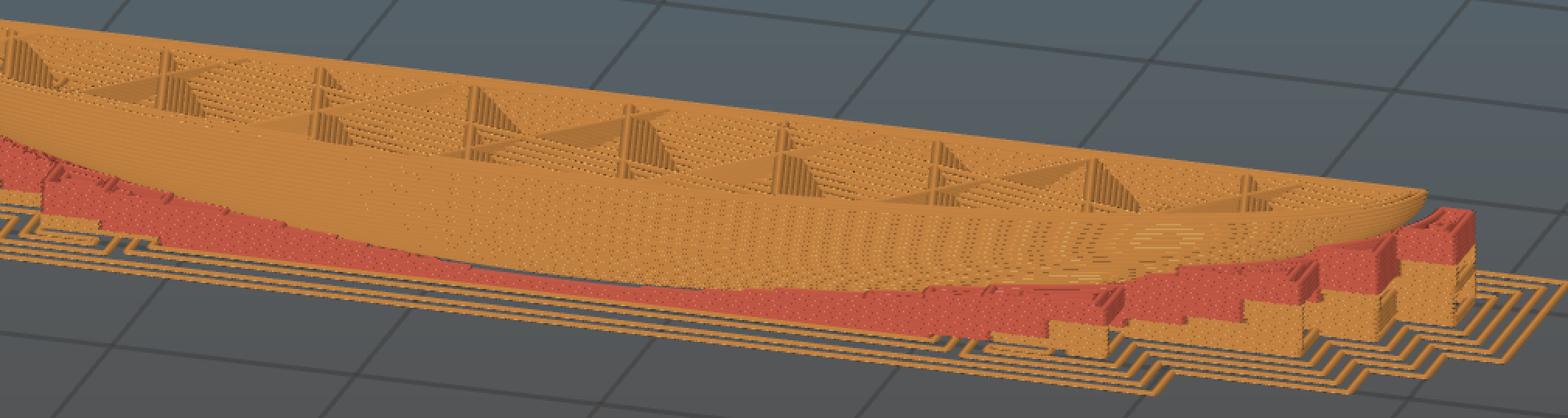
This screenshot also appears to show the soluble interface layers correctly.
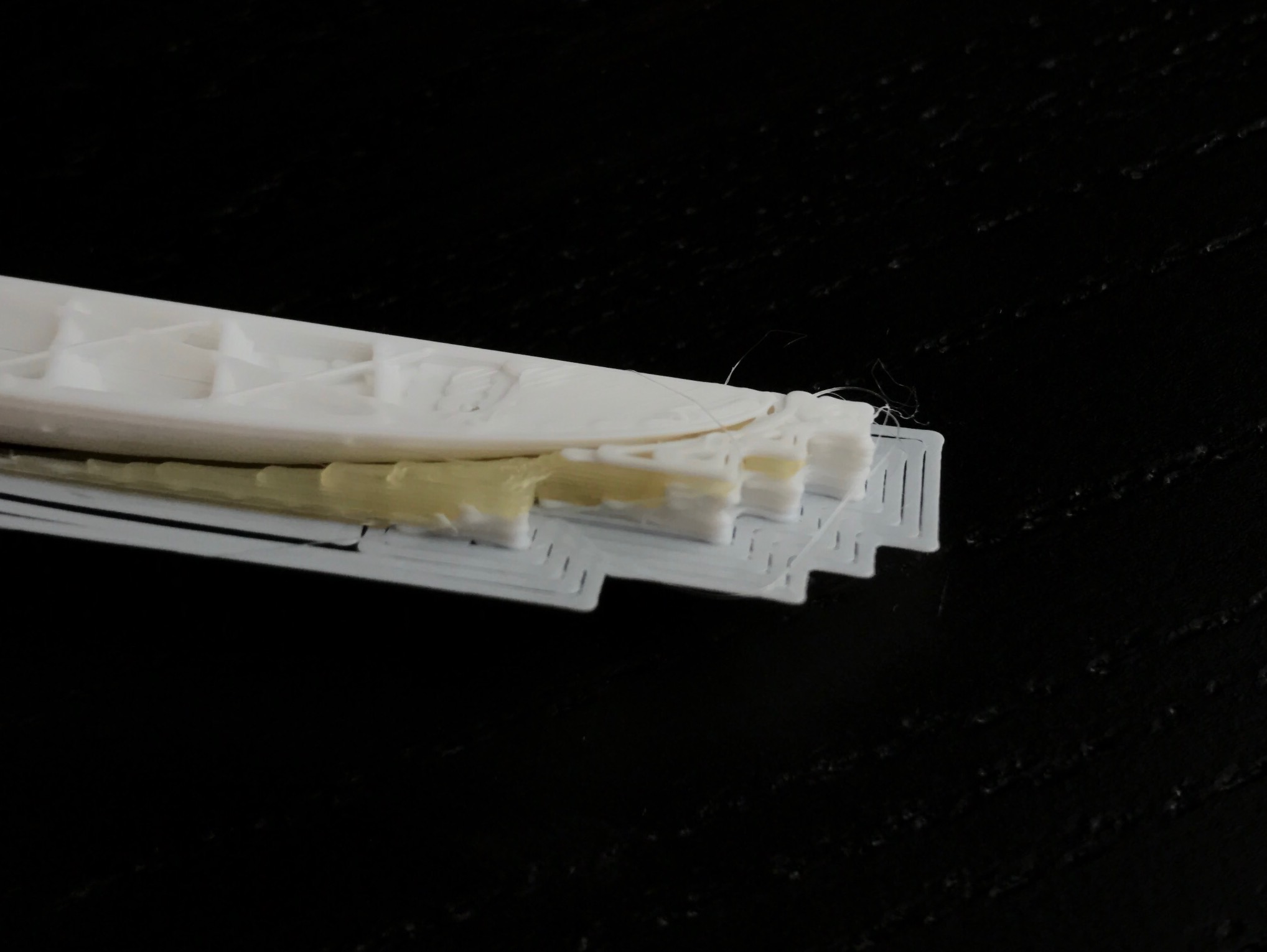
This time the interface layers started printing in the correct material, though they eventually printed in PLA. I cancelled the print as soon as I saw the issue.
I have attached my STLs and gcodes. Please let me know if there's anything else you need from me.
soluble_interface_bug.zip
-Keelin Jacobsen
P.S. Thank you for all your hard work on this project. It is much appreciated.
 KeelinJ
All 24 comments
Have the same issue, you can Preview the fault if you load the generated gcode in S3D
 m391118908
on 29 Aug 2017
m391118908
on 29 Aug 2017
Still present in version 1.37.1
KeelinJ
on 21 Sep 2017
yes, still present in 1.37.1
m391118908
on 22 Sep 2017
Have the same issue with only soluble interface feature.
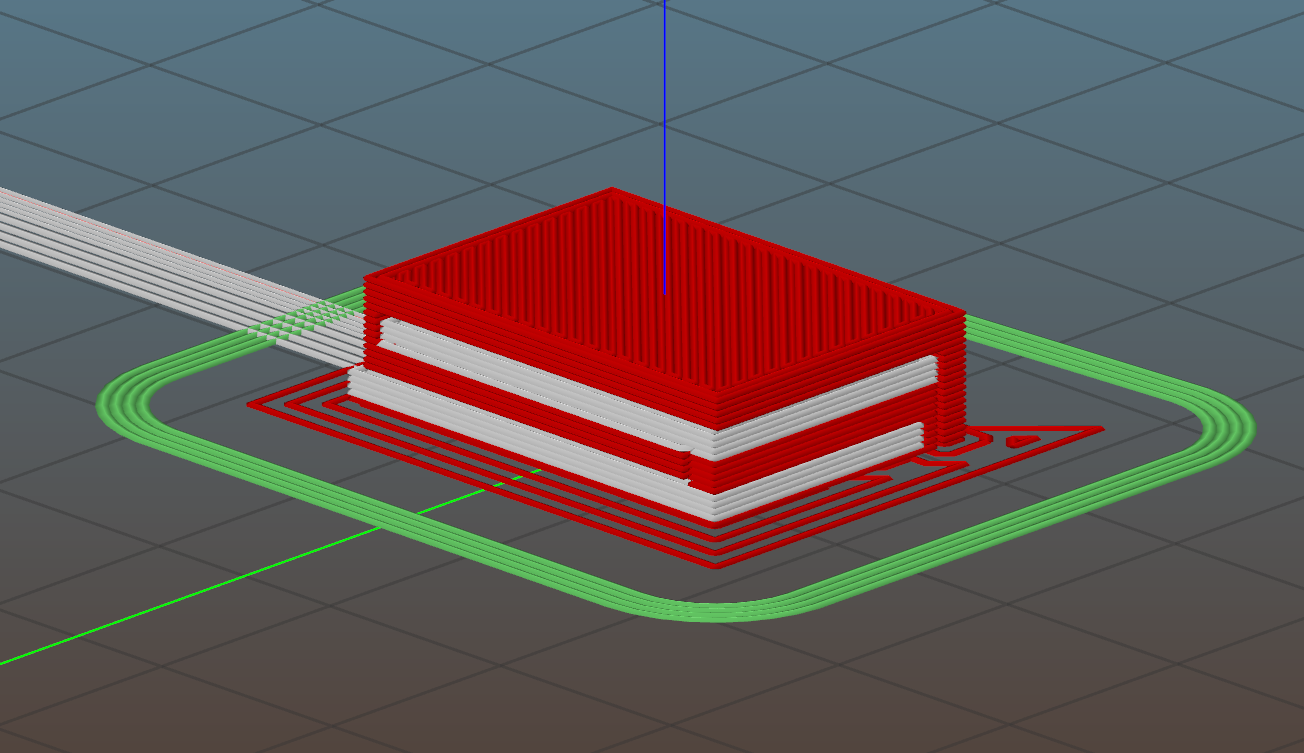
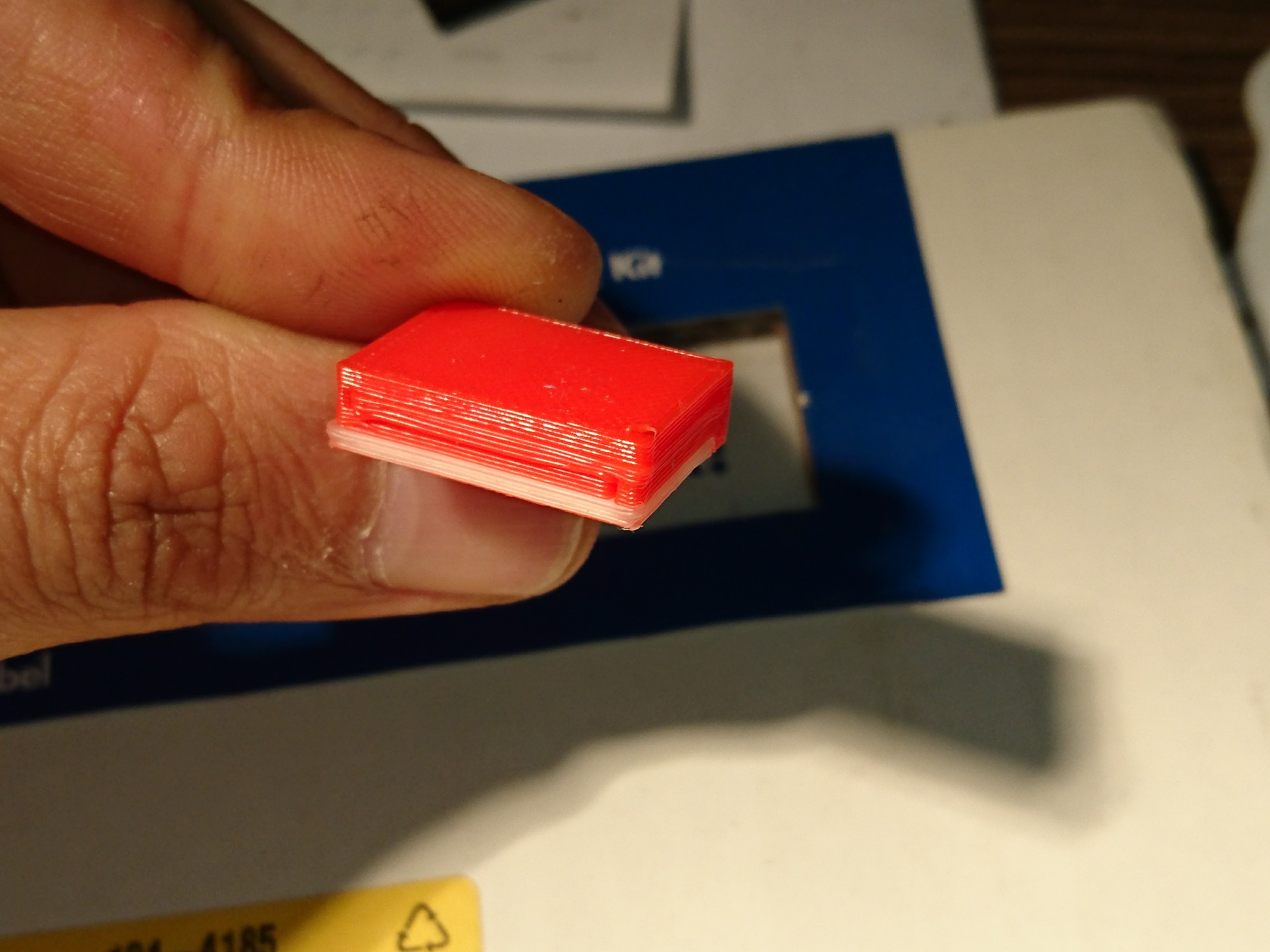
 AlbertoMotolese
on 28 Sep 2017
AlbertoMotolese
on 28 Sep 2017
I also have this issue.
 MStylesMS
on 2 Oct 2017
MStylesMS
on 2 Oct 2017
Thanks for the report. I am looking into this issue, I am able to reproduce it.
 bubnikv
on 3 Oct 2017
bubnikv
on 3 Oct 2017
I hope I have fixed the bug with
https://github.com/prusa3d/Slic3r/commit/eb0117b1c12d6bda5efc5856d7241d4b074f5876
I think I will provide a test build here.
bubnikv
on 3 Oct 2017
Here are the alpha builds. Please note that they are the development builds, far from being tested thoroughly.
Windows 32bit/64bit
Slic3r-1.37.1.10-prusa3d-win32-full-geb0117b-201710031130.zip
Slic3r-1.37.1.10-prusa3d-win64-full-geb0117b-201710031130.zip
OSX
Uploading Slic3r-1.37.1.10-prusa3d-full-geb0117b-201710031126.dmg.zip…
bubnikv
on 3 Oct 2017
bubnikv
on 3 Oct 2017
The OSX version crashes every time I try to open it. I will try the PC version soon.
Thanks for taking a look at this, @bubnikv!
KeelinJ
on 3 Oct 2017
I just re-sliced my model in Windows and the gcode preview looks much better in S3D. I will run a print tomorrow to see for sure.
KeelinJ
on 4 Oct 2017
Now I'm running into some different issues. The temperature and speed no longer change for the soluble material and the fan doesn't turn off, which makes the material come out bubbly.
Also, some non-interface support layers are printing in soluble material for no apparent reason.
KeelinJ
on 4 Oct 2017
I am just seeing this. @bubnikv, should I go ahead and test the OS X version or wait for you to address the issue KeenlinJ brought up about the temperature and speed?
MStylesMS
on 4 Oct 2017
@bubnikv any progress on @KeelinJ post about the new issues? I'm ready to test whenever you have a new build that addresses those.
MStylesMS
on 10 Oct 2017
OSX version 1.37.1.10 opens fine for me using macOS High Sierra. :?
 24c
on 13 Oct 2017
24c
on 13 Oct 2017
@KeelinJ
Now I'm running into some different issues. The temperature and speed no longer change for the soluble material and the fan doesn't turn off, which makes the material come out bubbly.
Would you please be more specific?
I realized that the fan may not be correctly controlled over the wipe tower. Other than that it shall work.
Also, some non-interface support layers are printing in soluble material for no apparent reason.
Do you have the support material parameters set as on the following screenshot? The "soluble material" is important, as it basically tells the Slic3r: "This material is expensive, use it sparingly". If the checkbox is off, it means "This materal is as expensive as the others, try to minimize tool switches for faster prints".
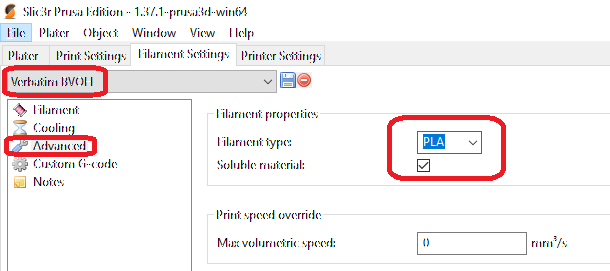
I am going to release a patch build soon, so a quick response would be appreciated.
bubnikv
on 21 Oct 2017
@KeelinJ
Now I'm running into some different issues. The temperature and speed no longer change for the soluble material and the fan doesn't turn off, which makes the material come out bubbly.
Maybe you erroneously chose a wrong filament preset for the soluble support interfaces?
If you still have the problem, please provide me with the exported config file and an AMF. Thanks.
bubnikv
on 21 Oct 2017
There will be a patch release 1.37.2 released any minute, please give me a detailed feedback if there is still something fishy.
bubnikv
on 21 Oct 2017
@bubnikv Thanks for the help. I did have the wrong material selected. Sorry for the trouble!
I'm printing again now, and both materials are printing well so far. I'll report back once the print has completed (it will take several hours).
KeelinJ
on 22 Oct 2017
@KeelinJ Great. I have already released the patch version. Let's see whether this will be the last patch version of this series, or whether I will have to amend it once again :-)
bubnikv
on 22 Oct 2017
bubnikv
on 22 Oct 2017
Fixed with 1.37.2 release.
bubnikv
on 6 Nov 2017
@bubnikv Works great! Thanks for the fix
KeelinJ
on 6 Nov 2017
I will test later today.
Mark Stevens
[cid:E99B5747-1535-4613-8A49-0567F764ABEB]
On Nov 6, 2017, at 11:06 AM, bubnikv <[email protected]notifications@github.com> wrote:
Fixed with 1.37.2 release.
—
You are receiving this because you commented.
Reply to this email directly, view it on GitHubhttps://github.com/prusa3d/Slic3r/issues/492#issuecomment-342216003, or mute the threadhttps://github.com/notifications/unsubscribe-auth/ATsI7Fj6rQcJoNtRcy3a5KzmypESlTwlks5szzyAgaJpZM4PDoF0.
MStylesMS
on 6 Nov 2017
Related issues
 Salamandar
·
33Comments
Salamandar
·
33Comments
 Seekerzero
·
71Comments
Seekerzero
·
71Comments
 skohls
·
75Comments
skohls
·
75Comments
 m-Th
·
141Comments
m-Th
·
141Comments
 Patrik-svobodik
·
52Comments
Patrik-svobodik
·
52Comments
Most helpful comment
Have the same issue with only soluble interface feature.

